
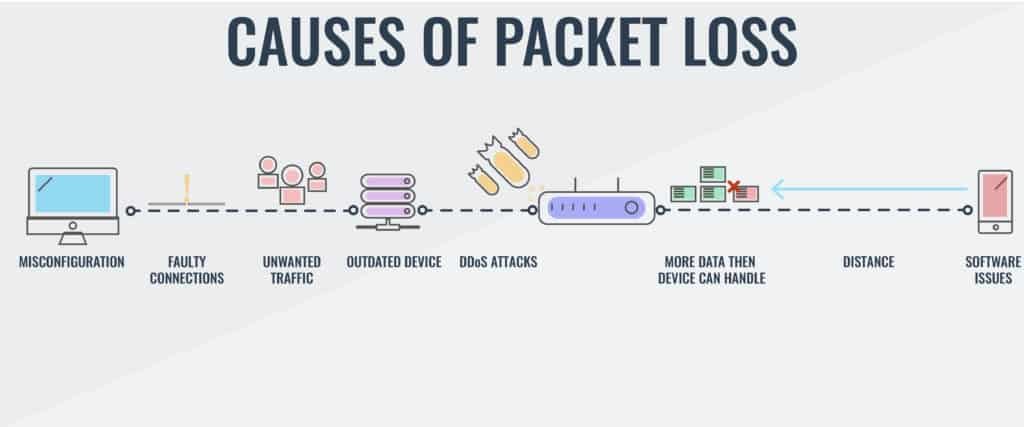
Packet loss in games arises from network congestion, faulty hardware, or issues with your internet service provider.
Ever experienced frustrating lag spikes mid-game, seemingly at random? This often points to a problem with your network data and can be identified as packet loss. It’s a common issue that affects online gaming experience.
So, what causes packet loss in games? Several factors contribute to this irritating problem, ranging from your own home network to issues beyond your control. Identifying the root cause is the first step to a smoother gaming session.
We’ll delve into the common culprits behind those lost data packets and offer advice on how to potentially improve things.

What Causes Packet Loss in Games?
Okay, so you’re in the middle of an epic game, you’re about to make that winning move, and then… BAM! You’re lagging, your character is jumping around, or maybe you get disconnected entirely. This can be super frustrating, right? A big reason for this gaming misery is something called packet loss. Think of it like this: when you’re playing an online game, your computer is constantly sending and receiving tiny packages of information, like little digital letters, called “packets.” These packets tell the game what’s happening – where you’re moving, when you’re shooting, everything! When some of these packets go missing, or don’t arrive in the correct order, we experience packet loss. This loss causes the game to not work correctly, leading to those annoying lag spikes and disconnects. Let’s dive deeper into what makes these packets disappear and how to fix it.
Understanding the Basics of Data Packets
Before we can figure out why packets get lost, we need to understand what they are and how they work in the context of online gaming. Imagine you’re sending a letter to a friend. You wouldn’t just write everything on one giant piece of paper, would you? Instead, you’d write different parts of the message on separate sheets, put them in envelopes, and mail them. Data packets are kind of like that. Your game data, which can include things like your character’s position, your actions, and the game world around you, is broken down into smaller chunks. These smaller chunks are then sent over your internet connection. Each packet has a header, which is like an address label, that helps it get to its destination and be put back in the right order. This process is very fast, happening thousands of times every second, which allows the game to run smoothly when everything works correctly.
How Packets Travel
These data packets don’t just magically beam across the internet. They travel through a network of wires, cables, and wireless signals. Your home network, your internet service provider’s network, and the game server’s network are all part of this journey. The packets make hops, traveling from router to router along the way. When everything is working correctly, these packets are delivered reliably and quickly. But, the path isn’t always smooth, and sometimes packets don’t arrive at their destination.
Think of it like a delivery truck navigating city streets. It might encounter traffic (congestion), detours (routing issues), or unexpected stops (problems with the network equipment). If something goes wrong at any point during this journey, packets can get lost.
Common Causes of Packet Loss
Now that we know what packets are and how they move, let’s explore the most common reasons why they disappear during your gaming sessions. Packet loss is rarely due to one single reason; it’s often a combination of factors that contributes to the issue. We’ll take a close look at each potential troublemaker.
Wi-Fi Woes
Wi-Fi is super convenient, but it can sometimes be the biggest culprit behind packet loss, especially for gaming. Here’s why:
- Distance and Obstructions: The further away you are from your router, the weaker the Wi-Fi signal becomes. Walls, furniture, and even other electronics can interfere with the signal, causing dropped packets. Imagine shouting to a friend across a playground, if it’s really noisy, some of the words will not be heard. Wi-Fi signals act like sound waves that get weaker as the distance increases.
- Interference from Other Devices: Your microwave, cordless phone, and other wireless devices also use radio waves. These devices might cause interference and interrupt your Wi-Fi signal. Think of it as too many people talking at the same time, making it hard to hear what anyone is saying.
- Shared Bandwidth: If multiple people are using the same Wi-Fi network at the same time, downloading large files, watching videos, or even just browsing, it can choke your connection. This reduces the amount of available data for your gaming traffic and increases the chances of packets getting delayed or dropped.
- Outdated Hardware: Old routers may not be able to keep up with modern internet speeds and the demands of online gaming. If your router can not handle a number of devices then the performance of all the connected devices will suffer.
Solution: Consider switching to an Ethernet cable for a more stable and faster connection. Move closer to your router, minimize interference from other electronic devices, and if possible, upgrade your router to a newer model.
Overloaded Networks: Congestion Issues
Think of the internet as a highway system. When lots of cars try to travel on the same road at the same time, traffic jams happen. When a lot of data tries to travel over a network at once, it creates network congestion, which can result in packet loss. Congestion can happen at various points along the path from your home to the game server.
- ISP Overload: Your internet service provider (ISP) has a limit on how much data it can handle. During peak hours, when many people are online, their network may get congested, leading to packet loss.
- Shared Networks: If you are sharing the internet connection with many users, for example in a college dorm or family home, everyone is sharing the network’s capacity. This means the available data space will be divided up which can cause issues and increase packet loss.
- Game Server Issues: Sometimes the problem is not with your own internet, but with the game server itself. If the game server is overwhelmed with too many players, or is experiencing technical problems, it can result in packet loss for everyone connected to it.
Solution: If the problem is your ISP or shared network, there is not much you can do. However, if the game server is experiencing issues, you might have to wait it out, or try playing on a different server.
Faulty Cables and Hardware
Sometimes the problem is not in the air, but in the physical connections themselves. Here’s why your cables and hardware can be a source of packet loss:
- Damaged Ethernet Cables: If your Ethernet cable is old, damaged, or not properly connected, it can cause packet loss. Check your cables for wear and tear, make sure they are securely plugged in, and try a new cable if you suspect an issue. Think of it as a leaky water hose, some of the water will be lost if the hose is damaged.
- Faulty Routers and Modems: Old or malfunctioning routers and modems can struggle to properly manage internet traffic, leading to packet loss. These devices might also overheat, which may cause them to slow down and have issues.
- Network Interface Card (NIC) Problems: Your computer’s NIC is responsible for connecting to your network. If the NIC is faulty, it can cause communication errors, which may result in packet loss.
Solution: Inspect your cables, check for damage, and replace them if necessary. Reset your router and modem, and make sure they are working properly, and update your NIC drivers.
Software and System Issues
Sometimes, the source of packet loss is not hardware-related but instead an issue with software or settings on your computer. Here are some problems you should be aware of:
- Outdated Network Drivers: If your computer’s network card drivers are outdated, they might not work correctly with your router, or they may have compatibility issues with the game. This may cause data errors and increase the chance of packet loss.
- Firewall and Antivirus Software Conflicts: Sometimes, security software like your firewall or antivirus might block or interfere with the connection of the game, causing packets to be dropped.
- Background Processes: Other programs running in the background might consume a lot of bandwidth and processing power, which can affect your internet speed and cause packet loss.
- Operating System Issues: An outdated or buggy operating system can also contribute to packet loss problems.
Solution: Make sure your network drivers are up to date. Temporarily disable your firewall and antivirus and check if this helps. Close unnecessary background programs, and ensure your operating system is also updated. You might have to re-install the game to make sure there aren’t any errors in the game files themselves.
Problems With Game Servers
Sometimes the issue is on the game’s side, not yours, this can sometimes be beyond your control.
- Server Load and Performance: When the server is overloaded by the number of players trying to connect, packets may be dropped due to a lack of resources. This can lead to a large amount of packet loss, and many players will experience issues.
- Server Configuration Issues: Misconfigured servers or software bugs on the game server can also result in packet loss problems.
Solution: Unfortunately, server problems are not something you can solve. If this is the case, try playing on a different server, or wait for the issue to be resolved by the game developer.
Troubleshooting Packet Loss
Figuring out the exact cause of packet loss can be tricky, but here’s a systematic approach to help you troubleshoot:
- Restart Your Equipment: Begin with the basics – reboot your computer, router, and modem. This can often clear out temporary glitches.
- Check Your Connection: Ensure all cables are properly plugged in and are not damaged, you can try using a different cable if you suspect an issue.
- Run Speed Tests: Use online speed test tools to check your upload and download speeds. Compare the results to your subscribed internet plan. If you are not getting the expected speed, contact your ISP.
- Monitor Your Ping and Packet Loss: Use online tools or in-game network monitoring to check for packet loss and ping. A higher ping and higher packet loss rate are indicators of an issue with your network connection.
- Test a Wired Connection: If you are on Wi-Fi, switch to a wired connection (Ethernet) and see if the packet loss improves. This can help you identify if the problem is with your Wi-Fi or another issue.
- Update Your Drivers: Make sure your network drivers, as well as your game are updated to the latest version.
- Test With Another Game: If the packet loss is only occurring in one game, this could indicate a problem with that particular game, or with the game server.
- Check Your Background Processes: Close unnecessary background processes that may be taking up too much network bandwidth or processing power.
- Contact Your ISP: If you are still experiencing high packet loss after all the checks, it’s best to contact your ISP for assistance as they may be experiencing issues on their network.
In conclusion, packet loss during gaming is a complex issue that can stem from a variety of factors, ranging from your home network setup to problems with the game server itself. By understanding the underlying causes and implementing the recommended troubleshooting steps, you can improve your connection stability and get back to enjoying your games without interruptions.
What Causes Packet Loss and How to Eliminate It In Your Network
Final Thoughts
Network congestion, both on your local network and your internet service provider’s network, creates packet loss. Wi-Fi interference often contributes, causing dropped packets.
Issues with your router or modem hardware can also lead to lost data. Outdated device drivers on your computer sometimes cause problems with game data transmission.
Ultimately, what causes packet loss in games boils down to these network issues. Addressing these will significantly improve your gaming experience.

