
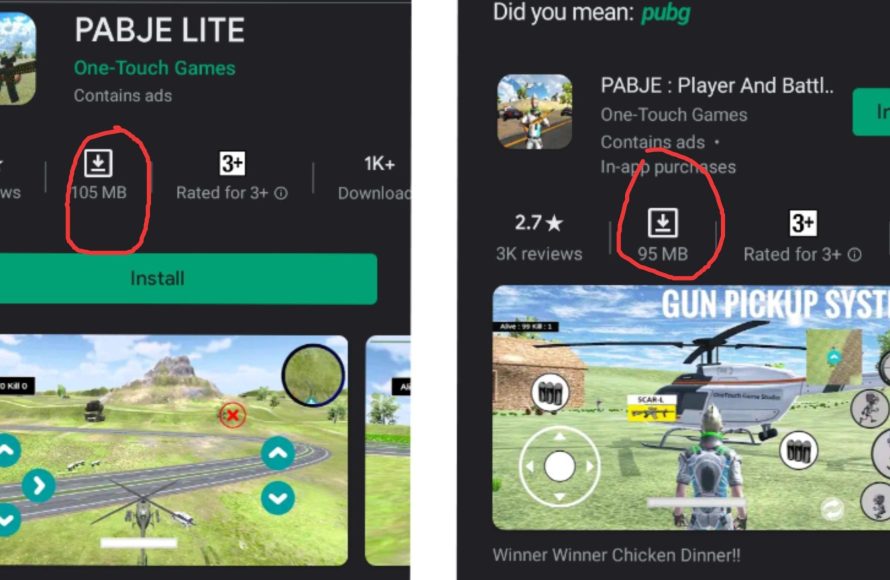
In games, “lite” typically signifies a simplified or reduced version of a full game experience, often with fewer features, lower graphical fidelity, or a smaller scope.
Ever wondered what does lite mean in games when you see it attached to a title? It’s a common term now, and it points to a more accessible and less demanding experience than the original. Developers use this label to offer different ways to play.
It generally implies a lighter version, maybe with fewer levels or less complex mechanics. Sometimes the focus is on a key feature, without all the added extras. This is often a great option for players looking for something quicker and simpler.

What Does Lite Mean in Games?
Okay, let’s dive into this! You’ve probably seen the word “lite” tagged onto a game title and wondered, “What exactly does that mean?” It’s not about the game being a lighter color! In the gaming world, “lite” generally signals a version of a game that’s been trimmed down in some way. Think of it like getting a “mini” version of a popular treat. It still tastes good, but maybe it doesn’t have all the bells and whistles of the original. Let’s explore what makes a game “lite.”
Core Concepts of “Lite” Games
The idea behind a “lite” game is to offer a more accessible experience. This accessibility can come in different forms. It’s like different flavors of ice cream – some have more chocolate chips, some have nuts, and some are just plain vanilla, but they are all ice cream. Similarly, “lite” games all share the trait of being a simpler experience than their full-fledged counterparts. These are several of the main aspects that are generally changed or altered:
Reduced File Size
One common reason for a game to be called “lite” is that it has a smaller file size. This means it doesn’t take up as much space on your phone, tablet, or computer. This is very important for players who don’t have a lot of storage space or for those who want to download games quickly, especially in areas where internet access can be spotty.
- Quicker to download: Less data means faster downloads.
- Uses less storage: Great for devices with limited space.
- Good for weaker connections: Can still play even with not super-fast internet.
Simplified Gameplay Mechanics
Another characteristic of “lite” versions is having simpler game mechanics. They often trim away some of the more complex features of the original game. This makes it easier for new players to learn and enjoy without feeling overwhelmed. Think of it like learning to ride a bike with training wheels – it’s easier to get started without having to worry about balance right away. This is particularly useful for people who want to play during short breaks, as they don’t need to invest large time to be able to play and have fun.
- Easier to learn: Gameplay is more straightforward.
- Less complex controls: Simple and intuitive to play.
- Good for quick play sessions: Perfect for short breaks.
Fewer Features and Content
Often, a “lite” version will have fewer levels, characters, or game modes compared to the full game. It might only feature one main game mode or a smaller number of maps. It’s like getting a sample platter at a restaurant – you get a taste of everything but not the entire meal. This helps to keep the game accessible, particularly at launch, and serves as a way to entice players to consider the full version with its complete package of features.
- Fewer levels: A reduced number of levels or areas.
- Less content: Fewer characters, items, or game modes.
- Focus on the core experience: It highlights the most fun parts of the game.
No In-App Purchases
While not always, some “lite” versions are totally free and have no in-app purchase options. These “lite” versions are often offered by developers to entice players and are like demo versions of the full game, but without any type of time restrictions. This can be an amazing experience for those players who just want to try a game without having to put any financial commitment upfront. Other “lite” games may have in-app purchases, but are limited compared to the full game.
- Completely free option: Play without spending any money.
- Limited purchases: Fewer purchase options than the full version.
Why Developers Create “Lite” Versions?
Why would game developers go to the trouble of making a “lite” version of their game? There are several strategic reasons:
Attracting New Players
A big reason is to attract new players. The “lite” version acts like a free sample or a trial run. Players can experience the core gameplay without having to pay upfront. If they like what they see, they’re much more likely to buy the full game, helping the developers earn more and continue making great games.
Expanding Market Reach
“Lite” games also help developers reach more players, especially those who might not have the newest phones or high-speed internet. These players might not be able to run the full game, but they can enjoy the “lite” version. This strategy opens up the game to a wider audience who may not have considered the game otherwise.
Testing and Feedback
Sometimes, developers use “lite” versions to test how well the game works, and what are the opinions of the players before releasing the full game. This helps them find issues that they can fix in the full game. Also, it allows them to see if the players are generally enjoying their game and if the mechanics they added are fun or not.
- Test game performance: Making sure the game runs smoothly for everybody.
- Gather feedback: Knowing what people think about the game and improving it.
Monetization Strategies
Even without in-app purchases in the “lite” version, developers can use this version as a way to encourage players to purchase the full version. The goal is that players are so immersed that they will want more of that game and will be prone to pay for the full experience.
- Promote the full game: A way to show players the full scope of the game.
- Increase full game sales: Get more players to buy the full version.
Examples of “Lite” Games
To understand “lite” games better, let’s look at some examples. Please keep in mind that there can be a multitude of variations, but these examples cover the most common use cases. These versions can usually be differentiated by how much the gameplay has been modified compared to the original version.
Mobile “Lite” Games
Many popular mobile games have “lite” versions. Games that have complex graphics and demanding mechanics are frequently released in “lite” versions to allow players with different types of phones to also be able to enjoy. In many cases, the “lite” versions allow the players to try a few levels from the main game or play in one game mode, with some restrictions on the level of player progression. Also, these versions are usually less demanding on the device itself, so most of the devices on the market should be able to run them smoothly.
- Smaller file size: Ideal for people with limited storage.
- Simplified graphics: They run smoothly on older phones.
- Less complicated gameplay: Easier for casual players.
PC “Lite” Games
The trend of “lite” versions can also be seen in PC gaming. Here, you often find “lite” versions of PC games that can be distributed through less-demanding methods, for example through web browsers. This makes it possible for players that don’t have gaming computers to still experience the gameplay. There may also be “lite” versions of popular games that don’t require the player to create any type of accounts, which lowers the barrier to entry for the game. Another example are the free demo versions of some games, that are usually referred to as “lite”.
- Browser-based: Accessible without high-end PCs.
- Simplified features: Easier to learn for new players.
- Demo Versions: Usually referred to as lite versions.
“Lite” vs. “Demo” vs. “Free-to-Play”
It’s easy to get “lite” versions mixed up with other common gaming terms like “demo” and “free-to-play.” While they share some similarities, they aren’t exactly the same.
“Demo” Versions
Demos are like short previews of a game. They usually let you play for a limited time or a few levels, but the full game is not available. Demos are a way for developers to show off their game, but these versions are not as different from the full game as a “lite” version. These versions are made as advertisement methods, usually being released before or alongside the full version of the game.
- Time-limited: Usually available for a specific period.
- Content limited: Only contains a portion of the main game.
- Designed for preview: Showcases a sample of the game experience.
“Free-to-Play” Games
Free-to-play games are free to download and play, but they often have in-app purchases that can provide different advantages. The free version of the game may restrict progression or offer limited types of game modes to encourage the players to buy upgrades. In most cases, you can complete the entire game for free, but with more time invested than paying customers. However, not all free-to-play games are “lite” versions. Some free-to-play games are full games, but they use this monetization strategy.
- Free download: Players can play the game without a upfront price.
- In-app purchases: Players can make purchases inside of the game to get advantages.
- Full game usually available: The full game can usually be accessed without having to pay.
Key Differences Summarized
Here’s a quick table that highlights the key differences:
| Feature | Lite Version | Demo Version | Free-to-Play |
|---|---|---|---|
| Primary Goal | Offer a simplified experience | Give a preview of the full game | Offer a free base game with optional purchases |
| File Size | Usually smaller | Often smaller or same as full game | Can vary, sometimes large |
| Content | Reduced | Limited portion | Full game with options to purchase advantages |
| In-App Purchases | Potentially none or limited | Usually none | Common, often present |
Is a “Lite” Game Right for You?
So, how do you decide if playing a “lite” version of a game is the right choice for you? Well, it depends on what you are looking for. If you prefer simple experiences, if your device has storage problems, or if you are looking for something to play during a short break, a “lite” version may be a great option. But, if you want the full experience, a “lite” version may not suit your necessities and should consider buying the complete version.
When to Choose a “Lite” Game
- Limited storage space: If you don’t have much space on your device.
- Casual gaming: When you want a simple and fun game for casual gaming sessions.
- Trying before buying: If you want to sample a game before buying the full version.
- Slow internet connection: If downloads take too long.
When to Consider the Full Game
- Wanting a complete experience: If you want the full game with all the features, characters, and maps.
- Looking for more challenge: If you prefer a more intricate and complex game.
- Enjoying depth: If you want a game with depth in the gameplay experience and story.
In conclusion, “lite” in games means a more accessible version, with smaller file sizes, simpler gameplay, and less content. They are a great way to try new games or play on the go, but if you are looking for the whole game experience, purchasing the full game is the only option. It’s like ordering a small or a large drink – they both get the job done, but one offers a bit more.
The Switch Lite is Only for Kids!
Final Thoughts
In games, “lite” typically indicates a reduced or simplified version. Developers might create a “lite” game to reach a wider audience, often sacrificing some features or graphical fidelity. These versions frequently cost less or are even free, serving as an introduction.
This strategy allows players to sample gameplay before committing to the full experience. The meaning of “what does lite mean in games” is thus a more accessible entry point. Lite versions often have fewer levels, characters, or modes compared to the main game.

