
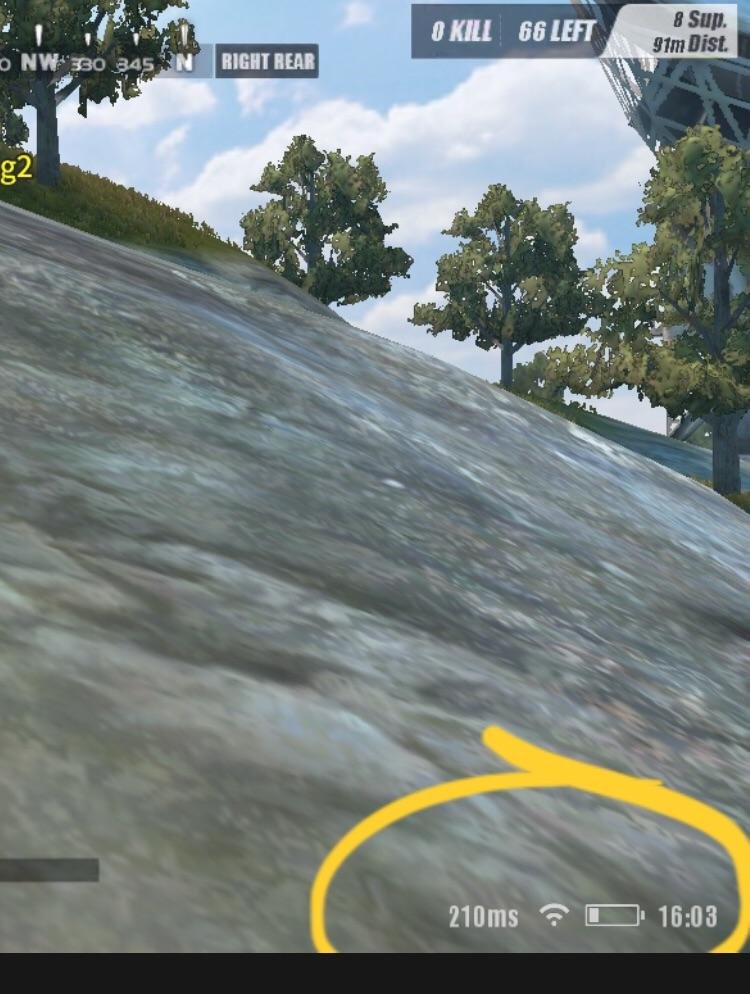
Milliseconds, often abbreviated as ms, represent the latency or ping in online gaming, indicating how long it takes for data to travel between your device and the game server.
Ever noticed that little number fluctuating when you are playing online? That’s often displayed next to a ping indicator, and it is usually showing you milliseconds. So, what does ms in games mean exactly? It represents the time it takes for a signal to travel from your computer to the game server and back.
Lower ms values are much better for gaming. This is because a lower number means there’s less delay, resulting in a smoother and more responsive gameplay experience. High ms can cause lag, making the game feel choppy.

What Does MS in Games Mean?
Have you ever been playing your favorite video game and noticed a number next to the word “ms” pop up? Maybe it’s during an intense online match, or while checking out your game’s settings. This little abbreviation, “ms,” might seem like a secret code, but it’s actually super important for understanding how smoothly your games are running. Let’s dive in and explore exactly what “ms” means in the world of games!
Understanding Milliseconds: The Basics
First off, “ms” stands for milliseconds. But what exactly is a millisecond? Well, think of it this way: a second is a unit of time we all know. It’s how long it takes to count to one. Now, a millisecond is a tiny, tiny fraction of a second. There are 1000 milliseconds in just one second. Imagine slicing a second into a thousand pieces – each piece is a millisecond. It’s super fast, right? These small units of time are crucial in games because they measure how quickly things are happening. When we’re talking about “ms” in games, we’re mostly talking about “latency” or the time it takes for information to travel, and “response time”, this can be confusing so let’s clear all this confusion.
Latency: How Long it Takes for Information to Travel
Latency, often shown in ms, is like the time it takes for your actions in a game to reach the game server and then come back to you. Think of it like this: you press the jump button on your controller. That signal has to travel from your controller, to your gaming system, then out to the internet, and finally to the game’s server. The server has to process your jump, and then send back information to your game system so you can see your character jump on your screen. All this back-and-forth takes time, and that time is measured in milliseconds. The lower the latency (lower “ms” number), the faster the round trip is, and the more responsive the game will feel. Here’s a breakdown:
- Your Action: You press a button.
- Signal Travels: The signal is sent to your gaming setup and then through the internet.
- Server Processing: The game server receives your signal, registers your action and processes it.
- Response Travels Back: The updated game information is sent back to your gaming setup.
- Action Displayed: You see the result of your action on the game screen.
Why is low Latency important?
Low latency is super important for competitive online games, such as first-person shooters (FPS) or fighting games, it is essential for fast paced games. If the latency is high, there’s a noticeable delay between pressing a button and seeing the result on the screen. This delay can cause you to miss shots, make inaccurate moves, and generally make the game feel slow or laggy. Low ms ensures that your actions are reflected nearly immediately in the game, giving you a smooth and responsive experience. In simple terms, high latency can cause frustrating game play experience, resulting in missing shots, and making you lose games frequently. Low ms, on the other hand, helps you to make the precise moves and be accurate in your gameplay.
Factors Affecting Latency
Several things can affect your latency. Here are some key factors that influence your latency when gaming online:
- Internet Connection Speed: A fast and stable internet connection is very important. If your internet is slow or unstable, the signals will take longer to travel, leading to high latency.
- Distance to the Server: The physical distance between you and the game server matters. If the server is far away, it will take more time for the signal to reach it and come back. This is why servers in your own region usually give lower latency.
- Network Congestion: If many people are using the same network at the same time, the network can become crowded, resulting in slower speeds and higher latency.
- Your Hardware: Your gaming system’s processing power and network card can impact latency. Older or slower devices may struggle, causing higher ms numbers.
Sometimes, the game itself might have issues on the server side, which can result in high latency, and it is not your fault.
Response Time: How Fast Your Screen Reacts
While latency refers to the time it takes for information to travel over the internet, response time is about how quickly your monitor or TV can display a change in the picture. Think of response time as how fast the pixels on your screen can change from one color to another. Like latency, this is also measured in milliseconds. A low response time means your screen can switch images quickly, which reduces blurring and ghosting during fast-paced action in games. This is very crucial for playing fast-paced games, where even slightest blur can cause you the game.
Why is low Response time Important?
A high response time can result in motion blur. This appears as a ghost-like image trailing behind fast-moving objects. High response times make games look blurry and can be distracting, especially in fast action sequences. A lower response time helps to get a smoother and crisp visual experience, especially in fast-paced games, where you see the fast moving objects clearly and smoothly, which is essential for an immersive experience.
Factors Affecting Response Time
Several things impact monitor response time. Here are some key factors that influence how fast your screen reacts:
- Monitor Type: Different types of monitors have different response time characteristics. For example, LCD (Liquid Crystal Display) monitors, most common, have different response times depending on their panel type: TN, IPS and VA. TN panels usually offer the fastest response time, but might not have the best color accuracy and viewing angles; IPS panels offer better color and viewing angles, but might have higher response times than TN; VA panels are somewhere in the middle.
- Pixel Overdrive: Some monitors have a feature called “pixel overdrive” that reduces response time by pushing the pixels harder to change color. This can decrease the motion blur but can also result in overshoot or inverse ghosting, which can cause dark trails to appear behind moving objects. It is a feature to use with care as incorrect settings can make image quality worse.
- Refresh Rate: The refresh rate of a monitor (measured in Hz) specifies how many times per second the screen updates its image. Higher refresh rates result in smoother motion and can impact perceived response time. A monitor with a refresh rate of 144Hz will display more frames per second than a 60Hz monitor, and this makes games feel more responsive, especially when paired with lower response time.
Ping: A term you may also see in Games
The term “ping” is very closely related to latency and is another way to measure the round-trip time for data to travel. You might see ping alongside “ms” in games. In simpler terms, ping measures the same thing as latency, but instead of saying “my latency is this many milliseconds,” people usually say “my ping is this many ms”. Both are telling how quickly data is being sent and received, and the lower the number is better.
How is Ping different from Latency?
While many use “ping” and “latency” interchangeably, they are not different. Ping is a tool that measures latency, so when you see your “ping” is high, it just means that your latency is high. The ping test sends a signal to a server and calculates how long it takes for that signal to come back. This is measured in milliseconds, same as latency. However, in most game menus, these two terms are frequently used interchangeably. They represent the same measure, which is how much delay you have in your game because of the time for signal to travel.
Why Lower Numbers are better?
In gaming, whether we talk about latency, response time, or ping, the goal is always to have the lowest possible number, expressed in milliseconds. Low numbers mean that actions happen faster, that there are less visual issues, and that the game feels responsive and smooth. High numbers mean delays, blurry images, and a generally bad experience.
Low ms benefits:
- More responsive gameplay: Your actions appear faster on screen.
- Reduced input lag: Less delay between pressing a button and the action happening.
- Clearer visuals: Less motion blur and ghosting.
- Improved competitive edge: React faster to in-game events, which will give you an advantage.
- Smoother experience: The game feels fluid and enjoyable.
High ms drawbacks:
- Input lag: Significant delay between your actions and the game’s response.
- Lag and stuttering: Game may feel slow and unresponsive.
- Motion Blur/Ghosting: Making the images blurry or hard to see the moving objects.
- Disadvantage in multiplayer: A huge disadvantage compared to people with low latency.
- Frustration: A bad experience, which can make a game unenjoyable.
Here is a summary of everything we have discussed:
| Term | What is it? | Measured in | Lower is better? |
|---|---|---|---|
| Latency | Time for actions to travel to the game server and back | Milliseconds (ms) | Yes |
| Response Time | How fast your screen shows change | Milliseconds (ms) | Yes |
| Ping | Same as latency, measures the round trip time | Milliseconds (ms) | Yes |
Tips to Improve Your MS in Games
If you are getting high latency or high response time, here are some things you can try to fix it:
For Latency/Ping:
- Use a wired connection: Connect your gaming system directly to your router using an ethernet cable. Wi-Fi can be less reliable and can cause delays.
- Close background applications: If you have other applications running on your device while you play the game, close them, especially applications that use the internet. This will reduce the load on the network and on your system, allowing the game to use the internet and system’s resources more efficiently.
- Use a faster internet plan: If your internet is slow, consider switching to a faster internet plan for smoother gaming.
- Move closer to your router: If you use Wi-Fi, being closer to your router may improve your connection.
- Choose server closer to you: When playing online, choose a server closer to your geographical location so the signal doesn’t have to travel far.
- Restart your router: Sometimes simply restarting your router can improve your connection.
For Response Time:
- Upgrade your monitor: If your monitor has a high response time, upgrading to a gaming monitor with low response time can improve the visual experience and eliminate motion blur.
- Adjust monitor settings: Try enabling overdrive feature in your monitor, but if you see inverse ghosting or overshoot, turn this feature off. Experiment to find optimal settings to get a good balance between lower response time and no visual artifacts.
- Choose the right monitor panel type: If you are choosing a new monitor, pick one that best suits your needs, keeping in mind that TN panels have fastest response times but might lack color quality, and IPS panels provide a balance of both.
By understanding what “ms” means in games and how latency and response time affect your gaming experience, you can take steps to improve your performance and enjoy your favorite games to their fullest. Remember that low numbers are better for smooth and responsive gaming.
In the world of video games, milliseconds can make a massive difference in the kind of experience you have. Whether you’re an online competitive player or just enjoying a casual game, understanding what “ms” means will help you optimize your system and improve your gaming experience.
FIX MS-GamingOverlay or MS-Gamebar Message on any PC!
Final Thoughts
In games, ‘ms’ represents milliseconds. It measures the latency between your actions and the game’s response. Lower ms values indicate quicker responsiveness, which is essential for a smooth gaming experience.
High ms, conversely, cause noticeable lag, impacting gameplay negatively. Therefore, monitoring your ms must be part of optimising your gaming setup. ‘What does ms in games mean’ is ultimately about response time; lower is better.

