
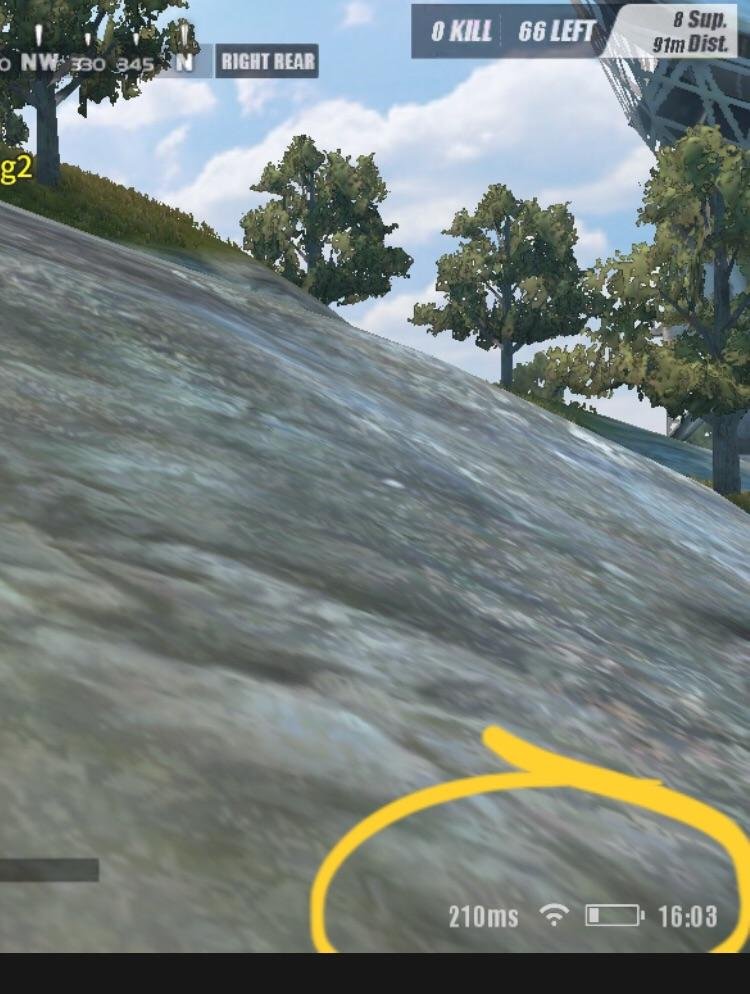
In games, “ms” refers to milliseconds, a unit of time measuring latency or network delay, indicating how quickly data travels between your device and the game server.
Ever wondered about the little number next to the connection bars in your favorite online game? That number, often shown as “ms,” represents something crucial for smooth gameplay. Specifically, what does ms mean in games? It directly relates to the responsiveness and speed of your connection.
A lower ms value means a quicker response, while higher numbers signal potential lag and delayed actions. Understanding this simple unit can significantly improve your gaming experience and help you troubleshoot connection issues.

What Does MS Mean in Games?
Have you ever been playing your favorite video game and seen the letters “ms” pop up? Maybe it’s next to a number, or part of a more complicated-looking display. It might seem a little mysterious, but “ms” is actually very important for your gaming experience. Let’s break it down and make it easy to understand. In the world of video games, “ms” stands for milliseconds. A millisecond is a tiny fraction of a second – one thousandth of a second, to be exact. This tiny measurement has a big impact on how smoothly and quickly your games run. Think about it like this: if a second is like a whole pizza, a millisecond is like a single tiny crumb. It’s super fast! Now, let’s dive deep and find out how this small unit makes a big difference in your games.
Understanding Latency and Ping
When you see “ms” in a game, it’s almost always referring to latency or ping. These terms are often used interchangeably, but they mean the same thing: the delay between your action (like clicking your mouse or pressing a button) and when you see that action happen on the screen. Think of it like shouting across a room. If the room is small, the sound of your voice will reach the other side quickly. If the room is huge, there will be a noticeable delay before the other person hears you. The same applies to games!
How Latency Impacts Gameplay
Low latency is what every gamer wants. It means your actions are translated into the game almost instantly. This makes the game feel very responsive and smooth. Imagine playing a fast-paced racing game where you press the brake and the car stops immediately; that’s low latency at work. On the other hand, high latency causes lag. Lag is the frustrating delay that makes your character respond late to your commands. It can cause you to miss shots in a shooting game, misjudge jumps in a platformer, or make it difficult to react quickly in any type of game. High latency can lead to frustrating experiences and poor performance in online games.
- Low ms (1-50ms): This is what we call good latency. Games will feel very smooth, responsive, and comfortable to play.
- Medium ms (50-150ms): This is an okay range, but some players may notice a little delay, especially in fast-paced games.
- High ms (150+ ms): This means you will probably experience lag. Gameplay will feel choppy, and it can be difficult to enjoy the game.
So, when you see a number next to “ms”, that number is an indication of how long it takes for information to travel from your computer to the game server and back. The lower the number, the better your game will play!
Factors Influencing Latency
Many things affect your latency. It’s not just one thing, it is actually the whole process, the whole path taken by your data which cause it. Here are some of the biggest culprits:
Your Internet Connection
The speed and quality of your internet are probably the biggest factors in determining your latency. A fast and stable internet connection is necessary for low latency. If your internet is slow, or if it sometimes drops out, you’ll definitely see higher “ms” readings and experience lag.
Here’s a way to think about it. Imagine that your internet is a pipe through which water (your game data) flows. If you have a big, wide pipe (fast internet), the water will flow fast and smoothly. If you have a tiny, old pipe (slow internet), the water will trickle out, leading to delay and lag. Here’s what can affect your connection
- Type of Connection: Fiber optic is usually the fastest, followed by cable, then DSL, and lastly, satellite. Each of these has its own pros and cons.
- Distance from the Server: The farther you are from a game server, the longer your data takes to travel. Imagine trying to shout to someone miles away; it will take longer than if they were right next to you.
- Network Congestion: When many people in your house or neighborhood are using the internet at the same time, it can slow everything down. It is like trying to use a road during rush hour.
Your Gaming Device
The device you use to play games can also affect latency. Older computers or consoles may have trouble processing data quickly, which can cause delay. Here are some device-related considerations:
- Processing Power: A fast processor can handle game data quickly and keep your latency lower. If your computer is struggling, you’ll see higher ms readings.
- Network Adapter: Your computer’s network card or Wi-Fi adapter needs to be working efficiently. Old hardware can lead to higher latency.
- Background Applications: Running too many applications in the background can also eat up your device’s resources, leading to higher latency. Close applications and programs that are not needed to free up your device to focus on the game.
Game Servers
The game server itself is another critical factor. Sometimes, the problem might not be on your end. If a game server is too busy or has issues, you might see higher latency even if your internet connection is perfect. Here’s what matters about servers:
- Server Location: The closer you are to the game server, the lower your ping will be. It is always better to connect to server near you.
- Server Load: When many people play on one server simultaneously, it can become congested and cause higher ping. It is like a crowded place when many people are walking around, you move a little slowly, the same happens with the game server, when too much players are on single server, the data exchange becomes slow.
- Server Quality: Some game servers are simply better than others. Poor quality servers can have issues that cause lag.
How to Check Your Ping
Most games display your ping (latency) right on the screen. You’ll often see it in the corner, or in a settings menu. It will look like a number followed by “ms”. Some games will show a bar graph or another visual to show your connection quality, instead of or in addition to the number.
Using In-Game Displays
Most online games have their own ways to display your ms. Here are some common places to find this information:
- Scoreboards: In many multiplayer games, the scoreboard will show your latency.
- Network Settings: Look in the game’s settings menu for options like “network,” “connection,” or “display.”
- HUD Display: Some games display this information directly on the screen, often in a corner of the screen or over the top of the game information.
Using External Tools
If your game doesn’t show you your ms, or you want to check your connection speed to a specific server, you can use external tools such as:
- Speedtest Websites: These sites can give you an idea of your download and upload speed, and they often include a ping test, which measures latency to their servers. These are great to get a general idea of how good your internet is, and it is always great to test with those.
- Command Prompt (Ping Command): If you’re comfortable using your computer’s command line, you can use the ping command. For example, typing ping google.com will test the latency between your computer and Google’s servers. You need to open Command Prompt in order to do this, and after opening it you just need to type ping google.com and press enter.
Tips to Reduce Latency
Having high ms readings can be very frustrating. Here are some easy and effective steps you can take to make your game more responsive and reduce your ping and overall latency in games:
Optimize Your Internet Connection
The most important step is to make sure your internet is working the best it can.
- Use an Ethernet Cable: Wi-Fi is convenient, but ethernet cables provide a more stable and faster connection. When using Wi-Fi, the signal can be interrupted because of different things like walls, distance from router etc. You are recommended to use an Ethernet cable if you want lowest ping in games.
- Move Closer to Your Router: If you must use Wi-Fi, move closer to your router and remove any objects that could be blocking the signal.
- Restart Your Modem and Router: A simple restart can fix many network problems. It refreshes the connection and can often improve speed and latency.
- Limit Background Usage: Close other programs that are using the internet such as video streaming or downloading files on other devices. That can cause the internet to slow down on your gaming device.
- Update Your Router Firmware: Make sure your router has the latest software to keep its performance best. Outdated firmware can cause connection issues.
Optimize Your Gaming Device
Your computer also has a key role to play in reducing latency. Here are some ways to optimize your gaming device:
- Close Unnecessary Programs: Close programs and applications running in the background to free up resources and improve performance.
- Update Graphics Drivers: Ensure that you have updated the latest drivers for your graphics card, so it works at its best.
- Lower Graphics Settings: Lowering the graphics settings in a game can reduce the load on your computer, which can lead to lower latency, try different settings and see which one works best for your device.
- Clean Up Your Device: Make sure there are no malware on your device, clean up junk files, and make sure that your device works smoothly and efficiently.
Choose the Right Servers
The game server you choose has a huge impact on your latency. Here’s what you should know:
- Connect to Servers Closer to You: Choose servers in your region to minimize travel time for data.
- Avoid Overcrowded Servers: If possible, choose a server with fewer players. Fewer players often mean less lag.
- Use a VPN: A VPN can sometimes help you connect to better servers or avoid congestion, but it can also increase latency in some cases. If your game has local servers, there is no need for VPN, but if it has far away servers, then a good VPN can help you reduce the latency.
Use Quality Network Equipment
Your hardware impacts your latency. Here are some tips for better network equipment:
- Use a Good Router: An outdated or low-quality router can lead to slow and unstable connections. Consider upgrading to a router with faster speeds and better coverage, make sure your router is working good and stable.
- Get a Good Ethernet Cable: A good Ethernet cable is very important for a stable and fast connection. Make sure your cable is not old or damaged.
When MS is Not the Only Problem
While “ms” primarily refers to latency, it’s worth noting that lag can sometimes result from other issues. Here are some problems that can feel like latency, but are caused by something else:
Frame Rate Problems
Frame rate (measured in frames per second, or FPS) is how many pictures your screen shows each second. Low FPS can make your game feel choppy, even if your latency is good. Here is what you should know about FPS:
- Difference from ms: Ms is about the time for your actions to be sent and received, FPS is about how smoothly the game displays visual changes on your screen.
- Impact: If your game struggles to reach high FPS, it will look and feel jerky, especially in fast paced moments of games.
- Solution: To improve FPS, lower graphics settings, update your graphics card drivers, or upgrade your hardware.
Packet Loss
Packet loss happens when some of your game data gets lost on the way to the server, or when the server sends it to your device. It can be more problematic than high latency in some cases, because while high latency causes delay, packet loss actually loses the data which can lead to strange behavior, and the game can feel very choppy even with a low latency.
- What it is: Data is sent in small chunks called packets, and losing these packets can cause weird things to happen on the screen.
- Symptoms: You might see sudden “teleports” of characters, rubber banding (where characters seem to move back and forth) or other unusual events.
- Solution: Check your internet connections, make sure the cables are not loose, if this problem persists, contact your internet provider, as packet loss is not always in your control, and sometimes it can happen because of your ISP.
Server Issues
Sometimes the problem is with the game server itself, and it can have issues that cause you to feel lag, even if your connection is fine. Sometimes servers can be broken and developers will try to fix them, but until that moment, there will be lag, that is beyond your control. Here is what to keep in mind:
- Unstable Servers: When game servers are having issues they can cause lag, even if you have good internet speed.
- Overloaded Servers: When too many people are on the server simultaneously, it can lead to slowdowns and other strange problems.
- Solution: If it is the game server’s fault, you may have to switch servers or wait for the game developers to resolve the issue.
Understanding MS in Different Game Genres
The importance of low “ms” can vary depending on the type of game you are playing. Here is what latency is like in different genres of games:
First-Person Shooters (FPS)
In first person shooters, latency can be a huge problem, as there is fast paced movement, and having high ms can cause you to perform really bad in games.
- Critical: Low latency is absolutely critical. Milliseconds can make the difference between winning and losing.
- Impact: High ms can make it hard to aim, react quickly, and hit your targets.
Massively Multiplayer Online Games (MMOs)
While latency is not as critical in MMOs as FPS games, it still matters. Here is how ms affect MMOs
- Important: Low latency is important for smooth interactions with other players and completing quests.
- Impact: High ms can cause delays in your character’s actions and difficulty with other players, like attacking or using your special skills.
Real-Time Strategy (RTS) Games
RTS games involve quick thinking and reacting, low latency in games like these can really help with your performance
- Helpful: Low latency is helpful but not as essential as in FPS games.
- Impact: High latency can make it harder to control your units and react to opponent actions quickly.
Casual Games and Single-Player Games
Casual games or single-player games don’t usually rely on fast reactions or quick inputs, so latency is not as important as in the other genres. Here are the impact of ms on this type of games:
- Less Critical: Latency is less critical because there is usually no need for quick reactions and fast decisions.
- Impact: Higher latency may not be very noticeable for these types of games.
This demonstrates how the importance of “ms” varies between different game genres. Always try to have the lowest “ms” possible for the best experience.
In Conclusion
So, when you see “ms” in your favorite video game, you now know that it’s the measure of latency—the small amount of delay between your action and the game’s response. Lower ms means smoother, more responsive gameplay, while high ms leads to frustrating lag. Your internet connection, gaming device, and the game servers all play a role in determining your latency. By understanding what “ms” means, you can make smarter decisions about your setup and enjoy better gaming experience. So keep an eye on your “ms” readings, and use the methods given to try and make it lower for smoother and more enjoyable games.
Why is PING So Important For Online Gaming?
Final Thoughts
In gaming, ‘ms’ signifies milliseconds, a crucial measurement of latency. It reflects the delay between your action and its appearance on screen. Lower ms means a faster, more responsive experience; higher ms creates noticeable lag.
This lag can seriously hinder gameplay, making reactions difficult. Understanding what does ms mean in games is vital for competitive players. Gamers must strive for the lowest ms possible to gain an advantage.

