
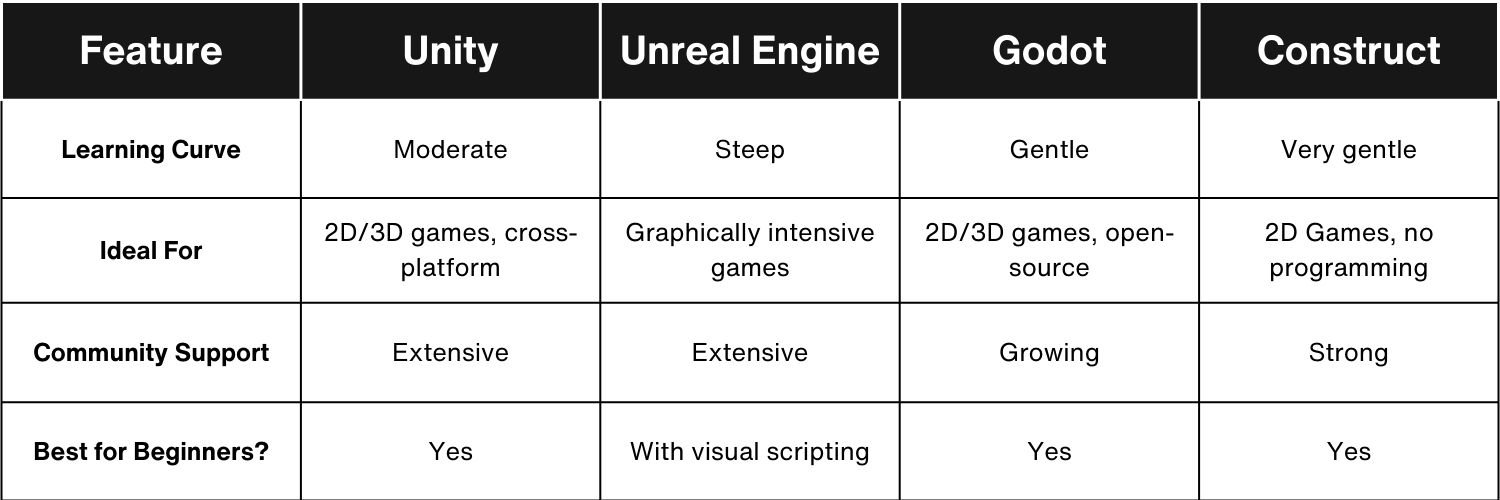
For beginners seeking the best entry point into game development, Godot Engine stands out due to its user-friendly interface, GDScript language, and free, open-source nature, making it the best game engine for beginners.
So, you want to make games? That’s awesome! One of the first questions you’ll probably ask yourself is “what game engine is best for beginners?” It can feel overwhelming because there are many options.
Don’t worry, you’re not alone in this search. We will guide you through the process, focusing on engines that are easy to learn and use. We’ll consider factors like ease of use, available resources, and community support.

What Game Engine Is Best for Beginners?
Choosing the right game engine can feel overwhelming when you’re just starting out. There are so many options available, each with its own strengths and weaknesses.
This article will help you navigate the landscape of game engines and find the perfect fit for your beginner journey. We’ll explore several popular engines and highlight what makes them beginner-friendly.
Understanding Game Engines
A game engine provides the tools and functionalities needed to create a game. It handles tasks like rendering graphics, managing physics, and handling input.
Think of it as the foundation upon which your game is built. Without a game engine, you’d have to code everything from scratch, which is extremely time-consuming and complex.
Key Features for Beginner-Friendly Game Engines
Not all game engines are created equal, especially regarding beginner-friendliness. Some features make learning and using an engine much easier for newcomers.
- Visual Scripting: This allows you to create game logic without writing code, using a drag-and-drop interface.
- User-Friendly Interface: An intuitive and well-organized interface makes navigating the engine much simpler.
- Extensive Documentation: Comprehensive documentation, tutorials, and learning resources are crucial for getting started.
- Active Community: A supportive and active community provides help, guidance, and resources.
- Free to Use (Initially): Starting with a free version or a generous free tier lets you experiment without a financial commitment.
Top Game Engines for Beginners
Let’s dive into some specific game engines that are known for being beginner-friendly. We’ll discuss their pros, cons, and what makes them suitable for newcomers.
Godot Engine
Godot Engine is a free and open-source game engine that has gained popularity in recent years. It’s known for its ease of use and versatility.
Godot uses a unique scripting language called GDScript, which is similar to Python. It is designed to be easy to learn, especially for those with some programming experience.
Godot’s Strengths
- GDScript: GDScript is relatively easy to learn and use, making it a great choice for beginners.
- Node-Based System: Godot’s node-based scene system is intuitive and promotes modular game development.
- Free and Open-Source: Godot is completely free to use, with no royalties or licensing fees.
- 2D and 3D Support: Godot is capable of creating both 2D and 3D games, offering flexibility for different projects.
- Active Community: Godot has a growing and active community that provides support and resources.
Godot’s Potential Drawbacks
- GDScript Learning Curve: While GDScript is easier than some languages, it still requires learning a new syntax.
- Smaller Asset Store: Godot’s asset store is not as extensive as those of some other engines.
- 3D Performance: While improving, Godot’s 3D performance may not be as optimized as some other engines for very demanding games.
Unity
Unity is one of the most popular game engines in the world. It is used by both indie developers and large studios.
Unity uses C# as its primary scripting language. While C# can be more complex than GDScript, Unity offers a vast amount of resources and tutorials.
Unity’s Strengths
- Extensive Resources: Unity has a massive library of tutorials, documentation, and online courses.
- Large Asset Store: Unity’s Asset Store provides a wide variety of pre-made assets, saving development time.
- Cross-Platform Support: Unity supports a wide range of platforms, including mobile, desktop, and consoles.
- Active Community: Unity has a large and active community that offers support and guidance.
- Visual Scripting Options: Unity offers visual scripting tools like Bolt (now owned by Unity), allowing for code-free development.
Unity’s Potential Drawbacks
- C# Learning Curve: C# can be challenging for complete beginners with no programming experience.
- Pricing Structure: Unity’s pricing structure can be confusing, especially for small teams or individuals.
- Performance Optimization: Achieving optimal performance in Unity can require some technical knowledge.
GameMaker Studio 2
GameMaker Studio 2 is designed specifically for 2D game development. It is known for its ease of use and intuitive interface.
GameMaker uses a visual scripting language called GameMaker Language (GML). GML allows you to create games with minimal coding.
GameMaker Studio 2’s Strengths
- Easy to Learn: GameMaker is very easy to learn, especially for beginners with no prior programming experience.
- Visual Scripting: GameMaker’s visual scripting system allows you to create games without writing code.
- Rapid Prototyping: GameMaker is great for quickly prototyping game ideas.
- Dedicated 2D Engine: GameMaker is specifically designed for 2D game development, making it highly optimized for this purpose.
- Beginner-Friendly Tutorials: GameMaker has tons of beginner-friendly tutorials and resources available.
GameMaker Studio 2’s Potential Drawbacks
- Limited to 2D: GameMaker is primarily a 2D engine, so it’s not suitable for 3D games.
- GML Learning Curve: While easier than some languages, GML still requires learning its specific syntax.
- Licensing Costs: GameMaker Studio 2 requires a paid license to export games to different platforms.
Construct 3
Construct 3 is a web-based game engine that focuses on visual scripting. It’s designed to be incredibly easy to learn and use.
Construct 3 uses an event-based system for creating game logic. This allows you to create complex games without writing any code.
Construct 3’s Strengths
- No Coding Required: Construct 3 is entirely visual, meaning you can create games without writing any code.
- Web-Based: Construct 3 runs in your web browser, so you don’t need to download or install anything.
- Easy to Learn: Construct 3 is incredibly easy to learn, even for complete beginners.
- Event-Based System: Construct 3’s event-based system is intuitive and makes creating game logic simple.
- Cross-Platform Export: Construct 3 can export to a variety of platforms, including HTML5, iOS, and Android.
Construct 3’s Potential Drawbacks
- Subscription Model: Construct 3 uses a subscription-based pricing model.
- Limited Advanced Features: Construct 3 may not be suitable for very complex or technically demanding games.
- Web Dependency: Requires an internet connection to use.
Comparing Beginner-Friendly Game Engines
Let’s compare these game engines side-by-side to highlight their key differences and help you choose the best one for your needs.
Godot vs. Unity
While both are powerful, Godot offers a gentler introduction. Godot’s GDScript is easier to grasp initially than Unity’s C#.
Unity, however, boasts a significantly larger asset store and community. This can be beneficial for finding resources and support.
Ultimately, the best choice depends on your learning style and project goals. If you want a free, open-source engine with a simple scripting language, Godot is a great option. If you prefer a more established engine with extensive resources, Unity is a solid choice.
GameMaker Studio 2 vs. Construct 3
Both engines are excellent for 2D game development and prioritize ease of use. GameMaker Studio 2 offers a mix of visual scripting and code-based development with GML.
Construct 3 is entirely visual, making it even more accessible to complete beginners. GameMaker offers a more traditional application experience.
Construct 3 is web-based. Consider your preference between a downloadable application (GameMaker) and a browser-based one (Construct 3).
Considerations Before Choosing a Game Engine
Before making a final decision, consider these factors:
Your Programming Experience
If you have no prior programming experience, visual scripting engines like Construct 3 or GameMaker Studio 2 might be the best starting point. If you have some programming knowledge, Godot or Unity could be a good fit.
Your Project Goals
What type of game do you want to create? If you’re interested in 2D games, GameMaker Studio 2 or Construct 3 are excellent choices. If you want to create 3D games, Godot or Unity are better options.
Your Budget
Consider the pricing models of different game engines. Some engines are free (like Godot), while others require a one-time purchase or a subscription.
Community Support
A strong community can be invaluable when learning a new game engine. Look for engines with active forums, tutorials, and online courses.
The Importance of Tutorials and Learning Resources
No matter which game engine you choose, make sure to take advantage of the available tutorials and learning resources. These resources can help you learn the basics of the engine and start creating your own games.
Look for official documentation, video tutorials, online courses, and community forums. Don’t be afraid to ask for help when you get stuck.
Don’t Be Afraid to Experiment
The best way to find the right game engine is to experiment with different options. Try out a few different engines and see which one you enjoy using the most.
Don’t be afraid to switch engines if you find that one isn’t working for you. The most important thing is to find an engine that you’re comfortable with and that allows you to bring your game ideas to life.
choosing a game engine is easy, actually
Final Thoughts
Ultimately, selecting the right engine depends on your goals. Unity offers vast resources and a large community. Godot provides a simpler interface and is completely free.
Both engines empower you to create games. Focus on learning core concepts, not just software.
For beginners asking, what game engine is best for beginners? Godot might present a gentler learning curve due to its intuitive design. It is a must, but it’s also a gateway to game development.

