
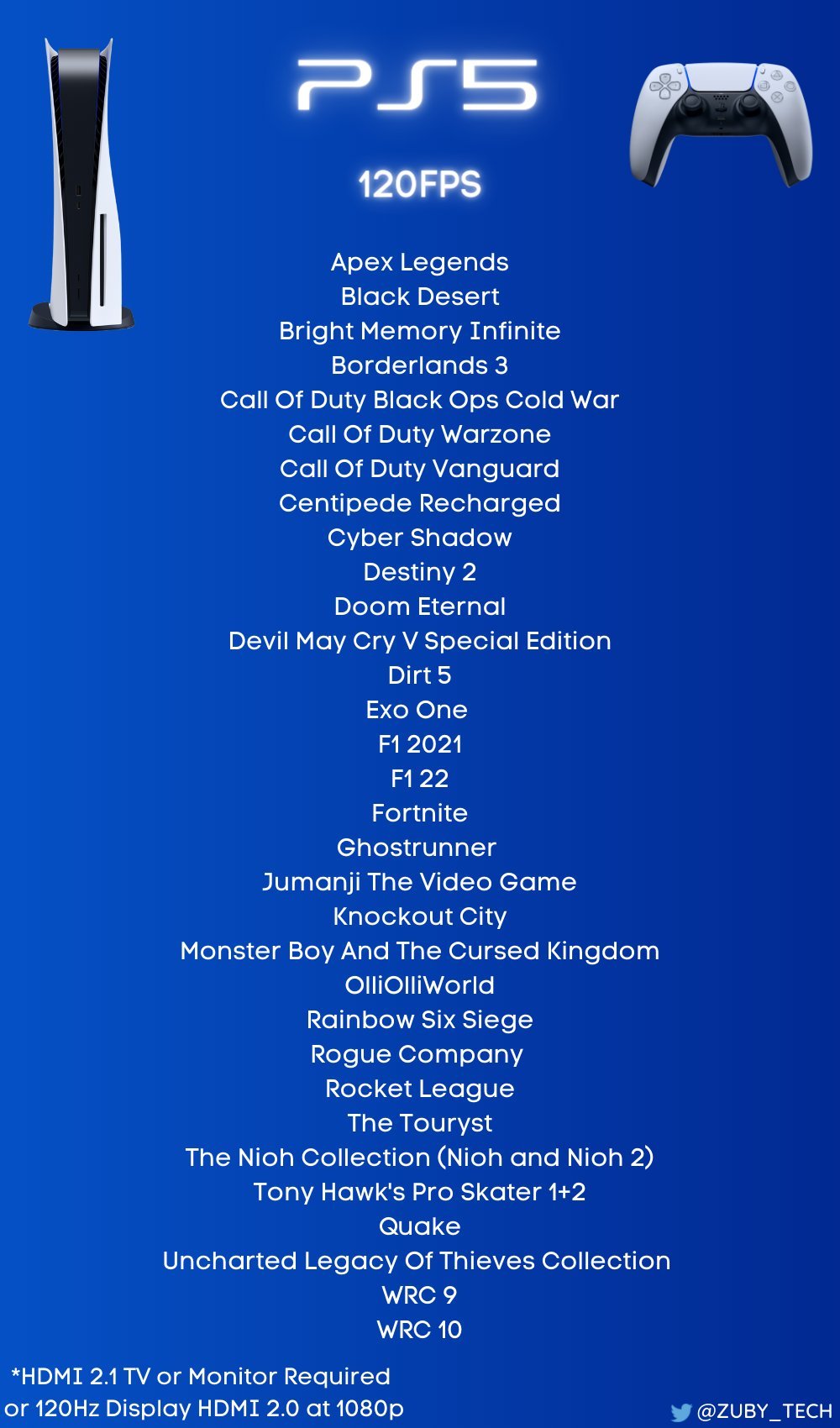
Several PlayStation 5 games support 120 fps, often in specific performance modes, including titles like Call of Duty, Rainbow Six Siege, and Devil May Cry 5 Special Edition.
Want buttery smooth gameplay on your PlayStation 5? Many players are curious about what games run 120 fps on PS5, and it’s a valid question with the console’s power. A higher frame rate provides a more fluid and responsive gaming experience.
The list of games varies, and some require specific display settings and compatible monitors or TVs. However, when you have the right setup, the difference is definitely noticeable.

What Games Run 120 FPS on PS5?
So, you’ve got your shiny new PlayStation 5 and you’re ready to experience games like never before. One of the coolest things about the PS5 is that it can play some games at a super-smooth 120 frames per second (fps). But what exactly does that mean, and more importantly, what games actually take advantage of this feature? Let’s dive in and explore the world of 120fps gaming on your PlayStation 5!
Understanding Frames Per Second
Before we jump into the games, let’s quickly talk about what frames per second actually means. Imagine a flipbook. The faster you flip the pages, the smoother the animation looks, right? Well, in video games, the “pages” are frames. The more frames that are shown on your screen each second, the smoother and more fluid the gameplay will appear. A higher frame rate like 120fps makes everything look really crisp and responsive compared to the standard 60fps that you’re probably used to.
Why is this important? Well, a higher frame rate can mean the difference between hitting your target and missing it. It reduces motion blur, making everything look clearer, and it helps to make the game feel more responsive to your inputs. Think of it like this: if you’re playing a fast-paced game and things are happening very quickly, a higher frame rate allows you to see what’s happening much better, and react quicker. It can truly make you feel more “connected” to the game.
Why 120 FPS Matters on PS5
The PlayStation 5 is a powerful gaming machine, and its ability to run games at 120fps is one example of how advanced it is. It’s about giving you a visual and gameplay experience that’s better than previous console generations. Not all games will support 120fps, as it requires some extra effort by the game developers. The goal is to provide players with a noticeable advantage in terms of responsiveness, fluidity, and overall immersion. Games that utilize 120fps on the PS5 feel so incredibly smooth, which really puts you right in the center of the action.
The Essential Requirements for 120 FPS Gaming on PS5
Before you get too excited, it is important to know that there are a few key things you need to make 120fps gaming a reality.
1. A Compatible Display
First and foremost, you need a TV or monitor that supports a 120Hz refresh rate at 1080p or 4K resolution. Not all TVs can do this. You’ll need to have a TV or monitor with an HDMI 2.1 port. This is the newest version of HDMI and is required to carry the extra data needed for a 120fps signal. Many older TVs, even if they have 120Hz refresh rates, don’t always support 120Hz at 4K, or even 120Hz from an HDMI source. Check your TV’s specifications to ensure that it is fully capable. When in doubt, search for your specific TV model online to see if it supports 120Hz gaming with HDMI 2.1.
2. A Game That Supports 120 FPS
Of course, the game you’re playing needs to be designed to run at 120fps. Not all games on the PS5 support this feature. Some games run at 60fps or lower, and that’s okay. There is a good list of games that support the higher frame rate, but the selection is not every game you have. We’ll get into the games list below.
3. In-Game Settings
Even if your TV and the game support 120fps, you might need to enable the feature in the game’s settings. Some games will automatically run at 120fps if everything is compatible, while others require you to turn the feature on. Typically, it can be found in the “Graphics” or “Video” options. Sometimes you will see “Performance Mode” in the options which allows the higher framerate. Usually, selecting it might reduce the resolution of the game to make it run smoother.
List of PS5 Games That Run at 120 FPS
Now for the part you’ve been waiting for! Here is a list of some popular PlayStation 5 games that can reach 120fps. Keep in mind that sometimes updates and patches change what settings are available for each game. Be sure to do an online search to verify the most recent settings before you start playing.
Action and Shooter Games
- Call of Duty: Black Ops Cold War: A fan favorite, this one is able to achieve 120fps in its multiplayer modes. The smoothness here will help you with aiming and reaction time.
- Call of Duty: Vanguard: This is another game in the series that can reach 120fps, keeping with the tradition of high-octane action and smooth gameplay.
- Call of Duty: Modern Warfare II and III: Modern warfare titles continue the trend for high frame rate performance.
- Destiny 2: Bungie’s popular shooter is able to utilize 120 fps for smoother gameplay.
- DOOM Eternal: This fast-paced action shooter is already crazy intense, but 120fps takes it to another level of awesome.
- Rainbow Six Siege: This competitive multiplayer game supports 120fps for precision and clarity.
- Borderlands 3: If you like looter shooters, this one has that added boost in smooth gameplay.
- Apex Legends: The popular battle royale runs incredibly smooth at the higher frame rate.
- Overwatch 2: Blizzard’s team-based shooter is very fast-paced and very fun at 120fps.
- Tiny Tina’s Wonderlands: Another Borderlands universe title, this one supports higher frame rates.
- Fortnite: It is a worldwide phenomenon and can certainly run at 120fps on the PS5
- The Finals: A new competitive shooter which is a great option for 120fps.
Racing Games
- Gran Turismo 7: The racing simulator is able to run at 120fps. If you have a 120hz screen it’s an amazing experience, it makes the controls feel super responsive.
- F1 23: This fast-paced racer is a great option for the 120hz refresh rate.
- Dirt 5: Fun, arcade-style racing is even more exciting with the smoother frame rate.
- WRC 10: The official World Rally Championship title can reach 120fps on the PS5.
Sports Games
- NBA 2K series (recent titles): Playing your favorite basketball games at 120fps adds to the immersion and responsiveness of the game.
- Tony Hawk’s Pro Skater 1+2: Relive the glory of skating with very smooth, detailed gameplay.
- EA Sports FC 24: The new EA soccer game runs super well with 120fps enabled.
Other Games
- Devil May Cry 5 Special Edition: If you want hack-and-slash action, this game runs great at 120fps.
- The Pathless: The beautiful and fluid experience of running around in this game looks incredible at 120fps.
- Resident Evil Village: Experience this horror title with a very smooth feel.
- Ghostrunner: A fast-paced parkour action game that truly shines with 120fps.
- Uncharted: Legacy of Thieves Collection: The PS5 versions of Uncharted 4 and Uncharted Lost Legacy both have a smooth 120fps option.
- Ratchet & Clank: Rift Apart: This colorful and exciting title offers the 120fps option.
- Hades: This amazing indie game will let you experience all the intense action at the higher framerate.
Optimizing Your PS5 Settings for 120 FPS
Once you’re sure you have all the required hardware, it’s time to optimize your PS5 settings for 120fps. This might include things such as setting the correct resolution on the console and also making sure you have the correct setting enabled for your display. Here is a quick step-by-step guide on how to get started.
1. Adjusting Display Settings
Go to “Settings” on the PlayStation 5 main menu. Then choose “Screen and Video.” Inside this menu, go to “Video Output”. Make sure that “Enable 120 Hz Output” is turned on. Set your resolution to the appropriate setting, either 1080p or 4K depending on your display. If your TV supports it, also make sure that “Allow HDR” is turned on.
2. Checking Game Settings
As mentioned before, some games will automatically run at 120fps if your setup is compatible. Other games might require you to switch to a specific mode in their graphics or video settings. Check each game individually to make sure you’re getting the most out of your experience. These types of options are usually called performance mode and if you want higher frame rates that is the one you need to choose.
3. Keeping Your Console Updated
Make sure your console has the newest system software version installed. Sometimes Sony will make changes in their updates that will help with performance and video output. These updates are all for the better so make sure your system is up to date!
The Benefits of 120 FPS Gaming
Okay, so we’ve gone through how to get 120fps gaming on your PS5, but let’s really talk about the benefits. Why would you want this increased frame rate? Here are a few advantages to consider:
Smoother Gameplay
The most obvious benefit is the smoother motion that comes with a higher frame rate. It makes movement look more natural, reduces screen tearing, and helps make for a more enjoyable experience overall. Games just feel that much better when they’re smooth.
Improved Responsiveness
With 120fps, there is less input lag, which means the game responds quicker to your controller movements. This makes a big difference, especially in competitive games where every millisecond counts. The fast responses could be the difference between winning and losing!
Better Visual Clarity
A higher frame rate also means less motion blur, making objects appear clearer when moving at a fast pace. This is helpful when dealing with fast-moving objects or trying to spot enemies. With better clarity, you can react quicker to everything happening on screen.
More Immersive Experience
When the gameplay is smooth and responsive, it pulls you into the game more deeply. The experience is just a lot more enjoyable when it looks great and feels like you are in control. 120fps makes a very noticeable difference in how games look and how they feel.
Games That Benefit Most From 120 FPS
While all games benefit from the smoothness of 120fps, some genres show the most improvement. For example, fast-paced shooters see a huge difference because the action is very quick. Racing games feel more connected when they are running smoother. And fighting games also get a nice boost. Any game that requires quick reactions or fast movements will likely be very improved with a high frame rate.
Here is a list of game types that generally benefit from 120hz:
- First-Person Shooters (FPS)
- Racing Games
- Fighting Games
- Platformers
- Sports Games
The Future of 120 FPS Gaming on PS5
The availability of 120fps on the PlayStation 5 is a very important step in gaming. As display technology continues to improve and more developers begin to understand what high framerates can bring, we’ll likely see even more games start to adopt this feature. It’s a trend that is going to make video games even more exciting for the future.
As you have seen, 120fps gaming on the PS5 is a terrific way to experience games at a higher level. With the right TV and the right game, you can enjoy smoother, more responsive gameplay and better visuals. If you haven’t tried out a game with 120fps yet, now’s a great time to check it out.
How To Enable 120 FPS On PS5 – Easy Guide
Final Thoughts
Many titles on PlayStation 5 offer a silky smooth 120 frames per second experience. Several games like Call of Duty and Rainbow Six Siege utilize this feature, providing a competitive edge. These enhanced framerates make gameplay feel incredibly responsive.
It’s also worth noting that some other titles provide 120fps options through performance modes or specific settings. So, if you’re wondering what games run 120 fps on ps5, there’s a good range to enjoy. Always check game settings for available graphics options.

