
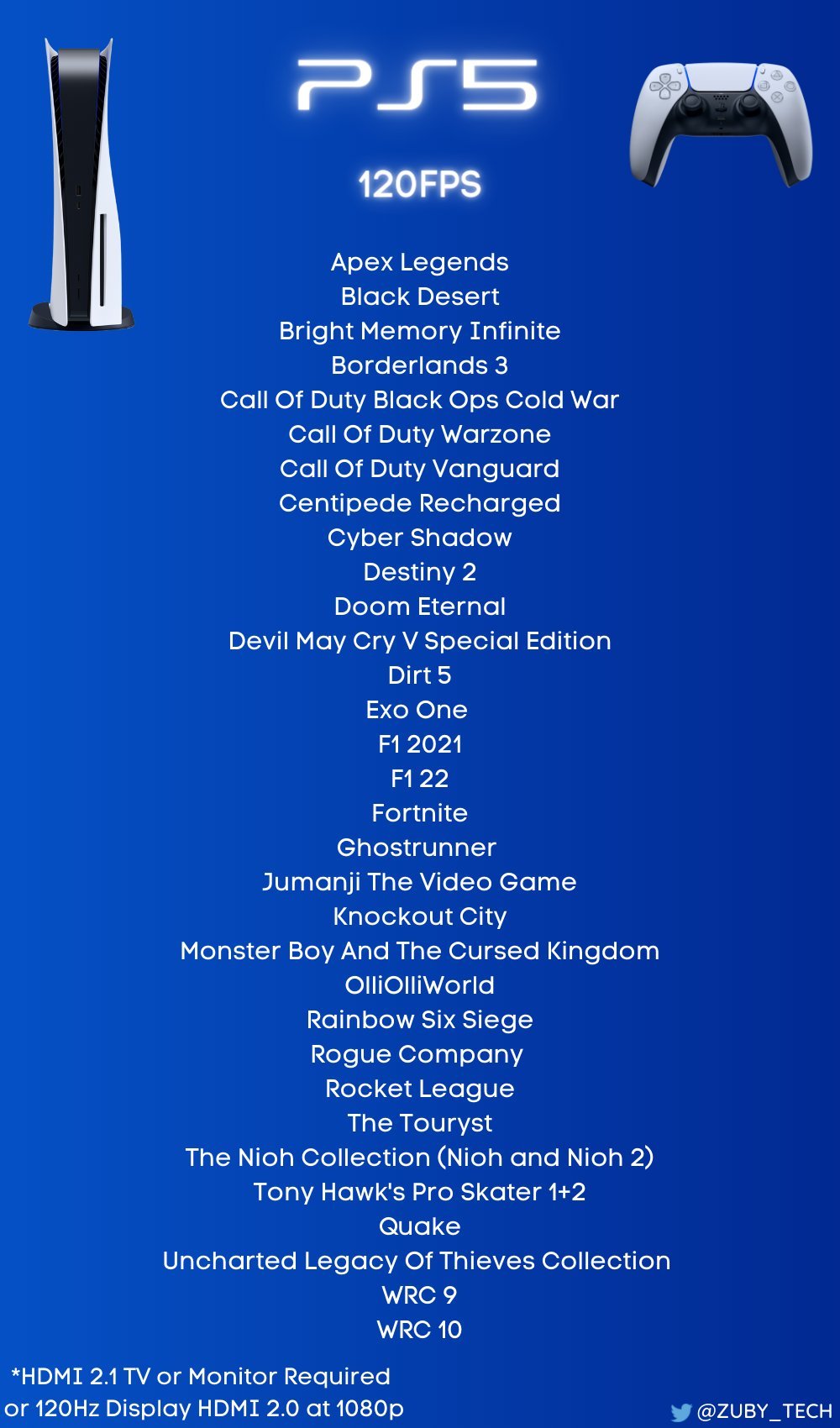
Currently, several titles offer 120 fps on PS5, including Call of Duty: Black Ops Cold War, Rainbow Six Siege, Devil May Cry 5 Special Edition, and Borderlands 3.
Want smoother gameplay? You might wonder what games support 120 fps on PS5. A higher frame rate makes action feel much more responsive and fluid, giving you a competitive edge. This translates to a more visually appealing and enjoyable gaming experience.
Many popular titles now offer this improved performance. Enjoy faster paced battles and more crisp visuals. We will explore some of these 120 fps supported games.

What Games Support 120 FPS on PS5?
The PlayStation 5 is a powerful gaming machine, and one of its coolest features is the ability to play games at a super smooth 120 frames per second (fps). But not every game can do this. So, if you’re wondering which of your favorite games can run at that amazing speed, you’ve come to the right place! Let’s dive into the world of 120 fps gaming on the PS5. We’ll talk about what it means, why it’s awesome, and, most importantly, which games actually support it.
Understanding 120 FPS: More Than Just a Number
Okay, let’s start with the basics. What exactly does 120 fps mean? Think of it like this: When you play a video game, the screen shows a series of pictures very quickly to make it look like things are moving. The number of these pictures shown each second is called the frame rate, measured in fps. So, 60 fps means the screen shows 60 pictures every second. Now, 120 fps means it shows 120 pictures each second! This makes the game look much smoother and more responsive. It’s like going from watching a flipbook to seeing a real movie. This can make fast-paced action games even more enjoyable. When you use a monitor or TV with a 120Hz refresh rate, you can appreciate this benefit fully. It reduces the input lag and motion blur making you feel more connected to the game.
Why is 120 FPS a Big Deal?
You might be thinking, “Why does this matter?” Here’s the deal: A higher frame rate has a few key benefits:
- Smoother Gameplay: Actions appear more fluid and natural, which can make a game look significantly better. This benefit is more visible in the fast paced games, where a player makes a lot of quick movements and camera angles change often.
- Reduced Motion Blur: With more frames each second, the blur caused by fast movement is minimized, making the picture sharper.
- Improved Responsiveness: When you press a button, it feels like your actions happen faster on the screen. This can be a big advantage, especially in competitive games. With less lag, your reaction time will improve.
- More Immersive Experience: The combination of smoother movement and less blur makes the game world feel more real and engaging.
Important Requirements for 120 FPS Gaming on PS5
Before you jump into 120 fps gaming, there are a few things you’ll need to make sure you have:
- A 120Hz Compatible Display: Your monitor or TV needs to be able to refresh at 120 times per second (120Hz). Not all displays do this, especially older ones. You will need either a TV or a monitor with HDMI 2.1 which supports 120fps.
- HDMI 2.1 Cable: You need an HDMI cable that supports high bandwidth to send the extra information needed for 120fps. Standard HDMI cables might not be sufficient. Check your cable for an ultra high speed certification.
- Game Support: The game itself needs to be programmed to output at 120 fps. Not all PS5 games have this option, even if you have all the hardware.
It’s not enough to just have a PS5 and a game. You must verify if your tv or monitor supports the required refresh rate and the right HDMI cable. If you have all the requirements covered, then you’re good to experience the smoother gaming.
Games that Support 120 FPS on PlayStation 5
Now for the part you’ve been waiting for: The games! It’s important to remember that game support can change over time with patches or updates. Let’s explore some of the popular titles which support 120fps. Here’s a breakdown of some great games you can play at 120 fps on your PS5:
First-Person Shooters (FPS)
FPS games are where you’ll see some of the biggest benefits from 120 fps, with the fast-paced action becoming much smoother and more responsive.
- Call of Duty: Black Ops Cold War: You can enjoy the fast-paced multiplayer action with super smooth frame rates.
- Call of Duty: Vanguard: This Call of Duty entry offers 120 fps support for more fluid combat experience.
- Call of Duty: Modern Warfare II and Modern Warfare III: The latest installments also provide high refresh rates making it better in online battles.
- Destiny 2: Enjoy this cooperative shooter with silky-smooth gameplay which makes gunfight more accurate.
- Rainbow Six Siege: This game is perfect for 120 FPS gaming, improving your reaction time and giving you an edge.
- Overwatch 2: A great hero shooter which plays smoothly on high refresh rates.
- Borderlands 3: The action is even more chaotic and fun at 120 fps.
- DOOM Eternal: This fast paced shooter gains a lot from a high refresh rate which allows you to make quick decisions.
- Apex Legends: Experience the frantic battle royale action in crisp 120 fps.
Racing Games
Racing games also benefit significantly from the fluidity of 120 fps, making driving at high speeds feel much more realistic.
- Gran Turismo 7: Experience the realistic racing simulation in super smooth 120 fps.
- Dirt 5: This off-road racer is a blast at 120 fps with smooth motion and quick response.
- F1 23: Enjoy racing through F1 circuits with high visual fidelity and smooth frame rates.
Action and Adventure Games
Even action and adventure games can feel better with the improved motion and responsiveness of 120fps.
- Devil May Cry 5 Special Edition: Experience stylish action and smooth gameplay with 120 fps.
- The Nioh Collection: Two of the best action games running at high frame rates makes them more engaging.
- Tiny Tina’s Wonderlands: Enjoy this fantasy shooter at a high refresh rate which improves the chaotic battles.
Sports Games
Sports games, with their quick camera movements and action-packed moments, benefit from high refresh rates.
- Tony Hawk’s Pro Skater 1+2: The game feels more fluid and responsive at 120 fps, making those tricks feel even better.
- NBA 2K Series (Some editions): A handful of titles in this series also give you option to play in 120fps.
Fighting Games
Fighting games, with their precise timing and combos, are highly favored by the reduced lag and increased smoothness 120fps provides.
- Guilty Gear Strive: This fighting game feels incredibly responsive at 120fps.
Other Notable Games with 120 FPS Support
Here are some other titles across different genres which provide 120fps for smooth gameplay experience.
- Rocket League: A great game for high refresh rates with its fast-paced car soccer action.
- The Touryst: A puzzle game with beautiful visuals that plays amazing at 120fps.
- Ghostrunner: Enjoy the high paced ninja gameplay with improved response times and motion clarity.
It is important to remember that not every game will provide 120fps and a game can receive a patch or update at any time which will improve or remove the 120fps feature.
How to Activate 120 FPS on PS5
Getting 120 fps running is usually quite simple. Here’s how to do it:
- Check Your TV/Monitor Settings: Make sure your display is set to use 120Hz refresh rate in its settings menu. You might need to enable “Game Mode” or “HDMI Enhanced Mode.”
- Connect with HDMI 2.1: Make sure you’re using a high-speed HDMI 2.1 cable for optimal data transfer.
- In-Game Settings: Most games will have a graphics or display menu where you can enable 120fps mode. Check the game’s options to find this setting.
- PS5 System Settings: In the PS5’s system settings, go to “Screen and Video” and enable “Enable 120 Hz Output”.
In some games the option for 120fps may be visible only when your display supports the feature. You may need to restart the game for the settings to apply.
Variable Refresh Rate (VRR) and 120 FPS
Another cool feature you might encounter is Variable Refresh Rate (VRR). VRR works with your TV to match its refresh rate to the game’s frame rate. This can further smooth out gameplay and reduce screen tearing (when the image seems torn apart). If your display and PS5 both support VRR, it works along with the 120hz setting to provide even more immersive experience.
The Future of 120 FPS Gaming
As technology improves, more and more games are likely to support 120 fps. It’s becoming a standard feature that many gamers are starting to expect and this will continue to evolve with new game releases. This results in better visuals and response times which gives players a smoother and more interactive gaming experience. The push for high frame rates will improve the gaming experience in the future, with games supporting higher resolution, refresh rates and more visual effects.
So, there you have it! A look into the world of 120 fps gaming on the PS5. It can make a big difference, especially in fast-paced action games. Remember to check if your display and cable are compatible and be sure to look out for updates for your favorite games which may support this feature in the future.
15 Great PS5 120FPS Games | 2023
Final Thoughts
Many PS5 titles offer a smoother experience with 120 fps. These high frame rates require compatible displays. Games like Call of Duty: Black Ops Cold War and Rainbow Six Siege are known for this feature.
More games are added to the list of games support for 120 fps on ps5 over time. It provides players with responsive gameplay. It makes fast-paced action feel much better.
Knowing what games support 120 fps on ps5 improves your gaming experience. Check your display and game settings. It enhances overall performance significantly.

