
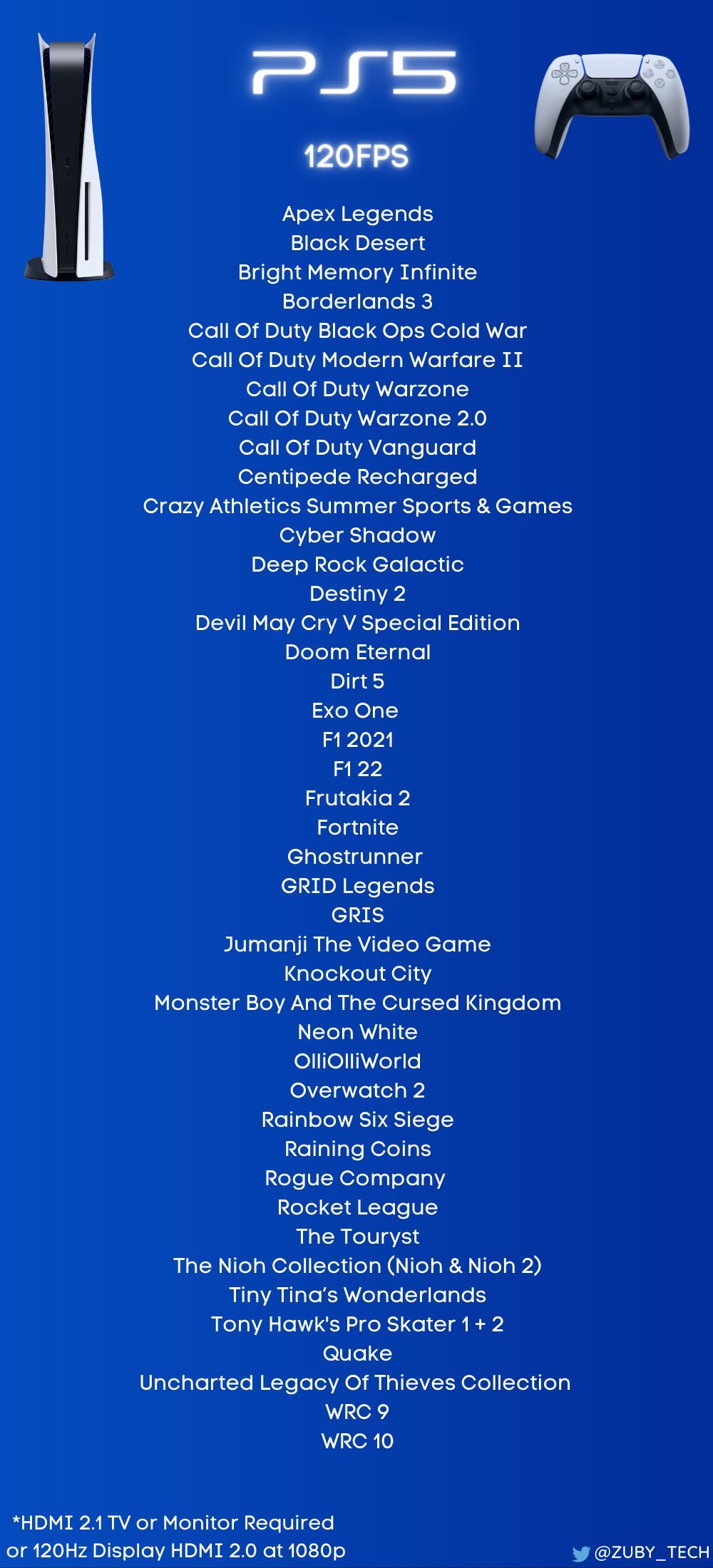
Many popular titles like Call of Duty: Black Ops Cold War, Destiny 2, and Rainbow Six Siege support 120hz on PS5.
The quest for smoother gameplay is real. Many PlayStation 5 owners wonder, what games support 120hz on PS5? It’s a fair question as the higher refresh rate can significantly improve the visual experience.
Achieving 120hz output requires both a compatible game and a TV or monitor with HDMI 2.1 support. Many competitive titles are now making the most of the console’s capabilities. You will experience very responsive actions in those mentioned 120hz games.

What Games Support 120Hz on PS5?
The PlayStation 5 is a powerful gaming machine, and one of its coolest features is the ability to play games at a super smooth 120 frames per second (fps). But, not all games can do this. 120Hz, also called 120fps, means the game updates the screen 120 times each second. This makes movement look incredibly fluid and responsive, which is awesome for fast-paced action games. So, if you’re wondering which games let you experience this smooth gaming magic, you’ve come to the right place! This article will guide you through the games that take full advantage of the PS5’s 120Hz capability.
Understanding 120Hz and Why It Matters
Before we dive into the game list, let’s talk about why 120Hz is such a big deal. Think about watching a movie at 24 frames per second; it looks pretty good. Now imagine seeing a scene with 120 frames per second. The movement looks much smoother and sharper, right? It’s the same thing with video games. When a game runs at 120fps, it feels much more responsive. You can react quicker, making your gaming experience more enjoyable and competitive. Especially in fast-paced games, 120Hz provides a crucial advantage. It allows you to see more details during action sequences and react with greater precision. This can be the difference between winning and losing.
Requirements for 120Hz Gaming
Before getting excited about playing games at 120Hz on your PS5, there are a few things you need. First and foremost, you must have a display that supports a 120Hz refresh rate. This means your TV or monitor needs to have a screen that can show 120 new images each second. Most modern TVs and gaming monitors have 120Hz capabilities, but it’s best to check your specific model’s specifications. You’ll also need a high-quality HDMI cable, specifically HDMI 2.1. This cable carries the larger amount of data required to support the faster refresh rate and high resolutions often associated with 120Hz gaming. It is important to ensure that your display setting is enabled for 120Hz output. You should also go through your PS5 settings to enable the performance mode and ensure 120Hz output setting are enabled to get the proper game performance.
Popular Games with 120Hz Support on PS5
Let’s get to the fun part – the games that support 120Hz on the PlayStation 5. This is where you get to see the magic of smooth gameplay in action! Here, we’ll categorize games by genre, so you can quickly find something that appeals to your gaming preferences.
First-Person Shooters (FPS)
Fast-paced shooters are where the benefits of 120Hz really shine. The enhanced responsiveness and smoother visuals can make a significant difference in your performance.
- Call of Duty: Black Ops Cold War: This game provides action-packed gameplay with 120fps in multiplayer mode. The smooth motion helps you track enemies better in those intense fights.
- Call of Duty: Vanguard: Similar to Cold War, Vanguard offers 120Hz support in its fast-paced, large-scale battles. It is designed for fluid action.
- Call of Duty: Modern Warfare II: The newest COD game, offering 120 fps in multiplayer mode.
- DOOM Eternal: Rip and tear through demons with silky smooth 120 fps action. This one really shines with high refresh rates.
- Destiny 2: This popular shooter offers 120fps in certain areas, bringing a new level of responsiveness to gunfights and exploration.
- Rainbow Six Siege: 120 fps allows better reaction time to what’s happening on-screen.
- Borderlands 3: Dive into the chaotic action of Borderlands 3 with smooth 120 fps.
- Overwatch 2: Enjoy improved clarity and smooth gameplay at 120 fps.
Racing Games
For racing games, 120Hz makes the cars feel faster and more responsive. The smoother animations also help you feel more in control of your vehicle.
- Gran Turismo 7: A classic racing sim that allows smooth 120 fps gameplay.
- Dirt 5: Feel the rush with smooth high frame-rate in this arcade style racer.
- WRC Generations: Experience the precision with this game, especially when racing on challenging terrains.
Sports Games
Sports games benefit a lot from 120Hz. Movements are smoother and more natural, making the game feel more realistic.
- Tony Hawk’s Pro Skater 1 + 2: This title features 120fps mode for very fluid skateboarding.
- NBA 2K series (select years): Many of the recent NBA 2K titles have a 120 fps mode, which allows for fast and fluid gameplay.
- FIFA series (select years): Recent FIFA titles have introduced 120 fps mode, adding a new layer of responsiveness to the virtual soccer field.
- MLB The Show series (select years): Like other sport sims, some MLB entries offer 120Hz support, enhancing gameplay clarity.
Other Action/Adventure Titles
Even beyond shooters and racers, a number of action and adventure games feature 120Hz modes to provide a smoother and more reactive gaming experience.
- Devil May Cry 5 Special Edition: This fast-paced action game really benefits from 120 fps.
- The Pathless: This beautifully designed game delivers smooth visuals with 120fps.
- Ghostrunner: Fast-paced action is even more fluid at 120fps.
- Nioh Collection: Both Nioh 1 and Nioh 2 are in this collection and offer 120fps, bringing precision to the demanding combat.
- Tiny Tina’s Wonderlands: This whimsical shooter allows a fluid experience at 120 fps.
- Resident Evil Village: Explore the village at a silky smooth 120fps.
- Ratchet & Clank: Rift Apart: This graphically impressive game looks even better with 120fps, though it’s not natively 120fps, it uses technologies to get the 120fps.
The Importance of Game Patches and Updates
It’s important to remember that game support for 120Hz can change. Some games might not have it at launch, but developers may add the feature through game patches and updates. Therefore, always keep your games updated. Game developers are constantly trying to improve their games and give players what they want. Keeping your games updated means you are getting the best experience. It’s a good idea to check patch notes for your favorite games. Many developers will mention if they have added 120fps in an update. Keep an eye on gaming news and forums for any updates or new games being added to the list. This helps you stay in the loop on any new titles that can provide this awesome performance.
Not All 120Hz is the Same: Dynamic Resolution Scaling
One thing to keep in mind is that some games may not run at a full 4K resolution when at 120Hz. They may instead use dynamic resolution scaling. Dynamic resolution scaling is a method where the game automatically adjusts the resolution in order to keep performance at a desired level. For example, if there’s a lot of action happening on screen, the resolution might drop a little to ensure that the frame rate remains at 120fps. This means that the game still looks great and runs smoothly, even if the image isn’t at the absolute sharpest resolution all the time. This balancing act is very common, and is often the only way to get stable performance at high frame rates. Many games do a good job of keeping this resolution change hard to notice.
Checking your Game Settings
Even if a game supports 120Hz, you may need to change your game settings to turn it on. Often, this is in the graphics or video settings within the game’s options. Make sure you look there if you don’t notice the game running at 120Hz right away. The settings may have several choices such as performance mode or fidelity mode. Performance mode is usually the option that targets higher frame rates such as 120Hz or 60Hz, where as fidelity mode targets better image quality, usually at 30fps. You should also ensure that your PS5’s output setting is configured for 120Hz output. It could be that your PS5 is defaulting to a 60Hz output or your display does not have the setting enabled for 120Hz. So, you need to confirm all the relevant settings.
The Future of 120Hz Gaming
As game development and console technology progress, we will likely see more and more games offering 120Hz support in the future. This is because people now have displays that can support higher frame rates. As more gamers get used to the smoothness of 120Hz, it will become expected of future game titles to give players that option. Game developers will continue to work on ways to get that silky smooth performance in their games. So, it’s a great time to be a gamer with all these advancements.
In conclusion, playing games at 120Hz on the PS5 provides a much more enjoyable gaming experience. The improved responsiveness and fluidity that this feature offers can be the difference between victory and defeat in many games. With an ever-growing list of titles that support 120Hz gaming, now is an excellent time to explore these options. Keep an eye on your game updates to see what improvements are coming, and always make sure your settings are correct so that you get the best possible performance. Now, go enjoy some super smooth gaming!
PlayStation vs 4K 120HZ
Final Thoughts
Many PS5 games offer a smoother gaming experience with 120Hz support. These titles often provide faster response times and reduced input lag.
Games like Call of Duty: Black Ops Cold War and Devil May Cry 5 Special Edition are some options. Other games with this feature include Rainbow Six Siege and Borderlands 3.
So, when considering what games support 120hz on ps5, remember this list offers a good start to enjoying higher refresh rates.

