
Playing a Steam game offline allows you to access and play single-player content, provided the game is fully installed and doesn’t require online verification. However, you won’t have access to multiplayer features, cloud saves, or game updates.
Ever wondered what happens if i play a steam game offline? It’s a common question for gamers, especially when internet access is spotty. You can still enjoy your favorite single-player adventures even when your connection is down.
However, playing offline does have its limitations. You need to keep in mind that multiplayer elements are inaccessible without an internet connection. Also, your saved progress won’t sync to the cloud till you connect to internet again.

What Happens If I Play a Steam Game Offline?
So, you’re ready to dive into your favorite Steam game, but the internet is down. No worries! Steam has an offline mode for just this situation. But what exactly does that mean for your gaming experience? Let’s explore what happens when you play a Steam game offline. It’s not always a simple ‘play as usual’ situation, and there are some important things to know about your library when the internet is out.
Starting Steam in Offline Mode
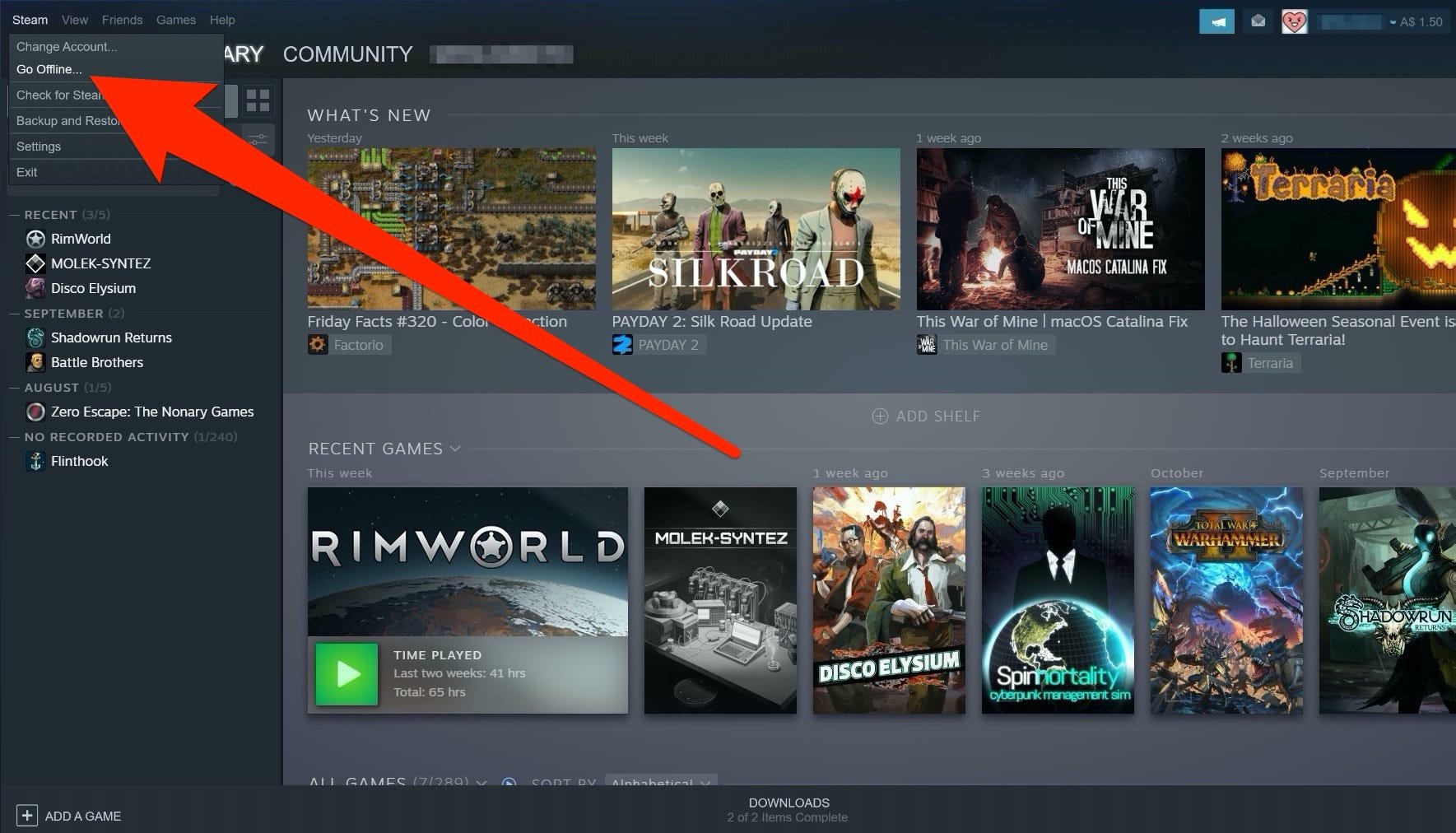
Before you can play games without a connection, you need to set Steam to offline mode. It’s a pretty easy process. First, make sure you’re already logged into Steam while you still have internet access. This step is very important, you cannot go to offline mode if you are not logged in. You have to log in at least once with an active connection. Then, go to the ‘Steam’ menu at the top left of your Steam window and choose “Go Offline…”. Steam will then start preparing for offline mode. It will verify game licenses and ensure it has the information it needs to let you play without the internet. You can also start Steam without internet, when you start Steam, it will ask you to go to offline mode.
Important tip: Make sure you’ve launched all the games you think you might want to play offline at least once before going offline. This way, Steam makes sure it has all the necessary license information for the game. Think of it like a quick check-in before your journey.
Playing Single-Player Games Offline
The good news is that most single-player games from your Steam library should work perfectly fine offline. You can continue your adventures, level up your characters, and build those fantastical worlds without needing any internet. The core game experience of single-player title, will remain the same, you can play all the levels, complete all the missions, and advance the game, as usual. The game will not hamper your progress, and allow you to play in your convenient timings without requiring any internet.
Saving Your Progress
When you are playing single-player games offline, your progress is saved locally to your computer. These save files remain on your hard drive. When you go back online, Steam will sync your saved games to Steam Cloud, it is done automatically. You don’t have to do anything manually. So, when you play on a different computer or if something happens to your computer, your game progress remains safely stored. It ensures that you can continue your games from where you left off.
Limitations with Multiplayer Games
Playing offline with multiplayer games is where things get a bit trickier. If a game is designed primarily to be played online with other people, you won’t be able to enjoy the multiplayer features offline. So, if you are playing a team based game, where you have a team of five players, you cannot play this kind of game offline, because this kind of games requires a stable internet to communicate the data between the players.
Can I Still Play Locally With Friends Offline?
If a game supports local multiplayer or splitscreen on the same computer or with a local network, you might still be able to play with friends, even offline. It is entirely dependent on the game, many games which have local multiplayer support, allows you to play with friends who are with you without any internet. If a game supports local area network or LAN, then you can still play games with your friends on same network without any internet, this feature is also dependent on the game support.
Updates and DLC
One crucial thing to remember about playing games in offline mode is that you cannot download any new updates, patches or any DLC for your games. If you are playing offline, and the developer releases a new update or a new content for your game, you will not receive the update, until you connect to internet. Games often receive updates to fix bugs, add content, or make improvements to the game play. When playing in offline mode, you will miss out on these updates. You will also miss out on DLCs, if you haven’t downloaded the DLC content, you cannot access the new levels or new content that the DLC provided.
How to Get Updates After Playing Offline
When you are done with your offline gaming and connect your device to the internet, you should see an automatic download for the updates of the games you played. You might have to restart the Steam app for the updates to start downloading. This process can vary slightly depending on the game and updates available.
Steam Cloud and Offline Mode
Steam Cloud is a very useful service by Steam, it keeps your saved games, game settings, and other game information in a remote storage. However, when you are in offline mode, cloud synchronization is not available. But don’t worry, it will not lose your progress, when you start your Steam client with internet connection, then all the cloud saves will be synchronized automatically. However, if you have played games on another computer and want to access your save from the previous computer, you have to connect your Steam to internet.
What Happens if I play on multiple computers?
If you play games on different computers, then it becomes crucial to go online, to make sure the saves are synced properly. Suppose, you are playing one game on two different computers, both in offline mode. After some time, you go online on one computer. If the game supports Steam cloud, then the current saves will be uploaded. However, the saves you made in other computer will not be available. So, it is advised to go online to sync and then play the game in offline mode. This will prevent data loss, and your game progress will remain safe.
What About Games with Online-Only Requirements?
Some games are specifically designed to require an active internet connection to play, even in single-player mode. These games might have online features that are essential to their core functionality. Unfortunately, you won’t be able to play these games offline. This type of game relies heavily on server access for various reasons, including saving user data, or doing verification checks.
How to Identify These Games
Usually, the game page on the Steam store will clearly state if a constant internet connection is required. You can also often see it in the system requirements. If you’re not sure, checking online reviews or the game’s forum can give you that piece of information. Before playing your game in offline mode, make sure that it can be played offline.
Steam Workshop and Offline Play
Steam Workshop is a popular platform, where players can share their own customized content or mods for the games. When you subscribe to a mod for a game, then it automatically downloads the content. These custom content can be new character skins, additional levels or it can be some tweaks. But when you are in offline mode, you can not download any custom content from the workshop. So, if you want to download any workshop content, you must have an active internet connection, and then subscribe to it.
Can I use already subscribed items offline?
Yes, you can definitely use the custom content that you have already downloaded from the workshop before going offline. If you have downloaded a new skin or have downloaded a new map for your game, then you can play it while in offline mode. But if you want to download some new custom content, then you must have internet connectivity.
Steam Achievements in Offline Mode
Many gamers love to collect achievements, which are like in-game challenges and rewards. When playing offline, your progress towards unlocking achievements will be tracked, and the progress is saved locally. But the achievements won’t be officially unlocked, until you go back online. After going online, Steam will synchronize the achievements with the server. This way you won’t miss out on unlocking any achievements.
Why it is done this way?
This system is designed to prevent any sort of cheating, or any type of false achievement unlocks. By syncing achievements when online, the system ensures that your progress is accurate and valid.
Purchasing Games in Offline Mode
You cannot buy new games or DLC while offline. This requires a connection to the Steam store to process payments and to link the game to your account. If you try to add games to your shopping cart while offline, it simply will not work. You will need internet connectivity to purchase any games from the Steam store.
Verifying Game Licenses Offline
Steam has to make sure that the copy of the game is legal and authorized for use. When you start a game while connected to the internet, Steam verifies the license automatically. When you start a game offline, then Steam uses the information it had saved locally, when you were online. This is why it’s important to log in with internet and launch your game atleast once before playing offline. This ensures Steam knows you own the game, so it can authorize you to play it.
Important Points to Consider
- Plan Ahead: Make sure to connect to the internet before going offline. This makes sure you get updates, and you can start your games once.
- Single Player Focus: Offline mode is best suited for playing single player titles.
- Cloud Saves: Always make sure you sync your games to Steam cloud, before going offline.
- Verify system requirements: When you purchase a game, check the system requirements carefully. Some games might have online only requirements.
Playing Steam games in offline mode can be a great way to enjoy your games when you don’t have internet access. Remember that while most single-player games will work, online multiplayer games will not. Be mindful of updates, save syncing, and license verification before unplugging from the web. By preparing properly and understanding the limitations, you can keep gaming no matter what.
Play Steam Games Offline With No Internet
Final Thoughts
Playing offline, you access already installed games. Achievements usually sync when you go back online. Some titles may limit offline features, like multiplayer.
What happens if i play a steam game offline? You can play most single-player titles. However, multiplayer, must be online. Certain functionalities might require a connection.

