
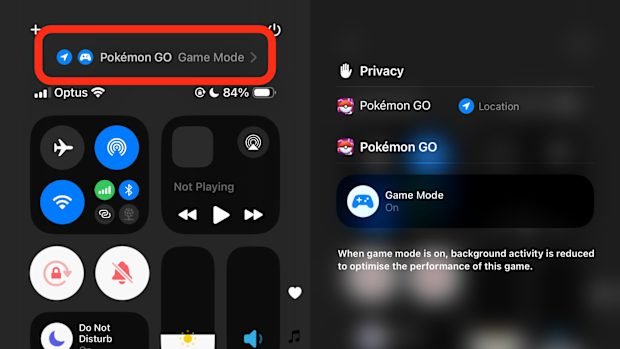
Game mode is a setting on devices that optimizes performance for gaming, often by prioritizing system resources for the game and reducing background activity.
Ever wondered why your favorite game seems to run smoother sometimes? It’s likely due to something called “game mode”. This special feature found on many devices changes how your system operates. It dedicates more processing power to your game while minimizing interruptions. What is game mode actually doing behind the scenes? Let’s dive deeper to learn exactly how it enhances your gaming experience.

What is Game Mode?
Have you ever been playing your favorite video game and noticed that it feels a little sluggish, or that your computer is making strange noises? It might be because your computer or console isn’t quite ready to give the game all the attention it needs. That’s where “game mode” comes in! Think of game mode as a special setting that tells your device, “Hey! I’m playing a game right now, so please give it your best effort.” It’s like putting on your running shoes before a race, or getting ready for a big test. Game mode helps your device focus on making your games run smoothly, look great, and respond quickly.
How Game Mode Works
So, how exactly does this magic happen? Game mode isn’t just one single switch; it’s a combination of things working together behind the scenes. It’s like having a team of helpers dedicated to making your gaming experience the best it can be. Here’s a closer look at some of the key things game mode does:
Prioritizing Resources
Imagine your device has a bunch of different tasks to do all at once, like checking email, downloading updates, and running that exciting game you want to play. When game mode is activated, your device says, “Okay, the game is the most important thing right now!” It then makes sure that the game gets the most access to the device’s resources, like processing power and memory. This means your game gets to run more quickly and efficiently, without other programs slowing it down. It’s like when your mom tells everyone to be quiet because you’re trying to concentrate. Here’s how resources are prioritized:
- CPU (Central Processing Unit): The CPU is like the brain of your computer. Game mode gives the game more of the CPU’s processing power, so it can handle complex actions and calculations needed in the game without lagging.
- GPU (Graphics Processing Unit): The GPU is responsible for creating all the visuals you see on screen. Game mode ensures the GPU has the power it needs to render high-quality graphics and animations without stuttering.
- RAM (Random Access Memory): RAM is like a workspace where your device keeps information it needs quickly. Game mode makes sure the game has enough RAM to store everything it needs, which also helps in reducing slowdowns.
Background Process Management
Your device is always doing things even when you’re not using it. It might be downloading updates, syncing with the cloud, or running other apps you don’t even see. These background processes can sometimes take away power from your game. Game mode works hard to put these background activities on hold or make them use fewer resources. This frees up your device to focus on giving you the best gaming experience. It’s like telling everyone else in the house to wait until you are finished with your game.
Reducing Input Lag
Input lag is that annoying delay between when you press a button on your controller or keyboard and when you see it happen on the screen. Game mode focuses on minimizing this delay. It helps ensure that the commands you give to the game happen as quickly as possible. For games, especially action games, every tiny delay can make a big difference. By decreasing input lag, game mode gives players better control and makes game play more responsive. It’s like making sure your toys respond when you want them to. Imagine trying to steer a car where the steering wheel is moving slowly – game mode makes the steering wheel (your controller) immediately turn the car in the game.
Optimizing Network Performance
If you play online games, having a good internet connection is very important. Game mode can sometimes help give your game priority on your network. This means that your gaming data gets sent and received more quickly, reducing lag and making sure you have a smooth online experience. It’s like having the fastest lane on the highway for your game data. This is particularly important for games where you interact with other players in real time. For multiplayer games, a stable and quick network connection is crucial, and game mode helps make this happen.
Where Can You Find Game Mode?
Game mode is not always exactly in the same place, or work the same, on every device. But you can usually find game mode on these platforms:
Windows PC
On Windows computers, game mode is a feature that has been built directly into the operating system. Here’s how to access it:
- Click on the Start Menu.
- Go to “Settings”.
- Click on “Gaming”.
- You will see “Game Mode” on the left side. Click on it.
- You can turn Game Mode “On” or “Off”.
Windows will usually try to figure out when you’re playing a game and turn game mode on automatically, but you can also manually turn it on or off. Windows game mode also has a bunch of other features, like game bar, allowing you to capture and share your game play.
Game Consoles (PlayStation, Xbox, Nintendo)
Most of the newer game consoles have game mode as part of their system settings. The name may be a little different depending on the console:
- PlayStation: Usually the console automatically activates some form of game-mode setting when you start up a game. You can sometimes tweak a few things in the settings if you have a compatible TV or display that also has game mode.
- Xbox: Like the PlayStation, Xbox consoles tend to handle gaming priority automatically. If you have an external monitor or television, you may see the option to turn on game mode on your screen.
- Nintendo Switch: The Switch focuses on game play and it does not have an explicit “game mode” button. However, when you’re in handheld mode the processing power is more focused on the game. Also, using dock mode gives the console more power for games. So while there isn’t an exact “game mode” button, the Switch is already kind of designed to focus on games when they are played.
Consoles are specifically designed for gaming, so game mode is usually already part of the design. You don’t often have to activate anything special. They usually run at their best when games are running.
Smartphones and Tablets
Many smartphones and tablets also include some kind of game mode. Where to find this feature may differ depending on the brand and operating system:
- Android: On Android devices, game mode is often found in the system settings or in a separate app that comes with the phone (like “Game Launcher” or “Game Space”). You can usually find this app in your app drawer or in the settings, under “Game” or something similar. Some of these systems even allow you to personalize settings for different games and prioritize network usage.
- iOS (iPhone/iPad): Apple devices will often automatically optimize game performance and do not have a specific game mode toggle button. However, you can use “Low Power Mode” to save battery. You can manage notifications, focus modes, and do not disturb to stay immersed in your games.
Smart TVs and Monitors
Many modern TVs and monitors designed for gaming have a game mode option. This setting is typically located in the picture settings menu. When you enable game mode on your screen, it decreases processing and display lags.
- Reduced Input Lag: Gaming TVs and monitors often have high input lag when they are not in game mode. Game mode makes the screen respond faster to the commands from your controller.
- Image Processing: TVs do many kinds of image processing to make things look pretty. When game mode is on, many of these things are shut off to make the screen respond faster. You are getting less processing, but you get faster action.
Why Use Game Mode?
Game mode can make a real difference to how enjoyable games are to play. Here are some good reasons to use it:
Improved Performance
Game mode helps games to run more smoothly and quickly. Games should have fewer stutters or slowdowns if you turn on game mode. This leads to a much more enjoyable gaming experience. Especially for games with high graphics or fast action, game mode is really helpful.
Better Responsiveness
With less input lag, you will notice that your commands will be quickly translated into in-game action. This is very important for games where your quick decisions really matter. It can be the difference between winning and losing. Game mode reduces that gap between pressing a button and what happens in the game, giving you better control.
More Immersive Experience
When games run smoothly and respond quickly, it’s easier to get lost in the game. You don’t have to worry about delays or slowdowns. This makes the game feel more real and lets you focus on the action and the story. Game mode can help you become fully engaged in the game without distractions. It allows you to dive into new game worlds and enjoy everything the game offers.
Reduced Distractions
By putting background programs on hold, game mode helps minimize distractions while playing your games. It helps stop all of the random pop up notifications, updates, and other distractions from interfering with your focus. It’s like having a quiet, private room just for gaming.
Conserving Battery
On some devices, especially phones and laptops, game mode can help to manage the battery more efficiently. It does this by making sure the device is not wasting energy on unnecessary background operations when you play games. This gives you longer gaming sessions before you need to recharge your device.
When is Game Mode Not Needed?
While game mode is a useful feature, it is not always necessary. Sometimes, your device will already be performing at its best without turning it on. Here are some times when game mode might not make a huge difference:
Light or Simple Games
If you’re playing a simple game that doesn’t need a lot of processing power, game mode might not change things too much. Games with basic graphics and simple mechanics will probably run well even without the help of game mode. For puzzles, card games, or older simple games, you might not notice much difference.
Powerful Devices
If you have a very new and high-powered computer or phone, it may already handle games very well. In those cases, the benefits of game mode may not be so obvious. These powerful devices can handle gaming without much extra help, and game mode might not offer a noticeable boost. However, it might still help with input lag and battery on some devices.
When You Need Other Background Tasks
Game mode turns off a lot of background tasks to help gaming. If you have other apps that you need to use while gaming, you might not want to turn on game mode. Game mode might interfere with streaming, music playback, or other things running in the background if they are not set as exceptions.
Tips for Using Game Mode Effectively
Here are a few tips to help you make the most of game mode:
- Update your software: Make sure your device and your game are updated to the most recent versions. Software updates often include changes to make game mode work better.
- Close unnecessary apps: Even with game mode, it is always a good idea to close apps you aren’t using. This frees up even more resources for the game.
- Test: Try turning game mode on and off when you play games. Some systems work differently than others. Find what works best for your specific games and devices.
- Adjust settings: Many game modes allow you to change different settings, such as disabling notifications or adjusting other system features. This lets you personalize settings to suit your preferences.
Game mode helps a lot in getting the best out of your games. It is worth trying and getting to know if it helps you improve your gaming experience.
Game mode is an excellent tool for gamers of all types. By understanding how it works and knowing how to use it, you can make sure that your gaming experience is smooth, responsive, and incredibly fun. So, the next time you fire up a new game, remember to give game mode a try and see what a difference it can make!
What is Game Mode in iOS 18? 🎮 🕹️ 👾
Final Thoughts
Game mode optimizes your device for gaming. It prioritizes processing power for better performance and reduced lag. This results in a smoother, more responsive gaming experience.
Essentially, ‘what is game mode’ is a feature designed to improve gaming by adjusting system settings. It manages background processes to dedicate resources to your game. This focus delivers higher frame rates and decreased input delay.

