
Game sharing is the act of letting someone else access and play games from your digital library, typically on a different device or account, while abiding by platform specific rules and limitations.
Ever wondered if you could let your friend play that amazing game you just finished? Many platforms now offer ways to do just that. This brings us to the question, what is game sharing exactly?
It essentially allows you to provide access to your purchased games with someone else. This is very handy for trying new titles or playing together without requiring a separate purchase of the same game.

What is Game Sharing?
Ever wanted to play a cool new game but didn’t want to buy it yourself? Or maybe you have a bunch of games your friends would love to try? That’s where game sharing comes in! It’s like sharing your toys, but with video games. Instead of letting your friend borrow the physical game disc, you’re sharing a digital copy. But how does it actually work? Let’s dive in and explore the exciting world of game sharing!
The Basics of Digital Game Sharing
At its heart, digital game sharing is about granting access to your purchased digital games to another person. This usually happens within a specific gaming ecosystem, like on a PlayStation, Xbox, Nintendo, or PC gaming platform. Instead of sharing the physical disc or cartridge, you’re sharing the rights to play the game. Think of it as lending a library book. You own the book (or game), but someone else gets to borrow it and enjoy it for a bit. It’s important to understand that different platforms have different rules and restrictions when it comes to game sharing. Some might call it ‘family sharing’ or ‘home console’ sharing, but the core idea remains the same.
How Game Sharing Actually Works
The process of game sharing might seem complicated, but it’s actually pretty straightforward once you understand the basics. Generally, you’ll need to:
- Designate a Primary Console/Device: Most platforms require you to select a primary console or device. This is the main device associated with your account where all your games and digital content are stored and can be accessed.
- Log in on the Secondary Device: The person you want to share games with will log in with your account details on their console or device. Yes, this means they will have temporary access to your account, so be sure it’s someone you trust!
- Activate Game Sharing: On the secondary device, there’s often a setting you need to switch on to activate game sharing. This allows the secondary device to “see” and play the games available on the primary device.
- Simultaneous Play Restrictions: It’s important to note that you usually can’t play the same game simultaneously on both the primary and secondary device, even on the same account. This is a key limitation of game sharing and prevents one account from being used to allow multiple individuals to play the game at the same time.
The Primary and Secondary Device
The concept of a primary and secondary device is central to understanding how game sharing works. The primary device is usually the console or PC you typically use to play your games. The secondary device is the one where you want to share your games with. Remember, the secondary console is relying on the primary console as the source of access to those games. Once set up, the secondary console can access a large library of games without buying them again.
Benefits of Game Sharing
Game sharing comes with some great advantages that can enhance your gaming experience. Let’s look at some of them:
- Cost Savings: Perhaps the biggest benefit is the potential for saving money. Instead of buying every game individually, you and your friend can split the cost of a game and share it. This can significantly reduce your gaming expenses, allowing you to play more games without breaking the bank.
- Trying Before Buying: Game sharing is a great way to test a game before committing to purchasing it. If your friend owns a game you’re curious about, you can try it out before making your decision. This prevents the disappointment of buying a game you don’t enjoy.
- Expanding your Game Library: With game sharing, you and your friend’s game library can become even more expansive than ever before. You both can buy different games and share them with each other, which means that you can experience a wider variety of games without excessive purchasing.
- Playing Games Together: Game sharing is also great for playing games with a friend. If you and a friend both have an account on the same console, you can share games. While you may not be able to play the same game at the same time (more on that later), you and a friend can enjoy each other’s game libraries.
Limitations of Game Sharing
While game sharing offers many benefits, it’s important to be aware of its limitations and drawbacks:
- Simultaneous Play Restrictions: As mentioned, most platforms don’t allow you and your sharing partner to play the same game simultaneously using a single shared account. This is designed to prevent abuse of the sharing system. If you both want to play at the same time, you’ll typically both need to own a copy of that game, unless you are playing a game that doesn’t require the game account.
- Account Sharing Risks: Sharing your account details with another person requires trust. If that person misuses your account, it could lead to consequences, such as penalties or even a permanent ban of your account.
- Platform Dependency: Game sharing only works within the same platform. You can’t share games across different ecosystems, such as between a PlayStation and an Xbox or a PC, unless they have a cross-platform sharing mechanism (which is not very common).
- Internet Connection Requirements: Game sharing usually relies on the internet, both to authenticate the game license and to download the game to the secondary console. This means that you must have a stable internet connection to access shared games.
- Limited Sharing Partners: Most platforms limit the number of devices or accounts you can share your games with. This is to prevent you from sharing your game library with a large group of people, which goes against the spirit of game sharing.
Understanding Account Security
When engaging in game sharing, particularly when sharing account details, the safety of your account is extremely vital. It is essential to understand the risks and take steps to protect your account. Only share account information with trusted individuals, such as close family members or very good friends. Always change your password after you’re done sharing to ensure no one has unauthorized access to your account.
Game Sharing Across Different Platforms
Each gaming platform has its own approach to game sharing, so it’s important to understand the specifics for each one. Let’s take a look at some of the popular platforms:
PlayStation Game Sharing
On PlayStation, game sharing is generally done through the “Console Sharing and Offline Play” setting. To share games, you need to designate your primary PlayStation console. Then you can log into another PlayStation console with your account and allow that console to access your games by switching on this setting. However, only one console can be a primary console at a time. The primary console can play games from the account that purchased them, while the secondary console can also play those games, but not while the primary console is being used for the same game. Remember, if you have “Console Sharing and Offline Play” enabled on a secondary console, you can also play your games offline, but only on that secondary console.
Some specific important details for PlayStation game sharing:
- Designated Primary Console: You must activate a console as your primary PS4 or PS5 in order to share games.
- One at a Time Use: You and the person you share with can’t play the same game simultaneously.
- Offline Play: If your secondary account is using your shared game, they can play offline if they are logged into your account. However, it can be complicated to manage if your friend uses your account a lot and you log in on your primary device without having them log out.
Xbox Game Sharing
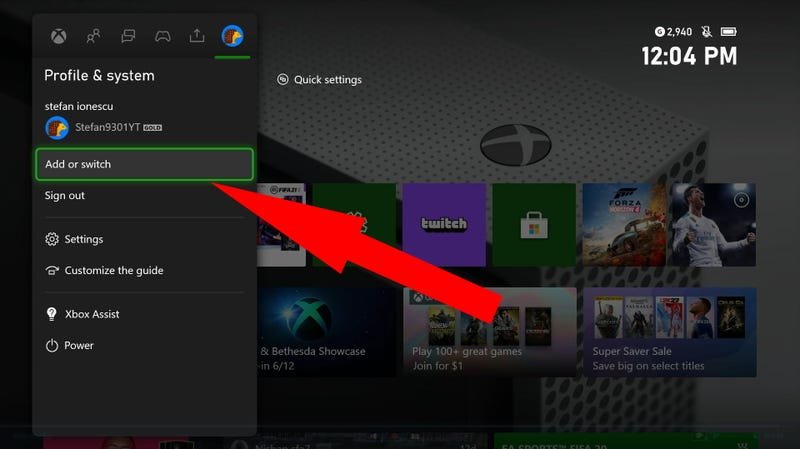
Xbox game sharing utilizes a similar concept, referred to as “Home Xbox.” You need to make a specific console your home console. This is where your purchased games will be accessible. Then, another console can access those games by being logged into the account that has the games, much like in PlayStation’s method. Any game on the home Xbox is accessible to anyone using the system, even without signing in to the account of the person that owns the games, as long as they are playing on the home console that they are designated to. Similar to PlayStation, if the games are being used on a secondary console, they cannot be used on the primary console simultaneously.
Some important things to remember for Xbox game sharing:
- Home Xbox Designation: Select one console as your “Home Xbox” to share your games.
- Shared Game Library: Anyone using your Home Xbox can access your digital games, even if your account is not signed in.
- Simultaneous Play Limits: Similar to PlayStation, the main account and any secondary account cannot play the same game at the same time.
Nintendo Switch Game Sharing
Nintendo Switch game sharing is a bit different and arguably more limited than PlayStation or Xbox game sharing. You can register your account on multiple consoles, but digital games are primarily linked to the account, not the console. The “primary” Nintendo Switch console can play your digital games offline without the need to be connected to the internet. However, any secondary Nintendo Switch consoles will require an active internet connection to verify the license of the game on your account. You can’t play on the primary console when the same game is already being played on the secondary console.
Some important facts about Nintendo Switch game sharing:
- Primary Switch Console: One console can be designated as the primary console that can play games offline.
- Secondary Console Requirements: Secondary consoles need an internet connection to verify the game licenses.
- Simultaneous Play: Similar to the others, simultaneous play of the same game on a single shared account is not allowed.
PC Game Sharing
PC game sharing is done differently across different digital storefronts. Steam, for example, has a family sharing feature. This feature enables you to authorize specific computers to access your Steam library. Like other consoles, however, you can’t play the same game simultaneously on two different computers at the same time with the same account. Each store like the Epic Store, or GOG has different features. Some don’t have game sharing at all! Make sure to check the terms of service for your specific game store to fully understand what is and is not allowed.
Here are a few things to know about PC game sharing:
- Family Sharing Features: Stores like Steam have a feature to share your library with select accounts.
- Device Authorization: You will need to approve which computers can access your games
- Simultaneous Play Restrictions: Similar to the consoles, you cannot play the same game at the same time as another account that is using your library on a different PC.
Ethical Game Sharing
It’s important to engage in game sharing responsibly and ethically. Don’t try to exploit the system by sharing games with lots of people, as most platforms limit the amount of devices you can share your account with. Understand the rules of the game sharing service, as well as the terms of service, before sharing with friends. Game developers and publishers rely on people purchasing games. Using game sharing fairly means that you are not losing potential sales for game developers. Try to share games with a few close friends or family members, not with a large group of strangers or acquaintances, and do your best to purchase the games you really enjoy so that the developers get supported!
Troubleshooting Common Game Sharing Issues
Sometimes, game sharing might not work as smoothly as you would like. Here are a few common issues and how to troubleshoot them:
- Game Locks: If the game is locked, make sure the sharing settings are correctly configured on both primary and secondary consoles, and that you have an active internet connection.
- Account Login Issues: If you’re having trouble logging into the shared account, double-check your username and password. Also make sure to have two factor authentication on any account being shared.
- Internet Problems: Make sure you have a good internet connection, as this is vital to game sharing.
- Updates: Be sure both consoles are up to date on software updates.
Looking Ahead: The Future of Game Sharing
Game sharing is always evolving as technologies and gaming platforms become more sophisticated. As digital games become more and more prevalent, developers may need to change the way we share games in the future. It’s exciting to imagine what changes we might see in the way we share our games in the years to come, as game ownership might change drastically in the coming years!
In conclusion, game sharing is a fantastic way to enjoy a larger collection of games without always having to buy them all yourself. It can bring significant cost savings, allow you to test out games before purchasing, and enable playing games with friends more easily. However, it’s essential to be mindful of its limitations and handle account sharing responsibly. As long as you follow the guidelines and share games ethically, game sharing is a beneficial tool in modern gaming!
How to GameShare on PS5 – OverSimplified (2024)
Final Thoughts
Game sharing allows players to access and play games from another person’s library. This feature enables friends or family members to enjoy titles without purchasing separate copies. Essentially, they share digital game ownership across accounts.
‘What is game sharing’ then? It is a method for sharing access to purchased games. Some platforms restrict sharing, while others offer it freely. This sharing feature can be a cost-effective and fun option.

