
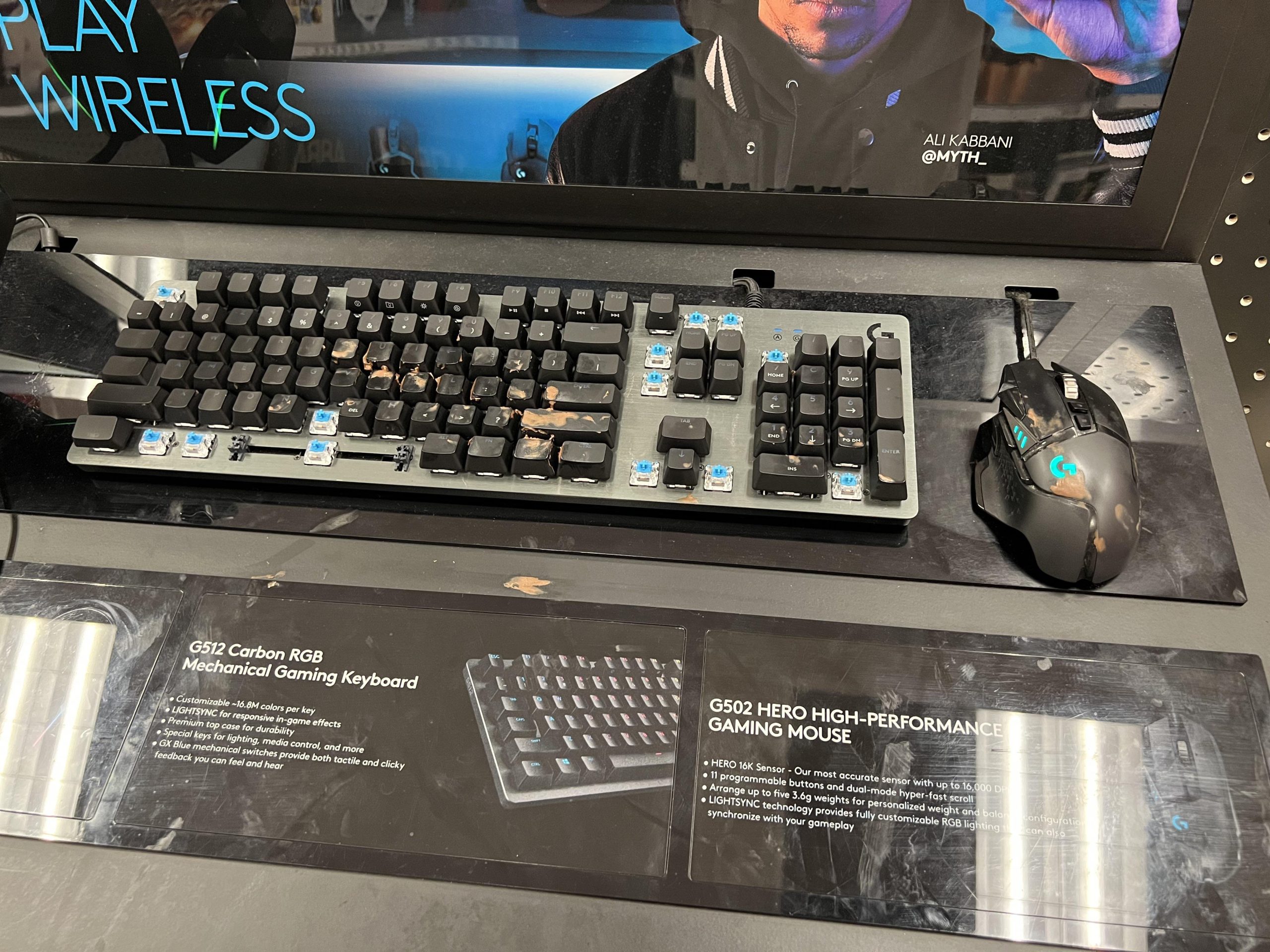
Gamer gunk is the buildup of dirt, sweat, oils, and dead skin cells on gaming equipment from frequent use.
Have you ever noticed that sticky, grimy feeling on your controller after a long gaming session? That, my friend, is likely gamer gunk. It’s not a fancy term for some mysterious substance; it is just the result of prolonged contact between your hands and your gear.
This accumulation can affect your gameplay. What is gamer gunk exactly? It’s a mix of things that can lead to controllers and other devices becoming less responsive, and overall quite gross.

What is Gamer Gunk?
Okay, let’s talk about something that might be a little gross, but it’s something every gamer experiences: gamer gunk. You might not have heard that specific name before, but you’ve definitely seen it, felt it, and probably even smelled it. Gamer gunk isn’t one specific thing, it’s actually a combination of stuff that builds up on and around your gaming setup over time. It’s like a collection of gaming byproducts, if you will. We are going to dive deep into what makes up this gunk, where you’ll find it, and how you can deal with it.
The Many Forms of Gamer Gunk
Gamer gunk isn’t a single entity, it’s more like a team of grossness. It comes in different forms, each with its own unique ick factor. Here’s a breakdown of the usual suspects:
Skin Oil and Sweat
Our skin constantly produces oil, which helps keep it moist and protected. When you’re intensely gaming, especially during those nail-biting matches, you probably start to sweat. This mixture of skin oil and sweat can transfer onto your controllers, keyboard, mouse, and even your headset. Over time, this creates a sticky, sometimes shiny, layer of gunk. The build-up can make your controllers feel slippery and your keyboard keys feel slick instead of clicky. Think of it like the grime you see on a doorknob after a lot of people have touched it, but specifically customized for gaming gear. This kind of gunk is made worse if you’re eating while you’re gaming too.
Food Crumbs and Spills
Let’s be honest, who hasn’t snacked while gaming? Whether it’s chips, cookies, or a full meal, crumbs are bound to find their way into your setup. Tiny crumbs get stuck in keyboard crevices, under the buttons on your controllers, and even on your desk surface. Spilled drinks, whether it’s soda, juice, or even water, can create a sticky mess that attracts even more dust and debris. This combination of food crumbs and dried spills is a major part of gamer gunk, contributing to its stickiness and attracting unwelcome bugs.
Dust and Hair
Dust particles are everywhere, and they love to settle on electronics. Couple that with hair from you and maybe your pets, and you have another layer of gamer gunk. The dust and hair get trapped in all the little spaces on your controllers, keyboards, consoles, and screens, creating a fuzzy mess that’s not only unsightly but can also impact how well your equipment works. Dust can clog vents on your gaming PC or console causing them to overheat or make noisy fans and it also affect the sensors on your mouse and controllers. If you are not keeping your things clean it can also create a great environment for dust mites to thrive.
Dead Skin Cells
We shed dead skin cells all day, every day. When you’re gaming, these tiny skin flakes can get all over your gear. These combine with sweat, oil, and dust, to make a nasty layer of gunk that is tough to remove. Even if you wash your hands regularly, it doesn’t eliminate dead skin cells. This part of the gunk might be something you don’t actively notice, but it contributes to the general yuckiness that builds up over time.
Germs and Bacteria
All these other components of gamer gunk provide the perfect environment for germs and bacteria to grow. When you combine sweat, food, dead skin, and dust, you create a breeding ground for microorganisms. This means your gamer gunk isn’t just gross, it’s unhygienic and it can cause skin issues. It’s crucial to clean your gear regularly not just to keep it looking nice, but also to keep yourself healthy and your things lasting longer.
Where Does Gamer Gunk Accumulate?
Gamer gunk isn’t picky about where it settles. It can appear anywhere your hands come into contact with your gaming equipment and in other places around your gaming station. Here are the most common places where you’ll find it:
Controllers
Controllers are prime real estate for gamer gunk because your hands are always on them. The buttons, joysticks, and grips are all areas where sweat, oil, and dead skin cells can build up. The crevices around the buttons are also notorious for catching food crumbs. Over time, your controllers can become sticky and grimy, making them less enjoyable to use and possibly causing issues with the functionality of the buttons and joysticks.
Keyboards
Keyboards, especially mechanical keyboards with their raised keys, are a magnet for gamer gunk. Food crumbs, dust, hair, and spills easily fall between the keys and underneath them. The surfaces of the keycaps also collect sweat and oil, which can make them feel sticky and look shiny. A dirty keyboard can become a nightmare to type on, and may even affect performance. Dirty keyboards can also have keys that don’t register correctly or get stuck.
Mice
Like controllers, mice are constantly being touched, leading to a buildup of sweat and skin oil on their surfaces. Dust and hair can collect in the crevices and around the sensor. The bottom of the mouse can also collect grime from your desk surface and can negatively impact tracking. A dirty mouse feels unpleasant and can make your cursor move erratically.
Headsets
Headsets, especially those with fabric or leather earcups, can absorb sweat and oil from your head and hair. The headband can also collect dust and hair. Over time, the earcups can become smelly and uncomfortable, and the build-up of grime may lead to bacteria growth which will cause skin irritation. Nobody likes using a smelly headset.
Desk Surfaces
Your desk is where everything sits, so it’s not surprising that it’s also a hot spot for gamer gunk. Spilled drinks, crumbs, dust, and other debris can create a sticky and messy surface. A dirty desk can also harbor bacteria and attract pests. Maintaining a clean desk is important not only for hygiene but also for creating a pleasant gaming environment.
Console and PC Cases
Although you may not directly touch them as often as your controllers or mice, the surfaces of your gaming consoles and PC cases can still accumulate dust. The vents on these devices are particularly susceptible, as they can become clogged with dust and hair, leading to overheating and reduced performance. This gunk is often less visible than the grime on your peripherals, but it’s just as important to address.
Screens
While not part of the typical grime collection, your screen can collect dust, fingerprints, and splatters. While not gamer gunk in the strictest sense, a dirty monitor can impact your viewing experience. The fingerprints, dust, and smudges distract from gameplay and cause you to strain your eyes. That can then give you headaches and affect your sleep quality. It is important to keep your screen clean and clear.
Why is Gamer Gunk Bad?
Gamer gunk isn’t just visually unappealing; it also poses several practical and health-related issues:
Reduced Performance
The buildup of gunk can directly impact the performance of your equipment. Sticky buttons on controllers can become unresponsive, and dirty keyboard keys can stick or fail to register. Mouse sensors clogged with dust might not track accurately, leading to frustrating gameplay. Over time, this can make your gaming experience much less enjoyable and even affect your performance in games.
Hygiene Concerns
Gamer gunk is a breeding ground for germs and bacteria. When your hands are constantly in contact with these contaminated surfaces, you risk transferring these microbes to your face and other areas of your body. This could lead to breakouts, skin infections, or other health issues. Keeping your gear clean is important for maintaining good hygiene.
Equipment Damage
If left unaddressed, gamer gunk can cause long-term damage to your equipment. Sticky liquids can corrode electronic components, and dust buildup can lead to overheating. By cleaning your gear regularly, you will help to prevent damage, extending the lifespan of your expensive equipment and ensuring you don’t need to replace them sooner than necessary.
Unpleasant Experience
Let’s face it, gaming with sticky, grimy gear is just unpleasant. It makes the whole experience less enjoyable and can even affect your mental focus. Clean equipment and a clean space make gaming more relaxing and more fun. Having to worry about the state of your equipment is a distraction you don’t need.
How to Clean Gamer Gunk
Now that we know what gamer gunk is and why it’s bad, let’s talk about how to get rid of it. Here are some steps and tips for cleaning your gaming setup:
General Cleaning Supplies
Before you start cleaning, make sure you have the right supplies. Here is a list of some essential items:
- Microfiber cloths: These are great for wiping surfaces without scratching them.
- Isopropyl alcohol (70% or higher): This is ideal for disinfecting and cleaning electronics.
- Cotton swabs or Q-tips: These are useful for getting into small crevices and around buttons.
- Compressed air: This is great for blasting away dust from keyboards and other hard-to-reach areas.
- Dish soap: This can be used with warm water for cleaning some parts of the equipment.
- Small brush: A small brush, like a toothbrush, is useful for removing crumbs and other debris.
- Distilled water: Great for mixing with dish soap.
Cleaning Your Controllers
Here’s a step-by-step guide on how to clean your gaming controllers:
- Power off the controller and remove batteries.
- Use a dry microfiber cloth to wipe away loose dust and debris.
- Dampen a cotton swab with isopropyl alcohol and gently clean around the buttons, joysticks, and crevices.
- Use the same dampened cotton swab to clean all over the surface of the controller.
- Use a dry microfiber cloth to dry the controller and to wipe up any residual alcohol.
- Let the controller air dry completely before using again.
Cleaning Your Keyboard
Here’s how to clean your keyboard effectively:
- Turn off your computer or laptop, unplug the keyboard, and remove the batteries if it is a wireless keyboard.
- Turn the keyboard upside down and gently shake it or use compressed air to dislodge loose crumbs and dust.
- Use a small brush or compressed air to remove any remaining debris from between the keys.
- Dampen a microfiber cloth with isopropyl alcohol and wipe down the keycaps and keyboard surface.
- Use a damp (not wet) cotton swab to clean around and between the keys.
- Use a dry microfiber cloth to dry any remaining alcohol.
- Let your keyboard dry fully before plugging it back in or using it again.
Cleaning Your Mouse
Follow these steps to clean your mouse:
- Turn off the computer or laptop and unplug the mouse or remove batteries.
- Wipe the entire surface of the mouse with a dry microfiber cloth.
- Dampen a cotton swab with isopropyl alcohol and carefully clean around the buttons, scroll wheel, and crevices.
- If your mouse has a sensor on the bottom, carefully clean it with the cotton swab.
- Use a dry microfiber cloth to dry the mouse.
- Let the mouse dry completely before using again.
Cleaning Your Headset
Here’s how to clean your gaming headset:
- Remove any detachable earpads, if possible.
- Use a dry microfiber cloth to wipe down the earcups, headband, and other surfaces.
- If the earcups are fabric or foam, use a soft brush or lint roller to remove dust and hair.
- If the earcups are leather, gently clean them with a damp (not wet) cloth and a mild detergent.
- Dampen a cotton swab with isopropyl alcohol and clean any hard-to-reach areas.
- Use a dry microfiber cloth to dry any surfaces.
- Let all the parts of the headset dry fully before using again.
Cleaning Your Desk and Other Surfaces
Here are some general steps for cleaning your desk and other surfaces:
- Remove all items from the surface of your desk and other surface that you want to clean.
- Use a dry microfiber cloth or brush to remove loose dust and debris.
- Mix some mild detergent in warm water.
- Dampen a clean microfiber cloth with the soapy water and wipe down the surface.
- Use a dry microfiber cloth to dry the surface.
- Use a damp cloth to wipe the surface again with just plain water to remove any detergent residue.
- Use a dry microfiber cloth to dry the surface again.
Cleaning Console and PC Cases
Follow these steps to safely clean your PC or console:
- Turn off the PC or Console and unplug it.
- Use a microfiber cloth to gently wipe down the exterior surfaces.
- Use compressed air to remove dust from the vents and other openings.
- If necessary, use a damp (not wet) cloth to wipe off stubborn smudges, making sure no water gets inside the machine.
- Use a dry microfiber cloth to dry any areas that you cleaned.
Cleaning Screens
Here’s how to clean your monitor or TV screen without damaging it:
- Turn off the screen.
- Use a dry microfiber cloth to gently wipe away dust and fingerprints.
- If needed, lightly dampen a microfiber cloth with distilled water and gently wipe the screen.
- Do not apply too much pressure to the screen.
- Use a dry microfiber cloth to dry the screen completely.
Tips for Preventing Gamer Gunk
Regular cleaning is important, but it’s even better if you can prevent gamer gunk from building up in the first place. Here are some preventative tips:
- Wash your hands regularly before and after gaming.
- Avoid eating greasy or messy foods while gaming.
- Keep drinks away from your gaming equipment.
- Clean your equipment regularly, even if it doesn’t look very dirty yet.
- Consider using keyboard covers or controller grips to protect them from sweat and oil.
- Regularly dust and vacuum your gaming area to minimize dust and hair.
Gamer gunk is a common issue that can impact your gaming experience and your health. With regular cleaning and preventative measures, you can keep your gaming setup clean, hygienic, and performing at its best. Remember, a clean setup leads to a happy gamer!
How to properly clean your gaming computer
Final Thoughts
Gamer gunk is the accumulation of dirt, oils, and dead skin cells that build up on gaming equipment. This grime can affect performance and hygiene. Regular cleaning with appropriate tools will prevent this.
This buildup, or “gamer gunk”, often shows up on keyboards, controllers, and mice. Keeping your gear clean is important for longevity. Neglecting the main topic can create sticky, unresponsive controls.

