
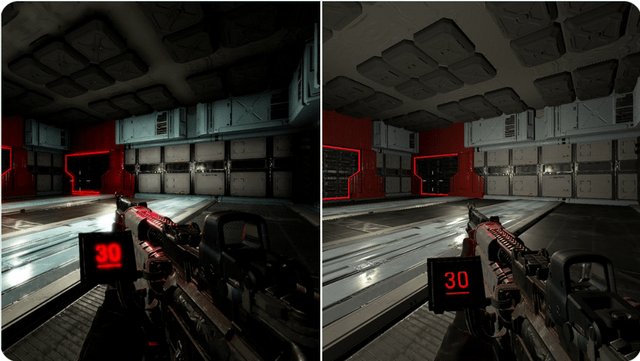
Post processing in games involves applying visual effects after the initial rendering of a scene, enhancing the final image’s appearance.
Ever wondered how games achieve those stunning visual qualities? It’s often not just the base graphics; a lot happens afterwards. We’re talking about what is post processing games and how it plays a vital role in creating the experiences we know and love. These techniques add depth, color correction, and other beautiful effects. It’s the secret sauce that makes games pop.

What is Post Processing Games?
Have you ever played a video game and thought, “Wow, this looks amazing!”? A big part of that visual magic comes from something called post-processing. It’s like the final layer of polish a game gets before you see it on your screen. Think of it as adding the finishing touches to a painting, but for video games. Post-processing isn’t about creating the main characters or the world itself; instead, it focuses on making everything look more beautiful, realistic, and engaging.
The Magic Behind the Scenes
Imagine building a Lego castle. You’ve got all the bricks in place, and the structure is there. But what if you could make it look even cooler? That’s what post-processing does in games. It takes the already rendered game world – all the characters, buildings, and environments – and applies special effects to enhance its appearance. These effects happen after the game’s main elements are drawn but before you see it on your monitor.
What Happens After the Game is “Drawn”?
To understand post-processing, you first need to know a little bit about how games are made. When a game runs, the computer first creates a basic version of the scene using a technique called rendering. This creates all the shapes and objects. Then, after this first layer, that’s when the post-processing takes place.
Imagine the rendering process as sketching out the drawing with pencil and paper. After the sketch is complete, post-processing acts like the color and highlight process.
Key Post-Processing Effects
There are many different types of post-processing effects, each designed to add a particular look or feel. Let’s explore some of the most common and important ones:
Bloom
Bloom makes bright objects appear to glow. It’s like when you see a bright light in real life and it seems to spread out a little, almost like a halo. In games, bloom makes lights, fires, and shiny objects look much more impressive and radiant. It adds a soft, almost ethereal touch.
Think of it like this: Imagine looking at a bright lamp at night. The light from the lamp seems to extend beyond the lamp itself, right? That’s similar to what bloom does in games.
Bloom enhances lighting, creating a more immersive and visually rich experience.
Anti-Aliasing
Anti-aliasing smooths out jagged edges. In video games, without anti-aliasing, diagonal lines and curves can look like staircases instead of smooth lines. This is also known as “jaggies.” Anti-aliasing helps fix this, making lines look smooth and clean. This greatly improves the overall visual quality, making objects look less pixelated.
Think of it like this: Imagine drawing a circle with blocks. Without anti-aliasing, the edges will look stepped, like stairs. With anti-aliasing, the circle looks smooth and round.
This tech makes games look more polished and less distracting.
Motion Blur
Motion blur adds blur to fast-moving objects. When things move quickly in real life, they appear blurry. Motion blur in games simulates that effect, making action sequences feel much faster and more realistic. It helps the eye blend frames together so that the motion looks more natural.
Think of it like this: When you watch a race car go by at top speed, it doesn’t look crisp; it looks blurry. The same effect happens when your character sprints or a vehicle races past.
Motion blur creates a sense of speed and dynamism.
Depth of Field
Depth of field focuses on a particular object, blurring everything in the background or foreground. This technique is often used in movies and photographs to draw attention to a specific point. In games, depth of field makes scenes look more cinematic and helps create a sense of focus and depth.
Think of it like this: Look at your hand. When you focus on it, everything else behind it gets a little blurry. That’s depth of field at work.
Depth of field focuses your attention on specific elements.
Color Grading
Color grading adjusts the colors of the scene, creating a specific mood or atmosphere. It can make a game look bright and cheerful or dark and gritty, depending on the style of the game. Color grading is a really important effect for influencing how you feel while playing a game, so different levels in a game can make you feel different emotions.
Think of it like this: Color grading is like applying a filter to a photo, but to the whole game. It affects the overall feeling of the game, making it look more dramatic, cheerful, or spooky.
Color grading is important for setting the game’s mood and style.
Screen Space Reflections (SSR)
SSR creates reflections on surfaces like water or shiny floors. These reflections are not perfect but can significantly enhance the realism of scenes. Screen-space reflections work by using what is visible on the screen to render the reflections, which makes it much faster than traditional ray-tracing.
Think of it like this: When you look at a puddle on the street, you see a reflection of the world around you, that’s similar to the job of Screen Space Reflections.
SSR gives surfaces a realistic and reflective quality.
Ambient Occlusion
Ambient occlusion adds shadows and shading to areas where objects meet or block light. This makes scenes look more detailed and three-dimensional. It’s like adding tiny shadows in all the corners and crevices to give more depth to the overall scene.
Think of it like this: When you look at a room, the corners and edges where the wall meets the floor are slightly darker, right? That’s similar to what ambient occlusion does in games.
Ambient Occlusion improves the sense of depth and realism by using shadows.
Chromatic Aberration
Chromatic aberration adds a slight color distortion to edges, creating an effect similar to looking through a camera lens. This effect is often used to add a more realistic touch or give a scene a specific stylistic look. It makes the edges of objects appear slightly blurry with a rainbow-like color fringe.
Think of it like this: When you look through a camera lens and you see a rainbow-like color fringe around some of the edges of objects, that’s what chromatic aberration does in the game.
Chromatic aberration adds a unique style and realism.
How Post-Processing Improves Gaming
Post-processing is essential for creating a great looking video game. Here is a little more about why it’s such a big deal:
- Increased Immersion: Effects like bloom and depth of field help draw you into the game’s world. By making things look more realistic and visually appealing, you feel like you’re really there, rather than just looking at a screen.
- Better Visuals: Anti-aliasing and other techniques make sure the game looks clear, crisp, and smooth. It’s all about preventing those jagged lines and rough edges that can distract from a game.
- Enhanced Atmosphere: Color grading and effects like ambient occlusion help set the mood and feeling of the game. Whether it’s a sunny, happy scene or a dark, scary one, post-processing can play a big part in making you feel a particular way.
- More Dramatic Action: Motion blur adds that sense of speed and dynamism to the game’s action. When the action gets intense, these effects help enhance the overall impact of these moments.
- Polished Look: Post-processing makes the game look finished and polished. It’s what turns a game from a collection of shapes and textures into a visually impressive experience.
Performance Costs of Post-Processing
While post-processing makes games look great, it can also require a lot of power from your computer or console. Every effect that is added means that the hardware has to work harder, which is why there are often graphics settings in the game’s options menu that can be adjusted.
Balancing Visuals and Performance
Game developers have to carefully balance performance and visual quality. They have to decide which post-processing effects are most important for the game and how to make them run smoothly, without making the game too slow. Game graphics settings allow you to adjust things according to how powerful your device is. You might need to turn some settings down for the game to run smoothly, but it will still look nice! This is one of the reasons why some video games might look better on more powerful computers and consoles.
Here are some ways developers and players manage post processing effects:
- Adjusting settings: Players can turn off or lower the intensity of certain effects, such as motion blur or depth of field, to improve the game’s performance.
- Optimization: Developers work to optimize how these effects run, so they don’t slow the game down too much. They might use clever coding tricks or specific graphic techniques to make the game look good and still run smoothly.
Post-Processing in Different Games
Post-processing techniques are used in almost all types of video games, but the specific effects and styles will vary depending on the type of game. Here are some examples:
- Action Games: Action games often use motion blur, bloom, and screen space reflections to make the action feel more intense. They may also make use of depth of field in order to bring more attention to your character.
- Adventure Games: Adventure games may use color grading and ambient occlusion to set the tone and mood of the game’s world. Often times these game will have very cinematic post-processing that make it feel more like a movie than a game.
- Racing Games: Racing games often use motion blur and screen space reflections to show the speed and shine of the cars.
- Horror Games: Horror games might make use of chromatic aberration and dark color grading to make the game scarier. Depth of field might be used to create a sense of paranoia, as you only see a small portion of the world at a time.
Why It Matters to You
Even if you don’t know all the technical details about post-processing, you can still appreciate its impact on how games look. It’s what makes games more immersive, beautiful, and exciting. Next time you are playing a game, take a moment to notice how the lighting, colors, and effects influence the way the game looks. Post-processing is like the unsung hero of the gaming world, doing its work behind the scenes to give you the best experience.
Without post-processing, video games would not look as good as they do today. Every effect from the small color adjustments to the dramatic motion blur, works together to give you the wonderful games we know and love.
Ultimately, post-processing in games is like the final artistic touch that transforms a well-made game into a truly impressive visual experience. It is a vital aspect of game development that enhances the beauty and realism that we all enjoy when we play.
What is "Post Processing" in Games? – Explained
Final Thoughts
Post-processing in games involves effects applied after the main rendering. These visual enhancements alter the final image. It changes colors, adds blur, and creates stylized feels.
Essentially, ‘what is post processing games’ is the set of techniques used to refine the visual output. These steps occur after the 3D scene is drawn. It adds polish and depth to the game’s presentation. Post-processing affects the player’s experience significantly.

