
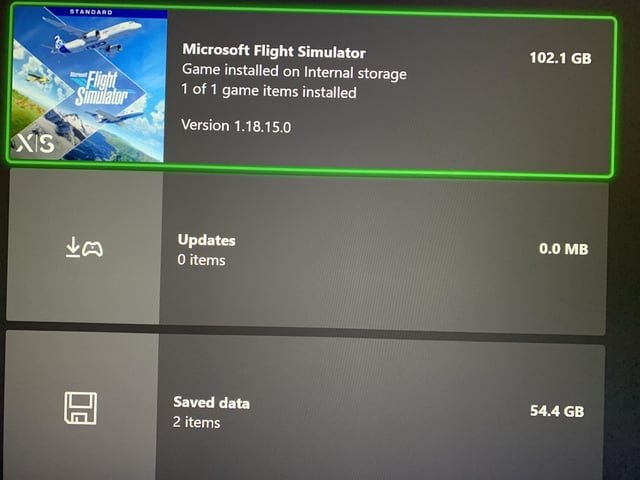
Reserved space on Xbox games is storage set aside for game updates, patches, and add-ons, ensuring smooth performance and preventing conflicts with saved game data.
Ever wondered about that chunk of storage space that appears occupied on your Xbox, even when you haven’t downloaded a new game? It’s often labeled “reserved space.” This space is very important for game function and can be a bit mysterious if you’re unsure what is reserved space on xbox games.
It actually serves a crucial purpose, allocating room for things like updates and downloadable content. This helps keep your games running smoothly and prevent any data corruption. Think of it as a designated area for game essentials.

What is Reserved Space on Xbox Games?
Have you ever noticed that your Xbox sometimes uses up space on your hard drive even when you don’t think you’ve installed a new game or app? That’s likely because of something called “reserved space.” It might sound a little confusing, but it’s actually a pretty helpful feature that keeps your games running smoothly. Let’s explore what reserved space is all about.
The Purpose of Reserved Space
Reserved space is like a special little area on your Xbox hard drive that the game sets aside for things it needs to work properly. Think of it like reserving a table at a restaurant. You’re not sitting there all the time, but it’s there waiting for you when you need it. This space isn’t used for the main game itself but for other important things. This way the game knows that when it needs to store something extra, like game saves, updates and other things to make the game run better. This helps make your game experience smoother and prevents some kinds of errors.
Why Games Need Extra Space
Games aren’t just big files of pre-made content, they actually need a little storage area to keep things organized. This reserved space is used for:
- Game Saves: When you play a game and save your progress, that information needs a place to live. Reserved space is where those saves go. So, you don’t lose all the levels you already played.
- Updates: Games often get updates, sometimes small and sometimes big. These updates are what fixes any problems the game has and sometimes add more cool stuff to play. Reserved space provides a place to hold those changes before they are properly applied to the game, making the update process faster and more efficient.
- Downloaded Content (DLC): If you download extra parts for the game like new maps, characters or missions, the reserved space will store them. These small extra pieces of the game will also be stored in the reserved space of your hard drive.
- Temporary Game Data: Some games may use temporary data while you play. This data helps the game to load things faster and run efficiently. Reserved space is a useful place for the temporary files to help in the performance of the game.
It’s like having a workbench where the game can keep all its tools close by and easy to get to.
How Much Space is Reserved?
The amount of space that games reserve can change. Some games may only need a little space, maybe a few hundred megabytes (MB). Other bigger, more complex games might need a couple of gigabytes (GB) or even more. It depends on the game and what it needs to store. The game developers decide how much space the game should be reserved. You usually do not have much control over the size of the reserved space.
Where is Reserved Space Located?
Reserved space is not in a special folder you can find easily. It’s kept alongside the main game data. So, when you see the total space a game takes up on your Xbox, that number includes the reserved space. It’s not separate, but part of the whole package that the game occupies.
Is Reserved Space Something to Worry About?
You may be worried about your hard drive filling up because of reserved space. It is mostly not something you should worry about. The space is often not very big compared to the overall size of the game itself. Reserved space helps the game work the way the game was meant to. It makes the game more efficient and you will have the game playing as it was supposed to. Here is what to consider:
- It’s normal: All games on your Xbox use reserved space. It’s a normal part of how Xbox games are made to work.
- It’s mostly not very large: Reserved space does not take up too much room. It is just enough to store all the important game data.
- It helps games: The reserved space keeps your game playing well. Without it, you might have games that do not work properly.
Managing Reserved Space
While you can’t directly control the amount of space reserved by each game, there are a few things you can do to manage it. These are helpful if you are short on storage space. Here are a few things you can do:
Freeing Up Space on Your Xbox Hard Drive
If you are having problems with low storage space on your Xbox, there are some ways you can free up space.
- Uninstall Games You Don’t Play: If there are games you’re not playing any more, you can delete them from your Xbox. The game will also delete the reserved space with it.
- Move Games to an External Hard Drive: If you have a USB hard drive, you can move games to it. This is a great way to have a lot more space for games on your Xbox.
- Delete Game Data: You can also delete game data, but be careful. If you delete your save files, you will lose all your progress in the game.
How to View Reserved Space
You can view the amount of space a game uses, including the reserved space, by going to:
- Go to “My games & apps.”
- Select “See all.”
- Select “Games.”
- Highlight the game that you want to see.
- Press the Menu button on your controller.
- Select “Manage game & add-ons.”
- You can see the total space the game is using, which includes the reserved space
Clearing Local Save Data
If you need more space, you can try to clear local saved data. Sometimes there may be corrupt data causing an issue. Here is how to clear local saved data on Xbox:
- Press the Xbox button to open the guide.
- Select “Profile & system” and then go to “Settings.”
- Select “System” then “Storage.”
- Select “Clear local saved games”.
- This may help if you are having issues with a game save file.
Note: Be careful when deleting game saves, you may lose game progress.
When Might You Need to Pay Attention to Reserved Space?
There are a couple times when it’s worth keeping an eye on the amount of reserved space your games use:
- Low Storage: If your Xbox hard drive is starting to get full, you will need to check what is taking up most of the space. It is a good idea to see which games are taking up a lot of space and then you can delete those games.
- Troubleshooting Game Issues: If a game is acting up, sometimes deleting and reinstalling the game can help. When you do this, the reserved space is deleted too. This is sometimes a good way to see if a game is not working correctly.
Reserved Space vs. Actual Game Installation Size
It’s important to know that reserved space is not the same as the size of the game itself. The game itself is a large collection of data files. These data files contain all the assets to make a game. This includes all the models, textures, sounds and many other assets of a game. Reserved space is the space that is set aside for all of those extra things. This also includes game saves, updates and DLC. The game size is usually much larger than the reserved space.
The Importance of Reserved Space for Game Performance
Reserved space is a vital part of your Xbox experience. It helps your games run better and makes sure you have the best experience. It’s something that happens in the background, mostly automatically, without you needing to worry about it. Here’s a detailed look at why this space is so critical:
- Ensuring Stability: Without reserved space, games could run into problems when trying to save data, apply updates, or load temporary information. This could lead to game crashes, lost progress, or other errors. The space allows for smooth operation, which is what the developers intend.
- Faster Loading Times: Temporary data stored in reserved space can help games load levels and other assets more quickly. This results in shorter loading screens and a more seamless game experience. This is important, especially for players who like to play for a long time.
- Preventing Corrupted Data: By having a dedicated space for updates and saves, games can reduce the risk of data getting corrupted or lost. The dedicated space means the updates and saves are in a secure place. This protects the integrity of your game and progress.
- Efficient Updates: Reserved space allows games to download and install updates more efficiently. This is because it gives the game a place to store the update before it’s fully applied. This makes the update process faster, and with less interruption.
- Supporting Complex Features: Many modern games have complex features like online multiplayer, downloadable content, and detailed game saves. Reserved space is important to ensure these features work correctly. This allows the players to enjoy the game as intended.
Reserved space is therefore not just a matter of storing data; it’s about creating a proper environment for games to function at their best.
In short, Reserved space is an important part of how games work on the Xbox. It makes the gaming experience smoother and helps games run correctly. It’s mostly automatic, so you don’t need to worry about it. But it helps to know what it is and how it helps your games.
How to clear reserved space on xbox
Final Thoughts
Reserved space on Xbox games is essentially a portion of your storage dedicated to game updates and saved data. This ensures your gaming experience remains smooth and consistent. The system automatically manages this allocated space.
Essentially, what is reserved space on xbox games prevents corrupted files and ensures seamless operation. It allows games to quickly access needed data. This prevents errors and performance issues.

