
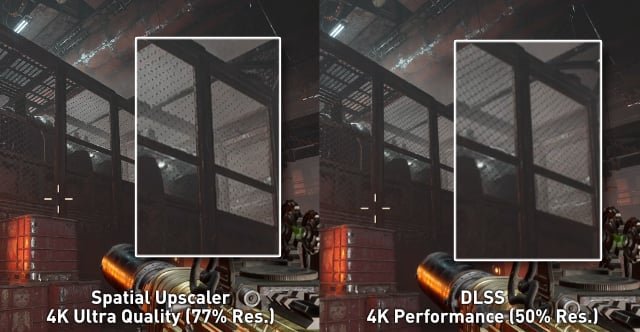
Upscaling in games is a technique that renders a game at a lower resolution and then stretches it to fit a higher resolution display, improving performance while maintaining visual quality.
Ever wondered how some games can look great and still run smoothly, even on less powerful hardware? Well, that often comes down to clever techniques, and one such trick is what is upscaling in games. It’s a process that lets you enjoy sharper images than the raw rendering power of your system might otherwise allow.
Imagine your game is first painted on a small canvas, and then carefully enlarged to fit a bigger frame. That’s basically the idea behind upscaling. This helps players have a good gaming experience without needing the very latest and most expensive equipment.

What is Upscaling in Games?
Have you ever played a video game and wondered how it looks so clear and sharp, even when your screen isn’t super fancy? Well, a big part of that magic is something called “upscaling.” Think of it like this: imagine you have a small picture, and you want to make it bigger without it getting all blurry. That’s what upscaling does in games, but instead of pictures, it works with the images you see on your screen. It makes the game look better and run smoother, even if your computer or console isn’t the most powerful.
The Basic Idea: Making Low-Resolution Images Look Better
At its core, upscaling is about taking a low-resolution image – something that might look a little pixelated or fuzzy – and making it appear as if it has a higher resolution. This process is vital in gaming because games often need to be rendered (created) at a lower resolution to run quickly and smoothly. The graphics card (the part of your computer that makes the game’s images) then uses upscaling techniques to make that lower-resolution image look sharper on your monitor. It’s like a clever trick to get the best of both worlds: good performance and pretty visuals.
Why Do Games Need Upscaling?
There are several reasons why game developers use upscaling techniques:
- Performance: Rendering games at high resolutions like 4K takes a lot of power from your computer. By rendering at a lower resolution (like 1080p) and then upscaling to 4K, the game can run much smoother, especially on less powerful hardware.
- Hardware Limitations: Not everyone has the latest and greatest computer or console. Upscaling allows games to look better on older systems that might struggle with high resolution graphics. This way, more people can enjoy the game without huge performance issues.
- Maintaining Image Quality: Without upscaling, rendering games at lower resolutions would make them look very blurry or pixelated on higher resolution displays. Upscaling helps maintain a clearer, more detailed image that’s pleasing to the eye.
Different Ways of Upscaling
There isn’t just one way to upscale. Different techniques have different strengths and weaknesses. Here are a few of the most common ones:
Traditional Upscaling Methods
Before the fancy new technologies, there were some simple ways to make images bigger, we called them traditional methods. Think of these as the older ways that are still used in some areas but are less common in high-end games.
- Bilinear Upscaling: This method averages the colors of nearby pixels to create new ones, filling in the gaps when you make the image bigger. It’s like taking different colored crayons and mixing them to make new colors in between. It’s fast but can result in blurry images, especially when upscaling a lot.
- Bicubic Upscaling: Similar to bilinear, bicubic upscaling uses a more complicated method to average out the colors. This often gives you a sharper result than bilinear upscaling, but it is also a bit slower. This is like a more advanced way of mixing those crayons, so you get a clearer result.
- Nearest Neighbor Upscaling: This is the simplest method. Instead of mixing the colors, it just copies the color of the nearest pixel and uses it to fill in the gaps. This results in sharp edges but can create a blocky look that can appear jagged and unnatural. Think of it as if you only use one color crayon at a time without trying to mix it with other color crayons.
These traditional upscaling methods are often used as a base for other more advanced methods. They are not as effective as modern methods, but can still be used in certain cases.
Modern Upscaling Technologies
Today, we have much more advanced ways of upscaling that use powerful technology and smart algorithms to make games look better than ever. These new methods can give us images that look almost as good as true 4K or higher resolutions, but without using too much power.
Temporal Upscaling
Temporal upscaling is a big step up. It doesn’t just look at one frame at a time, but also takes into account the previous frames, or history, to figure out what details to add. Imagine you have a stack of drawings, and you look at them one after another, and use them to fill in missing pieces in each one, that is how temporal upscaling works. This method can do a very good job of preserving the details and reducing blur. Let’s take a look at some of the main technologies that utilizes the idea of temporal upscaling.
- NVIDIA Deep Learning Super Sampling (DLSS): DLSS uses special hardware in Nvidia graphics cards called Tensor Cores to learn how to upscale. It’s trained on a huge dataset of high-resolution images, so it knows exactly how the lower resolution images should look at a higher resolution. This is like teaching a robot how to draw, so it can make pictures look very real.
- AMD FidelityFX Super Resolution (FSR): FSR is similar to DLSS, but it works on a wider range of graphics cards. It doesn’t require special hardware. It uses algorithms to figure out how to make the picture look sharper while adding details. Think of it as using a special set of tools that can make any drawing look better without the need for a robot.
- Intel XeSS: XeSS works in a similar way to both DLSS and FSR, but is used on Intel graphics cards. It also uses a temporal upscaling method to make low-resolution images look better on higher resolution display. It does so by utilizing AI algorithms and can work on other hardware as well. It is like using a another set of tools that work well with Intel graphics cards and can make the drawings look crisp.
These technologies are a big deal in gaming, as they make games look fantastic and also allows them to run better. They are changing how games are made and how we play them.
How Upscaling Impacts the Gaming Experience
Upscaling plays a major role in the gaming experience. Here’s a look at how it affects different aspects of playing:
Improved Visual Quality
The most obvious benefit of upscaling is that games look a lot better. The images are sharper, clearer, and more detailed. This means things like character faces, backgrounds, and even small details look much nicer. It makes the games more immersive and fun to play. Imagine a forest in a game: with upscaling, you can see more details like leaves, bark on trees, and other tiny things that make the scene more real.
Better Performance
Because upscaling lets games run at lower resolutions internally, but look like they’re at a higher resolution on your screen, they can run much smoother. This is helpful, especially when games have lots of action happening on the screen, or if you have an older computer or console. This allows more players to enjoy the game, since it allows games to be more accessible to everyone.
Lower Resource Usage
With upscaling, your computer or console does not need to work as hard. This can make the fan on your computer less noisy, since it will not get too hot, and it can use less power. This will also help your device last longer because it does not have to work so hard.
Different Upscaling Settings in Games
Many games now offer different upscaling settings that allow you to adjust how much upscaling is applied. These settings are often labeled like “Quality,” “Balanced,” and “Performance.” Here’s what those usually mean:
- Quality: This setting will provide the best visual quality but might require more power. It tries to make the game look as good as possible, even if it slows the game down just a little.
- Balanced: This mode is a balance between image quality and performance. It allows you to get pretty visuals while keeping the game running smooth.
- Performance: This setting is about getting the game to run as quickly as possible. While you won’t get the best visuals, the game will be the smoothest at this setting. This is good for when a game is very demanding on your device.
The best setting depends on the game, your hardware, and what you like most – whether it is looks or performance. You can test which ones work the best for your setup.
What Does the Future Hold for Upscaling?
Upscaling technology is always getting better. As graphics cards get more powerful and new artificial intelligence methods are invented, upscaling will only improve. In the future, we can expect even better-looking games without requiring super high-end hardware. We might see AI upscaling becoming even more advanced and more widely used, giving us almost perfect images from games that render at lower resolutions. This is going to make games more fun and more accessible for a lot more people.
The Impact on Different Platforms
Upscaling isn’t just for PCs. It’s also very important for consoles, especially handheld ones. On devices like the Nintendo Switch and the Steam Deck, upscaling lets games that are not so demanding run smoothly while using lower power. It is likely going to be even more important in the future as new hardware continues to come out.
Consoles use upscaling techniques to look good on your TV. Modern TVs also come with their own upscaling abilities, so both your game and your screen work together to give you the best visual experience.
The Role of AI
Artificial intelligence will become a more and more important part of upscaling. AI will help to improve how good the games look and help to make better use of your hardware. AI can learn how games work and help the computer make smart decisions about how to upscale. This will lead to better graphics and a more enjoyable gaming experience.
Upscaling is a clever technology that helps games look great and run smoothly. It is a behind-the-scenes process that most of us don’t really think about, but it makes a huge difference in how we play and enjoy games. Whether you are playing on a PC, a console or even a handheld, upscaling will keep playing an important part of gaming for years to come. It will continue to make gaming look better and more fun for everyone.
Upscaling Explained: DLSS vs XeSS vs FSR & More
Final Thoughts
In essence, what is upscaling in games? It’s a technique to render games at a lower resolution, then intelligently enlarge it to fit your display’s native resolution. This process improves performance without significantly sacrificing visual quality. It makes demanding games playable on less powerful hardware.
Upscaling algorithms use various methods to achieve this, often employing AI to predict what the higher resolution image should be. This means smoother gameplay with decent visuals. Therefore, upscaling becomes essential for enjoying modern games across a variety of systems.

