
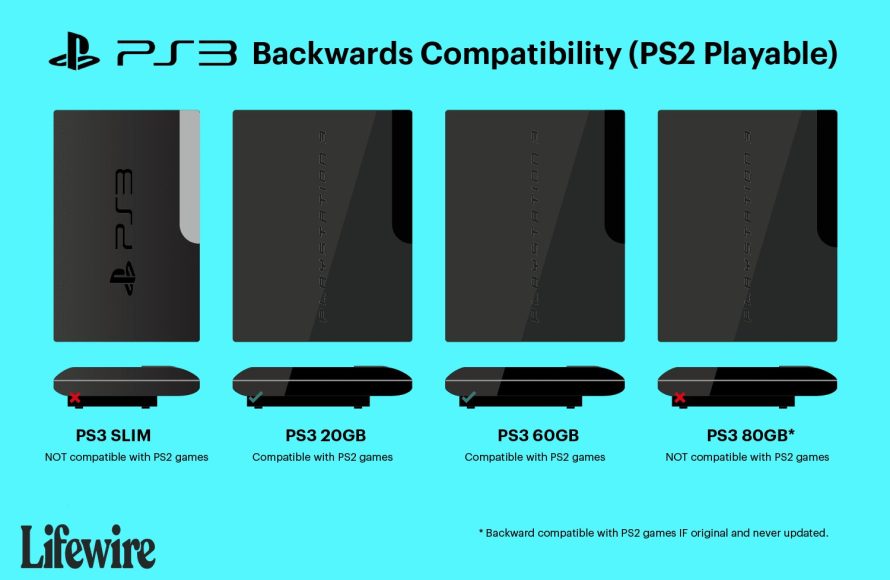
Not all PS2 games work on the PS3. Compatibility varies by PS3 model, with some models having full backward compatibility and others none. Check specific game lists for compatibility details.
Want to revisit your PlayStation 2 classics on your PS3? It’s a common question: what ps2 games work on ps3? The answer isn’t straightforward, sadly. Some PS3 consoles can play PS2 discs, while many cannot.
This mainly boils down to the specific PS3 model you own. Early models packed hardware for backward compatibility, but later versions lack this feature. You’ll need to research if your particular console supports those classic titles.

What PS2 Games Work on PS3?
Okay, so you’ve got a PlayStation 3 and a pile of awesome PlayStation 2 games gathering dust? You’re probably wondering, “Can I play these old favorites on my PS3?” The answer, like many things in the world of video games, is a bit complicated. Let’s dive into which PS2 games work on the PS3 and why some don’t. It’s not as simple as popping in the disc and hitting play; there are different kinds of PS3 consoles, and that affects compatibility a lot.
The Different Types of PS3 and Their PS2 Compatibility
The key to understanding which PS2 games work on your PS3 lies in knowing which model of PS3 you own. Sony released different versions of the PlayStation 3, and some have the hardware to play PS2 games, while others do not. This hardware is inside the console and helps it to understand the game discs of another console. Let’s explore the three main types:
The “Fat” PS3 Models (CECHAxx, CECHBxx, CECHCxx, CECHExx)
These are the original, chunky PlayStation 3 consoles that came out first. They’re sometimes called “fat” PS3s because of their large size and rounded design. If you have one of these, you’re in luck—to a degree. The very first models (CECHAxx and CECHBxx) are the true kings of PS2 compatibility. These consoles had actual PlayStation 2 hardware built right into them! This meant that almost every PS2 game would work flawlessly. Then came slightly modified “Fat” PS3 models (CECHCxx and CECHExx) that used software to emulate PS2 games. This software is like a translator that helps the PS3 understand the game. The change in hardware and software means the overall compatibility isn’t as high, but many games work.
Here’s a quick breakdown of the ‘Fat’ model compatibility:
- CECHAxx (20GB, 60GB models): These have full PS2 hardware and are the best for playing PS2 games. You’ll have the best experience with almost any PS2 game.
- CECHBxx (20GB, 60GB models): Also have full PS2 hardware, just like the CECHAxx models, giving them excellent compatibility.
- CECHCxx (60GB model): This model started using partial hardware emulation and software emulation and has slightly less compatibility than the first two. Not all games work smoothly, but a good portion still do.
- CECHExx (80GB, some 40GB models): These have software emulation for PS2 games, which offers the lowest compatibility compared to the original ‘Fat’ models. Still, many PS2 titles are playable on this system.
The “Slim” PS3 Models (CECH-20xx, CECH-21xx, CECH-25xx, CECH-30xx)
As the name suggests, these PS3 consoles are thinner and lighter than the original “fat” models. The big news here? They removed the hardware and the software used to play PS2 games. This means that if you own a “slim” PS3, you cannot play your old PS2 discs. You can’t just put the disk in and play it. Sorry, there’s no going back here.
The “Super Slim” PS3 Models (CECH-40xx)
These are the thinnest and lightest PS3 models. They are also completely unable to play PS2 games. Just like the “Slim” models, they don’t have any of the technology needed to run PS2 game discs. So, if you have one of these, you’ll need another way to play your PS2 games, like a PS2 console itself.
Checking Your PS3 Model Number
Not sure what PS3 you have? It’s easy to find out! Flip your PS3 over, and look at the back or bottom. You’ll find a sticker there with the model number, which usually starts with “CECH”. Once you know your model number, you can check the list above to see whether your PS3 is compatible with PS2 games. If you have a CECHA, CECHB, CECHC, or CECHE model, then you’re in business!
Software Emulation: How it Works and Why It’s Not Perfect
For the later “fat” PS3 models, and the digital versions that you can purchase from PSN store, PS2 game compatibility relies on software emulation. What exactly is emulation? It’s a fancy way of saying that the PS3 is pretending to be a PS2. The PS3 has a special program that reads the PS2 game disc and translates the game’s instructions into something that the PS3 can understand and play. But this process isn’t perfect. Here’s why:
- Software Limitations: Emulation software doesn’t always perfectly recreate the way that a PS2 game works. Sometimes, it might miss some little details, causing a game to run incorrectly. It is a very complex process.
- Game-Specific Issues: Some PS2 games use special tricks and techniques that emulation software can have problems with. This might result in glitches or slowdown.
- Not Every Game Works: Because of these issues, not every PS2 game will work on the PS3. Some might just refuse to start, others might have problems while playing, and some might work perfectly fine. It’s a gamble!
PS2 Classics on the PlayStation Store
Don’t despair if you have a “Slim” or “Super Slim” PS3 that doesn’t support PS2 discs. You can still experience many classic PS2 games! How? Many PS2 games have been rereleased digitally as “PS2 Classics” on the PlayStation Store (PSN). These games have been adapted to work on the PS3. These versions often work very well and may even look a bit nicer than they did on the PS2.
Benefits of PS2 Classics
- Convenience: No need to dig out old discs. You can download them straight from the PSN.
- Improved Performance: Some PS2 Classics have had small improvements to make them look a bit better and run smoother.
- Compatibility: These versions are built to work on all PS3 models, so you can enjoy them no matter what PS3 you own.
Limitations of PS2 Classics
- Limited Selection: Not every PS2 game has been released as a PS2 Classic. Many favorites are still missing.
- Cost: You have to pay to download them, even if you own the original PS2 disc.
The Compatibility List: What Works and What Doesn’t?
Now, you’re probably wondering about the specifics. “Will my game work?” Unfortunately, there isn’t a simple, single list of every PS2 game that works on the PS3. It’s different for each model. However, here’s a general guide to common games and how they typically fare:
Games That Usually Work Well on “Fat” PS3 Models
The “fat” PS3 models, particularly the original CECHA and CECHB series, have a very good track record with PS2 games. These are some games that usually run well:
- Grand Theft Auto: Vice City and Grand Theft Auto: San Andreas
- Metal Gear Solid 2: Sons of Liberty and Metal Gear Solid 3: Snake Eater
- Final Fantasy X and Final Fantasy XII
- Kingdom Hearts and Kingdom Hearts II
- God of War and God of War II
- Shadow of the Colossus
- Okami
- Resident Evil 4
- Tekken 5
- Silent Hill 2 and Silent Hill 3
Games That May Have Issues or Not Work on “Fat” PS3 Models
Even on the “fat” models, some PS2 games might have problems. It’s not very common on the CECHA and CECHB models, but the CECHC and CECHE models are a little more picky. Here are some examples:
- Certain obscure titles might be incompatible.
- Some games with specific hardware requirements might have glitches.
- Games that push the PS2’s capabilities to the limit are more prone to issues.
This does not mean that these games won’t run, but there is a chance that they may not work or may not work correctly.
PS2 Classics That Work on all PS3 Models
Here’s a small list of some of the digital PS2 Classics available on the PlayStation Store, that all PS3s can play:
- Grand Theft Auto III, Grand Theft Auto: Vice City and Grand Theft Auto: San Andreas
- Bully
- Dark Cloud and Dark Cloud 2
- Max Payne and Max Payne 2: The Fall of Max Payne
- Resident Evil: Code Veronica X
- The Warriors
- Manhunt
These are just some of the titles available, with the digital versions usually running well. This list can change, so it’s always best to check the PlayStation Store.
Tips for Improving PS2 Game Compatibility on PS3
While the compatibility situation isn’t perfect, there are a few things you can try to improve your chances of playing PS2 games on your older “Fat” PS3:
Keep Your PS3 Software Updated
Make sure your PS3 is using the latest software. Sony occasionally releases updates that may improve PS2 emulation and stability.
Clean Your Game Discs
A scratched or dirty disc is much more likely to cause problems. Gently clean your PS2 games with a soft, lint-free cloth before trying to play them.
Try Different Console Orientations
Some people claim that having the console in a vertical or horizontal position can sometimes make a difference in reading game discs. It is worth a try.
Check Online Forums
If you are having trouble with a specific game, there are many helpful forum posts online, usually on sites like Reddit or GameFAQs. Other players may have found fixes or workarounds for issues you may be facing.
Why Sony Didn’t Keep Full PS2 Compatibility
You might wonder why Sony removed full PS2 compatibility on later PS3 models. There are a few reasons:
- Cost: Including the PS2 hardware added to the cost of the PS3. Removing it made the console cheaper to produce and buy.
- Focus on PS3 Games: Sony wanted people to buy PS3 games, not just play their old PS2 games. By removing the compatibility, they pushed people to embrace the newer generation of games.
- Size and Complexity: The PS2 hardware took up space inside the PS3. Removing it helped to make the console smaller and more energy-efficient.
In the end, Sony’s decision was a business one, trading off backward compatibility for lower production costs and a push towards their newest platform.
So, as you can see, which PS2 games work on your PS3 depends a lot on which model you have. The original ‘fat’ models with hardware and software emulation will play a good number of ps2 games, while newer models have no disc-based PS2 game compatibility at all. However, the digital PS2 Classics on the PlayStation Store still provide a good and enjoyable way to play many classic PS2 games.
What happens when you put a PS2 Game in a PlayStation 3
Final Thoughts
Only early PlayStation 3 models with backward compatibility play PS2 games. These models use specific hardware to run the older discs. Not all PS2 titles function flawlessly, some may have glitches.
Therefore, knowing what ps2 games work on ps3 involves identifying the correct PS3 model. You can check lists online, but generally, CECHA, CECHB, CECHC and CECHE model play PS2 games.

