
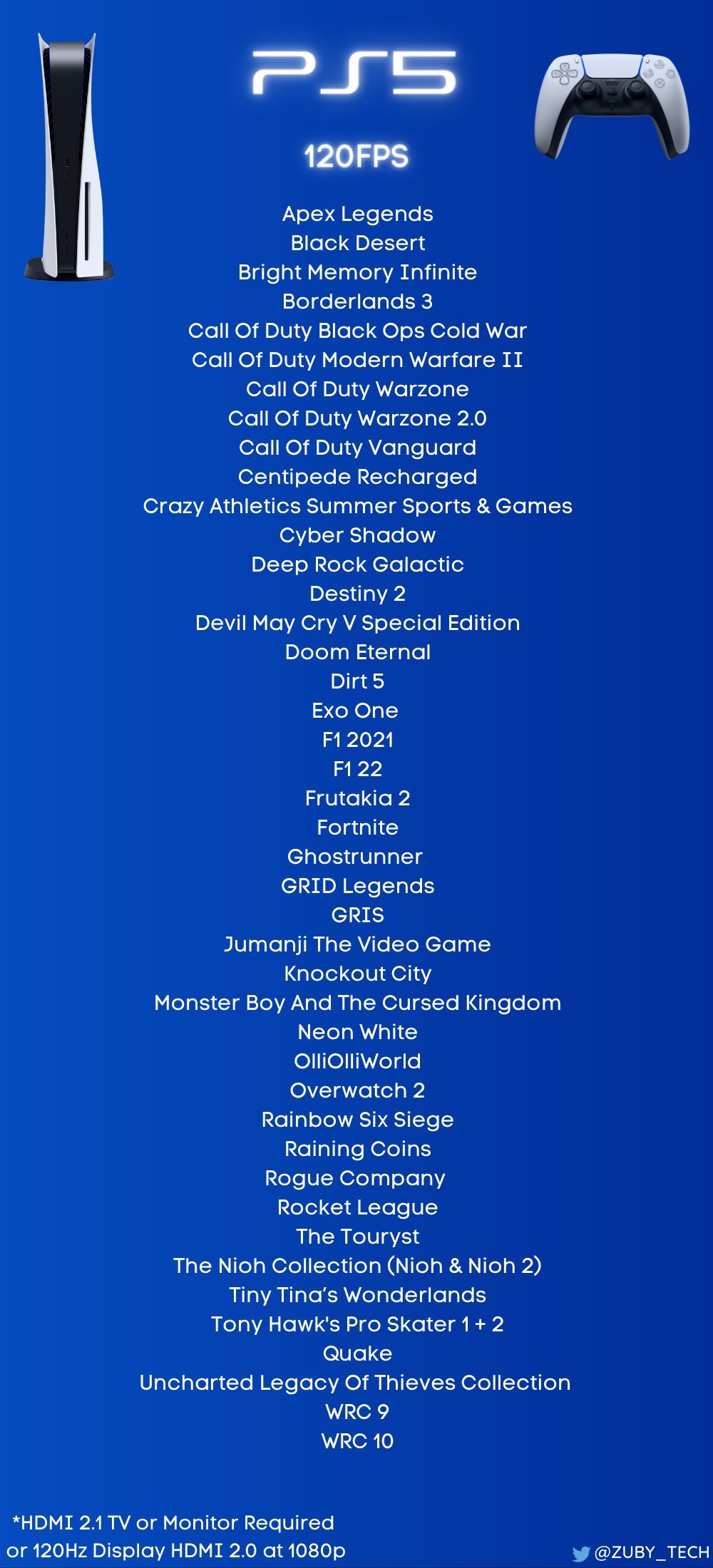
Many PS5 games support 120hz output, including titles like Call of Duty: Black Ops Cold War, Devil May Cry 5 Special Edition, and Rainbow Six Siege, although specific performance can vary by game and display.
Want smoother, more responsive gameplay on your PlayStation 5? Then you’re probably wondering about what PS5 games support 120hz. It’s a feature that makes a real difference, especially in fast-paced action games.
Not every PS5 game has 120hz support, so knowing which ones do is important for getting the most out of your high refresh rate display. Thankfully, several titles utilize this capability to provide a superior gaming experience.

What PS5 Games Support 120Hz?
So, you’ve got a shiny new PlayStation 5 and a super-fast TV that boasts a 120Hz refresh rate? That’s awesome! You’re probably wondering which games can actually take advantage of that extra smoothness. Well, you’ve come to the right place. Getting the full benefit of your powerful console means playing games at the highest possible frame rates. We’re diving deep into the world of 120Hz gaming on the PS5 to tell you exactly which games support this feature, how to make it work, and why it matters.
Understanding 120Hz and Refresh Rate
Before we get to the games, let’s quickly understand what 120Hz means. Think of your TV or monitor screen like a flipbook. Each page of the flipbook is a “frame.” The refresh rate is how many times per second your screen updates those frames. A 60Hz display updates 60 times per second, while a 120Hz display updates 120 times per second. That’s twice as many frames in the same amount of time, which can make movement look much smoother and more responsive.
Why is a High Refresh Rate Important?
A higher refresh rate is particularly noticeable in fast-paced games. It helps reduce motion blur, making objects and action appear clearer. This is a big advantage in competitive multiplayer games, where seeing things clearly and reacting quickly can mean the difference between victory and defeat. Imagine playing a racing game where the environment blurs as you zoom along. With 120Hz, you’d see more detail and have a better sense of control. The same goes for action-packed first-person shooters, where smooth movement can make aiming much easier.
PS5 Requirements for 120Hz Gaming
Okay, so you want to play at 120Hz. Here’s what you need to make it happen:
- A PlayStation 5 Console: Obviously, you’ll need a PS5. This is the core of the system.
- A 120Hz Compatible Display: Your TV or monitor needs to support a 120Hz refresh rate. Not all TVs or monitors do, so double-check the specifications of your display. Also, it needs to support HDMI 2.1. This is a crucial step. Older displays may not have the needed hardware to get the most out of the ps5.
- An HDMI 2.1 Cable: You’ll need a high-quality HDMI 2.1 cable to handle the data bandwidth required for 120Hz gaming. Usually, the cable that comes in the PS5 box is adequate. Don’t assume all HDMI cables are the same, as older versions of the cable can limit the frame rate of your games.
Checking Your Display’s Compatibility
How do you know if your TV or monitor is 120Hz capable? Here are some steps to follow:
- Look for Specifications: Check the manual or the product page of your TV or monitor. The specifications should clearly mention its refresh rate. It will likely say “120Hz” or “120 fps” (frames per second). Also, search for the HDMI version of the device. Make sure that the display and cable both support HDMI 2.1.
- Check Your TV Settings: Some TVs require you to manually enable 120Hz or a gaming mode that supports it. Look for these settings in your TV menu, often under “Picture” or “Inputs”.
- Test It: If you’re still unsure, try playing a game you know supports 120Hz and check the display settings or monitor’s OSD.
The List: PS5 Games That Support 120Hz
Now, for the main event – which PS5 games offer that smooth 120Hz goodness? Keep in mind that the list of compatible games is growing, but here is a good selection at present. This also means that certain titles on this list may have a 120Hz mode, but certain visual details might have to be sacrificed to achieve this performance.
First-Person Shooters (FPS)
- Call of Duty: Black Ops Cold War: This title was one of the first to adopt 120Hz on consoles, providing an edge in multiplayer combat.
- Call of Duty: Vanguard: Following the trend, Vanguard also delivers smooth 120Hz gameplay.
- Call of Duty: Modern Warfare II: Experience the latest COD entry with high refresh rate.
- Call of Duty: Modern Warfare III: The most recent COD release delivers smooth 120Hz gameplay.
- Doom Eternal: This action-packed shooter allows for fast, fluid movement at 120 fps.
- Overwatch 2: The team-based hero shooter looks and feels better than ever at 120hz.
- Rainbow Six Siege: Competitive players can gain an edge with the fluidity of 120hz.
- Borderlands 3: Enjoy the looter shooter with higher fps and a very smooth experience.
- Apex Legends: The battle royale title provides smoother and more precise gameplay.
Racing Games
- Gran Turismo 7: Experience incredibly fluid and responsive driving at 120Hz in the popular racing sim.
- DIRT 5: This arcade racer benefits hugely from the high refresh rate, offering incredible smoothness.
- F1 23: The official F1 game shows off its beautiful visuals and responsive controls in 120Hz.
- WRC Generations: Drive rally cars with high responsiveness and detail.
Action and Adventure Games
- Devil May Cry 5 Special Edition: Experience stylish combat with incredibly smooth animations at 120Hz.
- The Nioh Collection: Both Nioh and Nioh 2 can be played at 120fps on ps5 for a faster gaming experience.
- Ghostrunner: The parkour-action game looks great and feels very smooth at high refresh rates.
- Tiny Tina’s Wonderlands: This adventure game allows for more responsive gameplay at high framerate.
- Uncharted: Legacy of Thieves Collection: The remastered versions of these great games can take advantage of high frame rates.
Sports Games
- NBA 2K Series (Multiple): Experience fast-paced basketball with enhanced smoothness. Some NBA 2K games offer 120Hz support. The specifics may depend on the specific year’s edition.
- Tony Hawk’s Pro Skater 1 + 2: Pull off tricks and combos with the fluidity that 120Hz provides.
Other Notable Games
- Rocket League: The fast-paced car soccer game is a perfect fit for the smoother gameplay of 120Hz.
- Resident Evil Village: Enjoy a smoother, more responsive experience in the first-person horror title.
- Ratchet and Clank: Rift Apart: Play this visually stunning platformer with increased frame rates and smoother gameplay
- Fortnite: This game runs exceptionally well at high refresh rates, allowing for high precision.
How to Enable 120Hz on PS5
So, you have the gear, and you have a game. Now, how do you actually enable the 120Hz mode? The process is pretty straightforward:
- Go to Settings: From the PS5 home screen, go to “Settings” (the gear icon on the top right).
- Select Screen and Video: Scroll down and find the “Screen and Video” option.
- Output Settings: Under “Screen and Video,” go to “Video Output.”
- Enable 120Hz Output: Look for “Enable 120Hz Output.” If your display is compatible, this option should be available. Make sure it is set to “Automatic.”
- Game Settings: Some games may have their own in-game settings for 120Hz. Look for these in the game’s graphics options.
Remember, even if your display supports 120Hz, some games might need to be set to a “performance mode” to reach this refresh rate. Be sure to check in-game menus if you can not get the 120Hz to work initially. Some games also utilize dynamic resolution scaling, and this setting can sometimes be required for high frame rates.
Potential Issues and Troubleshooting
Sometimes, things don’t go as planned. Here are some common issues and how to fix them:
- 120Hz Option Not Available: If you can’t find the 120Hz option in the PS5 settings, double-check your display’s specifications, the HDMI cable that you are using, and the input on your display to make sure it is the right one. Make sure that all your devices are capable of 120Hz gaming.
- Screen Flickering or Blackouts: If your screen flickers, goes black, or displays artifacts, it might be a compatibility issue or a problem with your cable. Try a different HDMI 2.1 cable or a different input on your display. If the problems continue, update both your PS5’s and your display’s firmware.
- Game Not Running at 120Hz: Make sure the game supports 120Hz and that you have selected it in the in-game settings if necessary. Some titles may require specific game modes, such as “performance mode” to reach 120Hz.
The Future of 120Hz Gaming on PS5
120Hz gaming is still relatively new on consoles, and it’s only going to grow in popularity. With the power of the PS5, we can expect more and more titles to take advantage of this higher refresh rate. As game developers continue to push the boundaries of what’s possible, 120Hz will likely become a standard for many games, especially those with competitive multiplayer or fast-paced action. It’s an exciting time for console gamers, with high frame rates opening up a new era of performance.
By understanding what 120Hz is and which games support it, you can truly get the most out of your PS5 and your display. Keep an eye out for new titles that take advantage of this feature, and get ready to experience gaming like never before. Higher frame rates are not only about a technical leap, but about how you perceive games as well. Faster responsiveness and smoothness adds to an increase in immersion and overall enjoyment.
15 Great PS5 120FPS Games | 2023
Final Thoughts
Many PS5 games offer a smoother 120Hz gaming experience. These enhanced titles provide faster refresh rates when connected to compatible displays. Some popular options include Call of Duty: Black Ops Cold War and Devil May Cry 5 Special Edition.
Several other games also support 120Hz. You’ll find titles such as Rainbow Six Siege and Tony Hawk’s Pro Skater 1 + 2 on the list. It’s important to check specific game settings.
What PS5 games support 120Hz? Many titles do, but ensuring your setup is correct is vital to benefit from this feature. Check your display and game settings to enable 120Hz output.

