
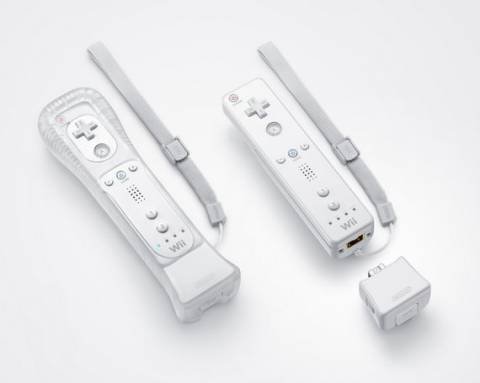
Several Wii games require the Wii MotionPlus accessory for enhanced motion control, including titles like Wii Sports Resort, The Legend of Zelda: Skyward Sword, and Red Steel 2.
Ever wondered which games demand that extra bit of precision from your Wii Remote? Many players ask what wii games require motion plus, and it’s a fair question. Knowing this helps you avoid frustrating gameplay experiences.
The Wii MotionPlus significantly improves the accuracy of motion tracking. This accessory connects to the base of your Wii Remote. Certain games, designed with its enhanced capabilities in mind, need this accessory.

What Wii Games Require Motion Plus?
Okay, so you’ve got your Nintendo Wii, ready for some action, but then you see it – the Wii MotionPlus. What’s the deal with this little add-on? And more importantly, which games actually need it? Well, let’s dive in and figure it all out together! It’s like having a super-powered remote for your games, making your movements in real life translate even more accurately to what’s happening on the screen. Some games require this extra precision for a better playing experience. If you are ready, let’s get started and explore the games that benefit from this motion tech.
Understanding Wii MotionPlus
Before we jump into specific games, let’s talk about what the Wii MotionPlus actually does. It’s an accessory that you plug into the bottom of your Wii Remote. Think of it like a tiny extension, but it’s more than just a piece of plastic. It houses gyroscopes and accelerometers which are fancy ways of saying they measure how your remote is moving, not just side to side and up and down, but also rotation and how fast you are moving it. This gives the Wii a much better understanding of what you are doing, allowing for very precise movements in games.
How it Changes the Gameplay
Without the Wii MotionPlus, the original Wii Remote could only track basic movements. For example, it could tell if you were swinging the remote left or right, or if you were pointing it up or down. But, it wasn’t very good at knowing complex things, such as how much you twisted the remote. The Wii MotionPlus changed everything. Now, when you rotate your wrist while holding the Wii Remote, the game can know exactly how much you moved it. This makes games that rely on precise movements, such as sword-fighting or drawing much more accurate and fun to play. It’s like going from a basic pencil sketch to a detailed painting! And it’s that extra layer of precision that some games really thrive on.
The Main Games That Need MotionPlus
Now, for the moment we’ve all been waiting for – what games absolutely need the Wii MotionPlus? The truth is, there are several must have games that wouldn’t play as well, or even at all without the technology. Let’s take a look at some of the key titles.
- Wii Sports Resort: This is arguably the biggest reason many people got MotionPlus in the first place. This is the sequel to the popular original Wii Sports, and it featured a host of new sports and activities that heavily relied on the accuracy of MotionPlus to function properly. You need it for activities like swordplay, table tennis, and archery. The improvements with MotionPlus make the game a totally different experience than the original Wii sports.
- The Legend of Zelda: Skyward Sword: This Zelda adventure was created around the precision of Wii MotionPlus. Sword fighting is a core part of the gameplay, and without the MotionPlus, you won’t have the ability to properly swing your sword and fight enemies accurately. Every twist, turn, and angle of your sword is tracked, giving you complete control in combat. The game would be near impossible without it, and the enjoyment would be very limited.
Other Notable Games That Use MotionPlus
The games above are the primary examples of titles designed with the MotionPlus in mind. But there are a variety of other games that enhance the gameplay with the add-on, even if they do not require it completely for gameplay. Here’s a quick list:
- Red Steel 2: This sword-fighting and shooter game makes full use of MotionPlus for both melee attacks and aiming.
- Grand Slam Tennis: Serve and volley your way to victory by making full use of the added motion controls.
- Tiger Woods PGA Tour Series (most versions after 2009): Swing your golf club with more control and accuracy for the best virtual golf experience.
- Virtua Tennis 2009 & 2010: Serve the best shots by making use of more precision when playing.
- FlingSmash: While this game also comes with a special remote attachment for the wiimote, it fully uses the MotionPlus for accurate gameplay.
- Metroid Prime 3: Corruption: This game has an interesting mechanic which makes use of the added precision. While you can still play without it, the experience is much better with it.
Games with Optional MotionPlus Support
Some games don’t completely require MotionPlus, but they offer enhanced gameplay if you use it. The extra precision offers a much better experience in some cases. Let’s take a look at some examples:
- Wii Play: Motion: This is a collection of mini-games, much like Wii Sports, but designed with MotionPlus in mind. While it can work with the original remote, the game truly shines with the MotionPlus accessory.
- Link’s Crossbow Training: Whilst not strictly needing it, the game has enhanced aiming when using a MotionPlus, which will ultimately allow for higher scores.
- The Godfather: Blackhand Edition: This is another game that does not require the add-on but it enhances gameplay when using it.
How to Tell if a Game Needs MotionPlus
So, how do you know if a game needs the Wii MotionPlus? Here are a few ways to tell:
- Look at the box: The game box will usually have a sticker or icon stating “Wii MotionPlus Required” or “Wii MotionPlus Compatible”. This is the most obvious sign.
- Read the manual: The game manual will mention if MotionPlus is needed or if it enhances gameplay. It’s always a good idea to check before you start playing.
- Check the back of the box: Sometimes, you will see a symbol on the back of the box. This will tell you what accessories the game requires.
- Research Online: If you are unsure, a quick search on the internet for the game title plus “motionplus” will usually give you the answer.
What Happens if you Play Without MotionPlus?
If you try to play a game that requires MotionPlus without the add-on, you will find that the game won’t work correctly, or in some cases, won’t start at all. With games where it is optional, but recommended, you will notice a large drop in the control of the game, especially in fast paced moments where precision matters a lot. The in-game movements will feel clunky and imprecise. So, if you see the “Wii MotionPlus Required” message, make sure you have the attachment plugged in before you start the game!
Buying MotionPlus
If you need a Wii MotionPlus, they’re not too hard to find. You can often find them in second-hand stores, online market places, or even still sold at some retailers. Keep in mind that some Wii Remotes came with the MotionPlus already built-in. These are called Wii Remote Plus controllers. If you have one of these, you don’t need to attach a separate MotionPlus. When you are purchasing make sure you know whether it is a standalone attachment or if it is a controller that has the tech built-in.
Wii Remote Plus vs. Wii Remote with MotionPlus
Let’s clear up some confusion here. There are two ways to get the benefits of the MotionPlus technology: with a Wii Remote with an attachment, or with a Wii Remote Plus controller. The Wii Remote Plus has the same technology built in and it is generally a better option as it is a lot more convenient. You don’t have to deal with connecting an extra attachment, and they are still readily available. So, when you are buying a controller, make sure you double check what you are purchasing so that you can avoid buying unnecessary attachments. If you are looking to upgrade from an old Wii Remote, you should definitely look into upgrading to the plus model.
Why Did Nintendo Make the MotionPlus?
Nintendo made the MotionPlus to improve the gaming experience for Wii owners. As more complex and precision based games were being developed for the platform, the original remote wasn’t able to handle the needed control and precision. By adding the MotionPlus, developers could create games with more realistic and accurate movements. Nintendo wanted people to feel even more like they were actually in the game, and this add-on really helped in fulfilling that goal, allowing for new and improved games.
The Legacy of Wii MotionPlus
Even though the Wii’s era has ended, the impact of the MotionPlus is still clear today. It showed how much accurate motion tracking can make game play more engaging and immersive, and it set the stage for future motion control technology. The controllers it provided allowed developers to get really creative, and they really pushed the limits of what was possible at the time. Even now, people are still enjoying many of the games that were improved by the technology that this simple add-on allowed.
In conclusion, the Wii MotionPlus was a game-changer for certain Wii titles, adding a new level of accuracy and control to games. If you plan on playing games like Wii Sports Resort or The Legend of Zelda: Skyward Sword, you will definitely need this add-on or the Wii Remote Plus. So make sure you check if a game needs it, it could dramatically improve the playing experience, and in some cases make it possible to play the game at all.
Wii MotionPlus
Final Thoughts
Many Wii games greatly benefit from, but do not require, MotionPlus. Games such as Wii Sports Resort and The Legend of Zelda: Skyward Sword, however, must have MotionPlus functionality for accurate gameplay.
These titles utilize the advanced sensor for precise controls. To quickly determine what wii games require motion plus, always check the game’s packaging before purchase. Ensure you have this specific add-on for compatible games.

