
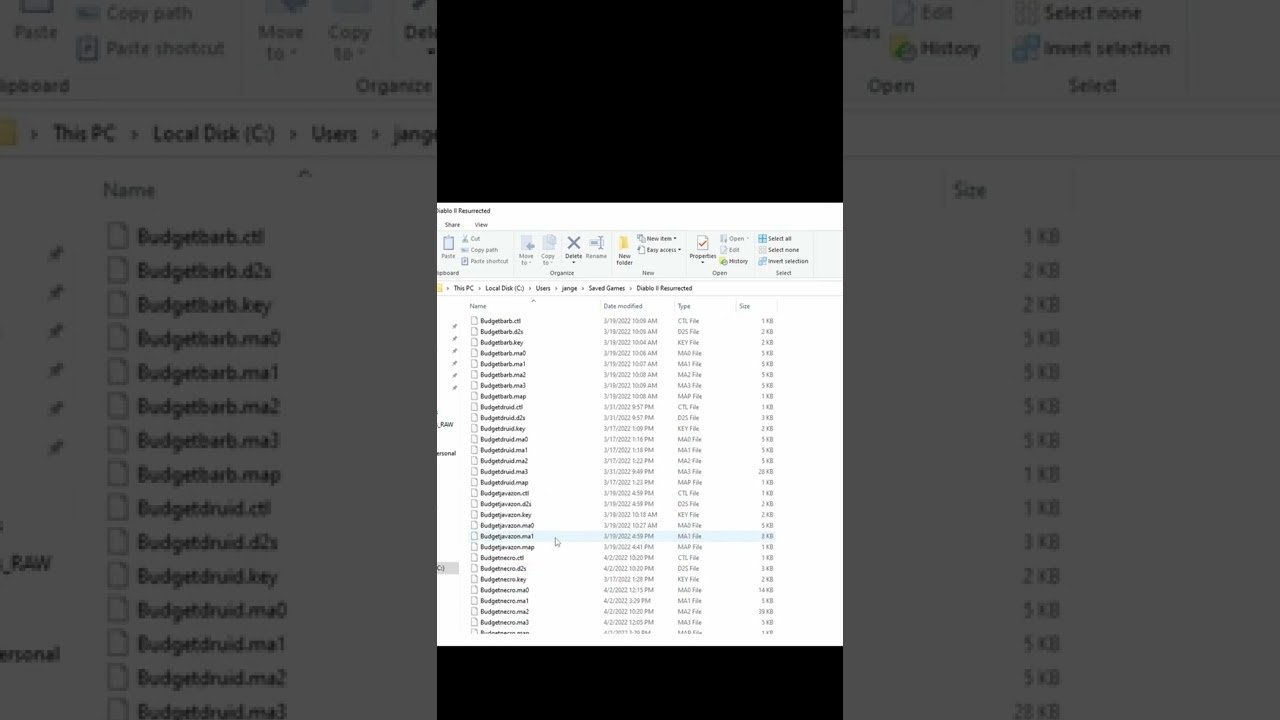
The saved games for Diablo 2 Resurrected on PC are stored in the following location: C:\Users\[YourUsername]\Saved Games\Diablo II Resurrected.
Losing your hard-earned character progress in Diablo 2 Resurrected would be a nightmare, right? It happens sometimes, and knowing where to find your files is essential. Many players often ask, “where are saved games stored in d2r pc?” Knowing the specific location allows you to backup your characters or troubleshoot if something goes wrong.
It’s simple enough to find; the path uses your PC’s user profile for access. These save files contain character info, items, and all your journey progress. Remember this location if you ever need to retrieve a backup!

Where Are Saved Games Stored in D2R PC?
Alright, let’s talk about something super important for Diablo 2: Resurrected players on PC: where your game saves actually live. You know, those precious characters you’ve spent hours leveling up, those rare items you’ve found – they all need a safe place to stay. It’s not just about knowing where they are, it’s also good to understand how they work and what you might need to do if things go a little wonky. So, grab your Horadric Cube and let’s dive into the digital depths of your computer to find those saved games!
The Main Save Game Location: A Deep Dive
The primary place where Diablo 2: Resurrected (D2R) keeps your saved games is within your user profile’s directory. This isn’t some hidden, super secret folder, but it can be a little tricky to find if you aren’t familiar with how Windows organizes user data. Don’t worry; we’ll break it down step by step.
Locating the “Saved Games” Folder
Here’s how you find the main folder where your D2R saved games reside:
- First, you need to open your File Explorer. You can do this by clicking on the folder icon in your taskbar, or by pressing the Windows key + E at the same time.
- Look at the left side, there should be a list of locations. One of these will be “Documents.” Click it.
- Inside your “Documents” folder, you’ll find a folder named “Saved Games”. This is where a lot of games, including D2R, store their data. Open it.
- Inside the ‘Saved Games’ folder, you’ll find a folder called “Diablo II Resurrected”. This is the magic spot we’re looking for!
Inside this “Diablo II Resurrected” folder, you’ll find individual folders for your single-player characters. The name of each folder will be the name of the character it holds.
Key Points to Remember:
- The full path usually looks something like this: C:\Users\[YourUserName]\Documents\Saved Games\Diablo II Resurrected. Replace [YourUserName] with the actual name of your user account on your PC.
- Sometimes, the “Saved Games” folder might be in a different location if you have changed your folder settings. However, this is rare and for most people, the path above should be accurate.
- The folders with your character names contain the actual save files that keep track of your game progress. These files have names that end with .d2s.
Inside the Character Folder: What’s Actually There
Now, let’s open one of those character folders. Here’s what you will typically see:
- .d2s Files: These are the main save files. There’s one for each character and it contains all the info about the character like levels, stats, equipment, and progress in the game. If you need to back up a character, copying this file is the most important thing to do.
- .ma0, .ma1, and .ma2 Files: These files store information related to the automap for your character in normal, nightmare, and hell difficulties respectively. If you want to keep all your map explorations along with character progress, remember to copy those files as well while taking a back-up.
- .key Files: These files are associated with character hotkeys setting. If you don’t want to lose your custom hotkey settings, take backup of these files as well while backing up character.
These files are what the game uses to load your character. Never rename, move, or open them with other programs except the game itself, as this might corrupt them.
Cloud Saves vs. Local Saves
One key thing to know is that Diablo 2: Resurrected doesn’t use cloud saves for your single-player characters. This means that your saved games are stored only on your computer. This has its advantages and disadvantages.
Why Local Saves Matter
Because your saves are on your PC, you have complete control over them. You can back them up whenever you want, transfer them to a new computer, or share them with others (though you should be cautious about doing this). It also means your game won’t suffer from lag or any internet issues.
Potential Downsides
The downside is that if your computer has a problem, like a crash or hard drive failure, your saved games might be lost if you haven’t backed them up. This is why understanding where your saves are and learning how to back them up is important. Also, you can’t play your local characters on another computer unless you manually copy these save files. Also, remember that you can not play with the same single-player character on multiple devices at the same time.
Backing Up Your Saved Games
Backing up your saved games is an important habit for any gamer. Losing hours of progress because of a computer issue isn’t fun. Here’s a simple guide on how to do it:
How to Back Up Your D2R Saves
- First, close the Diablo 2: Resurrected game. You don’t want any changes being made to the save files while you are copying them.
- Go to the Diablo II Resurrected folder (as we discussed before).
- Now, copy the entire folder of the character you want to back up. You can either do it with Ctrl + C then Ctrl + V or you can right-click and select “Copy” then right-click on a new location and select “Paste”.
- Paste the character folders in a safe place. This could be on a USB drive, an external hard drive, or even a different folder on your computer.
Tips for Backups:
- Try to create backups regularly, especially after significant progress.
- Always back up before making changes to your character’s setup or when you are testing new stuff.
- Give your backups a clear name. For example, MyBarbarian_06_15_2024. This will help you easily find them later.
Restoring Your Saved Games
If you need to restore a backed-up character, the process is simple:
- First, close the Diablo 2: Resurrected game if it’s running.
- Navigate to the backed-up folder where you copied the character folder.
- Copy the character folder from your backup location.
- Go to your Documents\Saved Games\Diablo II Resurrected folder
- Paste the copied character folder into the Diablo II Resurrected folder. If there is already a folder with the same name, you may have to rename the older folder first to avoid data loss.
- Launch the game. Your character should be available to play.
If you are trying to restore a save with the same name as a current save, the game will prompt you to choose between the current and the restore save. You need to be extra careful while doing this, to prevent any data loss.
Save Game Issues: Troubleshooting
Sometimes things can go wrong. Here are some common issues and how to try to fix them:
Game Won’t Load Character
If your game doesn’t load your character, first make sure that your character’s save files are in the correct location. Sometimes, a game crash or a glitch during saving can cause corruption. Try restoring from a backup if you have one. Also, try to see that whether any files are missing from the character folder or not.
Character Progress Seems to be Gone
If your character seems to have rolled back to a previous state, it is likely due to a corrupted save file. This can happen if the game is closed improperly. If you have a back-up, try to restore your character. If you don’t have back-ups then there is a chance that you have lost your progress.
Save File Corruption
Save file corruption is a serious issue, usually it’s caused when there’s an error during the saving process, like a sudden power loss. If you don’t have a backup, then it might be difficult to recover it. So, always maintain back-up, especially when you have done something significant progress.
Game is Not Creating New Saves
If the game isn’t creating new saves, make sure that your hard drive has enough space. Sometimes, if your hard drive is full, the game cannot save. Also, it’s important to check whether the game has proper write permissions to the save folder. You can do this by right-clicking on the game shortcut and selecting ‘Run as Administrator’ or you can check folder permissions in security tab from the folder properties.
Sharing Save Files and Potential Risks
While you can share save files with other players, it’s something you should be careful about. You can send your character save folder to a friend to play, and vice-versa. But here’s why you should be cautious:
- Character Corruption: There is a chance of character corruption when you are taking files from random users.
- Security Risks: Always download files from trusted sources only, because shared files can have malware.
- Balance Issues: Playing a character with someone else’s progress might make the game less fun.
Other Important Things to Know
Before we wrap this all up, let’s cover a couple more useful things about D2R saved games.
Offline vs. Online Characters
Remember that the character save files we’ve talked about are only for offline, single-player characters. Your online characters are stored on Blizzard’s servers. So, you don’t have to worry about your online character saves, because they are automatically backed up by Blizzard, but you also cannot access those saves manually.
Transferring Characters to a New PC
If you get a new computer, you can easily transfer your D2R single-player characters. Follow the backup steps mentioned above, and then paste the backup to the Diablo II Resurrected folder on your new computer. It’s just as easy as copying and pasting.
Hopefully this detailed information helps you manage your D2R save files with more confidence! Understanding where your saved games are stored, how to back them up, and what to do when things go wrong is an important part of the game. So go back to Sanctuary with new knowledge, and continue your adventure!
Where to find your Diablo 2 Resurrected Saves and Character Files D2R #shorts
Final Thoughts
Your Diablo 2 Resurrected saved games are located within your user profile’s Saved Games folder. This location is typically within your Documents folder, ensuring personal save data remains separate. The specific path includes your Windows username.
Navigating to C:\Users\[YourUsername]\Saved Games\Diablo II Resurrected will reveal your character save files. Therefore, you now know exactly where are saved games stored in d2r pc.

