
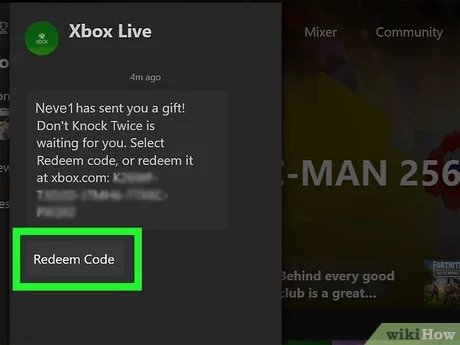
Gifted games on Xbox typically appear in your Xbox messages, or in the ‘My games & apps’ section under ‘Ready to install’, after someone has sent them to you.
Ever wondered where to find gifted games on xbox? It’s a common question! Finding those generous gifts from friends or family can sometimes feel like a small quest in itself.
They don’t just magically appear on your dashboard. The games someone sends you show up in a specific place. Knowing where to check makes claiming your game super easy.

Where to Find Gifted Games on Xbox
Getting a free game is like finding a twenty dollar bill in your old jeans – it’s awesome! If you’re an Xbox gamer, you might be wondering how to get your hands on some gifted games. It’s not always obvious where to look, so let’s break down all the different ways you can score some free Xbox games.
Xbox Game Pass and Games with Gold: Your First Stop
The most reliable place to find gifted games on Xbox is through Xbox’s own subscription services. These are like a monthly membership to a club where you get to play lots of games. Let’s explore them:
Xbox Game Pass
Xbox Game Pass is like Netflix, but for video games. You pay a monthly fee, and you get access to a big library of games that you can download and play as much as you want. Sometimes, they also include games as a bonus, meaning they are gifts to the subscribers.
- How it Works: You subscribe to Game Pass, and every month, there are new games added and others that might leave. Some of the new games added could be gifts.
- Different Tiers: There are a few different Game Pass plans: Console, PC, and Ultimate. Ultimate is the best deal, because it includes both console and PC games, plus Xbox Cloud Gaming. These plans offer extra perks, like free game trials or special content, which sometimes is like getting a gifted game.
- How to Find Gifted Games: Keep an eye on the Game Pass app or your Xbox dashboard. Microsoft often announces new additions, including any gifted titles.
The Game Pass library is always changing, so you’ll find something new to play all the time. This is a great place to start if you’re looking for access to a whole bunch of different games, and a chance to pick up gifted games!
Games with Gold
Games with Gold is a perk for Xbox Live Gold and Xbox Game Pass Ultimate members. Every month, you get a few free games that you can keep as long as you have your Xbox Live Gold or Game Pass Ultimate subscription. These are like little presents for being a loyal member.
- How it Works: Microsoft gives away a selection of games each month, and they’re yours to download and play.
- How to Find the Games: On your Xbox console, look for the “Games with Gold” section in the Xbox dashboard. They are usually displayed at the front, so they’re not hard to find. You can also find them in the Microsoft Store.
- Keep an Eye Out: Make sure you “claim” the free games each month, even if you don’t want to play them right away. You can add them to your library and play them later.
Games with Gold is perfect if you want to add some games to your library and discover some cool new titles each month. It doesn’t give you a giant library like Game Pass, but these games are free and you keep them.
Following Xbox Social Media and News
Staying up-to-date with Xbox news can help you snag some free games. Xbox and gaming websites often give away games through contests and promotions.
Following Xbox on Social Media
Xbox has a strong presence on social media platforms like Twitter, Facebook, and Instagram. They regularly announce giveaways and promotions. Sometimes they will just give away game codes to people who comment or share. Here’s how to use this:
- Follow Official Accounts: Search for the official Xbox accounts and follow them. Make sure it’s the official one by looking for a checkmark.
- Watch for Giveaways: Pay attention to their posts, looking for contests or announcements for game giveaways.
- Participate: If they ask you to like, share, or comment, do it! The more you interact, the better your chances of winning a free game.
Following these accounts is an easy way to keep your eyes peeled for opportunities.
Gaming News Websites and Blogs
Gaming news websites and blogs often run contests and giveaways, sometimes in collaboration with Xbox or game developers. These websites cover all things gaming, including big announcements. This is how you can use them to your advantage:
- Find Gaming News Sites: Search online for popular gaming news websites and blogs, focusing on ones that cover Xbox.
- Check Regularly: Visit these websites regularly to see if there are any contests or giveaways. You might see special limited time offers.
- Enter Contests: Don’t be shy to enter contests. Read the rules, and follow them, you could win!
Checking these sites regularly is an easy way to discover new games, and learn about free game opportunities!
Participating in Xbox Community Events
The Xbox community is huge, and there are often events that involve free games and prizes. Participating in them can be a fun way to get some gifts. Here are some ways to get involved:
Xbox FanFest
Xbox FanFest is a big event where Xbox fans can meet, play games, and attend exclusive sessions. They sometimes offer gifts, including game codes, to attendees. Here’s how to participate:
- Look for Announcements: Keep an eye on the Xbox website and social media for announcements about upcoming FanFest events.
- Attend Events: If possible, attend in-person or virtual events to participate and try to win prizes.
- Follow the Event Online: Even if you can’t attend in person, FanFest often includes online activities that include giveaways.
These events can be super fun and offer great chances to win prizes, including gifted games.
Xbox Online Events and Tournaments
Xbox often holds online events and tournaments that feature prizes for the winners. They might offer a free game to everyone who participates, too! Here’s what to do:
- Check Xbox Website: Look on the Xbox website for information on upcoming online events.
- Register for Events: If there are any events you want to participate in, make sure to sign up.
- Participate Actively: Play in tournaments and take part in the activities.
These events not only let you have fun, but give you a chance to win games, too!
Developer and Publisher Promotions
Sometimes, game developers and publishers give away free game codes. This could be to celebrate a new game, or just because they want to give something to their fans. Here’s how to find these offers:
Following Specific Game Studios
If you have a favorite game studio, it’s a great idea to follow them on social media, and on their website. They will often give games away, and offer chances to win game codes. Here’s what to do:
- Find Your Favorites: Make a list of the game studios that make the games you love.
- Follow Socials: Follow them on all their social media channels.
- Sign Up for Newsletters: See if the studio has a newsletter you can sign up for. This way you will hear about any giveaways.
Following game studios can be rewarding and help you get some free games!
Publisher Promotions
Game publishers, like EA, Ubisoft, and Bethesda, also hold promotions. Sometimes, they will give away game codes for certain games. Here is how to find them:
- Follow Publishers: Follow game publishers on their social media accounts.
- Check their Websites: Look at the websites for the game publishers often, to see if they are giving away games.
- Watch for Announcements: Always keep your eyes open for giveaways!
Keeping up with publishers is another great way to find gifted games.
Using Microsoft Rewards
Microsoft Rewards is a program where you earn points for using Microsoft products. You can also earn points for doing things like playing games, searching on Bing, and completing daily tasks. You can then use these points to get gift cards, and even free games!
How to Earn Points
- Use Bing: Start using Bing as your search engine to earn points.
- Play Xbox Games: You get points for completing challenges and achievements in games.
- Complete Quizzes and Polls: In your Microsoft Rewards dashboard, you can earn points by completing quick quizzes and polls.
- Shop in Microsoft Store: When you buy something in the Microsoft Store, you can earn points.
Earning points is easy and you can redeem them for great things.
Redeeming Points for Games
- Redeem for Gift Cards: Use your points to get gift cards that you can then use to buy games from the Microsoft Store.
- Look for Direct Game Rewards: Sometimes, Microsoft offers the chance to redeem your points directly for specific games.
- Check Regularly: The rewards can change, so make sure you check what’s available from time to time.
Microsoft Rewards is a great way to get free games just by doing things you usually do!
Other Ways to Find Gifted Games
There are a few other ways you can find gifted games, that are not so common. Lets have a look:
Giveaways from Streamers and Content Creators
Many game streamers and content creators host giveaways on their channels. Sometimes they are gifted games from publishers and sometimes they give games away as gifts to their community. Here is how to get in on the action:
- Follow Streamers: Find game streamers on platforms like Twitch or YouTube who play games you like, and follow them.
- Participate in Chats: Watch their livestreams, and be active in their chats. Sometimes they offer giveaways for the people watching.
- Enter Contests: Many streamers have contests on social media to give away games and prizes.
Watching streamers can be fun, and give you chances to win free games!
Special Promotions and Partnerships
Sometimes companies work together, and offer free games to promote each other. If you buy a new computer you might get a free game. It’s good to be aware of these special offers:
- Watch for Promotions: Always pay attention to the news, for any special promotions.
- Check with Retailers: Sometimes retailers, like Best Buy, offer games as a bonus when you buy an Xbox or a new TV.
- Read Fine Print: When buying a new computer or other electronic, always read the fine print to see if they include free games as a bonus.
Always pay attention to special promotions, as they can help you get a free game or two!
Finding gifted games on Xbox requires a little bit of effort and knowing where to look, but it’s totally achievable. By using Game Pass and Games with Gold, participating in events, following the right people online, and keeping your eyes open for promotions, you can find plenty of opportunities to add great titles to your Xbox library without spending extra money. It might take some time and patience, but the reward of getting a game for free is well worth it.
I did not recive my game gift from my friend
Final Thoughts
To summarize, finding gifted games often involves checking Xbox’s digital store, as well as specific game bundles or promotions. Keep an eye on your messages for gift notifications from friends.
Participating in community events or contests might also present opportunities. Remember that availability of gifted games varies.
So, where to find gifted games on xbox? Primarily, it’s within the Xbox ecosystem itself.

