
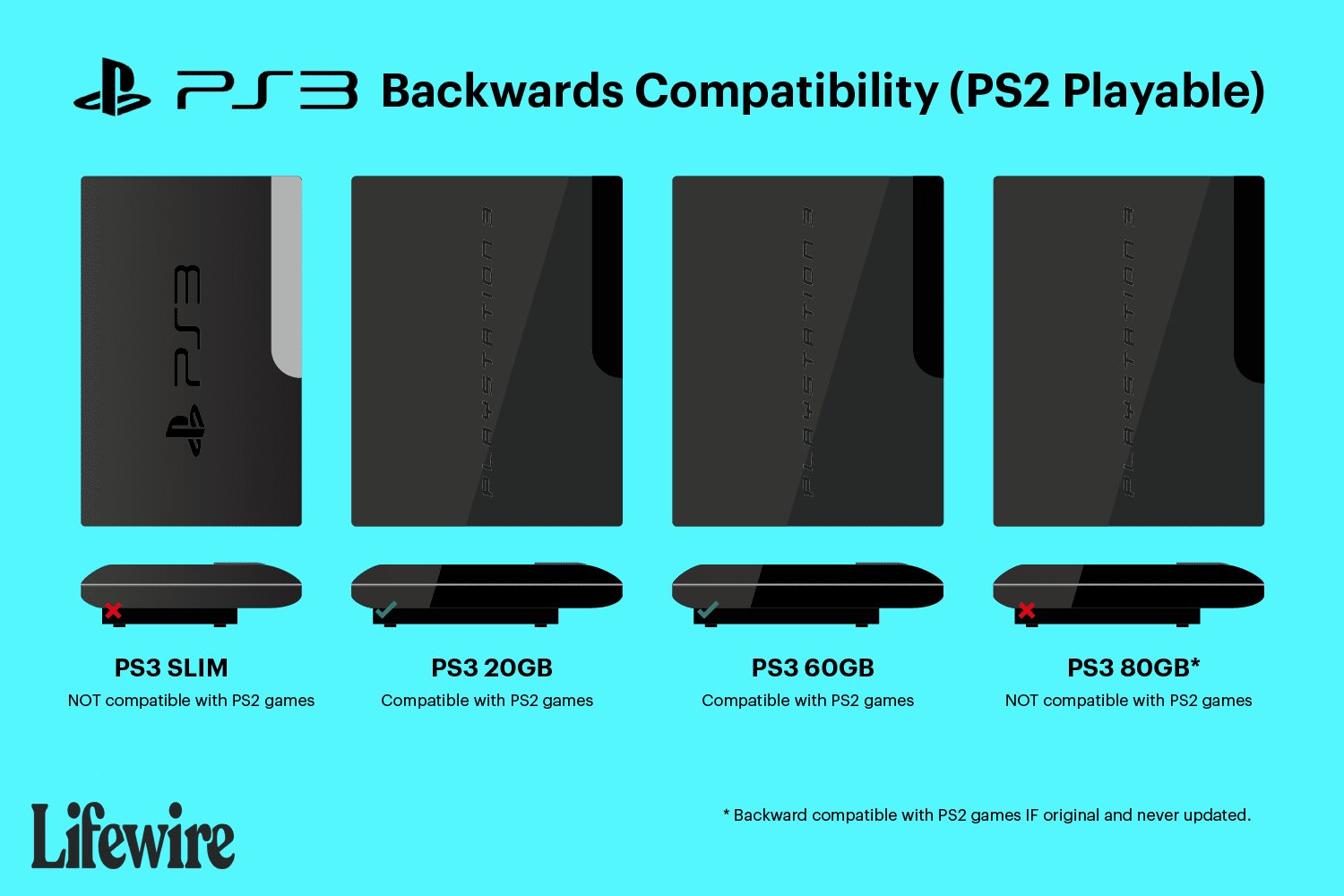
Only the original, backwards-compatible PlayStation 3 models (CECHAxx, CECHBxx, CECHCxx, and CECHExx) can play PlayStation 2 games.
Do you have a mountain of classic PS2 games collecting dust, and a PS3 itching to bring them back to life? You are not alone! The question of which ps3 models play ps2 games is a very common one, and it has tripped up many gamers.
It’s not as straightforward as it might seem, with different PlayStation 3 versions offering varied features. Some models proudly carried forward this ability to play older games, while others didn’t have that capability. Understanding these differences is key.

Which PS3 Models Play PS2 Games? A Deep Dive
So, you’re curious about playing those classic PlayStation 2 games on your PlayStation 3? It’s a fantastic idea! Who doesn’t love revisiting old favorites? But here’s the thing: not all PS3 consoles are created equal when it comes to backward compatibility with PS2 games. It’s a bit of a puzzle, but don’t worry, we’ll piece it together for you. This article will guide you through which PS3 models can play PS2 games, and it will give you the whole story. Let’s jump in and explore this console history.
The Short Answer: Not All PS3s Are Equal
Let’s get straight to the point. Only the very first generation of PlayStation 3 consoles had full hardware support for playing PlayStation 2 games. That means they actually had the PS2’s processing parts inside them! This is called “full hardware emulation”. Think of it like having two game consoles in one. Later PS3 models removed those parts to save money, which is why they cannot play PS2 games using the same method.
Why Did Sony Change Things?
You might be wondering why Sony decided to remove the PS2 hardware from later PS3 models. Well, there were a few reasons. First, including the PS2 hardware made the original PS3 consoles more expensive to produce. Sony wanted to make the PS3 more affordable, and removing the extra hardware helped them do that. Another reason was that Sony planned to create a software emulation system. This approach uses the PS3’s own processing power to mimic the PS2, but this method was never perfect and was only used in later, very limited released ways. It did not offer the kind of universal support seen in those original PS3s with hardware emulation.
The Specific Models That Play PS2 Games
Now, let’s get to the nitty-gritty. These are the specific PS3 models that can play PS2 games:
- The 20GB model (CECHBxx): This model is identifiable by its chrome trim and 20GB hard drive. It is the rarest of all PS3 models that feature full backward compatibility.
- The 60GB model (CECHAxx): This version, recognizable by its chrome trim and 60GB hard drive is the most widely known and desired for its ability to play PS2 games.
These models are also known as the “fat” PS3 models, due to their larger size. They are considered a prize among collectors and fans of both PlayStation consoles. Make sure you look for the specific model numbers “CECHAxx” and “CECHBxx”, which are located on a sticker on the back of the console, and sometimes also on the bottom.
Understanding the Difference: Hardware vs. Software Emulation
To better understand why only some PS3s play PS2 games, it’s helpful to differentiate between two types of emulation:
Hardware Emulation
The early “fat” PS3 models used hardware emulation. This means they had actual components from the PlayStation 2 built inside them. The PS2’s CPU, GPU, and other crucial parts were physically present. This allows these original PS3s to run PS2 games virtually flawlessly, because the games are running on their actual hardware. This method provides the most accurate and reliable way to play PS2 games on a PS3 console.
Software Emulation
Later PS3 models, and some “slim” PS3 models, use software emulation. Software emulation does not use the physical hardware of the original PS2. Instead, the PS3’s processor tries to mimic the behavior of the PS2’s hardware through code. This approach can be challenging, as it requires complex programming to translate everything from the PS2. It can also lead to games not running perfectly, having glitches, or not being compatible at all. While it is impressive that the PS3 is able to perform this emulation, it is not perfect. And, not all games are supported by this method.
Identifying PS3 Models That Don’t Play PS2 Games
It’s just as important to know which PS3 models don’t play PS2 games as it is to know which ones do. After the initial models, Sony removed the physical PS2 hardware. Here is a breakdown of the PS3 consoles that do not play PlayStation 2 games:
- The 80GB “fat” PS3 (CECHExx): This model had a software emulator for only some PS2 games, and it did not have the full hardware emulation. This model did not perform as well as the CECHAxx and CECHBxx models.
- All “slim” PS3 models (CECH-2000, CECH-2100, CECH-2500, CECH-3000): The slim PS3 models, which were smaller and more energy-efficient, do not feature any sort of PS2 compatibility.
- All “Super Slim” PS3 models (CECH-4000): The super slim models are the last versions of PS3. They are not able to play any PlayStation 2 games.
These models are not compatible with PS2 discs. They can not run PS2 games from disk. If you have one of these PS3s, you will not be able to play PS2 discs directly, or through any type of built in emulation that is in the console.
The “Software Emulation” Models: A Limited Exception
There’s one exception to the rule that later models don’t play PS2 games. As mentioned before, the 80GB “fat” PS3 model (CECHExx) did include a software emulation for a limited number of PS2 titles. This was never a perfect method, and it had limited support for game titles. It also did not provide the experience that the original two models had. It is important to note that this is not a replacement for the hardware emulation, because it has very limited game support and a limited compatibility. This means that not all PS2 games would work on this specific model of the PS3.
How to Check Your PS3 Model Number
If you’re not sure which PS3 model you have, finding the model number is easy. It is located on a sticker on the back of the console. You may also find it on the bottom of the console. It should start with the letters “CECH” followed by a series of numbers and letters (like “CECHA01” or “CECH-2001”). Check this label to determine which version you have. It is a good way to determine the features of the specific PS3 that you own.
Why Backward Compatibility Matters
The ability to play older games on newer consoles, called “backward compatibility,” is something many gamers appreciate. Backward compatibility allows players to enjoy games that they already own and revisit classic titles. In the case of the PlayStation 3, some players see its ability to play PS2 games as a huge advantage. For some gamers, it’s the primary reason for owning an original, backward compatible, “fat” PS3 console.
The Secondary Market for Backward Compatible PS3s
Due to their unique ability to play PS2 games using hardware emulation, the original 20GB and 60GB PS3 models have become very desirable in the secondary market. These units can sell for higher prices than other PS3 models, as they are valued by players who want to experience their PS2 game libraries on a modern system. If you want to buy a model that does play PS2 games, you should be prepared to spend a little extra, as they are in high demand.
Potential Issues with Older PS3 Models
While the original backward compatible PS3 models are the best at playing PS2 games, there are some things to consider. These are older pieces of hardware, and therefore, they might need some extra care. Here are a few possible issues:
- Overheating: These older models can get quite hot during operation. It is a good idea to ensure the console has adequate ventilation.
- Hardware Failure: Like any electronic device, these older PS3s can be prone to failure. This is especially true if they were not well taken care of. It is also true that some of the first few models were prone to failures, so research and testing is highly recommended.
- Laser Issues: The disc drives in older consoles can fail over time. This is a common issue with any older disc based system.
Taking Care of Your Backward Compatible PS3
If you’re lucky enough to own one of the original backward compatible PS3 models, it’s important to take good care of it. Here are some tips:
- Ensure Good Ventilation: Make sure your PS3 has plenty of space around it so that it can vent heat properly. Never place it in an enclosed cabinet where it cannot vent heat.
- Clean the Console: Periodically clean dust and debris from the console’s vents to help keep it running cool. This can be done with a vacuum with a brush attachment.
- Avoid Overuse: If possible, don’t use the console for extended periods of time without giving it a break. The components will heat up with use. Allowing it to cool down between gaming sessions is important.
These steps will help to keep your valuable PS3 working for years to come, especially if it is a model that has backward compatibility for PS2 games.
The Appeal of Retro Gaming
The continuing interest in playing classic games on older consoles speaks to the appeal of retro gaming. Many gamers have fond memories of playing these older titles. This provides them with a sense of nostalgia. The desire to experience classic games is strong. Playing the games on original hardware gives the player the most authentic experience.
Alternatives to Playing PS2 Games on a PS3
If you don’t have a backward compatible PS3, there are other ways you can play PS2 games. You can still use an actual PlayStation 2 console and play discs. You can also play some PS2 games on the PlayStation 4 or PlayStation 5 through the PlayStation Network. Sony provides some PS2 titles that can be purchased and downloaded to newer consoles. However, not all games are available, and it might not be the same as playing your old discs on original hardware.
In conclusion, the ability to play PS2 games on a PS3 is a feature that is limited to the original “fat” 20GB and 60GB models (CECHAxx and CECHBxx). These models have become collector’s items due to this function. Later PS3 models removed the PS2 hardware and did not provide full software emulation. Understanding the differences between these models is important for any gamer wanting to play PS2 titles on a PS3. While other methods do exist, using a backward compatible PS3 gives the most reliable and accurate results.
🆚 Which is the Best PS2 Backwards Compatible PlayStation 3? | CECHA01 vs CECHE01
Final Thoughts
Only the initial PlayStation 3 models, specifically the 20GB and 60GB versions, play PlayStation 2 games natively. These consoles have the necessary hardware built-in. Later PS3 versions removed this functionality.
It’s important to remember which ps3 models play ps2 games because not all versions will offer this backward compatibility. If playing PS2 titles is vital, you need to acquire one of those specific early models.

