
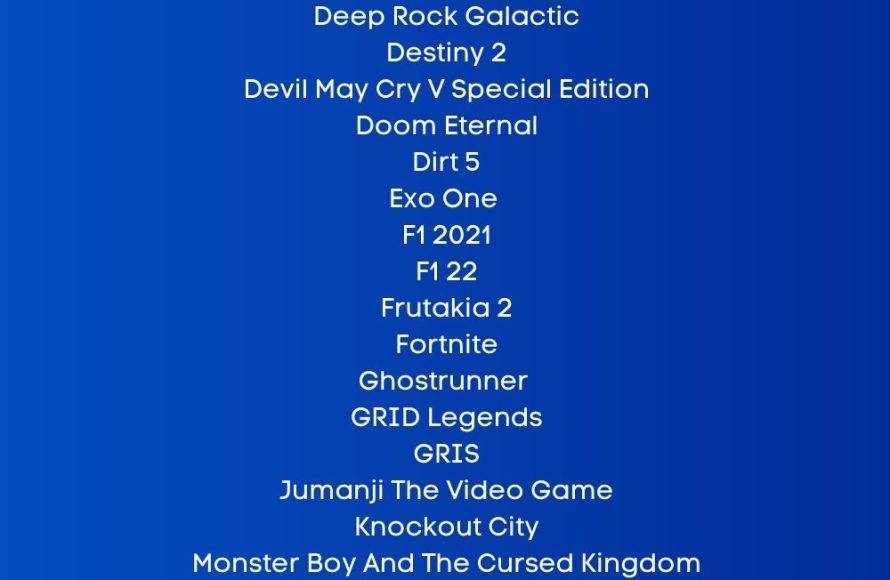
Several PlayStation 5 games support 120Hz refresh rates, including titles like Call of Duty: Black Ops Cold War, Rainbow Six Siege, and Devil May Cry 5 Special Edition, though this requires a compatible display.
Want to experience smoother gameplay on your PlayStation 5? Many gamers are asking which ps5 games support 120hz, and the answer isn’t always straightforward. Getting the full potential of your console requires the right combination of game and display.
It’s important to know that having a TV or monitor with a 120Hz refresh rate is crucial. Not all PS5 games offer this high refresh option but those that do can bring a significant boost in perceived smoothness and responsiveness.

Which PS5 Games Support 120Hz?
So, you’ve got your shiny new PlayStation 5 and maybe even a super-fast monitor or TV that can handle 120Hz. Awesome! But what does 120Hz even mean, and how can you make the most of it with your PS5 games? Well, let’s dive in. We’re going to explore which games can give you that smooth, super-responsive gaming experience and what you need to make it all work. Get ready to see your games like never before!
Understanding 120Hz and Why It Matters
Okay, first things first. What’s the big deal about 120Hz? Hz stands for Hertz, and in the world of displays, it means how many times the image on your screen updates per second. A standard TV or monitor usually operates at 60Hz, showing you 60 frames every second. With 120Hz, your screen updates 120 times per second! This means you see twice as much information, making movement look incredibly fluid and smooth, especially in fast-paced games. This extra smoothness is a great bonus. It can help you spot enemies quicker and react faster because you’re seeing everything more clearly. Imagine playing a racing game, or an intense battle royal game where every split second counts – 120Hz is a real game changer. It provides a huge advantage for competitive gaming. It’s not just about smoother visuals, it is about enhancing your gameplay and enjoyment.
The Difference Between 60Hz and 120Hz
Think about it like flipping through a flipbook. A 60Hz display is like flipping through 60 pages per second, which looks pretty good. But a 120Hz display is like flipping through 120 pages per second – it looks much more fluid and natural. Here’s a simple breakdown:
- 60Hz: Standard refresh rate, good for most viewing.
- 120Hz: Faster refresh rate, smoother motion, better for fast-paced gaming.
The increase in refresh rate also cuts down on motion blur, making things appear much sharper while you move quickly in the game. This reduction in blur makes it easier on your eyes and gives a more pleasant playing experience.
What You Need to Play at 120Hz on PS5
Before we get to the games list, you need to make sure your setup is ready for 120Hz gaming. It’s not enough to just have a PS5, there are some other important pieces of the puzzle you need. If you don’t have them, you won’t be seeing that silky-smooth 120Hz action. Here is what you need:
A Compatible Display
First, you need a monitor or TV that actually supports 120Hz. Not all displays do! Look for models that are specifically advertised as 120Hz or sometimes they are advertised at 144Hz which works with PS5. If your display doesn’t support 120Hz, you won’t get the high refresh rate no matter what games you’re playing. Make sure you check its specifications to confirm that it supports 120Hz, because if you have a 60Hz monitor or TV it will not work, it will only give you 60Hz.
HDMI 2.1 Cable
Next, you need the right cable. A standard HDMI cable won’t cut it. You need an HDMI 2.1 cable. These cables have the bandwidth to handle the extra data that 120Hz gaming needs. The good news is that PS5 comes with an HDMI 2.1 cable in the box, so you most likely already have this. But if you are using another HDMI cable, ensure that you’re using an HDMI 2.1 cable and not an older one. Older HDMI cables can prevent your device from using the full capabilities of your TV or monitor. You will need to check the specifications of the cable if you bought it separately to make sure it is indeed an HDMI 2.1 cable.
PS5 Settings
Finally, you’ll want to make sure your PS5 settings are correct. Go to your PS5 settings menu and make sure that 120Hz Output is set to ‘Automatic’. It’s usually set like this by default, but it’s good to double check it. This makes sure that your PlayStation 5 is ready to output at 120Hz when a compatible game is launched. Here’s how you can check this:
- Go to Settings on your PS5.
- Select Screen and Video.
- Choose Video Output.
- Make sure that “Enable 120Hz Output” is set to “Automatic“.
By making these settings changes, it ensures that you will have access to the high refresh rates available if you have a game that supports 120hz. Double check your settings because sometime you will need to change the setting in your game, which is usually located in the video settings of the game.
The List: PS5 Games That Support 120Hz
Now, for the main event! Here is a list of PS5 games that have 120Hz support. This list is not all inclusive, and it’s always a good idea to double check a game’s settings menu just in case.
Popular AAA Titles with 120Hz
Let’s start with some of the bigger titles that offer that sweet 120Hz action:
- Call of Duty: Black Ops Cold War: This first-person shooter is incredibly smooth at 120Hz, it gives you a competitive edge in online matches because it’s just so reactive.
- Call of Duty: Vanguard: Another Call of Duty title, this game also allows you to play at 120Hz and it makes it much easier to track your enemies, resulting in a big advantage in multiplayer matches.
- Call of Duty: Modern Warfare II/III: These newer entries in the series also support 120Hz, providing a great experience.
- Destiny 2: This popular multiplayer shooter looks gorgeous in 120Hz, especially with its great graphics. The faster framerate makes the action feel more fluid.
- Devil May Cry 5 Special Edition: If you like fast-paced combat, playing this in 120Hz will really increase the pace of the game. It can make all the quick moves and combos look amazing.
- Dirt 5: This off-road racing game benefits a lot from a higher refresh rate, making every corner and jump look very smooth.
- Rainbow Six Siege: This tactical shooter is much more responsive with the increase in frames, making it easier to react to threats.
- Borderlands 3: Playing this game in 120Hz makes it more fun with lots of shooting and explosions. It feels great when all the action is running so smoothly.
Indie and Smaller Titles with 120Hz
It’s not just big-budget games that use 120Hz. Here are some indie titles that offer a smooth experience:
- The Pathless: This beautiful game’s movement is very fluid at 120Hz.
- WRC 9 and WRC 10: These rally racing games work great at 120Hz, especially when navigating tight turns.
- Tony Hawk’s Pro Skater 1 + 2: Pulling off tricks in this game is even better with the extra smoothness of 120Hz, making the game very responsive.
- Nioh Remastered and Nioh 2 Remastered: These action RPGs look great at a higher refresh rate and make the gameplay much more responsive
Games With Optional 120Hz Modes
Some games don’t enable 120Hz automatically, but they give you the option in the game settings to enable it. This means you might have to go to the video settings of the game to turn this setting on. Here are some of those games:
- Rocket League: This soccer-with-cars game feels incredible at 120Hz. It’s very responsive, especially when making fast movements. You will find this in the video settings of the game.
- Fortnite: This popular battle royale game has an option for 120Hz support, which makes a big difference in the responsiveness of the game. You will need to turn this setting on in the video settings menu of the game.
- Ori and the Will of the Wisps: This beautiful game has a smooth 120Hz option.
- Doom Eternal: The fast-paced combat feels even more impressive at 120Hz with the extra fluidity in its performance. You can change this setting in the video settings of the game.
How to Confirm 120Hz is Working
It’s important to double check that you’re getting the full 120Hz while playing a supported game. You can tell if it’s working by using the following methods:
Visual Confirmation
The first way you’ll know if 120Hz is working is by the game simply looking and feeling very smooth. If you are switching from a 60hz to 120hz it can be very obvious. The motions will look less blurry and much more fluid. It’s a big difference that you can see with your eyes. If the game does not look smooth you may not be using 120hz and might need to check the games video settings to turn it on.
Checking Your Display
Many monitors and TVs have a built in display that will tell you if you are running at 120hz or a different refresh rate. If your device has this feature, it’s a good way to verify if you’re getting the 120Hz refresh rate. You may have to go to your display’s settings to turn on this display. Check your display manual to find the option to turn this on.
In-Game Settings
Some games actually show you what refresh rate you are running at in the video settings. So, it is always good to check the in-game settings. You can usually see it listed right on the screen if you are running in 120hz mode. Check the video settings and if you don’t see it, check to see if it provides the information in another setting in the game.
Benefits of Gaming at 120Hz
Why should you bother with 120Hz? Here are the main benefits:
- Increased Smoothness: As we’ve talked about, the main advantage is incredibly smooth visuals. Everything looks more fluid and natural.
- Reduced Motion Blur: With the increased refresh rate, there is much less motion blur, which makes moving in games look clearer and sharper.
- Quicker Reactions: The smoother visuals can make it easier to see what is going on and respond faster. It gives an advantage in competitive gameplay.
- More Immersive Experience: All the smoother movement can give you a more enjoyable experience by making it feel more real and engaging.
- Less Eye Strain: Some people find that the smoother visual can reduce eye strain, especially during longer play sessions.
Playing games in 120hz is not always necessary but it can make your gaming experience better by increasing the refresh rate of the game and making it look much better.
In summary, if you have a PS5 and the right equipment, diving into the world of 120Hz gaming is definitely worth it. The increased smoothness and responsiveness make a big difference, especially in fast-paced and competitive games. So, plug in that HDMI 2.1 cable, make sure your settings are good, and get ready to see your games in a whole new light!
15 Great PS5 120FPS Games | 2023
Final Thoughts
Many PS5 titles offer smoother gameplay at 120Hz, provided you have a compatible display. Games like Call of Duty: Black Ops Cold War and Devil May Cry 5 Special Edition achieve this higher refresh rate. This provides noticeable visual improvements and reduces input lag.
Several racing games, such as Gran Turismo 7 also support 120Hz output. Remember that you need an HDMI 2.1 connection for 120Hz at 4k resolution. Checking specific game details can help you know which ps5 games support 120hz.

