
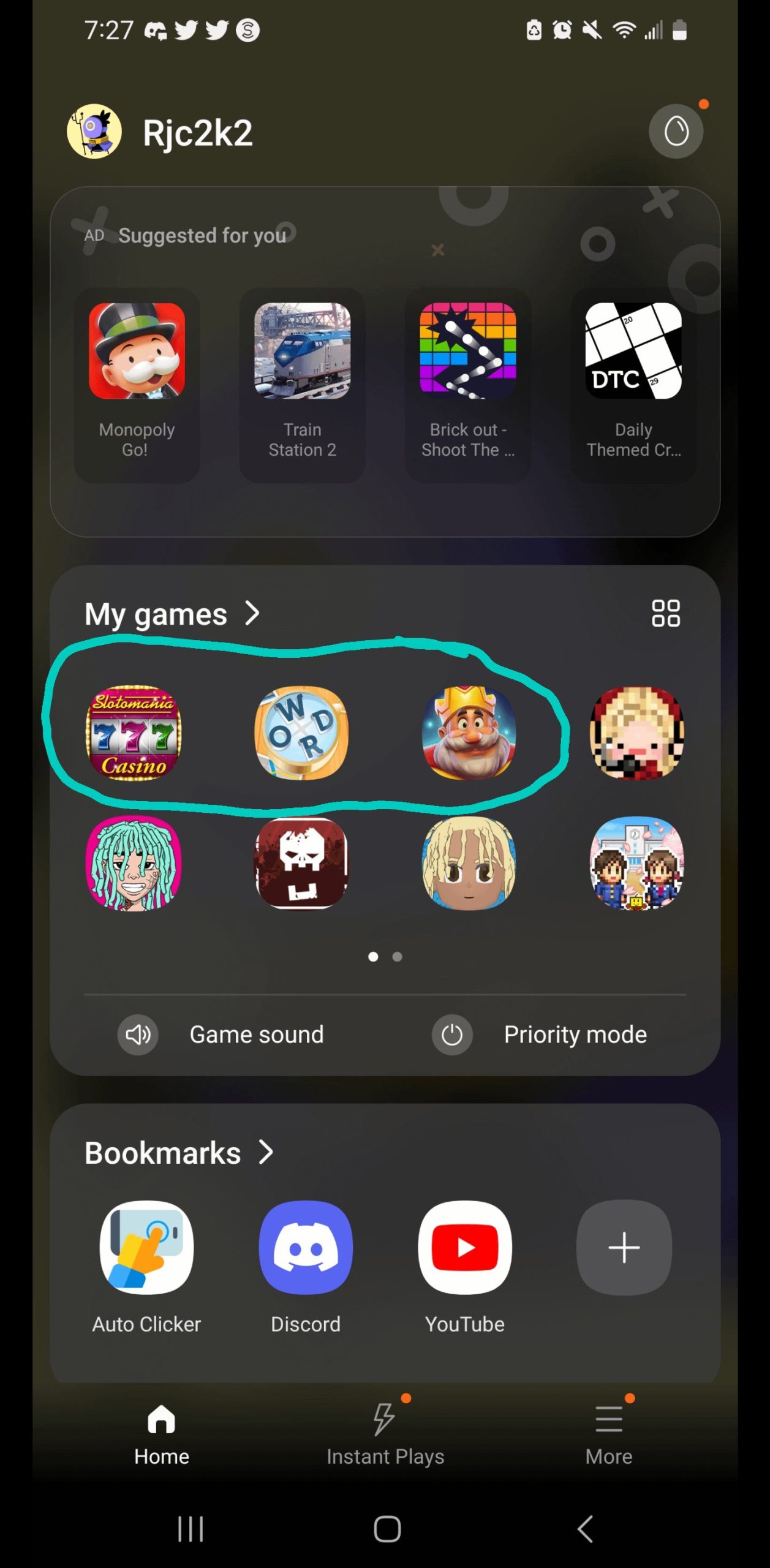
Phone updates often install games because manufacturers and app developers partner to promote these games, sometimes for revenue, sometimes simply to gain user adoption.
Ever felt surprised finding new games after updating your phone? It happens to many, and the question arises, why do phone updates install games? It’s a common practice by phone makers and game companies. They often collaborate to push these apps onto your device. This can help the game reach more people. Some find it a useful shortcut to fresh entertainment, while others see it as unwelcome clutter.

Why Do Phone Updates Install Games?
Ever noticed how after a phone update, a new game you never asked for suddenly appears on your screen? It’s like your phone decided to surprise you with a gift (or maybe not so much of a gift, if you’re not into that type of game). You might be scratching your head, wondering why these games are sneaking onto your phone during updates. It’s not magic, and it’s not your phone developing a secret gaming habit. There are a few clear reasons why this happens, and we’re going to dive deep into each one, so you’re in the know.
The Big Picture: Partnerships and Pre-installation
One of the main reasons games get added during updates is because of partnerships between phone makers and game developers. Think of it like this: the phone company (like Samsung, Apple, or Google) makes a deal with a game company. In this deal, the game company pays the phone company to put their game directly on your phone. This is called pre-installation. It’s kind of like when a store puts a special item right at the front of the shelf so you’re more likely to see it. The phone company gets some money, and the game company gets a lot more eyes on their game.
What’s in it for the Phone Makers?
So, why do phone companies do this? Well, it’s all about money. These partnerships provide a new way for phone companies to earn revenue beyond just selling phones. Instead of only getting paid once when you buy the phone, they also earn a commission every time they install an app for their users. For them, it is a very clever move to create a recurring income stream. It’s like having an extra income stream that flows in, rather than only relying on just phone sales.
What’s in it for Game Developers?
For game developers, pre-installation is a major opportunity. It’s a direct route to getting their game in front of millions of potential players. Instead of hoping people will find their game in an app store, the game is already there, ready to be played. This boosts the number of people who see and start playing their game, leading to a higher chance of people spending money on it with in-app purchases. It’s like giving their game a VIP pass directly to your screen. This is particularly useful for the game developer when they want to launch a new game.
The Update Process: A Perfect Time for Installs
Another reason why games appear during updates is because updates provide a convenient moment to install new apps. When your phone is updating, it’s already doing a bunch of behind-the-scenes work. Adding a game or two to the mix doesn’t take much more effort. It’s like when you’re already cooking a meal and decide to quickly chop some extra vegetables to throw in. It’s the best time to push the pre-install games without interrupting the normal usage of the phone. Therefore, most phone companies or app developers use this time window to push the games to the user phones.
Operating System Specifics
The exact way games are installed during updates can depend on your phone’s operating system (Android or iOS). Let’s have a look at both individually:
Android
Android, being an open-source system, often sees more pre-installed apps because many different phone makers use it. Phone companies like Samsung, Xiaomi, and OnePlus can customize their Android software, so they’re able to include the apps of their choice during the updates. These apps can be anything from games to utilities and third party softwares. This means that different Android phones from different brands might have different games pre-installed after an update.
iOS
Apple, which makes iPhones, also includes pre-installed apps, but they are usually their own apps or those that are part of Apple’s ecosystem. It is comparatively less common for third-party games to show up during an iOS update. But it’s not impossible. Apple has been known to promote certain apps or games on the App Store, which might get highlighted when you update your phone. These are very high standard games or apps with better user ratings.
Types of Pre-installed Games
Now, let’s explore the types of games you might find pre-installed on your phone after an update.
Casual Games
You will mostly find casual games on your mobile phones. These games are easy to learn and quick to play, they often don’t require much time commitment. Some typical casual games include puzzle games, arcade-style games, and simple simulation games. They are designed for a large number of people to play, irrespective of their gaming experience. Many people find these games very relaxing or amusing.
Free-to-Play Games
Many games that are pre-installed are free-to-play. This means you can download and start playing these games for free. However, these types of games frequently include in-app purchases. These purchases might allow you to buy virtual items, access new levels, or skip parts of the game. The game companies bank on the probability that users may be tempted to purchase these to improve their gameplay experience.
Promotional Games
Sometimes, the pre-installed game is not actually there to become a regular part of your game library. They could be there to promote a new game from that company. This way, when users launch the game, they are greeted with promotional material from other games from the same developer. It is like a free ad space for a game company on your mobile phone.
The User Experience: Why It Can Be Annoying
While these pre-installed games might seem convenient to some people, many find them annoying. It can feel like your phone is being cluttered with stuff you didn’t want. It also increases the apps on your phone, therefore, utilizing some extra space that you may want to use for other things. The games are frequently put in places where they are visible, pushing users to try them out. This can annoy users who just want to use their phones without the added distraction of pre-installed games.
Space and Performance Issues
Another complaint with pre-installed games is that they use up space on your phone. This can be a bigger problem for people who have phones with limited storage. Moreover, these pre-installed games take up the resources on your phone. This may cause the phone to run slower than it normally does.
The Privacy Angle
Some people also feel uneasy about having pre-installed games because it can raise questions about privacy. They might wonder what data these games are collecting. In most cases, these games work like regular apps that you download from the app store. But the way they got on your phone might still feel a little intrusive for some users.
How to Handle Pre-Installed Games
So, what can you do if you don’t want these pre-installed games? The good news is that you usually have several choices to manage them.
Uninstalling Games
The most straightforward way to get rid of pre-installed games is to uninstall them just like any other app. Here’s how you can usually do it:
- Find the app icon on your phone’s home screen or in the app drawer.
- Tap and hold the app icon.
- A menu should appear with options like “Uninstall,” “Remove,” or a trash can icon.
- Tap the uninstall option to remove the game from your phone.
Keep in mind that you might not be able to uninstall all pre-installed games, as some are built into the operating system. But most of the pre-installed games can be easily uninstalled.
Disabling Games
If you can’t uninstall a game, there’s often an option to disable it. This removes the app from your screen, making it harder to access. Disabling doesn’t free up storage space, but it can make your phone less cluttered. Here’s how you can usually disable a game:
- Go to your phone’s settings app.
- Find “Apps” or “Applications.”
- Locate the game you want to disable in the list of apps.
- Tap on the app, and there should be an option to “Disable.”
- Select the “Disable” option to remove the game from the display.
Using Third-Party Launchers
If you really want to customize your phone and get rid of pre-installed games, you could consider using a third-party launcher. These launchers let you change the look and feel of your home screen and app drawer. Some launchers also have options to hide apps. This way you can hide or group the games in a folder.
Being Mindful of Updates
Keep a watch on the updates and see if any of them have the mention of adding new apps or games. While this is not always mentioned, you might get an idea of the coming changes to your phone. You can also read or watch a review before updating to see if people have reported the inclusion of new apps after the update.
The Future of Pre-Installed Games
Pre-installed games are likely to remain a part of the phone landscape for a while. As long as phone companies and game developers see the benefits, it’s going to continue. It’s important to be aware of why these games appear on your phone and have ways to deal with them, so that your mobile phone experience remains clutter free.
Some people might find pre-installed games to be a great way to be introduced to new games. However, for people who don’t want them, it’s useful to know your options for uninstalling, disabling, or hiding them.
In the future, we might see changes to how pre-installed games are handled. There could be more transparency, or phone makers might give users more control over which apps get installed during updates. Until then, it’s best to stay informed and make the most of the tools you have to customize your phone to your liking.
Understanding the reasons behind why phone updates install games will help you navigate your mobile phone experience better. Whether you find these games enjoyable or annoying, now you have a better grasp of the how and why of this common practice. With the ability to remove or hide them, you can keep your phone organized and only have the apps you want and love.
How to Fix Can’t Install/Update Apps in Google Play Store (100% Works)
Final Thoughts
Phone updates often bundle pre-installed games through partnerships with developers. These deals benefit manufacturers by increasing app engagement. The added games, while sometimes unwanted, can generate revenue via in-app purchases.
Ultimately, why do phone updates install games comes down to these business decisions. Manufacturers seek ways to boost profits and user activity, and sometimes that means adding games you didn’t ask for.

