
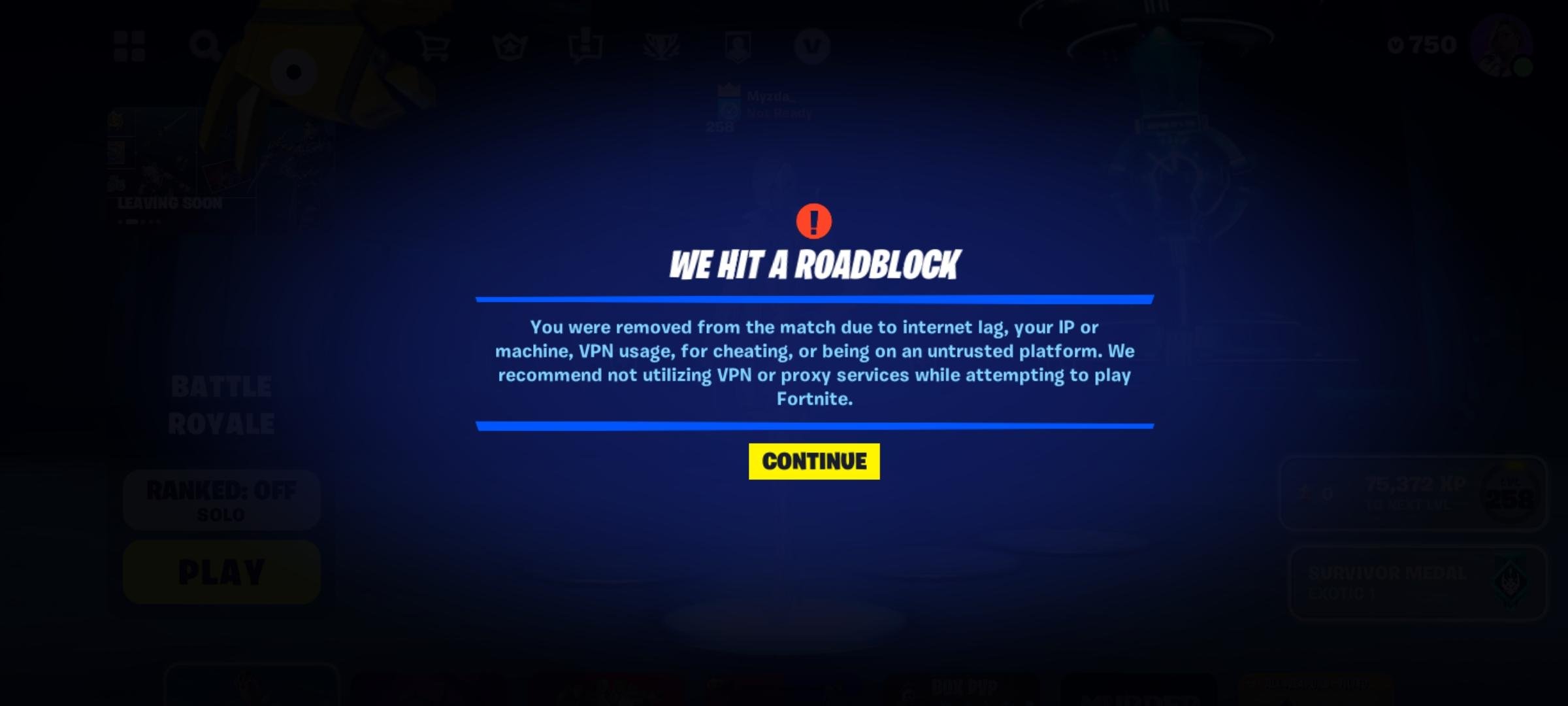
Fortnite kicks you out of the game due to server issues, poor internet connection, outdated game files, or problems with your gaming device.
Frustration hits hard when you’re in a tight match, and suddenly, why is fortnite kicking me out of the game? It’s a common problem, leaving players mid-battle and wondering what went wrong.
Several factors can cause these unexpected disconnections. From server overload to your own network stability, the culprit isn’t always obvious. We’ll explore the main reasons this might happen.

Why is Fortnite Kicking Me Out of the Game?
So, you’re trying to get that Victory Royale, building amazing forts and taking down opponents, but then… BAM! You get kicked out of the game. It’s frustrating, right? You’re not alone. Many Fortnite players experience this, and there are several reasons why it might be happening. Let’s dig into what could be causing those annoying disconnections and how to get back in the game.
Internet Connection Problems
A shaky internet connection is one of the biggest culprits behind Fortnite getting you kicked. Think of it like this: Fortnite needs a constant stream of data to run smoothly. If your internet is cutting out, it’s like trying to watch a movie that keeps pausing and buffering. Here’s a breakdown of internet issues that can lead to disconnects:
Unstable Wi-Fi
Wi-Fi signals can be affected by many things. Walls, distance from the router, even other electronic devices can weaken your signal. If your Wi-Fi icon on your device is showing weak bars, that’s a big hint that the issue is with your Wi-Fi. Try these tips:
- Move closer to your Wi-Fi router.
- Restart your router and modem. Wait about 30 seconds before plugging them back in.
- Try using a wired connection (Ethernet cable) for a more stable connection. It skips the Wi-Fi middleman and connects directly to your router, making it much better for gaming.
Slow Internet Speed
Fortnite needs a good internet speed to send and receive data quickly. If your internet speed is too slow, your game will struggle to keep up, leading to disconnects. Here’s how to know if your internet is slow:
- Do a quick speed test online. Just search “internet speed test” on Google and click one of the results.
- Check the download and upload speeds. For Fortnite, you need good enough speeds for both. Check Fortnite’s recommended settings for good upload/download speeds.
Connection Drops
Sometimes, your internet connection might just drop out suddenly, even if it was fine before. This can happen due to problems with your Internet Service Provider (ISP) or network issues. Here’s what you can try:
- Check with your ISP if there are any known outages in your area.
- Try restarting your modem and router again. Sometimes, a simple reset is all it takes.
Fortnite Server Issues
Sometimes, the problem isn’t on your end but with Fortnite’s servers. Think of the servers like a giant playground. If too many kids are trying to play at once, the playground gets crowded and things might start to break down. Server issues can lead to:
Server Overload
When lots of people try to play Fortnite at the same time, the servers can become overloaded. This is especially common during new season launches or big in-game events. This may cause you to be kicked out, as the server is struggling to process data from many players at once. There is no easy fix, but here is something you can do to try and get around this:
- Wait it out. Usually, server overloads are temporary. Check Fortnite’s official social media pages for updates.
- Try playing at off-peak hours, when fewer people are online.
Server Maintenance
Occasionally, Fortnite’s developers need to take the servers offline to fix things or make updates. This is called server maintenance. Usually, they announce these maintenances ahead of time. They may cause you to get kicked out of the game. Here is how to be prepared:
- Check Fortnite’s social media channels for announcements about server maintenance.
- Avoid playing during scheduled maintenance times.
Server Crashes
Unfortunately, servers can sometimes crash. This means they suddenly stop working, causing everyone to be kicked out. This is not very frequent but it can happen, as you can’t really control a server crash, here is what you can do:
- Be patient. Wait for Epic Games to fix the server and bring it back online.
- Check social media for updates about the status of the servers.
Device Problems
Sometimes, the issue isn’t your internet or the servers; it’s your own device. Think of your device like the car you are using to drive around the map, and if there is something wrong with the car it will lead to a breakdown. Here are some problems to look at:
Outdated Software
If the operating system on your device or Fortnite itself isn’t up-to-date, it can cause compatibility issues leading to kicks. Updates fix bugs and improve how the game runs, so it’s important to keep them installed. Here’s how to keep up to date:
- Make sure your device’s operating system (like Windows, PlayStation OS, Xbox OS, or Android) is updated. Check settings to do so.
- Always update Fortnite when new updates come out. You may need to manually go to the app store and update the game if it does not update automatically.
Insufficient Device Specs
If your device doesn’t meet the minimum system requirements for Fortnite, the game might struggle to run correctly. If your device is old, it might not have enough “power” to run the game smoothly. This can lead to the game freezing or kicking you out. Here is how to check your device’s specs:
- Check Fortnite’s official website to see the minimum requirements for your device.
- Compare your device’s specs to the requirements. If your device is below the minimum, it may not run the game well.
Overheating
If your device gets too hot, it might start to act up and cause games to crash. This is common on devices that are old, or have been running for a long time. Here’s what you can do:
- Avoid playing for extended periods.
- Make sure there is good ventilation around your device.
- Try using a cooling pad or fan to keep your device cool, especially when gaming.
Background Applications
Running too many applications in the background can eat up your device’s resources and cause Fortnite to malfunction. These other applications may slow down your device, causing it to crash while running Fortnite. Here is how to limit this problem:
- Close unnecessary applications before running Fortnite.
- Check your system settings to see what programs are running in the background and close them.
Game File Issues
Sometimes, the problem lies with the game files themselves. If some files are missing, damaged, or corrupted, this can cause the game to not run correctly and can lead to kicks. Here are some ways that game files might get corrupted:
Corrupted Game Files
Game files can get corrupted for various reasons, like failed updates or errors while saving. When files get corrupted, they are like a book with missing pages, making the game unable to function correctly. Here is how you can fix this:
- Use the game launcher’s verify option to check the game’s files and fix any problems.
- If verifying does not work, try uninstalling and reinstalling the game. This will replace all files with fresh new copies.
Game Bugs
Fortnite, like any game, can have bugs (errors). Sometimes these bugs can cause players to be kicked from the game. Bugs can come from faulty code when updates are made to the game, for instance. Here is what you can do:
- Always update to the latest version of the game. These updates often include fixes for known bugs.
- Check the forums online for the current game version, and see if other players are facing the same issue.
Account Issues
On very rare occasions, you might be getting kicked due to problems with your account. These issues are not too frequent, but here is what could be happening with your account:
Account Security Problems
If there is any suspicious activity on your account, Fortnite may kick you out for security reasons. This is done to protect your account from hackers. Here’s how you can keep your account safe:
- Make sure you use a strong and unique password.
- Turn on two-factor authentication.
Banned Account
If you have violated the game’s rules, your account may get banned. If you have been banned, you will be unable to play Fortnite. Here is what you can do:
- Review the terms of service, so you do not violate them again in the future.
- Contact Fortnite support to discuss your ban.
Other Potential Reasons
There might also be other unique causes that are making you get kicked. Here are some other things to consider.
Firewall Issues
Sometimes, firewalls can block Fortnite from accessing the internet or the game’s servers. Here is how to check your firewall settings:
- Make sure Fortnite is allowed through your firewall.
- Temporarily disable your firewall to see if the issue resolves.
VPN Problems
VPNs can sometimes cause issues with your connection, and therefore with Fortnite. If you are using a VPN, here is what you can try:
- Try playing without a VPN to see if that helps.
- Make sure your VPN is reliable and has a fast connection.
Hardware Problems
If you are on a PC, it could be that one of your hardware components is failing. For example, you could have a faulty memory stick, or your graphics card might be running too hot. The best course of action for this is:
- Monitor your PC hardware with a monitoring program, to check if any component is not running well.
Being kicked out of Fortnite can be a real headache, but by looking into these possible reasons, you can figure out what’s happening and get back to playing. Check your internet, device, game files and be sure to keep everything updated. You will soon be getting those Victory Royales.
Fix Fortnite Crash on PC – Crashing Problem Solved
Final Thoughts
Fortnite kicks players for many reasons. Connection issues, outdated game files, and server problems are common. Sometimes, hardware conflicts or glitches within the game cause unexpected exits.
Therefore, investigating your internet, updating the game, and checking for hardware compatibility helps. Understanding these issues provides the answer to ‘why is fortnite kicking me out of the game’. These steps help you fix and reduce the problem.

