
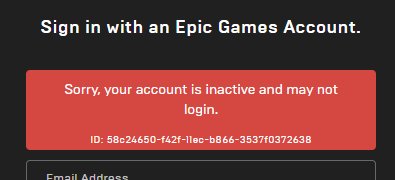
Your Epic Games account is likely inactive due to a period of prolonged inactivity, violating their terms of service, or because you’ve requested account closure.
It’s frustrating when you try to jump back into your favorite games and find yourself locked out. You’re probably asking yourself, “Why is my Epic Games account inactive?”. It can feel confusing when you are unable to access your progress and your library.
The good news is, there are a few common reasons why this occurs. Understanding these reasons can help you take the necessary steps to get back into action.

Why is My Epic Games Account Inactive?
Having your Epic Games account suddenly become inactive can be super frustrating, especially when you’re ready to jump into a game. It’s like finding the door locked when you have the key! But don’t worry, this happens to many people, and there are usually understandable reasons why. Let’s explore some of the common causes and how you can get back to gaming.
The Most Common Reasons for Account Inactivity
Let’s start by looking at the usual suspects behind an inactive Epic Games account. Sometimes, the reason is pretty straightforward, and you might even be kicking yourself when you figure it out! Here are some frequent causes:
Inactivity Due to Extended Periods of Not Logging In
Imagine a video game account like a library card. If you don’t use it for a long time, sometimes the library might put it on hold. Epic Games, like many other online services, might temporarily make your account inactive if you haven’t logged in for a long time. This is often done to free up resources and to keep their system tidy. They might do this after a few months, or sometimes it can be much longer. The exact timeframe can vary, but this is an important factor to consider.
Terms of Service Violations
Think of the rules in a video game like the rules of a playground. If you don’t follow them, you might get a time-out. Epic Games has terms of service (TOS) that every user agrees to when they create an account. If your account activity breaks these rules, like cheating, using inappropriate language, or any other misbehavior, your account might be made inactive, or worse, be permanently banned. It’s important to read and understand the TOS to avoid any problems. Here’s a simple breakdown of common violations:
- Cheating or hacking: Using unauthorized programs to gain an unfair advantage.
- Harassment or bullying: Being mean or hurtful to other players.
- Inappropriate content: Posting bad words, images, or videos.
- Account trading or selling: Giving your account to someone else.
- Spamming or phishing: Sending junk messages or trying to steal people’s info.
Account Security Concerns
Sometimes, Epic Games might lock your account to protect you. This is like a superhero swooping in to save the day! If they notice suspicious activity, like a login from a location you usually don’t use or lots of wrong password attempts, they will temporarily make your account inactive to prevent someone from getting in and taking over. This is a good thing because it means they care about keeping your account safe. It might be a bit of a headache to resolve, but it’s better than losing your account.
Accidental Account Deletion
Although not common, it’s possible that you might have accidentally requested your account to be deleted, or perhaps someone who knows your login information did it. If you do that your account will not become inactive but it will be deleted and you will not be able to use it anymore. This situation needs a detailed review, because normally epic games will send you an email to confirm that you asked for the deletion of your account. This is why we always suggest checking your email.
Diving Deeper into Specific Scenarios
Now, let’s take a closer look at each of these scenarios. It helps to know more about the details so you can figure out what’s happening with your account.
The Long Inactivity Time Period: How Long Is Too Long?
So how long is too long, when it comes to inactivity? Epic Games does not publicize the exact time periods before an account is flagged for inactivity. This is mostly to prevent malicious users from taking advantage. The timeframe can vary depending on multiple things like account activity, region, and other variables. It is, however, a good rule of thumb to log into your account at least once every 3 to 6 months just to keep your account in good standing.
If your account is flagged for inactivity, it’s not usually permanent. Epic Games will likely send an email or give you a prompt when you try to log in, directing you on how to activate your account again. It usually involves a few quick steps.
Terms of Service Violations: What Exactly Did You Do?
If your account has been deactivated because of a TOS violation, it’s crucial to find out exactly what caused the problem. When you get a message saying your account was suspended or banned, it often will include a reason. Checking your email for messages from Epic Games is always a good first step. If you are not sure why your account was flagged it’s essential to contact Epic Games support.
Here are a few things to keep in mind:
- Be Honest: If you messed up, it’s best to own up to it. Being honest can help in figuring out the path to getting your account back.
- Review the TOS: Make sure to carefully check the terms of service on the epic games website. Reviewing the TOS will ensure that it doesn’t happen again.
- Avoid Recreating Violations: Never try the same activity again. If you have a suspension you should use that time to reflect on what you have done wrong.
Account Security: Keeping Your Account Safe
When it comes to security, Epic Games has very protective measures. They will lock your account to protect you from any suspicious activity and from bad actors. Here’s a list of reasons for a security lock down:
- Unusual login locations: if you travel a lot or you moved from one country to other, your account may be flagged as you are logging in from a new place.
- Password Guessing Attempts: If someone tries to access your account using wrong passwords multiple times, your account might be locked to avoid a potential breach.
- Third-party Applications: If you try to log in using an unauthorized application, this could raise a red flag and your account might be locked to prevent potential problems.
To unlock your account, Epic Games might require you to verify your identity through an email or a phone number. It is very important to follow the steps that are provided by the platform, to keep your account safe and active. Also make sure to always use a strong password that is hard to guess, and use a unique one for every platform.
What To Do If You Accidentally Deleted Your Account
If you have accidentally deleted your Epic Games account, it is possible to recover it if you do that within a specific time frame. The first thing you need to do is to contact Epic Games support team, they are usually able to help and let you know what options you have available to you. This can be a tricky process so be sure to follow the steps given to you by their support team.
How to Get Your Account Back
Okay, so now you know why your account might be inactive. The good news is that usually you can get it back. Let’s walk through the steps you can take:
Checking Your Email
Your email is the first place you should always check. Epic Games will usually send you an email when they have done something with your account. They might provide a reason why it has been deactivated and give steps on what you can do to re-activate it. This is usually a simple click on a link they provide in the email. If you don’t have an email from Epic Games make sure to check your spam or junk folder as it might have landed there.
Using the Epic Games Support Center
If you can’t find an email or if the email doesn’t solve the issue, you need to get in touch with Epic Games Support. They have a special support portal on their website which will walk you through the process. Here are a few steps you can take:
- Navigate to the support website: The support website can be found in Epic Games website.
- Find the Account Related Topic: Find the topic or questions that related to “inactive account” or “account recovery.”
- Fill out the support form: You might need to provide information like your username, email, or any supporting documentation that shows that the account belongs to you.
- Be clear and polite: Provide all the correct information and always be kind and polite.
Recovering Your Account with an Authenticator App
If you have an authenticator app connected to your account, it can be very helpful in proving that you are the account owner. Authenticator apps generate time-sensitive codes which are linked with your account. This will verify that you are the real owner of the account and help re-activate your account.
Password Reset Process
Sometimes, all you need is a good old password reset. If you suspect that your password might have been compromised, or if you have just forgotten your password, a password reset is always a good option. Here’s how you usually do it:
- Go to the Epic Games login page.
- Click the “Forgot Password?” button.
- Follow the instructions sent to your email.
Waiting It Out
In some cases, especially if your account was suspended for a TOS violation, you may have to wait the specified amount of time. The duration of the suspension is usually mentioned in the email they send you, and also sometimes when you try to login.
Preventing Future Account Issues
Now that you know how to get your account back, let’s talk about how to keep it active and safe. It’s easier to prevent problems than it is to solve them!
Regular Logins
A simple way to keep your account active is to log in to it regularly. Even if you don’t feel like playing, a quick check every month is a good idea. This will make sure that your account remains in active status and you are ready to play whenever you like to.
Keeping Your Information Up-To-Date
It’s very important that your account information is always correct and up-to-date. This includes your email, phone number, and any other information. If anything changes, make sure that you update it right away so that Epic Games can always reach out to you if needed. Having your correct information ensures your account’s safety, and it is easy for you to get it back in case you get locked out.
Using Strong Passwords
A strong password is like the security guard for your account. It should be hard to guess, should have numbers, symbols and both uppercase and lowercase letters. It should be a unique password that you don’t use on other websites. Using a password manager is also a good idea.
Enabling Two-Factor Authentication
Two-factor authentication (2FA) adds an extra layer of security to your account. When 2FA is enabled, in addition to your username and password, you’ll need to provide a verification code that is usually sent to your phone or an authenticator app. This makes it really hard for anyone to get into your account, even if they know your password.
Being Mindful of Your Actions
Always be mindful of your behavior while playing on Epic Games. Follow all the rules and be respectful of other players. This will help you avoid any suspension or ban and your account will stay safe. Always be aware of the terms of service and follow them carefully.
In short, an inactive Epic Games account is usually a solvable problem. It can be due to inactivity, breaking the rules, or security concerns. By checking your email, contacting support, and taking simple steps to keep your account secure, you can ensure that your gaming experience remains smooth and fun. Keep an eye on your account, follow the rules, and happy gaming!
How To Fix Epic Games Inactive May Not Login
Final Thoughts
Inactivity, incorrect credentials, or a security issue are main causes for a disabled Epic Games account. If you have not logged in for extended periods, they might mark it inactive. Double-check your email and password details.
Suspicious activity on your account can prompt Epic Games to temporarily deactivate it. Review your linked accounts and enable two-factor authentication. Doing so will help prevent future issues.
Therefore, the answer to ‘why is my epic games account inactive’ lies in identifying these key issues. Actively maintaining your account helps avoid issues.

