
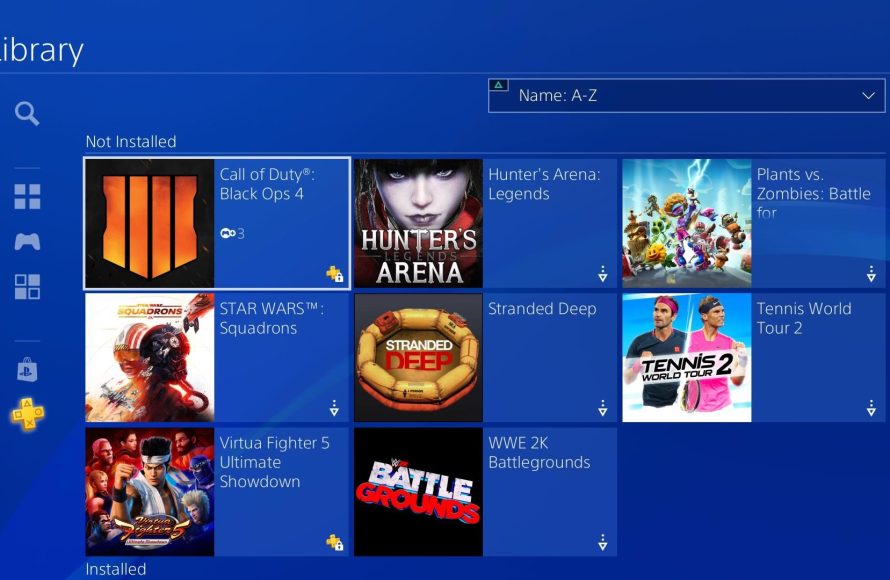
Your Playstation Plus game is locked because your Playstation Plus subscription has expired or the game has left the Playstation Plus catalog.
That frustrating moment when you go to play a game you’ve downloaded, only to find it’s locked – we’ve all been there! It’s a common issue, and the question, “why is my playstation plus game locked,” pops up for many gamers.
This usually points to a change with your subscription or with the game’s availability itself. The problem most of the time is simple.
Knowing the cause means you can quickly get back to gaming instead of dealing with annoying errors. We are going to explain all the possible reasons in detail.

Why is my PlayStation Plus game locked?
It can be super frustrating when you’re ready to play a game you thought you owned, only to find it locked with a little padlock icon on your PlayStation. You’re a PlayStation Plus member, you downloaded the game, and now… you can’t play it! It’s like being promised candy and then having it snatched away. Don’t worry; you’re not alone. Many players face this problem. Let’s explore the most common reasons why your PlayStation Plus game might be locked, and what you can do about it.
The Core of the Issue: Your PlayStation Plus Subscription
The biggest reason why a game might be locked after you’ve downloaded it through PlayStation Plus is because your subscription isn’t active anymore. PlayStation Plus games aren’t like regular purchases. You don’t actually own the game outright; you have a license to play it while you’re a paying member. Think of it like a library. You can borrow books as long as you have a library card. Once your card expires, you can’t borrow anymore, and the books you have might get locked, but still stay on your shelf.
Checking Your Subscription Status
The first thing you should always do when a PlayStation Plus game is locked is to check your subscription status. You can do this easily on your PlayStation console:
- Go to Settings.
- Select Account Management.
- Choose Account Information.
- Navigate to PlayStation Subscriptions.
Here, you’ll be able to see if your PlayStation Plus membership is active. If it has expired, this is most likely the reason why your game is locked. You’ll need to renew your subscription to regain access to the games.
Different PlayStation Plus Tiers
PlayStation Plus comes in different tiers: Essential, Extra, and Premium. Each tier provides different benefits. The most common reason for a locked game related to tiers is that you might be trying to play a game included in a higher tier than you’re subscribed to. For example, if you’re an Essential subscriber, you can’t play games available only through the Extra or Premium libraries. Verify that the locked game falls under the correct tier of your active subscription.
Technical Glitches and Account Issues
Sometimes, even with an active subscription, things can still go wrong. Technical glitches or problems with your PlayStation account can cause games to lock. Let’s look at some of these potential issues.
Licensing Problems
Sometimes the issue isn’t that your subscription is expired, but rather that your console is having a hard time verifying your license. A license is like a digital key that tells your console you are permitted to play the game. When this license verification fails, the game gets locked. This problem can happen randomly, and luckily, there are simple fixes. One way to fix a license problem is to try restoring your licenses. Here is how to do it:
- Go to Settings.
- Select Account Management.
- Choose Restore Licenses.
- Click Restore.
This process will force your PlayStation to double check your permissions for all the content on your console. This simple trick can resolve most license issues.
Console as a Primary System
If you have more than one PlayStation console, make sure the console you’re playing on is set as your primary system. If your account is sharing games with more than one console and the system you’re using isn’t your primary one, it might lock games that it needs to access license verification for. Here’s how to check if your system is your primary:
- Go to Settings.
- Select Account Management.
- Choose Activate as Your Primary PS4/PS5.
- If it is activated, you can try deactivating it and then activating it again. This can sometimes refresh the system.
Account Synchronization Issues
Sometimes there are delays or glitches when your account synchronizes between PlayStation’s servers and your console. If your account isn’t synchronized properly, your console may not recognize your active subscription. To fix this, try signing out of your PlayStation Network account and signing back in. This will force your account to refresh. Restarting your console after signing back in also helps. Here are the steps:
- Go to your Profile icon.
- Click Sign out.
- Sign back in.
- Restart your console.
PlayStation Network Outages
PlayStation Network, like all online services, occasionally experiences server issues or goes down for maintenance. If the PlayStation Network is having issues, your console might not be able to verify your PlayStation Plus subscription status. You can check the status of the PlayStation Network using a web browser or your PlayStation. This will let you know whether or not the problem is widespread, or if the issue lies solely with your console or account. If it is a network-wide problem, you will just have to wait for the issue to be resolved by Sony.
Game Specific Situations
Sometimes, the problem might not be your subscription or account, but the game itself. Certain situations with games can also result in the game locking up.
Games Removed from PlayStation Plus
PlayStation Plus games are not permanently available. They cycle in and out of the monthly offerings or the Extra and Premium libraries. If a game has been removed from PlayStation Plus, and you don’t have a direct purchase for the game, it will become locked even if it was previously available through your subscription. To see which games are coming to PlayStation Plus or leaving, visit the PlayStation Blog. It will help you understand which games may soon be locked, allowing you to plan ahead.
Free Trial Periods
Some games that appear on PlayStation Plus are not fully included, but are rather free trials. If you downloaded a game with a free trial period that has ended, the game will lock. Be sure to check the game details to see if the game is an offer to keep with a subscription, or a temporary free trial.
Accidental Download of a Game From Different Regions
If you have a PlayStation account set for a specific region, such as the United States or Europe, and you accidentally downloaded a game from a different region using a different PlayStation account, this can also cause issues. It’s important to download games with the same account and region as your PlayStation Plus account to avoid any locking issues. Games downloaded from a different region’s store won’t work with your primary account or subscription.
Early Access or Beta Access
Sometimes developers release game for early access or beta testing through PlayStation Plus. If this was the case for the game you downloaded, once the test ends or the game fully releases, the access associated with the test may expire. This can look like a locked game even with an active subscription. If you enjoyed the early access or beta, look for the full game in the store to keep playing.
Steps to Take When a Game Is Locked
When you find yourself staring at a locked game, it can be annoying. Here’s a recap of the troubleshooting steps you can take, from simple to more detailed:
Quick Checks
- Check your PlayStation Plus Subscription: Make sure your subscription is active and that you’re on the correct tier to play the game.
- Restart Your Console: Sometimes a quick restart fixes minor glitches.
- Sign out and Sign in: Log out of your PlayStation account and back in to refresh your account status.
Account and License Verification
- Restore Licenses: Go to Settings, then Account Management, and restore your licenses.
- Check Primary Console: Make sure your console is set as your primary system.
Game and Subscription Verification
- Check if the Game Was Removed: Make sure the game has not been removed from the PlayStation Plus library.
- Verify that you have the Full Game and not a Free Trial: Make sure the game does not have a trial period that has ended.
When to Seek Further Help
If you have tried all these steps and your game is still locked, it’s time to reach out to PlayStation Support. They can help with more technical or account-specific issues. Be sure to be ready to provide as many details as possible. Here’s what you should have ready when contacting them:
- Your PlayStation Network ID.
- The name of the locked game.
- The date you downloaded the game.
- The specific steps you have tried.
- Any error codes shown on screen.
With all the details provided, PlayStation support can further help in investigating the matter and fixing the issue as soon as possible. Sometimes, there is a technical problem only the support team will be aware of and equipped to fix.
Having your PlayStation Plus games locked can be a frustrating experience, but understanding the reasons behind it, and knowing the steps to take, will help you get back to gaming in no time. Remember to keep your subscription active, verify your account details, check for game removals, and reach out to PlayStation Support when needed. Most importantly, keep enjoying your PlayStation experience!
How to UNLOCK Games on PS5 (EASY) (2022) | SCG
Final Thoughts
PlayStation Plus games lock primarily due to an inactive subscription. If your membership lapses, access to previously claimed games disappears. This is the main reason you may encounter a padlock.
Another cause is incorrect account association. Ensure you’re logged in with the PlayStation account that originally claimed the game. This will also solve a problem.
So, why is my playstation plus game locked? It’s usually either subscription issues or incorrect account use. Review your active memberships and your logged in details.

