
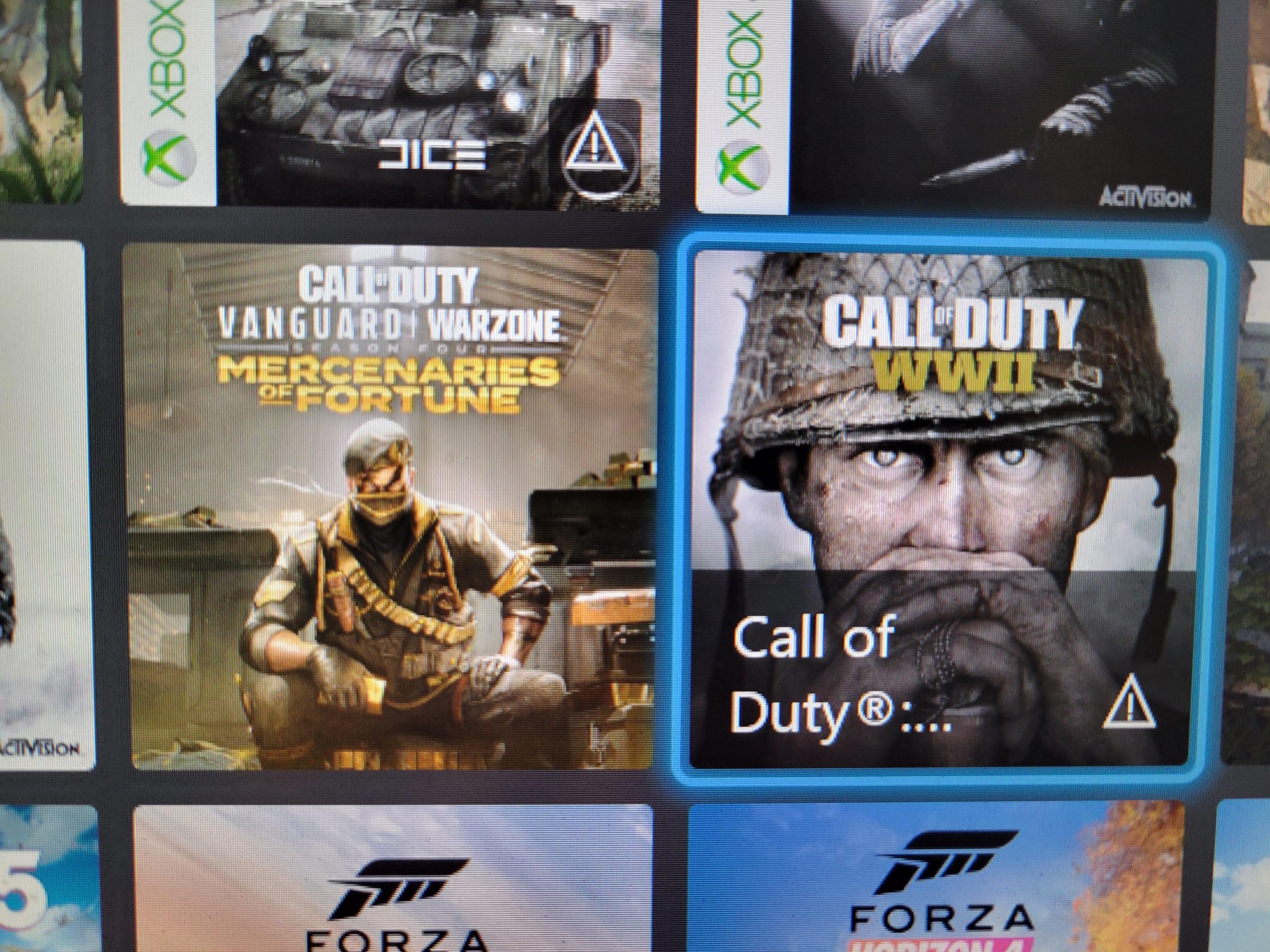
The warning sign on your Xbox games appears to indicate the game’s content may not be suitable for all ages due to themes, language, or violence.
Have you ever noticed that little symbol on the cover of your favourite Xbox games? It’s understandable to wonder why is there a warning sign on my xbox games and what it means. These ratings are in place to help you, the consumer, make informed decisions about the games you play. They let you know what kind of content the game contains so that you can choose something appropriate. The game industry uses these signs so you are able to know which titles are appropriate for your household.

Why is There a Warning Sign on My Xbox Games?
Ever popped in your favorite Xbox game and noticed that little warning symbol on the screen? Maybe it’s a picture of a hand with a line through it, or maybe it’s something else. These aren’t just random pictures; they are there for a good reason! They’re like little messages telling you something important about the game. These signs help keep you, and sometimes even your Xbox, safe and sound. Let’s dive deeper and see why these important signs exist on our favorite games. It’s not just to be annoying; there’s some actual important stuff behind these warnings!
Understanding Game Content Ratings
Before we even get to those warning signs, it’s good to understand about game ratings. Think of it like movie ratings—G, PG, PG-13, R. Games have their own system to tell you what kind of stuff you might see or hear in the game. This rating system is to help parents and players choose games that are appropriate for them. The ratings are made by organizations like the Entertainment Software Rating Board (ESRB) in North America and PEGI in Europe. So, you may see different ratings depending on where the game is from or where you bought it.
Types of Game Ratings
Game ratings usually consider the age that the content is appropriate for, and they give you clues about what’s inside a game. Let’s look at some common types:
- E for Everyone: These games are usually suitable for all ages. They often have cartoonish violence, and they’re often fun for the whole family.
- E10+ for Everyone 10 and up: These games are okay for players 10 and older. They might include some cartoon violence or mild language.
- T for Teen: Games rated Teen are appropriate for those 13 and up. They could feature some violence, suggestive themes, or language.
- M for Mature: Mature games are for players 17 and older. These games often have intense violence, blood and gore, strong language, and mature themes.
- AO for Adults Only: These games are meant only for adults. These usually involve very strong graphic violence and sexual content, and it is often not sold in stores.
These ratings help you choose games that you’ll feel comfortable with and will also allow you to pick games appropriate for your age group. It’s really important to pay attention to these when you are getting a new game. It’s important to discuss these rating with parents to ensure that the game you’re choosing is a good fit.
Why Warning Signs Are Needed
Now that we know about ratings, we can look more closely at warning signs. Game ratings usually give a general idea about the content, but warning signs tell you about very specific things in the game you should know about. These are not the same as content ratings; they are specific safety and health warnings for playing video games. These warnings can be very important for your health and safety.
Photosensitive Epilepsy and Game Warnings
One very important warning you’ll often see is related to something called photosensitive epilepsy. This is a condition where flashing lights or patterns can trigger seizures in some people. Video games, especially fast-paced ones with lots of action, can sometimes have these kinds of visuals. So, the warning sign is there to make sure people who have this condition are aware of the risk. These are designed to prevent negative health outcomes.
- Flashing Lights: Games sometimes use quick flashes to create special effects, or simulate explosions. These flashes could trigger someone who has photosensitive epilepsy.
- Patterns: Repetitive patterns or images can also be a trigger. These patterns may create a kind of strobe-light effect on screen, which may result in a seizure for susceptible players.
The warning signs will usually tell you to stop playing if you feel dizzy, have an altered vision, experience tremors or if you lose consciousness. This is a serious issue, and it’s why the warnings are included in video games.
Motion Sickness and Virtual Reality
Another kind of warning we see often has to do with virtual reality or games that use a lot of camera movement. Some players, may experience motion sickness. It’s similar to the feeling you get when you’re on a boat or in a car. Your eyes see movement, but your body doesn’t feel it, which can make you feel queasy or dizzy.
Virtual reality games make this happen more often because you’re “in” the game. Your brain is tricked into feeling like you’re moving, even if your body is still. So, if you start feeling bad, it’s important to take a break and stop playing. These signs are there to inform you of these risks. The best way to avoid getting motion sick is to take regular breaks and not over play.
General Health and Safety Warnings
Beyond the specific types of warnings above, you’ll also see general advice for staying safe. Here’s a few of them:
- Taking Breaks: Playing for a long time without taking breaks isn’t great for your eyes, your body, or your brain. The warning signs will tell you to take frequent breaks.
- Sitting Comfortably: It’s important to have good posture and not sit too close to the screen. Some warning signs will advise you to set up your play area so you don’t hurt your back or neck.
- Keeping the Volume Down: Loud sounds can hurt your ears. The warnings may tell you to play at a safe volume to help keep your hearing healthy.
These types of warnings are there to keep you safe and healthy while enjoying your Xbox games. The game developers and manufacturers do not want you to experience negative health outcomes because of their products.
Where Do You See These Warnings?
These warnings aren’t usually hidden somewhere on the game case; they usually pop up right on your screen when you start the game. Here’s where you are most likely to see them:
- Start of the Game: Right when you load up your new game, the warnings are often among the first things you’ll see. They’re not there for long, and you might have to press a button to make them go away.
- Game Manual or Inserts: Some older games and even some newer ones may put their warnings inside the game case, on a printed page.
It’s important to at least take a look at these warnings; they are there to ensure your safety and well being when playing video games.
Who Decides What Warnings to Use?
Game developers and publishers are the ones who decide what warning signs to include. They have to follow guidelines from different organizations that have studied the potential health effects of video games. They will also take into account things like the content of the game, and what could be potentially dangerous. This is why the warnings often differ from game to game. Different types of games with different visual styles will require different warnings. These guidelines and procedures help ensure that you can game safely and have fun.
The Role of Industry Regulations
There are also some industry bodies that oversee games and what should be included in the warning systems. These regulations help make sure the warnings are consistent and helpful for all gamers.
Why Ignore These Warnings?
While the warning signs may seem like a hassle, there’s a good reason for them. They’re not just there to cover a company’s legal issues; they’re also there for your safety. Ignoring the warnings could have negative consequences for you. Here’s why you should take them seriously:
- Health: The most important thing is your health. Ignoring warnings about seizures, motion sickness, or repetitive strain could lead to health issues.
- Safety: Warnings can keep you safe from other problems related to long play sessions, such as eye strain or sore muscles.
- Awareness: It helps you be aware of your own body. You’ll be able to know when to take breaks or if you’re feeling unwell.
The companies make an effort to make sure you’re safe while gaming. Following the guidelines that they present are essential for your health and enjoyment.
Examples of Common Warning Signs
Let’s take a look at some signs and what they mean:
| Symbol/Text | Meaning |
|---|---|
| Image of a hand with a line through it | This may indicate that you should take breaks while playing so as to avoid repetitive stress injuries. |
| Text reading “Photosensitive Seizure Warning” | This indicates that flashing lights could trigger seizures for some players. |
| Text reading “Motion Sickness Warning” | This warns players that they could feel motion sick from playing the game, particularly with VR games. |
| Text that says, “Stop playing if you feel dizzy.” | This is a warning for you to stop playing if you feel unwell or lightheaded. |
These are just a few examples, but they show you how the warning system works. Each sign is trying to tell you something important.
Adapting Your Play Habits
The good news is, that with a few changes to how we play, we can stay safe and still have fun. Here are some steps you can take to stay healthy:
- Take Breaks: Set a timer for every hour, or half hour if needed. Get up, stretch, and give your eyes a rest.
- Adjust Lighting: Make sure your room isn’t too dark or too bright. If it’s too dark, it might strain your eyes; if it’s too bright, it could cause glare on the screen.
- Proper Seating: Sit in a chair that supports your back. Make sure that the screen is at eye level.
- Lower Volume: Keep the game’s volume at a comfortable level. Loud sounds can damage your hearing.
- Be Aware: Pay attention to your body. If you’re feeling unwell, stop playing and take a break.
Following these simple tips can ensure that you have a much better, and safer, time playing Xbox games.
In short, the warning signs on your Xbox games aren’t just there to be annoying. They are important reminders for us to play games safely and responsibly. By taking a moment to understand the reasons behind the signs, we can ensure that our gaming experiences are healthy and enjoyable.
Xbox Series X/S: How to Fix Games Experiencing Issues Tutorial! (Game Outage Alert)
Final Thoughts
Ultimately, the presence of a warning symbol on your Xbox games is there for safety. These symbols indicate content suitability, potential health risks, or gameplay features. This system ensures players understand what they are getting before they start.
These ratings help manage expectations and provide essential information. You must pay attention to them before you play. The question, ‘why is there a warning sign on my xbox games’, is answered by the need to inform.

