
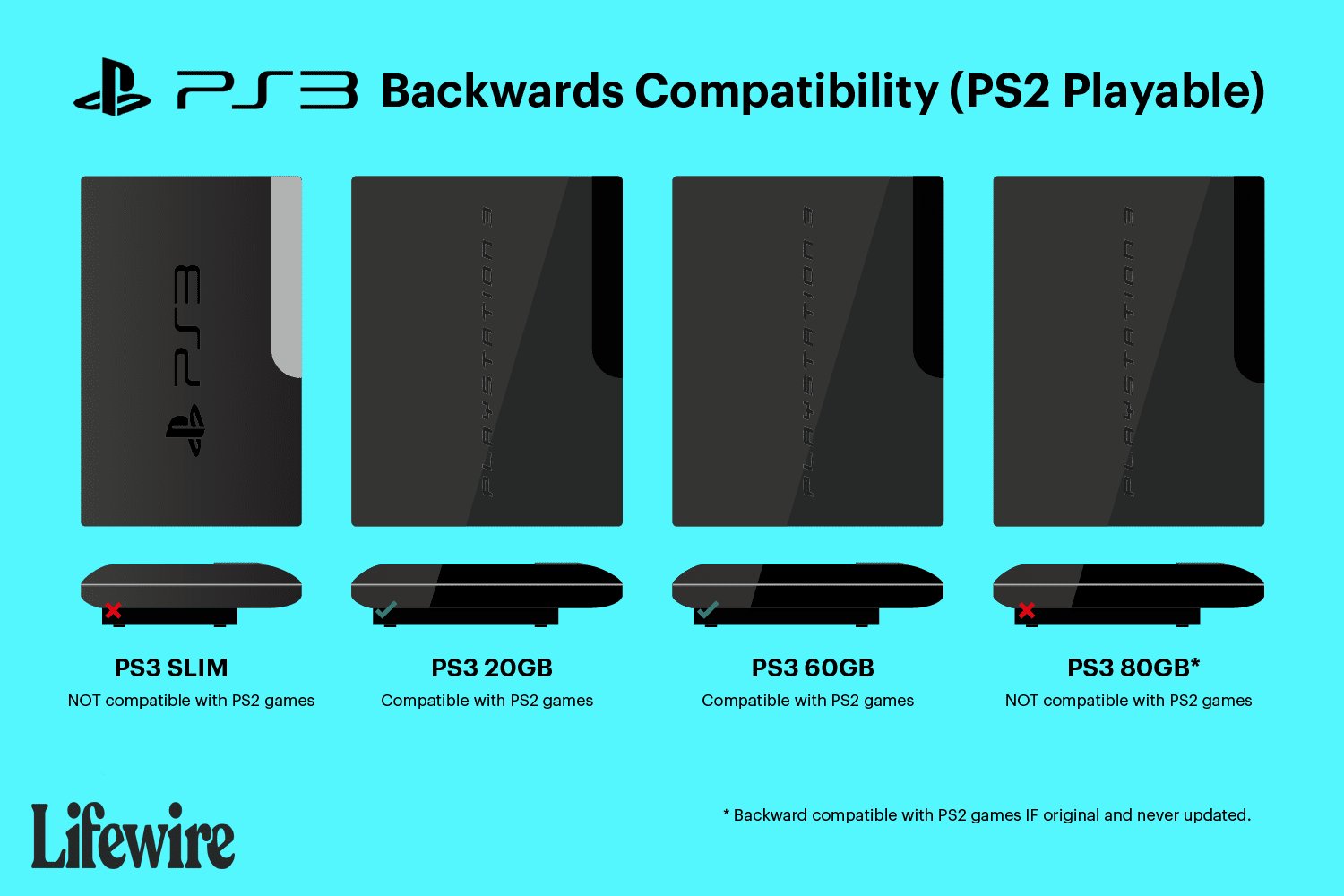
No, not all PS3 models can play PS2 games. Only the original, “fat” PS3 models with specific hardware include backwards compatibility.
So, you’ve dusted off your old PlayStation 2 games and are now wondering, will my PS3 play PS2 games? It’s a common question among gamers who remember the classics. Sadly, the answer isn’t a simple yes for every PS3 console.
Early versions of the console were designed with this feature. However, Sony removed it from later models to reduce costs. Thus, not all PS3 consoles can play those older discs. This creates a need for specific information before you try and load up those old games.

Will My PS3 Play PS2 Games?
Okay, let’s dive into this big question that’s been on many gamers’ minds: “Can I play my old PlayStation 2 games on my PlayStation 3?” The answer, like many things in the world of video games, isn’t a simple yes or no. It depends a lot on which PS3 you have. This is because not all PS3s were made equal when it came to playing older games. Some had the special hardware needed, and some didn’t. We’re going to break it all down, making it super easy to understand.
The Tale of Two (or Three!) PS3s
When the PlayStation 3 first came out, it was a real powerhouse. Sony wanted it to play all your favorite games from the previous generation, the PS2. So, the very first versions of the PS3 actually had the PlayStation 2’s hardware inside of them. This meant they could play PS2 games perfectly, just like a PS2 console would. Think of it like having two game systems in one box! These initial PS3s are often called the “fat” models because they were larger and chunkier compared to later versions. But over time, things changed.
The Original “Fat” PS3 Models: The Champions of Backwards Compatibility
These early “fat” PS3 models were the kings when it came to playing PS2 games. They had actual PS2 hardware built in. This special hardware, which included the “Emotion Engine” CPU and “Graphics Synthesizer” GPU, allowed them to play PlayStation 2 games directly, without having to do any fancy software trickery.
You can quickly identify the most compatible model, the 60GB “fat” PS3. It typically has a shiny, chrome trim, and most notably, it will have four USB ports on the front. The 20GB “fat” model also had PS2 hardware but was not as common, and had only two USB ports. Both of these original models can play nearly every PS2 game, aside from rare compatibility issues. Here’s a quick guide to help you see the specific features.
- 60GB “Fat” PS3 Model:
- Has four USB ports on the front
- Chrome trim and finish
- Full PS2 hardware inside
- Plays most PS2 games without issues
- 20GB “Fat” PS3 Model:
- Has two USB ports on the front
- Also had full PS2 hardware
- Less common than the 60GB version
- Plays most PS2 games without issues
These two are the ultimate PS3 models for playing your PlayStation 2 library. If you own one of these, consider yourself lucky!
The Shift: Software Emulation on Later “Fat” PS3 Models
As time went on, Sony started to make changes. They wanted to make the PS3 cheaper to produce. This meant removing the expensive PS2 hardware. However, they didn’t want to completely abandon playing PS2 games. So, they introduced “software emulation.” This means that instead of having the actual PS2 parts, the PS3 would use special programs to pretend to be a PS2. This was a good idea, but it didn’t work perfectly. The software emulation was not as good as the hardware, and could not play every PS2 title.
The 80GB and later 60GB “fat” models had this emulation, and they could play a large selection of PS2 games, but some titles had glitches, slowdown, or just wouldn’t work at all. These models are usually very similar in appearance to the older models, but only have two USB ports, not four.
- Later 60GB & 80GB “Fat” PS3 Models:
- Have two USB ports on the front
- Use software emulation to play PS2 games
- Play a large selection of PS2 games, but not all
- Some games may have glitches or compatibility issues
If you have one of these, it is still worthwhile to experiment, because many titles will play fine. But it is not a guarantee that every game will work smoothly.
The Slim and Super Slim PS3: No Direct PS2 Play
Now, let’s talk about the “slim” and “super slim” versions of the PS3. These models were designed to be smaller, lighter, and more efficient. However, they lost the ability to play PS2 games entirely. Sony had completely removed the PS2 hardware and abandoned the software emulation. So, unfortunately, if you have a slim or super slim PS3, you will not be able to play PS2 discs.
- Slim & Super Slim PS3 Models:
- Do not have any PS2 hardware or software emulation
- Cannot play PS2 discs
These PS3 models focus exclusively on playing PS3 games, Blu-ray movies, and media. If you only have a slim or super slim model, then you’re out of luck, as far as playing your original PS2 game discs.
The Details: Why the Change?
You might be wondering, “Why did Sony take out the PS2 hardware?” There are a couple of reasons. First, it made the PS3 cheaper and easier to make. The PS2 parts were expensive and took up space. By removing them, Sony could make more PS3s for less money. Second, Sony wanted to encourage gamers to buy new PS3 games and not just play their old PS2 ones. This was just a business decision, designed to try to sell more newer titles.
Identifying Your PS3 Model: A Simple Guide
Okay, so now you know that it all depends on the model. But how do you figure out which model you have? Don’t worry; it is not that hard! Here’s what you can do:
1. Look at the Number of USB Ports: The early “fat” models (60GB and 20GB) usually have four USB ports on the front. Later “fat” models (80GB and some later 60GB versions) have only two. Slim and super slim models also have only two USB ports.
2. Check the Model Number: Turn your PS3 over, and you’ll find a sticker with a model number printed on it. This is the best way to confirm the exact model you own. Look for this number. Here’s a quick rundown of what to look for:
- CECHAxx and CECHBxx: These are the original “fat” models that fully support PS2 games. (e.g., CECHA01, CECHB01)
- CECHCxx and CECHExx: These are the later “fat” models with software emulation for PS2 games. (e.g., CECHC01, CECHE01)
- CECH-2xxx, CECH-3xxx, CECH-4xxx, CECH-43xx, CECH-45xx: These are the slim and super slim models that do not support PS2 games at all.
If you find your model number from the first or second bullets above, then you are able to play PS2 games on your PS3.
3. Look at the Trim: The earliest “fat” models (those that are most capable of playing PS2 games), often have shiny chrome trims, which makes them look a little more upscale. Later models often replaced this chrome trim, with more simple plastic trim.
4. Check the Storage Capacity: While not definitive, 60GB and 20GB models are usually the original “fat” models with full PS2 hardware. 80GB models are the later “fat” models with emulation. Slim and super slim models come in different sizes like 120GB, 250GB, 320GB and 500GB.
By using these tips, you’ll know for sure what kind of PS3 you have, and whether it can play those PS2 games you’ve been wanting to revisit.
What If Your PS3 Doesn’t Play PS2 Games?
Okay, so maybe you have a slim or super slim model, or maybe you have an early “fat” model that is having issues. Don’t lose all hope! Here are some alternatives you could consider:
Find an Original PS2 Console: The simplest, if not easiest, solution is to just get a PlayStation 2 console. They can often be found used for low prices, and it is the best way to play PS2 games as they were meant to be played. This allows you to experience the games exactly as they were on the original hardware. You might want to consider getting a component video cable if you have a modern television, to improve video quality.
Play on PS4 or PS5 with PS2 Classics: There is some good news, at least for some of your PS2 games. Many popular PS2 games have been made available as digital downloads through the PlayStation store for both PS4 and PS5. These often have upgraded graphics and performance, and are an easy way to play some of the best PS2 games on modern consoles. While it is not every PS2 game, many of the most popular titles can be found this way.
Use a PS2 Emulator on PC: If you are comfortable with computers, you can use a PS2 emulator to play PS2 games on your computer. This is a more advanced method, as it requires a decent PC and some technical setup. However, it is a completely legal way to play your game backups, provided that you also own the original game.
Seek out Other Platforms: Some PS2 games have been re-released or remastered on other gaming platforms. Check to see if your favorite titles are available on your PC, Switch, Xbox, or even mobile phones.
While it can be frustrating to learn that your PS3 won’t play your PS2 games, thankfully, there are still options available for you to enjoy these fantastic games.
The World of Backwards Compatibility: An Important Feature
Backwards compatibility (the ability for a console to play older games) is something that many gamers really love. It allows people to relive old memories, or catch up on classic games that they missed the first time around. When the original PS3 launched with this feature, it was a very big selling point for many people. This feature was sadly, later removed, but other consoles have since implemented their own forms of backwards compatibility. This is one of the reasons that many retro gamers prefer older consoles, because they are a way to play games without needing to have multiple systems.
Why Backwards Compatibility Matters to Gamers
Here’s why backwards compatibility is important to a lot of players:
Preservation of Games: It helps to keep games alive, and available to be played. This is important, because video games are a form of art, just like movies or music.
Cost Savings: Instead of needing both a PS2 and PS3 (or both a PS3 and PS4 etc), backwards compatibility allows you to play both on a single device, saving both space and money.
Nostalgia: Playing old games brings back great memories of simpler times, and allows you to experience those great games again.
More Game Variety: Backwards compatibility allows you to play more games, and a wider variety of genres.
Backwards compatibility is a wonderful feature for many reasons, and this is why it is something that gamers want in their gaming consoles.
A Final Note About Game Discs and Compatibility
It is very important to also note that sometimes disc condition is what is causing a PS2 game to not load properly. A scratched or damaged disc, even on a fully backward-compatible PS3, can cause it to not load properly. It can be a good idea to clean your discs with a soft cloth if you are encountering loading issues. Scratched or damaged discs can also cause other issues, such as game crashes, freezes, or visual glitches. If the disc is extremely scratched, there is a high chance that it may not be able to play at all. This is something to keep in mind when you are trying to play older games. So, keep your game discs safe, and store them in their original cases, in a safe place to keep them working well.
In short, the ability of your PS3 to play PS2 games comes down to the specific model of PS3 you own. The early “fat” models were the best for playing PS2 games, while the slim and super slim models cannot play them at all. If you are lucky enough to have a compatible model, enjoy the amazing catalog of PS2 games! If not, there are still other ways to enjoy these great games.
The PS3 Had a Hard Time Playing PS2 Games Because of…..Emotions?
Final Thoughts
So, will my ps3 play ps2 games? The answer is not straightforward. Some older PlayStation 3 models do have backward compatibility. This feature allows them to play original PlayStation 2 discs.
However, the later, slimmer PS3 versions removed this functionality. You must check your specific PS3 model number to confirm its capabilities. If you have a compatible console, enjoy your PS2 games.

