
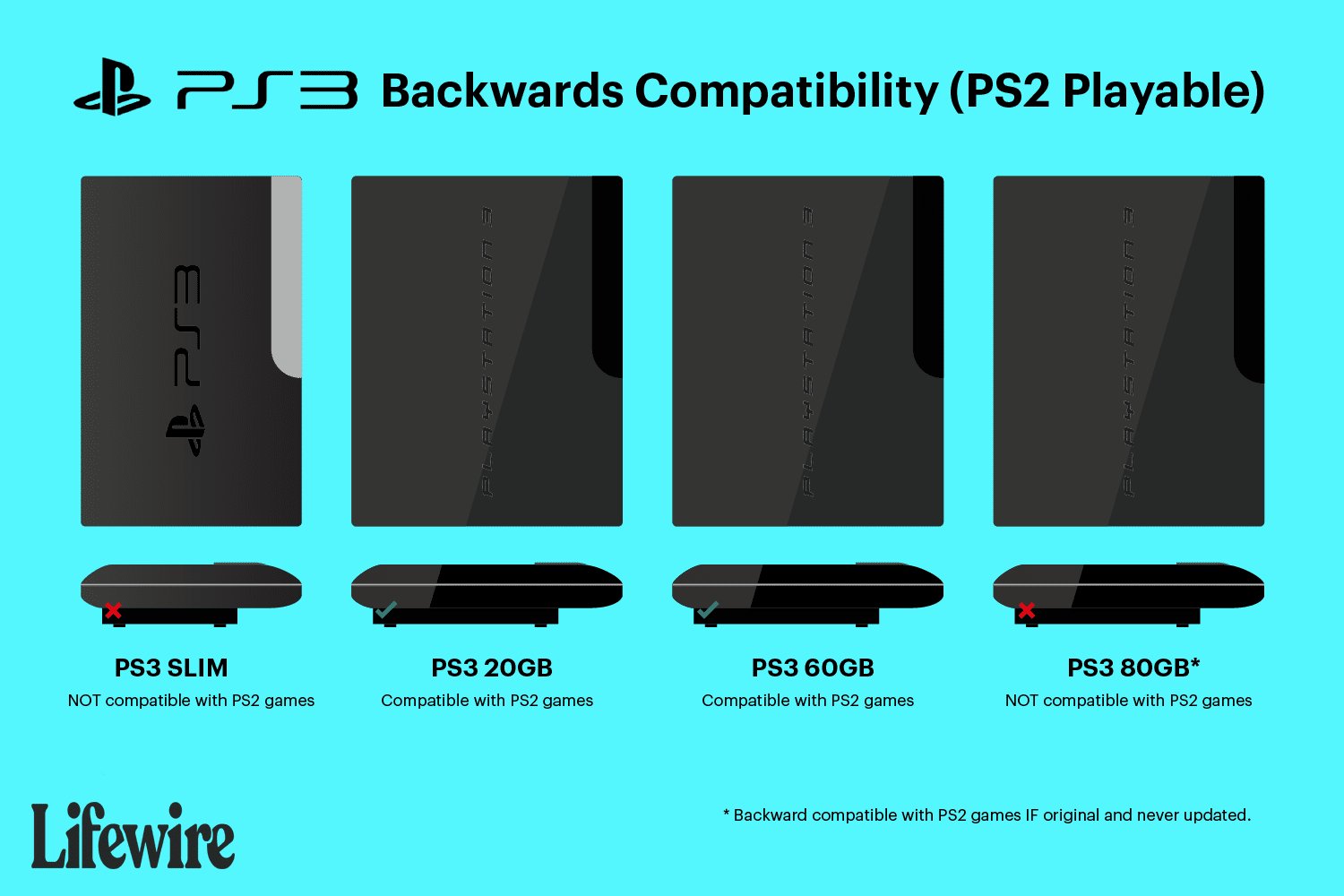
Unfortunately, not all PlayStation 3 models can play PlayStation 2 games. Only certain early PS3 models offer backward compatibility for PS2 titles.
Remember the golden age of gaming? PlayStation 2 offered iconic experiences, and many wonder if they can revisit them on a newer console. The question “will playstation 2 games work on ps3” often surfaces among gamers. It’s a valid concern.
Finding the right answer can be a bit confusing since not all PS3 consoles are the same. Some can play those classic games, while others cannot.

Will PlayStation 2 Games Work on PS3?
So, you’ve got a stack of awesome PlayStation 2 games and you’re wondering if they’ll work on your PlayStation 3. It’s a great question, and the answer isn’t as simple as a yes or no. Let’s dive deep into why some PS2 games work on the PS3 and why others don’t. We’ll explore all the details to help you figure out which of your classic games you can play on your PS3.
The Short Answer: It’s Complicated!
The quick answer is: Not all PlayStation 2 games work on all PlayStation 3 consoles. This isn’t because the PS3 is bad; it’s due to how Sony made different versions of the PS3. Some PS3 models have special hardware that allows them to play PS2 games, while others do not. This is called backward compatibility, and it’s a feature that changed during the PS3’s lifespan.
Understanding Backward Compatibility
Backward compatibility is the ability of a newer console to play games designed for older consoles. Think of it like this: your parents might still have an old record player, but most music today is on CDs or digital files. If a new CD player could also play vinyl records, it would be backward compatible with those older records. Similarly, some PS3s were designed to play PS2 games. However, not all PS3 models can do this. Let’s take a look at different PS3 models and their capability to play PS2 games:
PS3 Models and Their PS2 Game Compatibility
Sony released different versions of the PlayStation 3 over the years, and they changed their ability to play PS2 games as time went on. This is a crucial part of understanding if your PS3 can play your cherished PS2 titles.
The “Fat” PS3 Models: The Original Champions
The earliest PlayStation 3 models, often called “fat” PS3s due to their larger size, were the ones with full backward compatibility. These were the first PS3s that hit the market. If you own a “fat” PS3, here’s what to look for:
- CECHAxx: These models are the most sought after. They are 60GB models and offer full hardware emulation. This means they have the actual PlayStation 2 chips inside, allowing them to play almost all PS2 games just like a PS2 console would. These models are considered the “holy grail” for PS2 game fans.
- CECHBxx: These were the 20GB models and like the 60GB models, these also use full hardware emulation, making them extremely good at playing PS2 games. However, due to being released alongside the 60GB models, these were far less popular.
- CECHCxx: These 60 GB models only partially emulated the PlayStation 2. These models had the Graphics Synthesizer chip from the PlayStation 2 inside, but the Emotion Engine CPU was emulated via software. These models have a higher chance of incompatibility when compared to CECHAxx and CECHBxx.
- CECHExx: These were 80GB models and like the CECHCxx models, these also did not have full hardware emulation of the PlayStation 2. These models also partially emulated the PlayStation 2, which means that some games will not play at all, some games will play with issues, and some games will play just fine.
How to tell if you have a “fat” PS3 model?
Look at the back of your PS3 for the model number, which starts with “CECH” followed by letters and numbers. If your model number starts with CECHA, CECHB, CECHC, or CECHE, then you have a “fat” model PS3. To further ensure which model you have, you can always google the serial number or model number, and you will be able to easily find out which model of PS3 you have.
The Slim PS3 Models: A Step Backwards
As technology moved forward, Sony released “slim” versions of the PlayStation 3. These were smaller, lighter, and more power-efficient. However, there was a trade-off: backward compatibility was removed from these models. They couldn’t play PS2 games at all. These models of the PlayStation 3 include:
- CECH-20xxA/B: These models are the earliest “slim” models, and the earliest models to not be able to play any PlayStation 2 games at all.
- CECH-21xxA/B: These models are also incapable of playing any PS2 games.
- CECH-25xxA/B: These are a later iteration of the “slim” model, and again these can not play any PS2 titles.
- CECH-30xxA/B: These are the final iteration of the “slim” model, and just like the models mentioned prior to this, are unable to play any PlayStation 2 games.
Super Slim PS3 Models: No PS2 Support
The last versions of the PlayStation 3, known as “Super Slim” models, also lacked the ability to play PS2 games. This was the case for all models of the Super Slim PS3.
- CECH-40xxA/B: The 40xx series of Super Slim PS3s do not have the capability to play any PlayStation 2 games at all.
- CECH-42xxA/B: Like the 40xx series, the 42xx series of Super Slim PS3s are not capable of playing PlayStation 2 games.
- CECH-43xxA/B: These are the final model of Super Slim PlayStation 3s and just like the 40xx and 42xx models, these are also not capable of playing any PS2 games.
Key Takeaway: If you have a slim or super slim PS3, you cannot play PS2 games on it using the physical disks. These are important details to consider when you are wondering about playing your PlayStation 2 games on your PS3.
Why the Change? Cost and Complexity
You might wonder why Sony removed the PS2 compatibility. The main reason was cost and complexity. The chips needed for full PS2 hardware emulation were expensive to include in every PS3. As the PS3 became cheaper, Sony had to remove these chips to lower production costs. The move toward software emulation was also problematic as it took a lot of time to perfect, and even when it was perfected, it was still not perfect and was not capable of running every game. It’s about cutting costs so they could sell the newer PS3s at a more affordable price, and focus on the PS3’s future instead of its past.
Software Emulation: Digital PS2 Classics
Even if your PS3 doesn’t have hardware for backward compatibility, there’s still some good news! Sony began offering some PlayStation 2 games as digital downloads on the PlayStation Store. These are known as “PS2 Classics.”
How PS2 Classics Work
These digital games are not the same as playing a PS2 disc. They are emulated by the PS3’s software. This means that the PS3 simulates the way a PS2 console would work, allowing you to play these specific games. However, it’s important to note:
- Limited Selection: Not all PS2 games are available as PS2 Classics. Sony hand-picked certain games for this.
- No Disc Support: PS2 Classics don’t work with your physical PS2 game discs. You must buy the digital version from the PS Store.
- Not Perfect Emulation: While generally good, software emulation can sometimes lead to minor graphical or performance differences compared to playing the games on an actual PlayStation 2. This means you might notice some minor lag, or other small graphical inconsistencies.
Finding PS2 Classics: To see which PS2 games are available, go to the PlayStation Store on your PS3 and search for “PS2 Classics”. You can then look through the selection, and find the games that you are looking for.
Checking Your PS3 Model Number: A Simple Guide
It’s really important to know which PS3 model you own. Here’s a quick way to find out:
- Turn off your PS3 and locate the back: First, make sure your PlayStation 3 is completely turned off. Then, carefully turn it around so that you can see the back of the unit.
- Look for the Model Number: On the back, you’ll see a sticker (it might be on the bottom of the unit depending on the model). Look for a series of letters and numbers that start with “CECH”. This is your PS3 model number.
- Use the Model Number for Verification: Now that you have your model number, compare it to the lists mentioned above. This will tell you what type of PS3 you have, and if you are able to play your PlayStation 2 games.
Common Issues and Solutions
Even on backwards-compatible PS3s, you may sometimes encounter problems. Here are some common ones, and what you can do about them:
Game Not Loading
Sometimes, a PS2 game disc won’t load properly on your PS3. This can be due to a few different reasons:
- Disc Scratches: Make sure your PS2 game disc isn’t too scratched or damaged. A scratched disc might cause loading errors. Clean the disc carefully with a soft, lint-free cloth. You can also look up guides on how to restore scratched discs if you have the required materials.
- Incorrect Disc Region: PlayStation games often have regional restrictions. A game from another region may not be compatible. Look at the box of the PS2 game to find the region. PS2 game regions are NTSC (North America and Japan) and PAL (Europe and Australia). Ensure that your console and the game are from the same region.
- Compatibility Issues: Even with full hardware emulation, some very rare PS2 games might not work on a “fat” PS3. This is because the emulation is not 100% perfect for every single game, and it is important to know this.
Graphical or Audio Glitches
Sometimes, you might experience graphical issues like flickering or strange colors. These can sometimes occur if:
- Overheating: Make sure your PS3 has good ventilation. Overheating can sometimes cause issues. Ensure that the air vents are clear, and that the console is in a well-ventilated area.
- Software Issues: Try restarting your PS3. Software glitches can also cause graphics or audio problems, and by turning the system off, and then turning it back on again you might find that these issues are resolved.
Controller Issues
Sometimes, you might find that the PS2 game is not responding to the controller in the same manner as when playing a PS3 game. There is often a fix for this:
- Use an Original Controller: Some games are not compatible with PS3 controllers, or the controller may not be fully supported. To resolve this issue, use an original PS2 controller using a USB adapter. This will ensure that the game responds perfectly to your inputs, as it is intended to.
Preserving Your PS2 Games: Other Options
If you don’t have a backwards-compatible PS3, there are still ways to enjoy your PS2 games:
Using an Actual PS2 Console
The most reliable way to play PS2 games is on an actual PlayStation 2 console. They’re still available to buy used online and in some stores. If you have an original PS2, this is the only method to play the games reliably, with perfect compatibility.
Emulators on PC
If you have a powerful PC, you can try using software called emulators. These programs try to mimic the PS2 console on your computer. This may be a good option for those who do not own a PS2 console, and if you have the hardware to support running the game on PC.
- Emulators are complicated: Setting them up can be tricky, and they require a lot of processing power for some of the more demanding games. You may have to do a lot of tweaking to get the best results, and it is advised you watch some tutorials before setting up an emulator.
- Legality: Always ensure you only use emulators for games you legally own. Make sure you are not illegally downloading ROMs of the games you wish to play.
In conclusion, the ability to play PlayStation 2 games on a PlayStation 3 depends entirely on the specific model of PS3 you own. The “fat” PS3 models with hardware emulation offer the best experience, while “slim” and “super slim” models do not support PS2 discs. For those newer models, PS2 Classics offer a digital alternative, but with a limited selection. Knowing your PS3 model and the potential issues you might encounter is the key to navigating the world of PS2 backward compatibility.
What happens when you put a PS2 Game in a PlayStation 3
Final Thoughts
Ultimately, the answer to “will playstation 2 games work on ps3” is complicated. Not all PlayStation 3 consoles are capable of playing PS2 titles. The early, “fat” PS3 models included hardware for backwards compatibility.
Later, slim and super slim PS3 models removed this feature to reduce cost. Therefore, you must check your specific PS3 model to know if it supports PS2 games.

