
Xbox accessibility compliance ensures games are usable by people with disabilities, following specific guidelines for inclusive design.
Ever wondered how Xbox makes gaming more inclusive? The focus on Xbox accessibility compliance is actually what makes it possible. It’s not just about ticking boxes; it’s about creating experiences everyone can enjoy.
Microsoft established clear guidelines, allowing developers to design games with all players in mind. This involves features like adjustable subtitles, customizable controls, and many more. These additions greatly benefit anyone who wants to play a game to its fullest potential.

Xbox Accessibility Compliance: Making Gaming Fun for Everyone
Imagine a world where everyone, no matter their abilities, can join in the fun of playing video games. That’s the idea behind Xbox accessibility compliance. It’s all about making sure that games and the Xbox console itself are designed in a way that people with disabilities can use them easily and enjoyably. This isn’t just a nice thing to do; it’s a crucial step in making gaming inclusive for everyone. Let’s dive deep into what it means for a game or the Xbox to be accessible and why it matters so much.
What Does Accessibility Compliance Mean for Xbox?
Accessibility compliance for Xbox means that the console and its games are built with features and options that help people with different disabilities play games. This could involve anything from changing how the game looks to providing different ways to control the game. Think of it like building a playground with ramps and different types of swings, so that all kids can play together. For Xbox, it’s about making sure that gaming is like that playground: inviting and enjoyable for everyone.
Key Areas of Accessibility
Xbox accessibility isn’t just one thing; it covers several key areas, each targeting specific needs. Let’s explore some of these areas:
- Visual Accessibility: This is about how the game looks and if it’s easy for everyone to see. For example, games should have options to make text larger or change colors to be easier to read for people with low vision or color blindness. Also, important on-screen elements shouldn’t be too small, making it easier to see and interact with them.
- Auditory Accessibility: This focuses on the sounds in the game. Games should include subtitles for all dialogue, sound effects, and other important audio cues. This allows people who are deaf or hard of hearing to understand what’s going on in the game. It might also include visual cues for important sounds.
- Motor Accessibility: This is about how a person controls the game. Games should have flexible control options. This may include allowing people to re-map buttons (change what each button does), or provide different ways to control like using just one hand, or use a special controller or a special setup with your controller to help move and act in game. It should also have difficulty settings so people who need a slower pace can still enjoy the game.
- Cognitive Accessibility: This focuses on how easy it is to understand and play the game. Games should have clear instructions and tutorials. They might offer options to simplify game play or reduce the amount of information on the screen at once. For people with cognitive differences, making the game easier to follow and play is incredibly helpful.
The Importance of Accessibility Options
Why are all these options so essential? Because they open up the world of gaming to a much larger audience. By building games and consoles with accessibility in mind, everyone can experience the joy, challenge, and social connection that video games offer. It’s about more than just letting people play; it’s about ensuring that everyone has an equal chance to enjoy a game.
How Does Xbox Ensure Accessibility?
Microsoft, the company behind Xbox, takes accessibility seriously. They have several ways of making sure Xbox products are accessible.
The Xbox Accessibility Guidelines (XAG)
Microsoft has developed a detailed set of guidelines called the Xbox Accessibility Guidelines (XAG). These guidelines are like a rule book for game developers. They help the game developers plan and design games that are accessible to all players. The XAG covers everything from game design to game mechanics and controls. These rules helps game makers plan all aspects of their game to be accessible.
The Accessibility Testing
Besides these, they also do regular testing. This means that they make sure that games and products are checked by people who have disabilities. They can use all the various controller inputs and see if the game or the product is accessible and usable, they then give a feedback that helps Microsoft ensure the products are easy and comfortable for all.
The Adaptive Controller
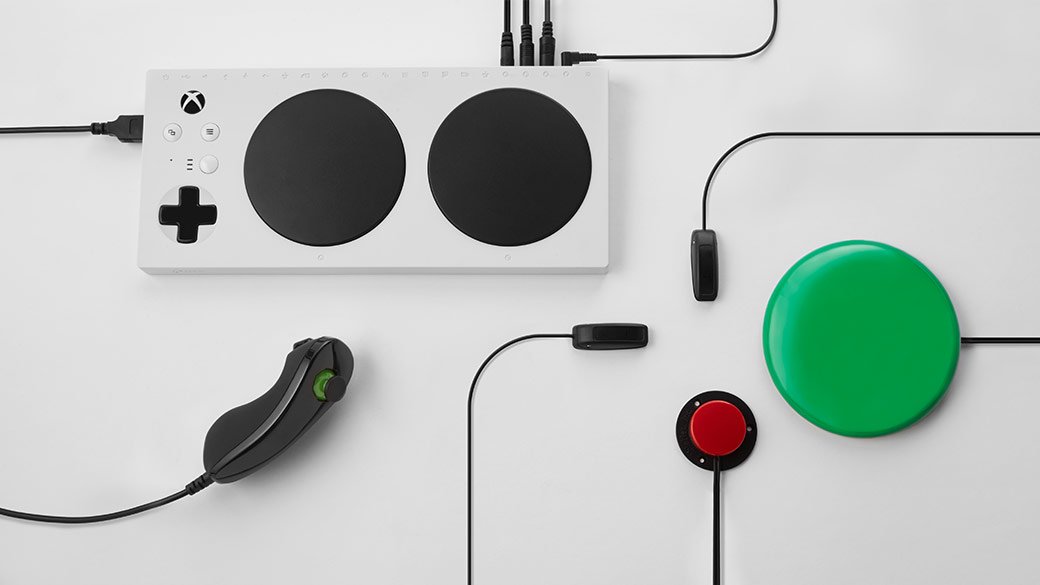
One of the most important products is the Xbox Adaptive Controller. This is a special controller that allows players to create a set up that works best for them. The controller has big buttons and spaces to plug in other types of inputs so you can use whatever is most comfortable for you. It can be connected to switches, buttons, joysticks, and many other devices.
Accessibility Settings on the Console
The Xbox console itself has built-in accessibility settings. These settings help players customize their gaming experience. This includes things like:
- Changing the size of text.
- Turning on a screen narrator (which reads text out loud).
- Adjusting the colors in the interface.
- Re-mapping controller buttons.
Specific Examples of Xbox Accessibility Features
Let’s look at some specific examples of accessibility features you might find in Xbox games or on the console itself:
Subtitle Options
Subtitles are very important for people who are deaf or hard of hearing. Here are the options that most games include to make the subtitles more accessible.
- Adjustable Size: You should have options to make subtitles bigger or smaller depending on the game or person using it.
- Adjustable Color: You should be able to change the color of the text.
- Background Options: You should be able to add a background behind the subtitles that will make it easier to read in most cases.
Colorblind Modes
Many games have colorblind modes that change the colors in the game to make them easier to see for people with different types of color blindness. These modes help the players see different parts of the game and interact with the world easily.
Button Re-mapping
This feature allows players to change the way the buttons on the controller work. This is very important for people who can’t use certain buttons due to motor disabilities. The player should be able to choose which button they want to use to do what action. So if someone has trouble using their right hand, they can re-map the right-side button commands to another button on their controller. It helps them to play the game in a comfortable way.
Difficulty Settings
Games should always come with multiple difficulty options. This is very helpful for many players who wants an easier experience while playing a game. Options for example like the “Story Mode” helps players enjoy the story in the game without having to fight through difficult battles.
Single-Stick or One-Handed Options
Many games that are developed with accessibility in mind provide options for players that want to play with one stick or with a single hand. This option helps players who don’t want to or can’t play with both hands. They can still enjoy the same experience as someone that can play with both hands.
Text-to-Speech and Speech-to-Text
This helps gamers communicate with each other without having to write or talk. With text-to-speech the system reads out what other players say in text. This allows people with hearing impairments to participate in team conversations. Similarly, speech-to-text allows people to write messages using their voices, this is useful for people with motor impairments.
How Accessibility Benefits Everyone
While accessibility features are designed to support players with disabilities, they often benefit everyone. For example, many people find subtitles helpful when playing in noisy areas or if they prefer to not turn up the volume of the TV. Button re-mapping can help players who find the default controls difficult or who want a more personalized setup. The more options a game has the more players can enjoy the game in the way that is best for them.
The Social Impact
Accessibility in gaming is more than just a technical issue. It is also about social inclusion. When games are accessible, more people can participate in gaming communities, play with friends and family, and have equal opportunities to enjoy entertainment. This makes gaming a more diverse and welcoming space for everyone.
The Future of Xbox Accessibility
Microsoft continues to work on making Xbox more accessible. They are investing in research and development, talking to disabled gamers, and constantly looking for new and improved ways to ensure that everyone can enjoy video games. They are committed to breaking down barriers and making gaming accessible to the widest possible audience. As technology grows and time moves on, accessibility for all will become more standard.
How Can You Help Make Gaming More Accessible?
Making gaming more accessible is a team effort that involves not only game developers and console makers but also the gaming community and individual players. Here are some ways you can contribute to a more inclusive gaming environment:
Support Games and Developers
Support game developers who prioritize accessibility. When you buy games that are well-designed for accessibility, you’re sending a message that these features matter. Provide positive feedback to the developers whenever you notice a game provides good accessibility features.
Advocate for Accessibility
Advocate for accessibility features in games. Let game developers and companies like Microsoft know how important these features are. Post online on discussion boards or talk with developers in forums about the need for accessibility.
Be an Inclusive Player
Be inclusive in your own gaming communities and online interactions. If you see someone struggling, offer help or support them. Avoid ableist language and create a welcoming space for everyone.
Learn More About Accessibility
Take some time to learn more about different types of disabilities and accessibility needs. This will help you better understand how to support others and advocate for inclusive practices in the gaming world. There are many groups and communities you can join, for example on social media, where you can learn more about accessibility.
Use Accessibility Features
Don’t be afraid to use the accessibility features available to you. You might be surprised at how much they can improve your overall gaming experience, even if you don’t identify as someone with a disability. These features are made to make the game experience better for everyone and not just for the people with disability.
Xbox accessibility compliance isn’t just a set of rules; it’s a commitment to making sure that everyone can experience the fun and joy of gaming. By creating games and products with accessibility in mind, we’re creating a world where all players can feel welcome, empowered, and entertained.
Xbox Accessibility Guidelines – At a Glance
Final Thoughts
Xbox ensures games are playable by everyone, this is due to its consistent adherence to accessibility guidelines. Game developers should prioritize these standards for a wider audience.
Ultimately, Xbox accessibility compliance creates a more inclusive gaming environment for all users. We encourage continued focus on and improvement of these important features.

