
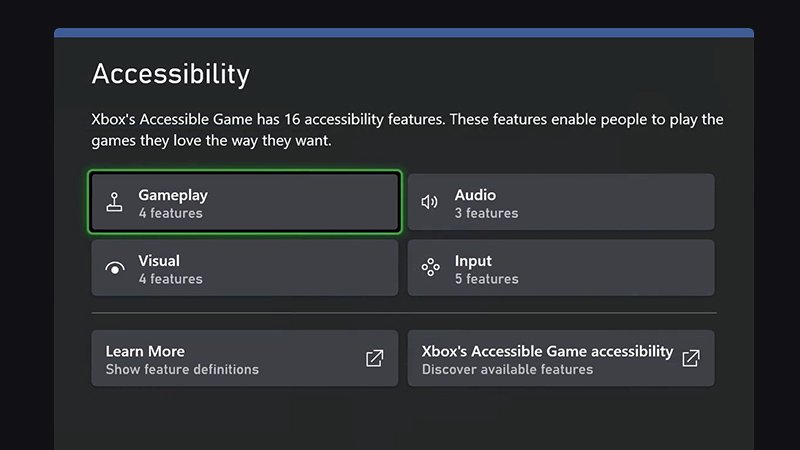
Xbox accessibility features in games provide options like controller remapping, customizable subtitles, and visual aids, allowing more people to enjoy gaming experiences.
Gaming should be for everyone, but sometimes, barriers exist. That’s why we’re exploring how developers are incorporating Xbox accessibility features in games. These options help players customize their experiences to match specific needs.
These changes make gaming more inclusive. Players with various physical and cognitive challenges can now participate fully. We’ll discuss some of these core features next.

Xbox Accessibility Features in Games
Playing video games is super fun! But sometimes, things can make it harder for everyone to enjoy them. That’s where accessibility features come in. They’re like special tools that help make games easier and more comfortable for all kinds of players. Xbox has been doing a great job adding these tools, and in this article, we’ll look at some of the amazing accessibility features they offer. Whether you’re new to gaming or a seasoned pro, understanding these features will help you get the most out of your gaming experience.
Understanding the Need for Accessibility
First, let’s talk about why accessibility is so important. Imagine trying to play a game where you can’t see the words clearly, or the buttons are too hard to press. It wouldn’t be much fun, right? Many people face these kinds of challenges every day. They might have trouble seeing, hearing, or using their hands. Accessibility features remove these barriers, allowing more people to play and enjoy video games. This creates a world of gaming that is inclusive and fun for everyone. It’s about making sure every player has a chance to have a good time!
Vision Accessibility Options
Games can sometimes be tricky for players who have vision differences. Xbox has built some great options to help with this:
Text-to-Speech
This feature reads text aloud. So, if a menu or a message pops up in the game, the console will read it out loud for you. This helps people who have trouble reading the text on the screen. Imagine you are playing an adventure game, and a long message appears, instead of reading it you can hear it, making the game easier to follow.
Narrator
Similar to Text-to-Speech but goes a bit further, Narrator reads out everything you select on the screen and any other things that are happening like button prompts etc. It is a powerful tool to help players who cannot read screen at all.
High Contrast Mode
Sometimes, the colors in a game can blend together, making it hard to see what’s happening. High contrast mode changes the colors in the game to make things stand out more. It makes the game clearer and easier on the eyes, making the game easier to navigate, and you can clearly see what’s happening in the game.
Adjustable Font Sizes and Styles
If the words in the game are too small or hard to read, you can change them! You can make the text bigger and change the way the letters look. This is very helpful for players who have trouble seeing small print. Imagine playing a role playing game and you can make the text bigger to be able to read the dialogues clearly.
Colorblind Mode
Some people have trouble telling certain colors apart. Colorblind mode changes the game’s colors, so these players can see the differences more easily. This can make a big difference in games where colors are important for gameplay, for instance, puzzle games or where you have to differentiate enemies by color.
Visual Effects Adjustments
Lots of games use visual effects like flashing lights, and motion blur. These can be problematic to some players. Xbox allows these effects to be adjusted or reduced so that players are not overwhelmed by them and can comfortably play the game. For example, you can reduce the screen shaking to have a more calm gameplay experience.
Hearing Accessibility Features
Just as there are visual challenges, some players have difficulty with hearing. Here are some options available on Xbox to help:
Game Audio and Subtitle Customization
You can change the volume of different sounds in the game. For example, if the music is too loud, you can turn it down and make character voices louder. Subtitles also appear on the screen for conversations and stories in the game so you can read the dialogue.
Mono Audio
If you have difficulty hearing from one ear, the game can output the sounds in Mono format where both speakers play the same audio instead of separated into left and right speakers.
Sound Effects Captions
Not just dialogues, in many games, important sound effects like gunshots or explosions are captioned on screen. This is also helpful for players who cannot clearly hear the sounds and they can get the idea of the sound effect from these captions.
Volume Controls
Xbox makes it easy to adjust all game audio volumes. You can control the master audio, music, speech and effects audio separately. This makes sure that sounds that are very important are audible and sounds that are disturbing are lowered to a level that doesn’t disturb the player.
Motor and Cognitive Accessibility Options
Some players might find it hard to use a traditional controller due to physical or cognitive differences. Xbox has worked hard to address these kinds of challenges.
Button Remapping
Imagine that you have difficulty pressing a specific button with your finger, the button remapping feature lets you change what each button does on the controller. You can switch buttons around to make things easier for you. Maybe you want to use a different button to jump or shoot – this feature lets you do that! This way, you are more comfortable and can play the game more easily.
Controller Customization
Xbox also has an Adaptive Controller which is specially built to let players connect different types of buttons and inputs, and it will work in every single game. You can use joysticks, foot pedals, big buttons and many other types of inputs that best suit you. For instance, if you have mobility issues, this makes sure that you can play video games like others without any problems.
Difficulty Adjustment
Many games now come with adjustable difficulty levels. You can choose to play on easy, normal, or hard. This helps players who are new to the game or who prefer a more relaxed experience. Easy settings mean that enemies are not as hard to beat, and you can finish the game without struggling too much. This makes sure that every player can experience the game to their own abilities.
Gameplay Speed Adjustments
Some games that require quick actions and reflexes can be made slower. This will give the players extra time to react and play accordingly, this can be helpful to players with cognitive disabilities or those that prefer to play the games at a slower pace.
Single-Stick Mode
In games that require the use of both analog sticks at the same time, you can use single stick mode where you only use one analog stick to control the player. This makes the games easier to control for players who have difficulties using both hands simultaneously.
Quick Time Events Adjustments
Quick time events where you have to press a button within a very small amount of time can be challenging for many people. You can adjust this timing to be slow or auto press it as needed. This feature makes sure that you can fully experience the story of the game without being restricted by difficult and rapid button prompts.
Menu Navigation Assistance
Sometimes just navigating through game menus can be difficult. Xbox offers navigation and pointer assistance to make it easier for players to understand the menu structure and navigate it easily. This is very useful in many types of games.
Communication Features
Games are more fun when you can play with friends. Xbox has features to make communication easier for all players:
Text Chat
If you can’t talk, you can type messages to your friends using text chat in a game. This is great for people who have trouble speaking or prefer not to use voice chat, you can coordinate easily using text chat, and is also helpful for players who have hearing issues.
Speech-to-Text
If you can’t type fast, you can speak into your microphone, and your words will turn into text. This is very helpful for players who have mobility issues and cannot type with a keyboard and want to easily communicate.
Voice Chat Moderation
Xbox offers features to make sure that voice chat is safe. You can mute specific players or even use filters so that you are not bothered by profanities and toxicity. This makes sure that everyone can have a fun and healthy environment to play online together.
Other Helpful Features
Apart from the above mentioned options, here are some other features that make a difference for players
Game and System UI Customization
Xbox lets you make changes to the way the screen looks. You can change things like the size of the cursor or the contrast and size of the system menus. This is all done at a system level and this makes it easier to make your games accessible before even starting the game.
Tutorials and Guidance
Many games now feature tutorials or guide on the settings page that tells you about the accessibility settings that are available, and how to use them. This way, even if you are new to the game, you can fully use the accessibility features to your own liking.
How to Access These Features
Finding and using these features is usually quite simple. You can usually find most accessibility features in the settings menu of both the Xbox console and within the games themselves. Here are the steps that you can follow.
- Go to your console settings.
- Find the accessibility options.
- Choose the settings you want to change like screen resolution, or colorblind mode
- For game specific settings, go to the settings menu of the game itself.
Xbox is continuously working on and implementing new accessibility features, so there might be even more options available in the future. Always make sure that you explore the settings menu of both the console and games and find the best settings that are comfortable for you.
In conclusion, Xbox’s dedication to accessibility ensures that gaming is not just for some, but for everyone. By offering a wide range of features, they empower players of all abilities to enjoy games to the fullest. As technology continues to improve, we can look forward to even more exciting advancements in accessibility, further breaking down barriers and creating a more inclusive gaming community.
PS5 and Xbox Series X/S Accessibility Features Explained
Final Thoughts
Ultimately, Xbox accessibility features in games provide many options for players. These tools allow more people to enjoy games. Developers now prioritize inclusive design during game creation.
The range of options, from control mapping to visual aids, improves the experience. These options give players control over how they play. They can customize everything to suit their needs.
Xbox accessibility features in games continue to grow. This shows the industry’s commitment to creating enjoyable games for everyone.

