
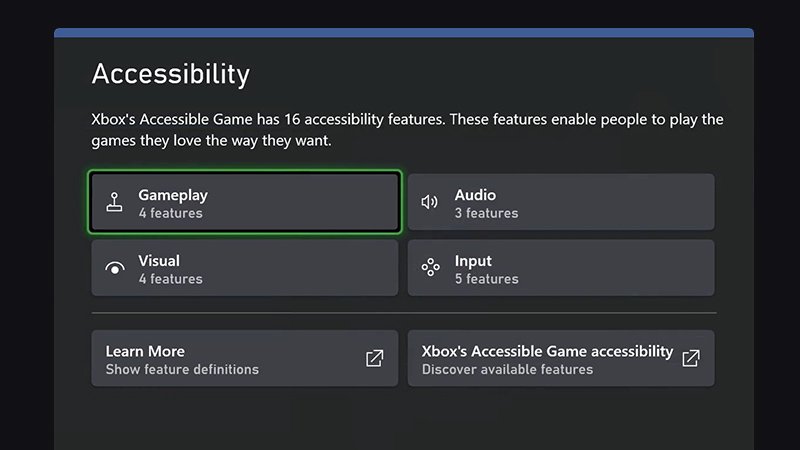
Xbox accessibility features include a variety of options such as copilot mode, magnifier, narration, and customizable controller inputs, designed to make gaming more inclusive for everyone.
Gaming should be for everyone, right? That’s exactly the thinking behind the inclusive design of modern consoles, specifically Xbox. The variety of options available means players of all abilities can enjoy their favorite games.
These are not just add-ons either, these are thoughtfully developed options which allow for a much wider range of users to experience Xbox games. The features really do make a huge impact on many lives.

Xbox Accessibility Features: Gaming for Everyone
Playing video games is super fun, and everyone should have the chance to join in! That’s why Xbox has created some amazing accessibility features. These tools help people with different needs play games comfortably and enjoy them just as much as anyone else. Let’s explore these features and see how they make gaming better for all.
Making Gaming Easier to See
Sometimes, things on the screen can be hard to see. Maybe the words are too small, or the colors are difficult to tell apart. Xbox has thought about this and added features to help. These features help people who might have trouble with their vision.
Narrator: Your Game’s Personal Storyteller
Imagine having a friend read everything on the screen to you. That’s what the Narrator does! It reads out loud the text, buttons, and menus, so you always know what’s happening. You don’t have to struggle to read tiny words anymore. The Narrator is like having a personal guide for your Xbox. You can change the speed and voice of the narrator to match what you prefer. Also, when your game has subtitles, the narrator will read out loud those subtitles, as well.
High Contrast Mode: Making Things Stand Out
Have you ever tried to find a dark object on a dark background? It’s not easy! High contrast mode changes the colors on the screen to make everything stand out more. Things become clearer and easier to see. You can even change the colors to what works best for you. If you are having trouble with some colors this setting will help you to see each color clearly. You can choose different types of colors based on your needs. This is especially great for people who have trouble seeing certain color combinations.
Magnifier: Zoom In Close
Sometimes you need a closer look. That’s where the magnifier comes in! Like a magnifying glass on your TV, it lets you zoom in on any part of the screen. This is super helpful for reading small text or seeing tiny details. The magnifier is quick to use, making it easier to see things that are small and hard to read without it.
Adjustable Display Settings: Make the Screen Just Right
The screen can be set up for each person! This is like having custom screen settings that can make things easier on your eyes, which includes being able to change the brightness, size, and color of the screen. You can adjust the brightness of the game and the colors, too. This makes the game look exactly how you like, so you will have a much more comfortable time playing it. You can even make the text bigger and easier to read.
Making Gaming Easier to Hear
Sound is a huge part of games, but not everyone hears the same way. Xbox has features that help people who might have trouble hearing. Let’s see what they are!
Mono Audio: Hearing All the Sounds
Usually, game sounds come through the left and right headphones differently. This is called “stereo” sound. But for some people, hearing this can be difficult. Mono audio puts all the sounds into both ears at the same time. This makes sure you don’t miss any sounds and makes the game easier to listen to. No more missing out on key sound effects! With Mono audio, every single sound will be present.
Volume Controls: Adjust the Game’s Volume
Sometimes, the game is too loud, or the music drowns out important sound effects. With the volume controls, you can turn up, or down different sounds based on your needs. These settings help you get the right balance so that the game sounds just right, especially the game’s background music or the different sound effects.
Chat Settings: Clear Communication
Communicating with friends online is a big part of playing games. But sometimes, the chat can be hard to hear or understand. With the chat settings, you can adjust chat volume or even turn voice chat to text chat, which will help people who can’t use their voice to communicate with others. You can change how loud it is, making the game chat much easier to hear and understand.
Making Gaming Easier to Control
Using a controller can be tricky for some people. Xbox has included accessibility features to help with this too, so that people with different motor skills can join in the fun.
Copilot: Partnering Up to Play
Have you ever wished you could play with a friend but you both only had one controller? Copilot is here to help! It lets two different controllers act like one. This means two people can work together to control one player in the game. Copilot can be really helpful for players that might find it hard to push all the buttons or coordinate the movements on a single controller. This makes it easier for a player to team up with others.
Button Remapping: Make the Controller Work for You
Everyone is different, and everyone might find that they like using the buttons differently. Button remapping allows you to change what the buttons do. For instance, you could swap the buttons on the right side with the buttons on the left side. Or perhaps switch the jump and action button. This is very helpful for anyone that has trouble with specific buttons. This means you can set up the controller to work best for your hands. No need to try and use a controller that is hard for you to control. You get to set up a custom layout that best suits you.
Sticky Keys: Press Buttons One at a Time
Some games need you to press many buttons at the same time, which can be a problem if you have trouble pressing buttons quickly. Sticky keys help you with this! With sticky keys, you can press one button, then another button, and the game acts like you pressed them at the same time. This is really useful for those who may have trouble pressing many buttons together, which means that all players have a fair shot at playing the game.
Slow Motion Mode: Time to Take it Easy
Some games are fast paced, which can be quite overwhelming! The slow motion mode is there to help, by slowing down the game so it is easier to manage. You can play the game at a slower pace giving more reaction time to those that need it. You can control the game with much more care using this mode.
Xbox Adaptive Controller: A Controller for Everyone
The Xbox Adaptive Controller is a special controller designed for people who find standard controllers hard to use. It’s like a blank slate! You can connect different buttons, switches, and joysticks to it, creating a setup that fits your own needs. It’s super customizable, which means that each person can make it work best for them. The adaptive controller is designed to allow the use of external devices and inputs to make playing video games a more accessible option.
Connecting External Devices
The Adaptive Controller has special plugs where you can connect your own buttons, joysticks, and switches. It’s like a puzzle where you choose the pieces that fit best. This can include big buttons that are easy to press, joysticks that are easy to move, or even switches you can control with your feet. It all depends on what will help the player use the controller in the best way possible.
Creating a Custom Setup
Once you have the external devices plugged in, you can set them up to do the actions you need. For example, you can make a big button be your jump button and a joystick be for moving around. The great thing is, you can change the setup as often as you want. It allows the user to build a custom controller. The only limit is your imagination. This helps create a much more enjoyable and personal way to play.
Other Helpful Features
Xbox has many other great accessibility features that help make gaming more enjoyable for everyone.
Game Transcriptions: Reading the Game’s Story
Many modern games have great stories, and these stories are sometimes told through voice chat. The game transcription will display the voice chat as text on the screen, which is really helpful for people that might have trouble hearing. You can understand the story completely even if you can’t always hear the voice overs or the chat messages very clearly. Every word will be displayed as text in your games, so you never miss a beat.
Game Input Settings: Choose Your Own Way to Play
Some games let you change how you use the controller in game, this can include remapping the game buttons, or even change how sensitive the controller is to movement, if that option is available in the game you are playing. This allows each user to set up their control scheme so that they are as comfortable as possible playing the game. Some games have a wide variety of control options that you can set up.
Easy Access to Settings
Finding these accessibility settings is super easy. You can find them in the Xbox settings menu, right on your console. From there you can easily change these setting. This makes it simple to find the help you need so that you can start playing your games right away.
Accessibility Guides: Helping You Find the Right Settings
Xbox also offers great guides that show you each of the different accessibility features and what each of them does. These guides help you set up your system in a way that is more comfortable for you. It’s like having a guide that helps you choose the right features. These guides also help walk you through each setting, making it very easy to understand.
These are just some of the many accessibility features on Xbox. They show that Xbox wants everyone to have the chance to enjoy playing games. Whether you have trouble seeing, hearing, or using a controller, there are tools and settings to help you. With these features, everyone can join in the fun and play games in a way that works best for them. It really shows that Xbox is committed to making gaming accessible for all.
Xbox accessibility features are always growing and changing. They want to make sure that gaming is always for everyone. They are making efforts to include the community in the conversation, so that they are always adding the features that people really need. If you or someone you know could use these features, then be sure to check them out. You will see that Xbox makes a huge effort to allow all players to enjoy every game.
Get Started With Accessibility Feature Tags on Xbox
Final Thoughts
Ultimately, Xbox accessibility features empower more players to enjoy games. These options create a more inclusive gaming environment for everyone. Microsoft continues to improve and expand these options. They are making gaming more enjoyable and approachable for individuals with various needs.
The diverse range of Xbox accessibility features supports gamers with different abilities. Players can customize controls, audio, and visuals. This allows them to play comfortably and effectively. The goal is simple: accessibility for all gamers is a must.

