
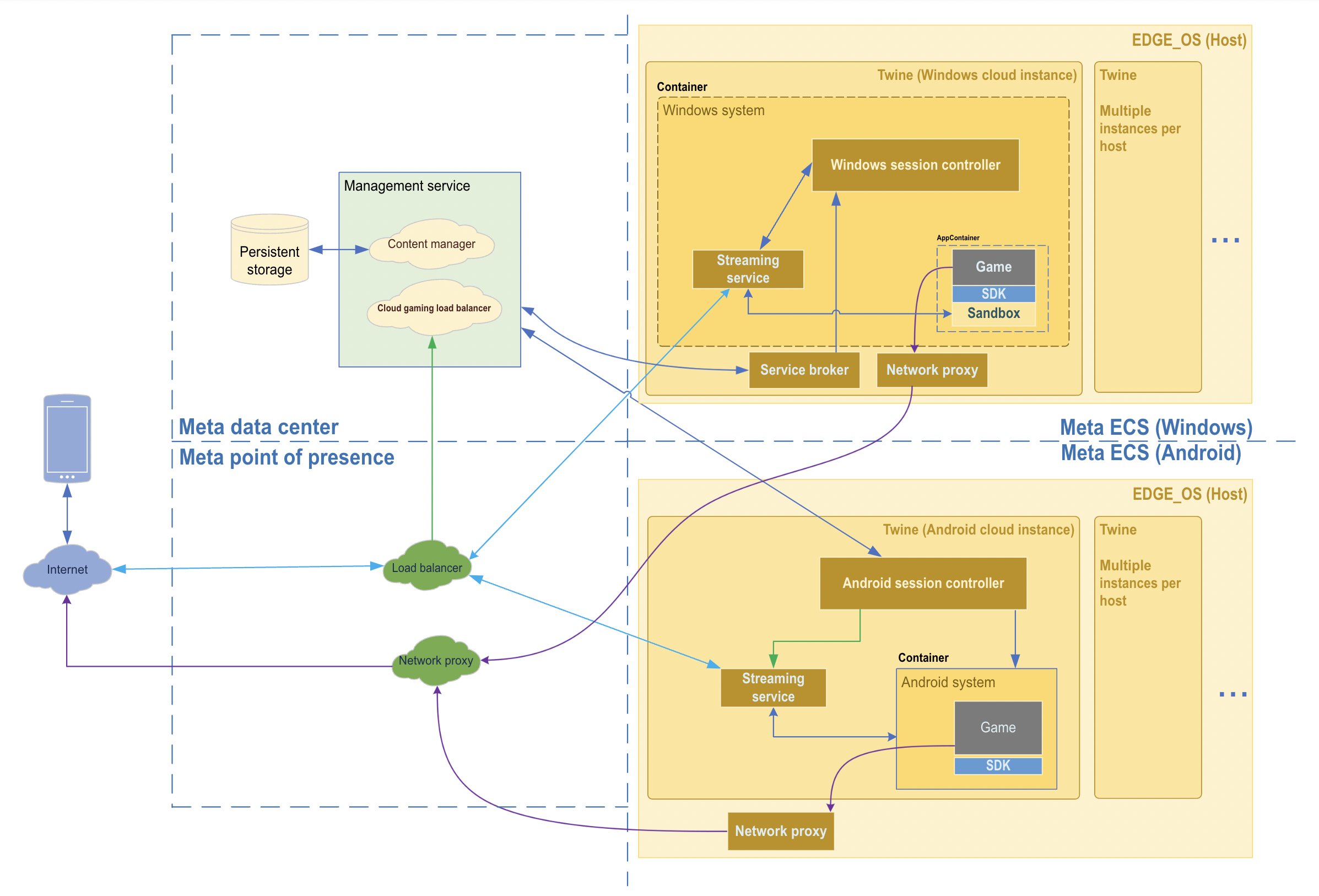
Xbox cloud gaming infrastructure uses powerful server blades in data centers to run games, sending video and audio to user devices and receiving input commands.
Have you ever wondered how you can play the latest Xbox games on your phone or tablet? It’s all thanks to the sophisticated Xbox cloud gaming infrastructure. This system allows gamers to play titles on virtually any device with an internet connection.
Essentially, Microsoft uses a network of server blades to do all the heavy processing. They send the game’s video and sound to you. Your controller presses are then sent back to the servers, making it feel like you’re playing on a local console.

Xbox Cloud Gaming Infrastructure: A Deep Dive
Alright, let’s get into the nitty-gritty of how Xbox Cloud Gaming actually works! You know, it’s not just magic – there’s a whole lot of clever tech powering those games that appear on your screens without needing a powerful console right next to you. Think of it like this: instead of your Xbox doing all the hard work, it’s happening somewhere else, and it’s all being streamed to you. So, what makes this all possible? The answer lies in the complex infrastructure built by Microsoft.
The Power Behind the Stream: Azure Data Centers
The real muscle of Xbox Cloud Gaming lives inside Microsoft’s Azure data centers. These aren’t your average server rooms; they’re massive facilities packed with powerful computers, all working together. These data centers are located all over the world, strategically placed to be close to users like you. This helps to reduce the distance the gaming signal has to travel, resulting in less lag and a smoother experience.
What’s Inside?
These data centers are filled with custom-built Xbox server blades. Basically, each “blade” is like a super-powered Xbox console, designed to run multiple game instances simultaneously. That means, when you start playing a cloud game, you are connecting to one of these blades that has the game pre-installed and ready to go. This way, you’re not waiting for the game to download onto your device every time you want to play. The servers use powerful processors and graphics cards, much like the components in a modern gaming PC, but they’re designed to handle many gamers at once.
Geographic Reach
Having data centers all around the world is key to delivering a solid cloud gaming experience. By having these servers close to where gamers live, it greatly reduces latency – that annoying delay between when you press a button and when the action happens on screen. The closer the data center is, the quicker your actions are reflected in the game. Think of it like shouting across the street versus shouting across the park; you’re going to hear the first much quicker! Microsoft continues to expand its data center presence, aiming to reach even more gamers with better cloud experiences.
How Games Get to You: The Streaming Magic
Okay, so we know the games are running on servers in data centers. But how do they actually appear on your phone, tablet, or TV screen? That’s where streaming technology comes in.
Encoding and Decoding
When you play a cloud game, the server is doing all the processing and rendering of the game graphics. This output is then encoded into a video stream, similar to how your favorite shows are streamed. This video is sent over the internet to your device where it’s then decoded and displayed on your screen. The encoding process needs to be quick and efficient to keep the delay low and provide a smooth experience. Efficient codecs, special software designed for video compression, play a vital role here.
Network Optimization
The internet connection plays a crucial role in cloud gaming. Even with the most advanced data centers, a poor connection can ruin the fun. Microsoft uses network optimization techniques to reduce latency and data loss, ensuring a stable and high-quality stream. They do things like prioritize gaming traffic, which means the network is more likely to give gaming data preferential treatment over other things you might be doing online. This prioritization helps to avoid those annoying glitches and pauses that interrupt the game flow.
The User Experience: From Controller to Screen
From your perspective, cloud gaming should feel as close to playing on a console as possible. Everything from your controller to what’s on your screen needs to work seamlessly.
Controller Input
Your controller is sending commands to the servers in real-time. When you press a button, that input signal is sent over your internet connection to the server where the game is running. The server acts upon your command and then sends back the updated video feed with the new action. This entire process has to happen extremely quickly, and that’s why a good internet connection and server location are so important.
Seamless Switching Across Devices
One of the coolest things about cloud gaming is that you can start playing on one device and then continue on another, picking up right where you left off. This is possible because your game progress is saved on the cloud, not on your specific device. Whether you’re using a phone, tablet, or computer, you can seamlessly switch devices without losing your game state.
User Interface and Game Selection
The Xbox cloud gaming interface makes it easy to pick and choose which games you want to play from the cloud. It’s designed to be friendly for all users, regardless of whether you are using a console or not. You can search through titles, view your game history, and start a new game with a few simple clicks or taps. The ease of access is a big win for cloud gaming.
The Technical Challenges: Overcoming Obstacles
Delivering a smooth cloud gaming experience is not without its challenges. There are many hurdles that Microsoft’s infrastructure has to address daily.
Latency: The Enemy of Fun
Latency, or lag, is the biggest challenge in cloud gaming. Even a fraction of a second delay between your button press and the game’s reaction can significantly impact the gaming experience. That’s why Microsoft invests heavily in optimizing their data centers and network to minimize latency as much as possible. They are continually working on improving this.
Bandwidth Requirements
Cloud gaming requires a stable and relatively fast internet connection. A game being streamed is essentially a live video. Just as watching a high-definition video on Netflix needs enough bandwidth, cloud gaming does too. If your internet speed fluctuates or falls too low, it can lead to a jerky, pixelated picture, ruining the fun. Microsoft recommends certain internet speeds for the best cloud gaming experience.
Maintaining Server Capacity
With many gamers playing at the same time, Microsoft’s servers need to have enough power to handle all the players. As demand grows, they need to consistently expand their server capacity and upgrade their hardware to ensure a smooth and consistent playing experience. This means scaling up their infrastructure to meet the constantly changing needs of gamers all over the world.
Future of Xbox Cloud Gaming Infrastructure
The future of Xbox cloud gaming looks incredibly bright, with a lot of innovation on the horizon. Here are some areas that are likely to see improvements:
Edge Computing
Edge computing is all about bringing the data center power closer to users. Instead of relying on data centers that might be farther away, edge servers can be placed in local areas like city centers, or even your neighborhood. This would further reduce latency, creating an even more responsive gaming experience. Imagine the servers being closer to you than ever before.
Improved Codecs
Just like new, advanced technology always comes out, new and improved video codecs are also in development that will allow games to be streamed at even higher quality with lower bandwidth usage. This means you’ll be able to get a clearer, sharper picture without needing a super-fast internet connection. This also opens the door to more visually intense games being available through the cloud.
Integration with More Devices
As cloud gaming gets better, it will likely be integrated into even more devices, such as smart TVs, tablets, and a broader range of mobile devices. This means that you will be able to game wherever you are, whenever you want, without needing any specific gaming hardware.
Artificial Intelligence (AI)
AI has the potential to change cloud gaming. AI could be used to predict and adapt to network conditions, which helps in managing bandwidth usage. It could also help with predicting player actions, which in turn would lower perceived latency. AI could also enhance and personalize game recommendations and provide better customer support for gamers using the service.
The Ecosystem: More Than Just Servers
The cloud gaming infrastructure isn’t just the hardware and software; it’s also the entire ecosystem surrounding it.
Game Catalog
The library of available games is a vital part of the cloud gaming infrastructure. Microsoft is continuously expanding its cloud gaming catalog, giving players access to an increasingly diverse and exciting range of titles.
Xbox Game Pass
Xbox Game Pass is a key to cloud gaming success. It provides access to a large library of games for a monthly subscription, which includes a selection of games that are playable on the cloud. Xbox Game Pass has really made it easy to enjoy cloud games.
Community and Social Features
Cloud gaming also has social features built in, just like console gaming. You can interact with friends, join multiplayer sessions, and share your gaming experiences. This social aspect creates a more immersive and engaging experience.
In conclusion, the infrastructure behind Xbox Cloud Gaming is a complex and evolving system. It combines the power of Microsoft Azure’s data centers, advanced streaming technology, and continuous innovation to provide gamers with a seamless and high-quality experience. From the data centers around the world to the user interface on your screens, everything is designed to make gaming accessible anywhere, anytime. As this technology continues to advance, we can expect cloud gaming to become even more prominent in the world of interactive entertainment, making games more accessible to everyone. It’s truly amazing how much behind-the-scenes work goes into delivering those games right to your screen.
XBOX & NVIDIA CREATING Infrastructure for CLOUD Gaming's FUTURE #xcloudgaming #geforcenow #nvidia
Final Thoughts
In conclusion, the powerful Xbox cloud gaming infrastructure enables playing games on various devices without needing a console. This accessibility greatly expands gaming reach.
The underlying technology allows quick game loading and smooth gameplay experiences. The infrastructure continuously improves, offering gamers better performance and features. Xbox cloud gaming infrastructure is core to future gaming.

