
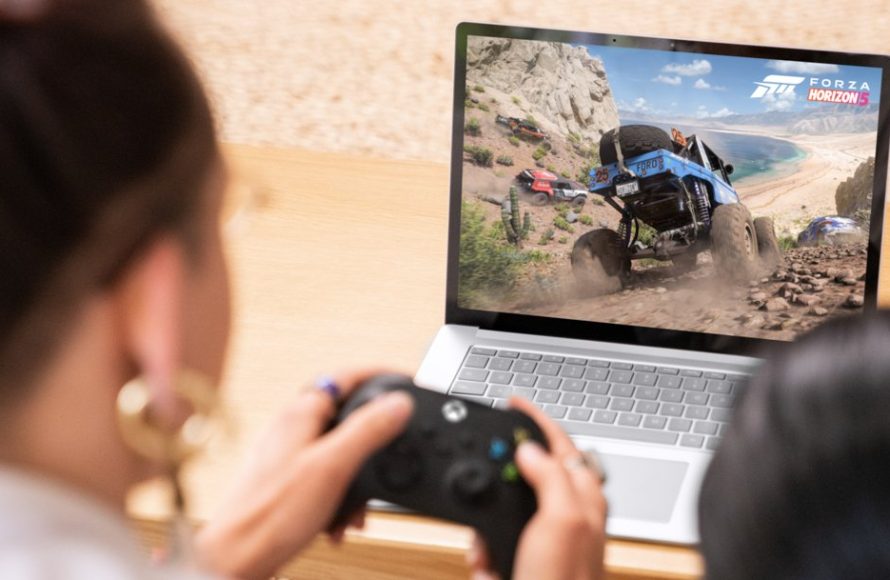
Xbox cloud gaming technology allows you to play Xbox games on various devices, without needing a console, by accessing game servers remotely.
Imagine playing your favorite Xbox titles on your phone or tablet—that’s the power of Xbox cloud gaming technology. This innovative approach moves the game processing from a console to powerful servers. Therefore, you can enjoy high-quality gaming experiences on devices you already own.
The experience also simplifies accessibility. Gamers can jump into their favorite worlds anytime and anywhere with a good internet connection. No more waiting for game downloads or dealing with expensive console hardware.

Xbox Cloud Gaming Technology: Play Anywhere, Anytime
Imagine playing your favorite Xbox games not just on your console, but on your phone, tablet, or even a low-powered laptop! That’s the magic of Xbox cloud gaming technology. It’s like having a super-powerful Xbox inside a computer far away, streaming the game directly to your screen. You control the game, and it feels like you’re playing on a local console. Let’s dive into how this awesome tech works and what it means for gamers.
How Does Xbox Cloud Gaming Work?
At its heart, Xbox cloud gaming is about making games accessible on different devices. Instead of needing a powerful Xbox console to run the games, the processing happens on powerful servers located in data centers. These servers do all the heavy lifting – rendering graphics, handling physics, and managing game logic. You connect to these servers through the internet, and the server sends the video of the game to your screen, while your controller inputs are sent back. It’s very similar to how you might stream a movie or TV show, but instead of just watching, you’re actively playing.
The Key Components
- Data Centers: These are where the powerful server computers that run the games live. Think of them as massive game rooms housing countless virtual Xboxes.
- Streaming Technology: This is how the game video is sent to your device and your controller actions are sent back. It needs to be fast and reliable to ensure a smooth gaming experience.
- Your Device: This can be your phone, tablet, PC, or even a smart TV, which acts as your screen, controller, and connection to the game.
The Advantages of Cloud Gaming
Cloud gaming offers a bunch of cool benefits, especially for those who want to game on the go or don’t own a high-end gaming PC or Xbox console.
Play on Multiple Devices
One of the best things about Xbox cloud gaming is that you’re no longer tied to just one screen. You can switch between your phone, tablet, and computer without losing your game progress. Want to play a quick race on your phone during your lunch break and then continue on your TV at home? With cloud gaming, it’s easy.
No More Long Downloads
Tired of waiting hours for a game to download? With cloud gaming, you can jump into a new game almost instantly. Since the game is running on a server, you don’t need to download large files to your device, saving time and storage space.
Less Need for Expensive Hardware
You don’t need the latest, most powerful gaming computer or console to enjoy top-tier games. Xbox cloud gaming brings high-quality games to many different devices. This makes gaming more accessible to people who might not have the budget for expensive gaming hardware.
Game Library Access
With Xbox Game Pass Ultimate, you get access to a large library of games that you can play via the cloud. This is a cost-effective way to experience many titles without needing to buy each one separately.
Play Anywhere with an Internet Connection
As long as you have a good internet connection, you can play your favorite games almost anywhere in the world. On long trips, in the waiting room, or even at a friend’s house without having to carry a console, the gaming fun follows you.
The Technology Behind the Scenes
Now, let’s get a bit more technical and see what makes this magic happen. It’s not just about streaming video; it also requires a quick, reliable transfer of user input and a smooth game experience.
Low Latency Gaming
Latency, or lag, is a big concern when playing online games. With cloud gaming, the goal is to make the delay between your controller input and the action on the screen as small as possible. This is achieved through advanced compression methods, fast internet connections, and efficient network infrastructure. Microsoft works hard to minimize any lag, providing you with an experience similar to playing locally.
Video Compression and Encoding
The game video needs to be compressed to reduce the amount of data sent over the internet. High-quality video compression techniques, like H.264 and H.265, are used to maintain visual quality while minimizing data usage. The encoded video is then sent to your device, where it is decoded and displayed on your screen. This process must happen quickly and smoothly to avoid any hiccups in your gaming experience.
Input Handling
When you press a button on your controller, that input needs to be sent to the cloud server to affect the game. The server processes the input, and the game responds. These input signals also need to be transmitted rapidly to make sure your actions register quickly in the game. If there were any considerable delays, you would notice them as input lag.
Adaptive Streaming
Cloud gaming technology also needs to be smart about how it streams video to different devices on various internet connections. Adaptive streaming means that the video quality will adjust based on your connection speed. If your connection is strong, you’ll see high-quality video, but if your connection is weaker, the quality might automatically reduce to keep the game running smoothly. This prevents buffering and keeps your gaming session going without interruption.
What You Need to Get Started with Xbox Cloud Gaming
To enjoy Xbox cloud gaming, there are a few important things you need.
Xbox Game Pass Ultimate
First, you need a subscription to Xbox Game Pass Ultimate. This gives you access to the cloud gaming library, online multiplayer, and a library of downloadable games that you can play on your Xbox console or PC. You get a lot of value for the subscription, with many great games to experience through the cloud.
Compatible Device
You can play cloud games on different devices, such as:
- Android phones and tablets
- Apple iPhones and iPads
- Windows PCs
- Xbox consoles
- Certain Smart TVs
Stable Internet Connection
A stable internet connection is crucial for cloud gaming. Microsoft recommends a download speed of at least 10 Mbps for the best experience. The faster and more stable your connection, the better your game will look and feel.
It’s important that your internet connection is stable, as disconnections will interrupt your cloud gaming experience.
Compatible Controller
A Bluetooth-enabled Xbox controller is often the preferred way to play, but you can also use other compatible gamepads or even touch controls on some devices. Some games are optimized for touch, making them easy to play with your fingers on a phone or tablet. However, using a controller often provides the best experience.
Specific Features of Xbox Cloud Gaming
Cloud Saves and Syncing
One great advantage is that your game progress is saved to the cloud. This means that you can start playing on one device and then continue exactly where you left off on another device. Your cloud saves make it seamless to switch devices and keep your progress in sync.
Touch Controls and Controller Support
Many games that are available on Xbox Cloud Gaming are enabled with touch controls that make them very comfortable to play on a touch-screen device like a phone or a tablet. However, if you prefer to play with a controller, that is of course, the best option for most games. It is important to know that you have both choices, depending on your preferences.
Xbox Game Pass Library Integration
The cloud gaming experience is closely tied with the Xbox Game Pass library. You can browse and launch games right from the Xbox app on your device. This helps ensure easy game discovery and quick access, without any hassles of searching.
Challenges and Future of Cloud Gaming
While cloud gaming is impressive, there are still some challenges. However, technology continues to improve. Let’s take a look at some current challenges and how they might be addressed in the future.
Latency Issues
Although huge strides have been made, latency issues can still sometimes be a factor, especially if your internet connection is not great. Ongoing improvements in internet technology, such as faster connections and better routing, will help further lower latency.
Internet Stability
Cloud gaming is very dependent on a consistent and reliable internet connection. Any fluctuation in internet speed will negatively impact your gaming experience. As internet infrastructure continues to improve, issues with connection instability will become less common.
Game Availability
While the Xbox Game Pass library has plenty of games, not every game is cloud enabled. However, this library continues to expand as time goes on, and more titles are expected to be added to the cloud library. More and more game developers are recognizing the importance of cloud gaming, thus this issue is getting solved by day.
The Future
Cloud gaming is expected to play a massive part in the future of video games. It promises to bring quality gaming to more people. As the technology improves, you will see higher resolutions and more robust features. You might even see the day when cloud gaming becomes the main way people play games, removing the need for local hardware entirely.
Tips for Better Cloud Gaming
Here are a few tips that can help you have a better experience with cloud gaming:
- Use a Wired Internet Connection: If possible, use an Ethernet connection instead of Wi-Fi to minimize lag.
- Close Other Applications: Ensure no other apps are using up your internet bandwidth.
- Use a 5GHz Wi-Fi Connection: If you must use Wi-Fi, use a 5GHz connection, which tends to be more stable than 2.4GHz.
- Check Your Internet Speed: Use an online speed test to make sure your internet speed is good enough for cloud gaming.
- Update Your Devices: Keep your device’s software updated for better performance.
Xbox cloud gaming technology opens up a whole new world of possibilities for gamers. It makes high-quality games more accessible than ever before, allowing you to play your favorite titles on almost any screen. Although there are some challenges that still exist, the future of cloud gaming seems promising with technology improving at a rapid pace. The potential is huge and it will be interesting to see where the technology goes in the coming years.
Xbox Cloud Gaming on the World's FASTEST Internet! 🤯
Final Thoughts
In short, Xbox cloud gaming technology provides access to numerous games across various devices. Players enjoy gaming on their phones, tablets, and even older computers. This advancement removes hardware limitations, allowing wider game access.
Xbox cloud gaming technology significantly changes how people engage with video games. It expands gaming opportunities beyond traditional consoles. This approach benefits both casual and avid gamers alike, offering great flexibility.

