
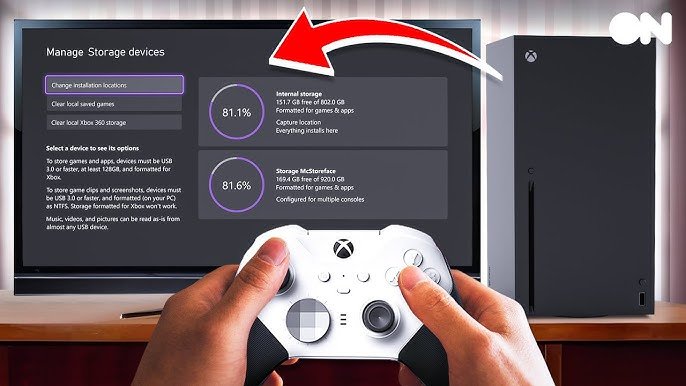
Xbox console storage options include internal SSD upgrades, external USB hard drives, and Seagate expansion cards.
Running out of space for your games can be frustrating. You’re probably wondering about the best way to handle it, right? Knowing your Xbox console storage options is key to keeping your game library ready and your console running smoothly.
Thankfully, you have several routes to expand. You could opt for upgrading the internal drive if you are comfortable with console modifications. You can easily add an external hard drive, or even use an officially licensed expansion card for extra speed.

Xbox Console Storage Options
Running out of space on your Xbox can be a real bummer. Imagine you’re ready to play that awesome new game, but then your console throws up that dreaded “storage full” message. It’s like being told you can’t have dessert after dinner! But don’t worry, there are plenty of ways to make room for all your favorite games, downloadable content, and saved progress. Let’s dive into all the storage options for your Xbox and figure out what’s best for you.
Understanding Your Xbox Storage
First things first, let’s talk about how storage works on your Xbox. Your console comes with a built-in hard drive, which is like the console’s own personal closet for games and files. The size of this closet depends on the type of Xbox you have. For example, an Xbox Series S usually has less storage space than an Xbox Series X. Think of it like a small apartment versus a larger house; you can store more stuff in the bigger space. When you download a game, it takes up space on this hard drive. The bigger and more detailed the game, the more space it needs. And guess what? Saved game files, DLC (downloadable content), and even those cool apps all take up space too. So, it doesn’t take long before things get a little crowded.
How Much Storage Do You Actually Need?
Figuring out how much storage you actually need really depends on your gaming habits. Are you someone who just plays a few games or a hardcore gamer who loves having all the latest and greatest titles? If you play a few games that you rotate regularly, then your console’s built-in storage might be enough for you. However, if you’re a game collector or love having a large library of playable games on hand, you’ll need more space. Games today, especially those on newer consoles like the Xbox Series X and S, can be really big. They often need 50GB or even 100GB each! That space adds up fast, especially when you consider that system files and other data also takes up a good chunk of your built-in storage. Therefore, think about these things when figuring out how much storage you need:
- How many games do you usually have installed? A few or many?
- Do you like to play large, AAA games? These take up the most space.
- Do you also download lots of apps? Apps like Netflix, Hulu, etc. use space as well.
- Do you play a variety of different games? Or do you mainly stick to a few?
These points can help you figure out how much extra space you’ll need. It’s always better to have a little more than you think you’ll need just in case!
External Storage Options: Expanding Your Xbox’s Capacity
When your console’s built-in storage starts feeling cramped, don’t fret! You have the option of adding extra storage space using external hard drives or expansion cards. Think of these options as adding a new closet or even a whole extra room onto your house! They give you the capacity you need to keep all your games ready to play. Let’s take a look at what’s available:
External Hard Drives (HDDs)
External hard drives are a very popular and budget-friendly option for extra storage. These drives connect to your Xbox through a USB port and come in various sizes, ranging from 1TB to even 8TB or more! It’s like having an extra chest of drawers to store all of your clothes, in our analogy.
Benefits of External HDDs:
- More Affordable: HDDs are usually cheaper than other types of storage, offering a good amount of storage for less money.
- Large Capacity: You can find HDDs with large amounts of storage, so you can have many games and other data stored on a single drive.
- Easy to use: They are simple to set up; you just plug them into your Xbox’s USB port.
Limitations of External HDDs:
- Slower Load Times: Games will load and run slower when they are installed on an external HDD, compared to the console’s internal storage or an SSD (Solid State Drive).
- Not compatible with all Xbox games: You can only play Xbox One, Xbox 360, and original Xbox games from an external HDD. You cannot play Xbox Series X|S optimized games on it. These require the faster speed of the internal drive or a compatible expansion card, which will be described next.
Think of external HDDs like having extra space, but your items aren’t quite as fast to get to. They are a good choice for storing older games, or for games you don’t play as often. They work great for managing your game library so you do not have to delete game each time you want to play a new game.
SSD Expansion Cards
SSD (Solid State Drive) expansion cards are a newer and higher-performing storage option designed specifically for Xbox Series X and S consoles. These cards are made by Seagate and are created to work directly with the console’s architecture. They are more expensive than external hard drives but are much faster and they can play all games from them, including Xbox Series X|S games, with same speed you get on internal storage.
Benefits of SSD Expansion Cards:
- Fastest Load Times: They provide the same speed as your console’s internal storage, which means the fastest loading times for games.
- Play All Games: You can play any type of game (including Xbox Series X/S games) directly from these expansion cards.
- Seamless Integration: They are designed to fit perfectly into the expansion slot on the back of your Xbox Series X or S console.
Limitations of SSD Expansion Cards:
- More Expensive: They are more expensive than external HDDs, which can make them a more significant investment.
- Limited Sizes: While a few options are available, the capacity options are less than you may find for an external HDD.
Think of expansion cards as adding an extra closet or room that’s just as quick to get items from as your main closet. It’s the perfect solution for gamers who want the best performance and want to enjoy all their games, including all the latest Xbox games.
External Solid State Drives (SSDs)
External SSDs are another option for external storage. These drives use the same type of technology as the expansion card (SSD technology) but are connected through a USB port instead of an expansion slot. They are faster than external HDDs but are not as fast as the internal storage or expansion card and have same limitations as external HDDs. They can help improve the performance of some games and help load games faster, while allowing you to store all games, including Xbox Series X|S, but can’t play those new games from them.
Benefits of External SSDs:
- Faster than HDDs: They offer faster loading times compared to traditional external HDDs.
- Play Xbox One, Xbox 360, and Original Xbox games: These can play the games from these era.
Limitations of External SSDs:
- Slower Than Internal: They are not as fast as the internal storage or expansion cards.
- Not for Xbox Series X/S games: They cannot play optimized Xbox Series X/S games.
- Price: They are more expensive than HDDs, but less than the expansion cards.
Think of these as being like an extra dresser in your room. It’s better than an older storage chest (HDD) but still not quite as fast as your main closet. They’re good for games you want to load a bit quicker or as extra storage for your older games.
Choosing the Right Storage for You
Now that you know your options, let’s consider how to pick the right one. It depends on your budget, how much extra storage you need, and what kind of games you like to play.
Budget-Friendly Options
- External HDD: If your budget is tight, a standard external hard drive is your best friend. You can get a large amount of storage for less money and you can store your entire library.
- Tips: Look for well-known brands, read reviews from other buyers, and always format your hard drive after you first plug it in.
For Speed and Performance
- SSD Expansion Card: If you want the best performance and speed, especially for Xbox Series X|S games, the official expansion card is the way to go.
- Tips: Consider this as a long term investment in your gaming performance.
A Balance of Speed and Price
- External SSD: If you are looking for better performance than a HDD but you do not want to pay the premium price for expansion card, an external SSD could be a good middle ground for you.
- Tips: Make sure your USB port is USB 3.0 or higher for the fastest speed.
Quick Summary
Here is a little table to help summarise the information that we have discussed so far:
| Storage Type | Price | Speed | Can Play Xbox Series X|S Games | Best For |
|---|---|---|---|---|
| Internal Storage | Included | Fastest | Yes | System Storage, Current Gen Games |
| External HDD | Low | Slow | No | Storing older games, Budget-conscious |
| SSD Expansion Card | High | Fastest | Yes | Fast Loading, Current Gen Games |
| External SSD | Medium | Faster than HDD | No | A bit faster than HDD, storing older games |
Tips for Managing Your Xbox Storage
No matter which storage option you pick, here are some great tips to keep your Xbox running smoothly:
- Delete Games You Don’t Play: If you haven’t touched a game in a while, consider deleting it to make room for new ones. You can always download it again later.
- Move Games to External Storage: Transfer games to an external HDD if you’re not playing them frequently, and move them to internal or expansion card when you decide to play again.
- Uninstall Apps You Don’t Use: Just like with games, you may have apps that you don’t use. Get rid of them and clear up storage space.
- Regularly Check Your Storage: Check your storage usage regularly in the settings to know what’s taking up the most space, and plan accordingly.
By managing your storage well, you can avoid the “storage full” problem and keep your Xbox ready for gaming action.
Setting Up Your External Storage
Setting up external storage is very easy. Let’s explore the steps you need to follow.
Setting Up External Hard Drives or SSDs
- Plug It In: Connect the external HDD or SSD to a USB port on your Xbox.
- Format the Drive: When you connect a storage drive for the first time, you need to format it. The console will guide you through the process. This step will delete any existing data on the storage so make sure you only format if the storage drive doesn’t have anything important on it.
- Choose Where to Store Games: You can set the external drive as the default location to store new games, or move games from your internal storage to the external storage drive.
Setting Up SSD Expansion Cards
- Insert the Card: Locate the expansion card slot on the back of your Xbox Series X|S and insert the card.
- Format the Drive: If the expansion card is not ready to use out of the box, the console will guide you through the formatting process.
- Ready to Play: The expansion card should now be available to be used on the console. You can now choose to install games onto it and play from it.
Setting up both these options is very easy and won’t take long at all. If you run into any problems, consult your xbox manual or look online for solutions.
So, there you have it! With all of these options, you will never have to worry about running out of storage space on your Xbox console. Whether you decide to go with an external HDD, an expansion card, or an external SSD, you can choose one that suits your needs and keep gaming!
How to increase Xbox Series Storage [All methods]
Final Thoughts
Ultimately, managing your game library requires careful consideration of your console’s storage. You can choose internal expansion cards for seamless performance. External hard drives offer a more affordable way to increase capacity, although with possible slower loading.
Selecting the best solution depends on your budget and gaming style. Consider your priorities when evaluating Xbox console storage options. Make informed decisions to enhance your experience.

