
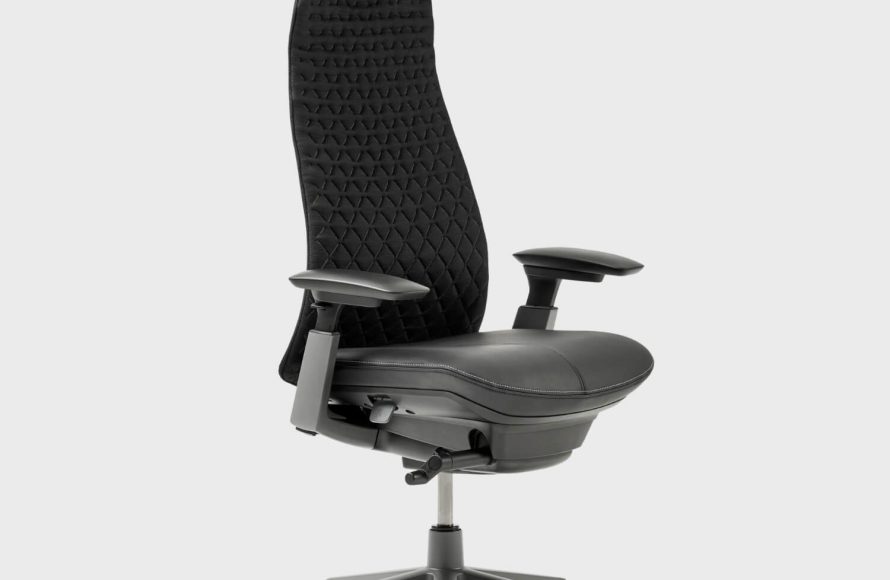
An Xbox gaming chair enhances your gaming experience with improved comfort and ergonomic support during long play sessions.
Ever wondered how to level up your gaming setup? An Xbox gaming chair could be the answer. Comfort plays a crucial role during intense gaming sessions, and a proper chair makes all the difference.
These specialized chairs are designed for extended use, offering features to support your posture. They can minimize strain and help you focus on the game.

Choosing the Perfect Xbox Gaming Chair
So, you’re serious about your Xbox gaming, huh? You’ve got the latest console, the coolest games, and maybe even a headset that makes you feel like you’re really in the action. But what about where you park yourself for those marathon gaming sessions? A regular chair just doesn’t cut it. That’s where the right Xbox gaming chair comes in. It’s not just about looking cool; it’s about comfort, support, and enhancing your entire gaming experience. Let’s dive deep into what makes a great gaming chair for your Xbox adventures.
Why Do You Need a Dedicated Xbox Gaming Chair?
You might be thinking, “Why can’t I just use the chair I already have?” Well, you could, but you’d be missing out on a lot. Normal chairs aren’t designed for the long hours you spend in front of your screen. A dedicated gaming chair, especially one designed with Xbox players in mind, offers several key advantages:
- Improved Posture and Comfort: Gaming chairs are built to support your back and neck, helping you maintain good posture even during extended play. They often feature adjustable lumbar support and headrests, crucial for preventing aches and pains. Regular chairs can lead to slouching and discomfort, impacting your performance and overall well-being.
- Enhanced Gaming Experience: These chairs often have features that make you feel more immersed in the game. Some come with built-in speakers or vibration motors that react to the game’s audio, adding a whole new layer to your gameplay.
- Increased Durability: Gaming chairs use materials built to last, able to withstand the wear and tear of frequent use. They’re designed for active gamers, unlike some typical office chairs.
- Personalized Adjustability: You can adjust almost everything on a good gaming chair. From armrests to seat height to tilt, you can customize it to your perfect comfort level, no matter your size or preference.
- Style and Aesthetics: Let’s be honest, a cool gaming chair just looks awesome! It can match your Xbox setup and make your gaming area feel complete and professional.
Types of Xbox Gaming Chairs
The world of gaming chairs can feel overwhelming with so many options available. But don’t worry, we’re going to break down the most common types you’ll come across, each catering to different needs and preferences. Choosing the best option will largely depend on the space you have available, your preferred seating posture, and of course, your budget.
Racer Style Chairs
These are the most common type you will see. They often resemble racing car seats and have a high back, prominent side bolsters, and a bucket-seat design. Here is what makes them popular:
- Pros: High level of support, great for long gaming sessions, and often come with adjustable features. They also offer a sporty, aggressive look that many gamers love.
- Cons: Can be bulky and may not fit well in smaller rooms. The bucket seat design can feel restrictive to some people.
- Who They’re Good For: Gamers who prioritize maximum support and an immersive feel, especially for racing or action games.
Rockers and Floor Chairs
Rockers sit directly on the floor and are ideal for a more relaxed and casual gaming experience. Here’s what to know about these:
- Pros: Perfect for low profile setups, great for younger gamers, and offer a comfortable, reclined seating position. They’re usually more affordable than pedestal or racer chairs.
- Cons: Less adjustable compared to other chair styles, not suitable for all posture preferences, and some people may find it difficult to get out of them.
- Who They’re Good For: Casual gamers, younger players, and anyone who wants a relaxed gaming experience with a smaller budget.
Pedestal Chairs
Pedestal chairs sit on a raised base that allows for swiveling and rocking. They offer a good compromise between the adjustability of racer chairs and the casual style of rockers. Check out the specifics:
- Pros: They provide a good level of comfort and support, have more adjustability than rockers, and are easier to get in and out of than floor chairs. The swivel function is particularly useful.
- Cons: Usually larger and bulkier than rockers, and may not offer the same level of adjustability as a racer-style gaming chair.
- Who They’re Good For: Gamers who like the idea of a pedestal base for easy access and movement without sacrificing a lot of comfort and support.
Bean Bag Chairs
These may not be the typical gaming chair, but they’re worth mentioning for their comfort and versatility.
- Pros: Highly comfortable, informal, perfect for casual gaming, lightweight and easy to move.
- Cons: Lacks back and posture support, not ideal for longer game sessions, does not fit every situation and space.
- Who They’re Good For: People who like a very casual gaming environment, and don’t want to have any adjustments.
Key Features to Consider
When choosing an Xbox gaming chair, there are several key features that you should always consider before making your decision. These can greatly impact your gaming experience and how well a chair fits your unique needs.
Adjustability
How much you can adjust the chair will influence how well it fits your body and how comfortable you will be. Here’s what to look for:
- Seat Height: Look for a chair that allows you to adjust the height so your feet are flat on the floor and your knees are bent at a 90-degree angle. This promotes good posture and helps avoid leg fatigue.
- Armrests: Adjustable armrests can move up and down, forward and backward, and even side to side. This lets you support your arms at a comfortable height which is key for preventing shoulder and wrist pain.
- Backrest Tilt: A chair that can recline or tilt allows you to find a comfortable position for relaxing between games or during less intense moments. Look for a good range of tilt and lock options.
- Lumbar Support: Look for a chair with built-in or adjustable lumbar support. This is essential for maintaining the natural curve of your lower back and preventing back pain, especially during long gaming marathons.
- Headrest: A supportive headrest can help reduce neck strain and fatigue. Some chairs come with adjustable headrests that you can raise, lower, and tilt.
Material and Build Quality
The materials used for a gaming chair greatly affect its comfort, durability, and overall feel. Here’s what you need to know:
- Frame: The frame provides the foundation for the chair. Look for a chair with a sturdy steel frame for maximum stability and durability. Avoid plastic frames, as these are not designed to last through extensive usage.
- Upholstery: The material that covers the chair makes a big difference in its comfort. Common materials include:
- PU Leather: Durable, easy to clean, and looks good. It is more affordable than real leather, but can get hot and sticky.
- Fabric: Breathable and comfortable, especially for longer sessions. Can be harder to clean and more prone to wear and tear.
- Mesh: Provides excellent airflow, keeps you cool, and is very durable. Usually found on the backrest of gaming chairs.
- Padding: Dense, high-quality foam padding provides comfortable support. Avoid chairs with thin, flimsy padding, as this will not support you for long.
Additional Features
Some gaming chairs come with special features that can greatly enhance your gaming experience. Think about what might be useful for your setup and preferences. Here are some common additions:
- Built-In Speakers: Some chairs have built-in speakers in the headrest that connect to your console or device. This can provide an immersive sound experience.
- Vibration Motors: Chairs with vibration motors can react to the audio of the game. This adds a tactile dimension to your gameplay.
- Footrests: A built-in or attachable footrest can help improve leg comfort, especially when reclined.
- Wireless Connectivity: Some chairs offer wireless connectivity for audio or vibration features which helps in not dealing with extra cables.
- Storage Pockets: A great feature that helps you store your remote or other small items conveniently.
Choosing the Right Size and Fit
Just like clothes, gaming chairs come in different sizes, and it’s crucial to choose one that fits your body type. A chair that is too small or too big can be just as uncomfortable as a standard chair. Make sure you check the chair’s weight and height capacity, but also these other important factors:
Seat Dimensions
Pay attention to the width and depth of the seat. If the seat is too narrow, the side bolsters may dig into your thighs. If it’s too deep, you might not be able to sit all the way back with proper support. Make sure you leave at least two inches of space between the back of your knees and the seat’s edge.
Backrest Height
The backrest should be high enough to support your entire back and neck. If you are taller, you will need to look for a chair with a higher backrest. Most good brands offer chairs in different sizes to fit most body types.
Weight Capacity
Always check the weight capacity of the chair to make sure it can safely support you. Ignoring this can lead to premature wear or even failure of the chair.
Setting Up Your Gaming Chair
Getting your gaming chair is just the first step. Setting it up properly is equally important to achieve the best comfort and ergonomics. Here’s how you make sure your gaming chair is working with you, and not against you:
Following the Instructions
Start by carefully reading the instruction manual that comes with your chair. Each chair is unique and may have a slightly different assembly process. Always refer to the manual to avoid mistakes.
Adjusting for Optimal Posture
After you’ve assembled the chair, it’s time to customize it. You need to adjust it to fit your body. Here’s a step-by-step guide:
- Seat Height: Adjust the seat so that your feet are flat on the ground and your knees are at a 90-degree angle.
- Lumbar Support: Adjust the lumbar support so it gently pushes into your lower back, maintaining the natural curve.
- Backrest Tilt: Adjust the backrest to your preferred angle. A slight recline can be more comfortable for longer periods, but upright is preferable for fast-paced games.
- Armrests: Position the armrests so that your elbows are supported and your shoulders are relaxed. Avoid armrests that are too high or too low as this will lead to bad posture.
- Headrest: Adjust the headrest so that it supports the back of your head, relieving neck strain.
Take Breaks
Even with the most comfortable gaming chair, it’s important to take regular breaks. Get up and move around every hour or so to stretch your legs and prevent stiffness.
Caring for Your Xbox Gaming Chair
To make sure your new chair lasts for years, you have to take good care of it. Here are some simple tips to follow to keep your chair looking and feeling its best:
Regular Cleaning
Regular cleaning is crucial to maintain hygiene and prevent buildup of dirt. How you clean it will depend on the material it is made of. Here is a quick guide for common materials:
- PU Leather: Use a damp cloth and mild soap to wipe down the surface. Avoid harsh chemicals as they can damage the material.
- Fabric: Vacuum the chair regularly to remove dust and dirt. For stains, use a fabric cleaner and follow the product instructions.
- Mesh: Use a soft brush or vacuum to clean the mesh. You can also wipe it down with a damp cloth.
Avoiding Damage
It is also important to be careful and avoid actions that could damage the chair. Here are some common mistakes to be aware of:
- Avoid Sharp Objects: Be careful not to bring any sharp objects near the chair, as they can easily damage the upholstery.
- Avoid Spilling Liquids: Spilling drinks can cause stains or damage to the internal components. If you do spill, clean it immediately.
- Avoid Direct Sunlight: Direct sunlight can fade or damage the materials over time. Keep the chair out of direct sunlight when possible.
Checking and Tightening Bolts
Check all the screws, bolts and other connecting pieces of your chair every few months. Over time, these can become loose and make your chair wobbly or even unsafe. Make sure to tighten them when needed, to ensure a secure gaming experience.
Popular Brands of Xbox Gaming Chairs
There are many companies making high-quality gaming chairs. Here are some of the most popular and trusted brands, each with their own specific strengths and focuses.
- Secretlab: Renowned for high-quality materials, exceptional build quality, and a focus on ergonomic design. Their chairs are often on the higher end of the price spectrum but are well worth the investment for serious gamers. They have options for various body types and offer stylish designs.
- Herman Miller: Known for their premium office chairs, Herman Miller also offers gaming-focused versions. These are very expensive, but they deliver the absolute best in ergonomics and comfort. Their chairs often come with long warranties and offer a timeless design.
- DXRacer: A pioneer in gaming chairs, DXRacer offers a wide range of models in different sizes and styles. They are known for their racing-style designs and wide selection of colors and patterns. They offer both great performance and aesthetics, making them a staple for many gamers.
- Anda Seat: Known for their comfort and durability, Anda Seat offers chairs with thick padding and adjustable features. Their chairs are designed for long gaming sessions and are available at different price points.
- Corsair: A popular choice for gamers, Corsair chairs have good build quality, comfortable designs, and integrate well into other gaming setups. They are a well known brand for PC gaming and have successfully transferred that experience to their chair designs.
Cost of an Xbox Gaming Chair
The price of a gaming chair can range quite a bit, depending on the brand, material, features, and size. Let’s break down the typical cost range:
- Budget-Friendly Options (Under $200): You can find basic rocker-style or floor chairs. These options are ideal for casual gamers or those on a tight budget. They may lack some adjustability and features, but are still a great upgrade to a regular chair.
- Mid-Range Chairs ($200 – $400): This range is where you’ll find most of the popular racer-style chairs with good adjustability and a few extra features. This is the most popular range of gaming chairs.
- High-End Chairs ($400 and Up): These chairs often feature premium materials, advanced features, and incredible ergonomics. They are designed for serious gamers who spend many hours gaming. If you have the budget, this is the category you should focus on.
It is important to note that while the cheapest chairs will save you money in the short term, they are not usually designed to last a long time. The cheapest chairs will often break or lose their support over a period of time. A mid range or high end chair should be seen as an investment into your setup.
Finding the perfect Xbox gaming chair is a very personal choice. The ideal chair will be the one that fits your body, your gaming style, and your personal preferences. Take the time to research your options, test out chairs if you can, and make sure that it fits your gaming setup and situation. By making an informed decision, you’ll greatly enhance your comfort and gaming performance, taking your experience to the next level. Happy gaming!
These might ACTUALLY be worth the price – Haworth Gaming Chairs
Final Thoughts
Ultimately, choosing the right gaming chair improves your play experience. Consider comfort and ergonomics for long sessions. A proper chair supports your body.
An Xbox gaming chair designed for gaming provides a superior alternative to standard office chairs. It can offer better posture and less strain. Making the best choice for your setup is key.

