
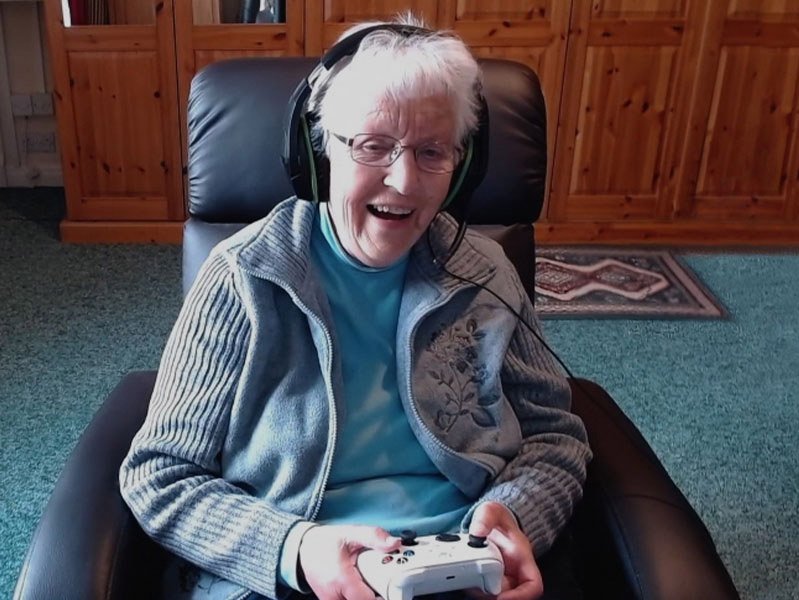
Xbox gaming for elderly people offers cognitive and physical benefits, encourages social interaction, and provides a fun, engaging activity.
Have you ever considered the potential benefits of video games for older adults? The idea of Xbox gaming for elderly people might seem unconventional, but it’s becoming increasingly relevant. This form of entertainment can stimulate the mind and body in surprising ways, making it a worthwhile activity.
Beyond simply providing amusement, engaging with video games on an Xbox provides a chance for socialization. Many games offer online modes, connecting players across distances and building new communities. It is much more than sitting and just watching tv.

Xbox Gaming for Elderly People: A World of Fun and Benefits
Video games aren’t just for kids and teenagers anymore! They’re a fantastic way for people of all ages, including our wonderful senior citizens, to have fun, stay active, and even learn new things. Xbox gaming, in particular, offers a diverse range of experiences perfect for older adults. Let’s dive into why Xbox can be such a great option and how to make it a part of a healthy and happy lifestyle.
Why Choose Xbox for Seniors?
You might be wondering, “Why an Xbox? Wouldn’t something simpler be better?” Well, Xbox has a lot going for it! It’s more than just blasting aliens or racing cars. It’s a versatile entertainment system packed with games that can improve cognitive function, enhance physical dexterity, and provide social interaction. Let’s explore these benefits further.
Cognitive Benefits
Keeping the brain active is just as important as keeping the body active, especially as we get older. Many Xbox games require problem-solving, strategic thinking, and memory recall. These kinds of mental exercises can help improve cognitive abilities and even delay cognitive decline.
- Puzzle Games: Games like Tetris, Minecraft, and Portal involve spatial reasoning and planning, helping keep the mind sharp.
- Strategy Games: Games like Civilization or Age of Empires require careful planning and decision-making, which is great for exercising the brain.
- Story-Driven Games: Following complex narratives and remembering characters and plot points can help enhance memory and attention.
Physical Benefits
You might not think of video games as physical activity, but many Xbox games can actually get you moving! Games using the Xbox Kinect motion sensor can help with balance, coordination, and even light cardio.
- Dance Games: Just Dance and similar games can be a fun way to get some exercise and improve coordination.
- Sports Games: Games like Wii Sports (available on older Xbox consoles) or other similar games can offer gentle physical activity.
- Motion-Based Games: Games that require the player to move their body rather than just use a controller can help improve balance and coordination.
Social Interaction
Staying connected with others is important at any age, and Xbox gaming offers opportunities for social interaction. Many games have online multiplayer modes where players can connect with friends, family, and even make new acquaintances. This can help combat feelings of isolation and loneliness.
- Cooperative Games: Playing together with family members or friends can be a fun way to spend time together and work as a team.
- Online Multiplayer: Joining online game communities can help meet new people and create lasting friendships.
- Family Gaming: Sharing the game experience with grandkids or other family members can create special bonding experiences.
Choosing the Right Xbox Games for Seniors
Not all Xbox games are created equal! Some games might be too fast-paced, too complex, or have content that isn’t appropriate for all ages. It’s important to choose games that are enjoyable, engaging, and suitable for the individual’s skill level and interests. Here are some ideas:
Gentle and Relaxing Games
Some seniors prefer games that are more calming and less demanding. These kinds of games offer a more relaxed experience:
- Simulation Games: Games like Animal Crossing or Stardew Valley allow for leisurely exploration, farming, and community building without intense action. These games let you play at your own pace.
- Puzzle Games: Games such as Tetris Effect: Connected are very easy to play, and are fun for everyone.
- Walking Simulators: Games like Firewatch let players explore beautiful environments without a lot of action and with easy controls.
Games with Simple Controls
Some games are much easier to play than others. Games that have easy-to-learn controls are perfect for people who are new to gaming or who find complex controls difficult. Here are a couple of game types with easy control schemes:
- Turn-Based Strategy Games: Games where players take turns making moves, allowing for slower and more thoughtful gameplay. These can be easier to control than real-time games.
- Point-and-Click Adventure Games: These games usually only require simple pointing and clicking actions, and are easy to learn.
Games for Social Connection
If the goal is to connect with others, selecting the right game is key. Many multiplayer games allow you to team up or compete with others, making it ideal for socializing:
- Family-Friendly Multiplayer Games: Games like Minecraft are great for playing with family.
- Online Party Games: Games such as Fall Guys or Jackbox Party Pack are simple to understand and are good for playing with groups online.
- Sports Games (co-op mode): Games like FIFA or NBA 2K, that let you work together on a team.
Games that are Engaging
Engaging games are really important. These types of games grab your attention and make you want to play for long periods. A few types of games that are engaging include:
- Story-Driven Adventures: Games that have compelling stories and characters that can hook the player.
- Open-World Exploration Games: Games that offer large areas to explore and many secrets to find, helping to keep one curious and involved in the experience.
- Music and Rhythm Games: Games that use music as the main aspect of the game can be very engaging for many people.
Setting Up the Xbox for Seniors
Before diving into gaming, it’s important to set up the Xbox so that it is as user-friendly as possible. Here are a few tips:
Adjusting Accessibility Settings
The Xbox has a lot of accessibility options that can be adjusted to make gaming easier for older people. These settings can help people with hearing, seeing, and motor control issues. Here are a couple of settings you should look into.
- Text-to-Speech: The console can read on-screen text aloud, which is good for people with impaired vision.
- High Contrast Mode: This setting makes the screen clearer and easier to see for those who have trouble with seeing smaller text and details.
- Controller Customization: You can change the layout of the buttons or change the sensitivity of the sticks on the controller.
- Subtitles: This option displays subtitles on the screen, making it simpler to understand what characters are saying.
Choosing the Right Controller
The standard Xbox controller might be hard for some seniors to use because of its size or button layout. There are other controllers available that might be more suitable:
- Third-Party Controllers: Look for larger controllers or those with different layouts. Some are more ergonomic for different hand sizes.
- Adaptive Controllers: If a senior is dealing with mobility limitations, this type of controller can be customized and expanded for more control.
Creating a User-Friendly Interface
The Xbox interface can be intimidating if you don’t use it often. Here are some ideas on how to make the interface easier to navigate.
- Keep it Simple: Remove any unnecessary icons and keep only the essentials on the main screen.
- Organize Games: Use folders to sort games into groups by category or preference so they are easy to find.
- Use Voice Commands: Use the built-in voice commands to control the console so that you don’t have to move through all the menus.
Tips for Safe and Comfortable Gaming
Gaming should be enjoyable, but it’s also important to keep it safe and comfortable. Here are some pointers:
Ergonomics and Setup
Making sure your gaming area is set up correctly is very important to avoid any physical issues.
- Proper Seating: Use a comfortable chair with good back support.
- Screen Distance: Make sure the screen is the correct distance from your eyes to avoid eye strain.
- Lighting: Set up the lighting in the room to be soft and not create glare on the TV screen.
- Breaks: Make sure that you take regular breaks while you play to avoid fatigue and eye strain.
Pacing and Moderation
It’s easy to get carried away while playing, so make sure you’re paying attention to how long you’re playing for. Here are some important ideas about pacing.
- Set Time Limits: Establish reasonable time limits for gaming to avoid overdoing it.
- Encourage Other Activities: It’s good to mix gaming with other activities like walking, hobbies, and socializing to keep a balanced lifestyle.
- Monitor for Fatigue: Watch out for any signs of fatigue, eye strain, or discomfort, and take breaks as needed.
Choosing Appropriate Content
Make sure you choose games that are appropriate for the person that will be playing. The Xbox has a rating system that lets you know if the content is suitable for that age range.
- Check Game Ratings: Always check the game’s rating before buying it, or starting it.
- Preview Gameplay: Watch some gameplay online to make sure it’s suitable for that person.
- Be Aware of In-Game Purchases: Some games may have opportunities to spend money inside the game, so watch out for these.
Making Xbox Gaming a Family Affair
Gaming is not just an individual hobby; it’s a chance to spend time with others and make lasting memories. Including the whole family, especially grandchildren, in the gaming experience can be rewarding.
Playing with Grandkids
Grandparents and grandchildren can make special bonds while playing video games together. It’s a great way to spend quality time together. Here are a couple of ways that you can make memories.
- Choose Shared Games: Select games that grandparents and grandkids can play together, even across distances, if needed.
- Game Nights: Set up regular gaming nights where everyone can join in and play a game together.
- Teaching Moments: Grandparents can learn to play games with help from their grandchildren, and can use it to have fun.
Creating a Supportive Environment
Make sure that the gaming experience is fun for all the family and not overly competitive. Creating a positive and encouraging space for people to play in is a key to everyone having a good time.
- Patience and Encouragement: Offer patience to anyone learning how to play the game.
- Focus on Fun: Focus more on enjoyment and togetherness, instead of winning.
- Celebrate Achievements: Celebrate any accomplishments made by anyone.
Xbox gaming for elderly people is much more than just entertainment. It’s a way to keep the mind and body active, connect with others, and have fun while doing it. With the right approach, it can become a regular and joyful part of their lives, providing both benefits and entertainment. Choosing the right games and adapting the setup can make all the difference. Embrace the world of Xbox gaming and help the seniors in your life add some fun, engaging, and beneficial experiences to their day.
I have 1,400 Xbox games
Final Thoughts
Xbox gaming for elderly people offers clear benefits, including improved cognitive function and social interaction. Simple games can keep minds active, and multiplayer modes can reduce feelings of isolation. Choosing games with accessible controls is key for comfort.
Ultimately, gaming provides a fun, engaging activity for seniors, promoting both mental and physical well-being. Xbox gaming for elderly people is a viable and enjoyable option to explore.

