
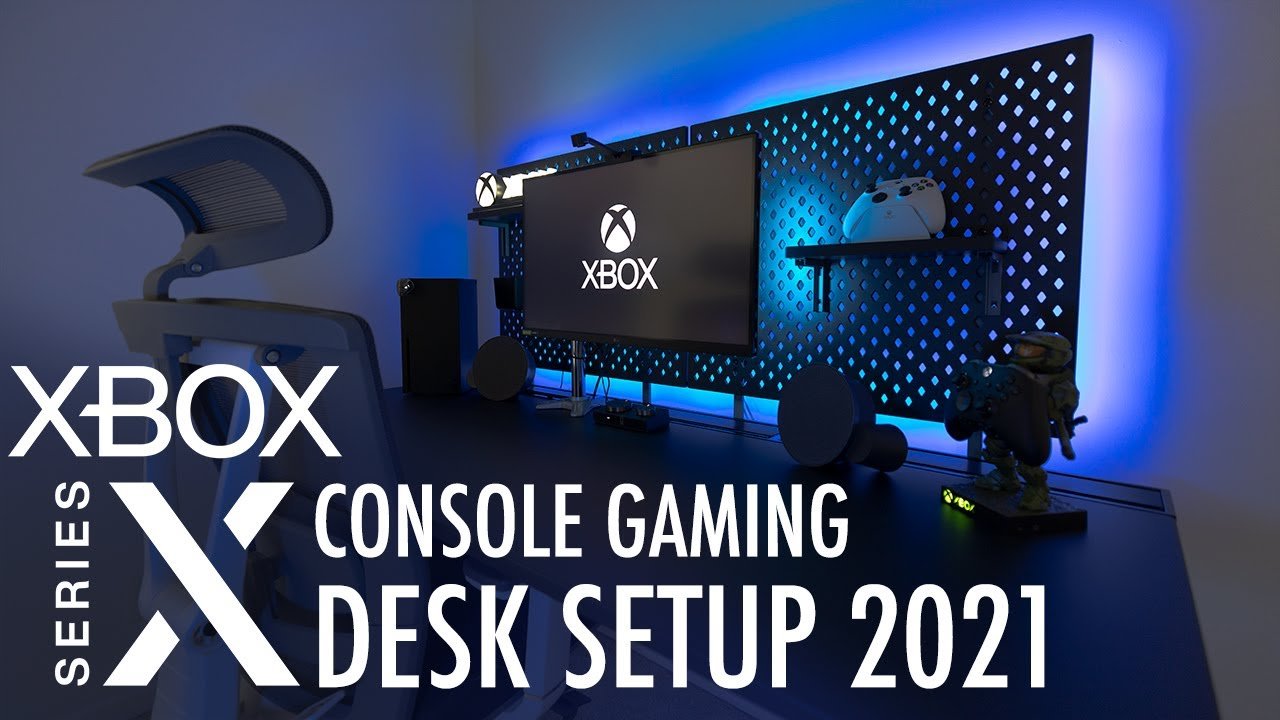
An Xbox gaming setup generally includes the Xbox console, a controller, a display like a TV or monitor, and necessary cables for power and connection.
Ready to dive into the world of Xbox? You’ve got your console and games, but what else do you need to get the best experience? We’ll guide you through what creates a top-notch Xbox gaming setup, covering essentials and some extras that can really improve your gameplay.
Making the right choices can make a huge difference in your enjoyment. From choosing the perfect display to picking comfortable headphones, everything plays a part.

Setting Up Your Awesome Xbox Gaming Station
Okay, gamers! So, you’ve got your shiny new Xbox, or maybe you’re just looking to make your current setup even more amazing. Getting your Xbox ready for action is more than just plugging it into the TV. It’s about creating a space where you can dive into your favorite games and have a fantastic time. This guide will help you build the best Xbox gaming setup ever, from choosing the right screen to connecting all your cool gadgets. Let’s jump in!
Picking the Perfect Display for Your Xbox
The screen you use to play your Xbox games is super important. It’s like the window into your gaming world. You want it to be big, clear, and fast. Let’s explore what makes a good gaming display:
TV vs. Monitor: What’s the Difference?
This is a common question for gamers. Both TVs and monitors can show your games, but they have different strengths:
- TVs: Usually, TVs have larger screens, which are great for playing with friends or just enjoying the view. TVs are also great for watching movies.
- Monitors: Monitors are often smaller and have faster response times (how quickly the screen reacts). This is key if you play fast-paced games where every millisecond counts. They also usually have a lower input lag (how long it takes your actions to show up on the screen).
Screen Size Matters
Bigger isn’t always better, but a good-sized screen can make a big difference. A 27-32 inch monitor is good for desks. If you play in your living room, a TV with a screen that’s 40-60 inches is a common choice. Don’t pick a screen that’s too big or too small for your room. If it is too small you may squint, and if it is too big it may seem blurry and distorted from too close.
Resolution: Making Games Look Great
The resolution of your screen tells you how many pixels (tiny dots) make up the image. The more pixels, the sharper and clearer the picture will be. Common resolutions are:
- 1080p (Full HD): This is a good place to start and is very common.
- 1440p (Quad HD): A step up from 1080p with sharper visuals.
- 4K (Ultra HD): The highest resolution for super crisp graphics. If you have an Xbox Series X, this is a good option for top-notch visuals.
Make sure your Xbox can output the resolution you choose for the display.
Refresh Rate: Smooth Gaming Action
The refresh rate is how many times the screen updates the image every second, measured in Hertz (Hz). A higher refresh rate makes the action on screen smoother. Common refresh rates are 60Hz, 120Hz, and 144Hz. If you have an Xbox Series X, 120Hz will make fast-paced games feel even more fluid.
Response Time: Minimizing Blur
Response time is how quickly a pixel on the screen changes colors. A lower number means less blur when things are moving quickly. 1ms – 5ms is best for gaming.
HDR: More Color and Depth
High Dynamic Range (HDR) makes colors look brighter, more vivid, and realistic. If your screen and games both have HDR, you’ll notice a great difference. Check if the TV or monitor mentions HDR 10 support.
Connecting Your Xbox to Your Display
Once you have your display, you need to connect your Xbox. This is not difficult, but you have to be careful. Here is how you connect it:
Using the Right Cables
HDMI cables are the main way to connect your Xbox to your display. Your Xbox comes with one. Be sure to check the back of the monitor for its inputs. There are different HDMI versions, so make sure you have HDMI 2.1 if you want to play at high resolutions and refresh rates on your Xbox Series X. An older HDMI cable may work, but it won’t give you the best quality. Always make sure that the cable is plugged in all the way, because if the cable is not plugged in all the way you may lose connection with the display or not get any video.
Setting the Display Settings on Your Xbox
Once connected, go to your Xbox’s settings. Go to “General”, then “TV & display options”. You can choose your screen resolution, refresh rate, and make sure HDR is on if your display supports it. If your display doesn’t support certain options, they will not appear in settings.
Sound: Getting the Full Gaming Experience
Sound is half the fun in games! Let’s talk about making your games sound awesome:
Headsets: Immersive Audio
Gaming headsets are great for blocking out distractions and letting you hear the sounds in the game clearly. You can hear things like footsteps and gunshots from every direction. You can use a wired or wireless headset. Some headsets can plug directly into your controller, or connect directly to your console. When using a headset make sure that it is charged to full to be used wirelessly or that it is plugged in all the way to the controller.
Speakers: Filling the Room with Sound
Speakers can fill a room with sound. You have a few options here:
- Soundbars: A soundbar is a long speaker that sits near your TV or monitor. They improve sound quality compared to built-in speakers, and are easy to setup.
- Surround Sound Systems: These involve multiple speakers placed around the room for an immersive, 360-degree sound experience. It makes sound more realistic and easier to locate.
Sound Settings on your Xbox
In your Xbox settings, you can choose your audio output (headset or speakers) and adjust the volume levels. Be sure to set your speaker settings to the right one. You can do that in the settings under General, then Volume & audio output.
Choosing the Right Controller
The controller is how you interact with your games. There are some things to think about while choosing a controller.
Official Xbox Controllers
The official Xbox controllers are reliable, comfortable, and work well. They come in different colors. They have all of the buttons that you need for the games. There are also special editions available. They use Bluetooth to connect to the console.
Third-Party Controllers
Lots of companies make controllers for Xbox. Some may have extra features, like extra buttons on the back, or different shapes. These are generally cheaper than the official ones, but not always as durable. Sometimes these may have delays. Check the reviews before you get them.
Controller Compatibility
Make sure any controller you buy is compatible with your Xbox console. The official Xbox controllers work with every Xbox, and most other controllers that are licensed by Xbox. Xbox One controllers are compatible with Xbox Series X/S consoles.
Wired vs. Wireless
Wired controllers plug right into your console or PC. Wireless controllers use batteries or rechargeable power and connect with Bluetooth. Wireless controllers let you move around freely but you need to charge them or replace batteries. Wired controllers don’t need to be charged, but they do limit movement.
Setting Up Your Gaming Space
Your gaming space is more than just the screen and console; it’s about making a comfortable, fun environment.
Comfortable Seating
A good chair is very important for long gaming sessions. Look for a chair that provides good back support, lets you move your arms freely, and is comfortable for a long period of time. Consider gaming chairs that are adjustable and designed for long-term comfort.
Desk or Table Setup
If you’re using a monitor, a good desk is a must. Make sure your desk is big enough for your monitor, keyboard, mouse, and other items. Keep your desk tidy, because a messy desk could make things difficult. Get a desk with cable management so your cords don’t look like a mess and you don’t accidentally unplug your devices.
Lighting
Good lighting is important. Avoid bright lights shining directly onto your screen. Ambient lighting behind the screen can make your eyes feel better and makes the room look nice. If your setup is in a room with natural light, make sure that you can use blinds to control the amount of light entering the room.
Keeping Things Tidy
Use cable organizers to keep your wires from looking like a mess. Try to organize your games and accessories in a way that makes sense, so you don’t lose anything. Keep your gaming space clean, because it will make your setup look better.
Internet Connection: Playing Online
To play games online, you need a good internet connection. If you have any network issues, it can ruin your gaming experience.
Wired Connection
A wired connection is generally faster and more reliable than WiFi. Connect an Ethernet cable directly from your router to your Xbox for the best connection. If you have a router from your service provider, they should have provided you with an Ethernet cable, but you can buy them in most electronic stores. If you want more cable length, be sure to buy one with more cable length.
WiFi Connection
If you can’t use a wired connection, WiFi is fine. Connect your Xbox to your home WiFi network in your network settings. Use a 5GHz Wi-Fi signal for less interference and better speeds, if your router and Xbox support it. Make sure the router is not too far away, or you might lose the signal. Walls and floors can weaken the signal. Sometimes, if the device is on the edge of your signal, it can cause an unstable connection.
Testing Your Connection
In the Xbox network settings, you can test your connection speed and make sure it is fast enough for online gaming. You may need to upgrade your internet if you have slow speeds.
Essential Xbox Accessories
There are many accessories that can help you have a better gaming experience:
- External Storage: Games can take up a lot of space. An external hard drive or SSD can give you more space to download new games. If you have an Xbox Series X/S, you need a special storage card to play some of the games. This card can be an official storage card or from another brand licensed by Xbox. Some games can be run on regular USB drives, but this is generally not recommended because the speeds are slower, and it may crash or run improperly.
- Controller Charging Station: If you use wireless controllers, a charging station can keep them ready to play. This can be a cradle-type charger, where the controller is simply placed on the charging base, or can be a battery charging station. Some rechargeable batteries can be plugged into the controllers and are charged with a regular USB cable.
- Gaming Keyboard and Mouse: Some Xbox games allow you to play with a keyboard and mouse, which can be good for playing games like first-person shooters. You can use a wired or wireless keyboard.
- Media Remote: Use a media remote to quickly move through menus and streaming apps on the Xbox. It is faster and easier to use than a controller when watching movies.
Game Streaming
Xbox has some game streaming features that can be very useful.
Xbox Game Pass
Xbox Game Pass is a subscription service that gives you access to a library of games. You can download and play these games on your Xbox. The games are regularly changed. It may be necessary to download games to your system’s storage. Some games can also be played using Cloud Gaming. Xbox Game Pass is a good value if you play a lot of different games.
Cloud Gaming
With Xbox Cloud Gaming you can stream games to your Xbox, phone, or PC. This means you can play games without having to download them. You will need a good and stable internet connection to have a good experience. It is easy to use, simply select the game and begin playing. It also saves space.
Final Tips for your Xbox Gaming Setup
Setting up a fantastic Xbox gaming station does not have to be hard or expensive. Simply remember the steps listed and follow them. Remember these important points:
- Always check for updates to your console and games.
- Keep your controllers charged.
- Clean your setup regularly.
By following these steps, you’ll have a gaming setup that you’ll love. You’ll be able to dive into any game and have a great experience. Enjoy your gaming adventure!
Turning my Xbox Series S into a Gaming PC! 😱
Final Thoughts
Building the ideal Xbox gaming setup involves several key components. Consider your monitor, headphones, and controller preferences. A comfortable chair also significantly impacts extended playtime.
Choosing quality accessories enhances the overall experience. You should test different options to find what best suits your style. Cable management contributes to a clean environment.
Properly configured settings optimize performance. Remember, a well-planned Xbox gaming setup greatly improves your enjoyment. Enjoy your gaming journey.

