
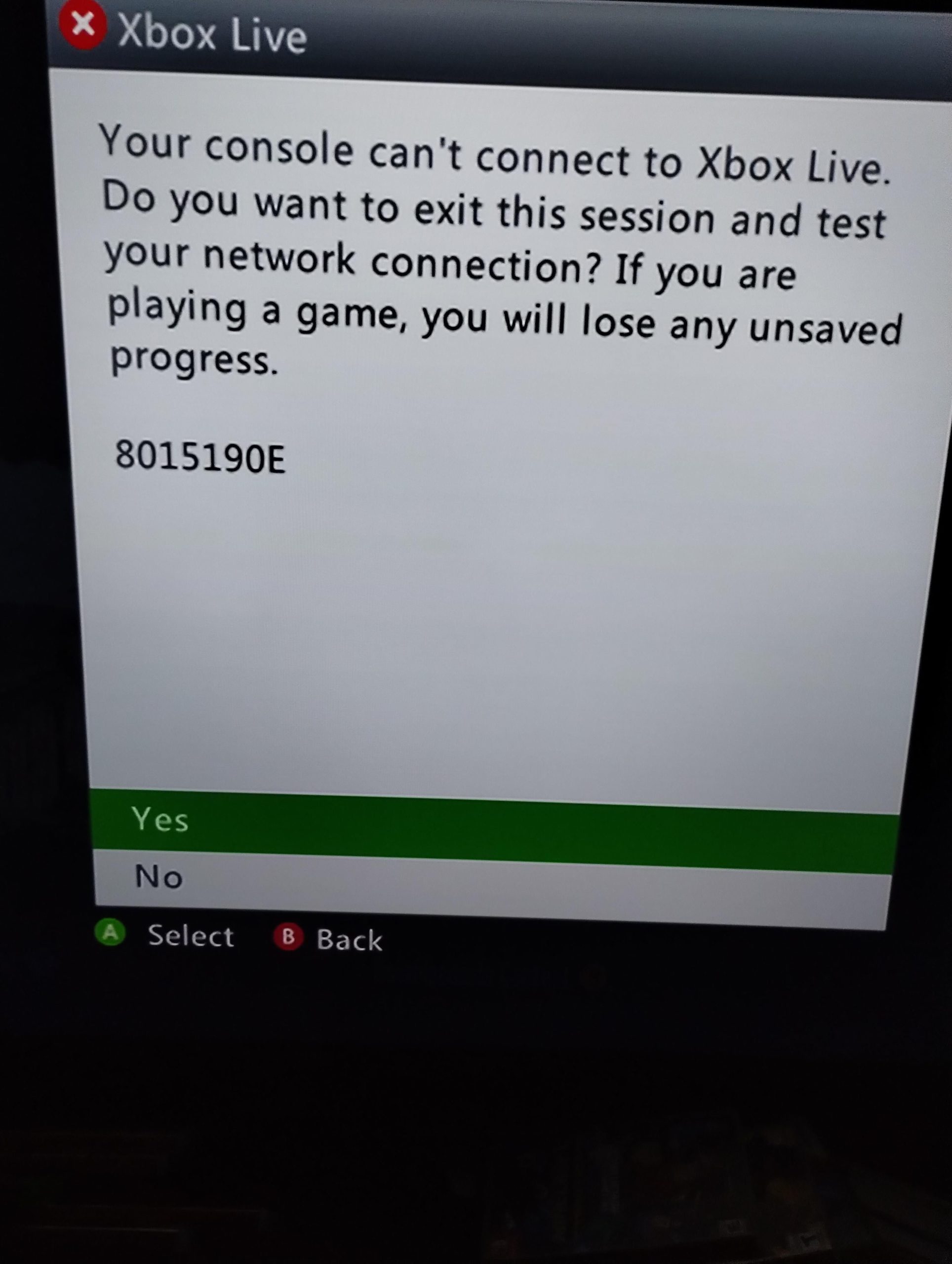
The current Xbox live server status can be checked through the official Xbox website or app, which will display any active outages or maintenance.
Is your game suddenly disconnecting? Are you having trouble connecting to multiplayer? These frustrating experiences often point to issues with the Xbox live server status. Knowing if the servers are down can save you a lot of troubleshooting time.
Microsoft provides specific channels to check the live status. These updates allow you to see if problems are widespread or specific to your own setup. Keep an eye on these sources for the most up-to-date information.

Xbox Live Server Status: What’s Going On?
Ever been ready to jump into your favorite Xbox game, only to be met with a frustrating error message? Or maybe your friends are online, but you just can’t seem to connect? Chances are, you’re dealing with issues related to the Xbox Live server status. It’s like the heartbeat of the Xbox online world, and when it falters, it can really put a damper on game time. Let’s dive into what this all means and what you can do when things go sideways.
Understanding Xbox Live: The Core of Online Gaming
Xbox Live is more than just a way to play games online; it’s the backbone of the Xbox ecosystem. It lets you connect with friends, download games, access entertainment apps, and even talk to people around the world. Think of it as a superhighway connecting millions of Xbox users. This highway runs on servers, powerful computers that handle all the traffic. When these servers are working correctly, the experience is smooth and seamless. But when they have problems, things can get a little bumpy.
What Does Server Status Mean?
Server status is simply a way to describe whether the Xbox Live servers are working as they should. When the status is “up” or “online,” it means everything is working normally. You can play online games, download content, and chat with your friends without any problems. However, when the status is “limited” or “down,” it means there are issues that could prevent you from using some or all of Xbox Live’s features. These issues can range from minor glitches to major outages that affect everyone. The most common issues involve getting dropped from games, difficulty logging in, trouble downloading new games, or inability to use various apps.
Why Do Servers Have Issues?
Servers, like any piece of technology, can experience problems. These issues are often varied. A few common culprits for server trouble include:
- Maintenance: Sometimes, servers need regular checkups, like a car going in for service. This maintenance often involves software updates or hardware repairs, and can cause temporary downtime.
- Unexpected Traffic: Imagine a tiny road trying to handle way too many cars at once. When many people try to use Xbox Live simultaneously, it can overload the servers, leading to slowdowns or outages. This commonly happens after a big game is launched.
- Software Bugs: Sometimes a new update may have hidden bugs that cause server problems. These bugs are like a small pebble in your shoe, causing discomfort. These need to be resolved by the technical staff of Microsoft.
- Hardware Issues: Just like any machine, servers can have hardware problems. A faulty hard drive or power failure can bring down a server or many servers.
- Cyber Attacks: Unfortunately, sometimes bad actors try to attack servers to disrupt services. This is like trying to jam all the traffic signals at once.
How to Check the Xbox Live Server Status
Knowing how to check the server status is a useful skill for every Xbox gamer. Thankfully, there are several easy ways to do this.
The Official Xbox Status Page
The best place to find the most up-to-date information is the official Xbox website. You can find this information by searching ‘Xbox status’ on any search engine. The official page will show you all the running services and their corresponding status. There, you’ll see different areas of Xbox Live, such as:
- Xbox Game Services: This includes your ability to start games, manage games and use game features.
- Social and Gaming: Here, you see the status of connecting with friends, messaging, and inviting others to play.
- Xbox Store & Subscriptions: This covers purchasing new content, managing your subscriptions, and all related functionalities.
Each section will display a status indicator. A green check mark or “up” means everything’s working. If there are issues, you might see a yellow triangle (limited) or a red circle (down). The page also provides details about ongoing problems and estimated times to fix.
Xbox Console Interface
You can also check server status on your Xbox console itself. Follow these steps:
- Press the Xbox button on your controller.
- Go to “Profile & system”.
- Select “Settings”.
- Go to “General”.
- Select “Network settings”.
- Choose “Test network connection”.
This test will not only tell you if your internet connection is working, but also it will show if there are any issues with the Xbox Live service. If you see any red alerts, that is a sign of server issues.
Third-Party Status Websites
Several third-party websites also monitor Xbox Live server status. These sites often use data from Microsoft and crowd-sourced information to track service issues. While these can be helpful, always double-check the official Xbox page for the most accurate information. Some popular sites include:
- DownDetector
- IsTheServiceDown
- Twitter (follow official Xbox support accounts)
Xbox Mobile App
The Xbox app on your mobile device also provides a quick overview of server status. Simply open the app and look for notifications or a status indicator. This is a super useful way to stay informed even when you’re not near your console.
Decoding the Status Indicators
When you are checking the server status, you will find different indicators. Knowing what they mean is the first step in resolving any issues you may be facing.
Online/Up (Green Check Mark)
A green check mark or the word “Online” or “Up” means everything is working perfectly. You shouldn’t have any issues with online gameplay, downloading content, or using other services. If you’re still having problems, the issue is more likely to be with your internet connection or your console.
Limited (Yellow Triangle)
A yellow triangle or the word “Limited” means that there are some problems with one or more services. Some features may not work correctly or might be experiencing slowdowns. During a limited service, you might have trouble logging in, joining games, or accessing certain apps. However, some features might work normally. This is often a sign of high traffic, server maintenance, or smaller glitches.
Offline/Down (Red Circle)
A red circle or the word “Offline” or “Down” means that there is a significant issue with the servers. Many parts of Xbox Live may be totally non-functional during a full outage. You’ll likely experience problems logging in, joining games, using apps, and using any online services. This usually indicates a bigger issue, such as major server problems or a cyber-attack.
Maintenance (Blue Wrench)
A blue wrench means that the server is currently under scheduled maintenance. During maintenance, services might be unavailable, but this is usually temporary. Xbox will almost always announce maintenance plans in advance on its official status pages and social media accounts. Most of the time, the maintenance period will happen in off hours when there is less activity so that the majority of users don’t feel any effect.
What To Do When Xbox Live Is Down
So, you’ve confirmed that Xbox Live is having issues. What do you do now? Here’s a list of action items.
First, Check Your Connection
Even if Xbox Live is having problems, double-check your own internet connection. Sometimes a problem can happen because of your own router or internet service provider. Restart your modem and router, and see if that fixes things. Also make sure all cables are properly connected and check if your wifi connection is stable.
Patience Is Key
When servers are down, all you can really do is wait. It is always best to check the official Xbox status page for updates. They will provide information on ongoing issues and an estimated time to fix them. Trying to log in over and over might just put more pressure on the system. It’s better to be patient and wait for the problem to be resolved.
Stay Updated
Keep an eye on the official Xbox social media accounts (like Twitter) and forums. These will give you any quick updates from Xbox support and the community. Also, third party status monitoring sites are very useful for keeping track of the situation, however always verify any information from these sources through official xbox status pages.
Try Again Later
If the servers are having temporary problems, trying to connect again in 30-60 minutes might work. Often, server problems get fixed in a small amount of time. During maintenance, the servers should return to normal quickly. Try again after the maintenance is complete.
Tips for Minimizing Downtime Frustration
Server issues can be annoying, but here are some actions to help you deal with them with a bit more grace.
Single-Player Games Are Your Friends
When you can’t play online, make use of your single-player games. Many great games don’t require an internet connection. This is a perfect time to explore those titles or finish some challenges.
Catch Up On Other Entertainment
Use the downtime to check out non-gaming activities. You can use your Xbox to watch movies or TV shows using apps such as Netflix, Disney+, or Hulu. Listening to music is also a good pastime. This helps you make the most of your Xbox console even when the game servers are down.
Try Different Games
If only certain servers are affected, try playing a game on a different server. For example, if you can’t join your favorite multiplayer game, try playing a different one to see if you can still connect and play with other people. Some games may be completely unaffected, and you may still get some game time in.
Join the Community
Head to Xbox forums or Reddit communities. Talking with other gamers going through the same problem can be comforting and fun. You might also get extra tips or updates from other people that you didn’t find on your own. This also allows you to stay in the loop and discuss your experiences.
Preventive Measures for a Smoother Experience
While you can’t control server issues, you can take a few steps to make your overall experience smoother and less stressful.
Keep Your Console Updated
Make sure your Xbox console is always running the newest software updates. These updates often include improvements and bug fixes that can help prevent problems. It also helps the console function more efficiently and improve online play.
Use a Wired Connection If Possible
A wired internet connection (using an ethernet cable) is generally more stable than Wi-Fi. If you are close enough to your router, plug in a cable. This can reduce lag, connection problems, and interference issues. This is a good way to ensure that your internet speed is the best it can be when Xbox live servers are up and running.
Maintain Your Router
Check your router regularly and make sure its software is up to date. A router that is running properly ensures a strong internet signal and helps prevent connection issues. Many routers have a setting to automatically do updates. This step can make a huge difference.
Check Your Internet Speed
Make sure your internet speed is good enough for online gaming. A slower connection may not be able to keep up. A simple internet speed test can help you confirm that your internet is working as well as you expect. If you find that your speeds are slower than advertised by your service provider, you may want to look into that further.
The Future of Xbox Live
Microsoft is continually trying to make Xbox Live better and more reliable. They know that online gaming is important for Xbox owners, and they continue to improve. They work hard to fix bugs, make their servers stronger, and make sure everything works well. Microsoft takes server stability seriously as it directly affects its users, so they will do what they can to make it the best it can be.
As technology improves, things like server downtime will most likely be less common. The constant work on server technology should help provide a better and more stable gaming experience for everyone. Microsoft also listens to the community and makes changes to benefit all Xbox users.
So, the next time you encounter an Xbox Live server issue, remember that it’s not unusual. By using the methods listed in this article, you can quickly learn whether you are experiencing a server problem or an issue specific to your setup. By taking a little time to understand the Xbox Live ecosystem and the status of its servers, you can handle any downtime like a pro. You can get back to your favorite games and friends when the situation is resolved. And, who knows, maybe you even use the downtime to find something new and exciting to do!
Xbox Servers Down? Check here..
Final Thoughts
Monitoring Xbox live server status is crucial for a smooth gaming experience. Regular checks prevent frustration caused by unexpected outages.
Knowing the status allows you to plan your gaming sessions effectively. It helps to avoid game interruptions or wasted time.
Always confirm Xbox live server status before starting a game. This simple step makes your online play enjoyable.

