
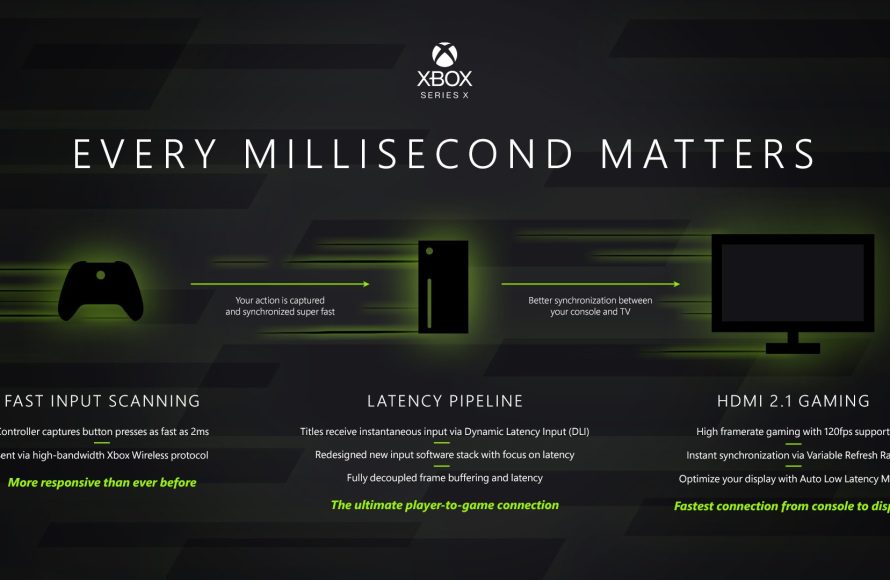
Xbox low latency gaming achieves quicker response times through technologies like VRR and ALLM, reducing lag for smoother gameplay.
Have you ever felt that frustrating delay between pressing a button and seeing the action on screen? It’s a common issue, especially in fast-paced games, but with Xbox low latency gaming, that problem becomes significantly reduced. This article explores how your Xbox achieves this responsiveness.
We will break down the technical aspects that contribute to minimal lag, and provide tips to optimize your own gaming experience. You can finally get the edge you need during intense moments.

Xbox Low Latency Gaming: Your Guide to Smoother Gameplay
Have you ever been playing your favorite Xbox game, and it felt like you were a step behind? Like your actions weren’t happening fast enough? That delay you’re feeling is called latency, and it can really mess with your game. Low latency gaming is all about making that delay as small as possible, so your actions in the game happen right when you want them to. It’s like having a super-fast connection between your controller and the game itself. In this article, we will dive deep into the world of Xbox low latency gaming, explaining how it works, why it’s important, and how you can achieve it.
Understanding Latency: The Delay Explained
Latency, in simple terms, is the time it takes for a signal to travel from one point to another. In gaming, this means the time it takes for your button press on the controller to be seen by the Xbox, processed, and then reflected on your screen. Think of it like this: you press “jump,” but the character on the screen jumps a fraction of a second later. That tiny delay is latency. While it might seem small, those fractions of a second add up, especially in fast-paced games. It’s the difference between winning a race and falling behind, or scoring a goal and missing the net entirely.
Why is Low Latency So Important?
For many gamers, low latency is not just a nice-to-have, it’s crucial for a good gaming experience. Here are a few reasons why:
- Competitive Edge: In online multiplayer games, milliseconds matter. Lower latency means your actions are registered faster than your opponents, giving you a real advantage. It allows you to react quicker, aim with precision, and anticipate your opponent’s moves more effectively.
- Immersive Experience: When there’s a noticeable delay between your actions and the game, it can pull you right out of the experience. Low latency makes the game feel more responsive and realistic, allowing you to get fully immersed in the game world.
- Reduced Frustration: Have you ever felt like the game was working against you? Latency can cause your commands to be delayed or even missed completely, which can be very frustrating. Low latency creates a smooth and predictable experience where you can focus on the game, not fighting against the delay.
- Better Overall Gameplay: When latency is low, everything just feels better. The game flows more smoothly, making it more enjoyable and rewarding. It’s easier to perform complex moves, enjoy fast-paced action, and feel more in control.
The Chain of Latency: Where Does the Delay Come From?
Latency isn’t caused by a single factor; it’s a complex chain that involves multiple parts working together. Let’s examine some of the key stages where delay can creep into your gaming setup:
Controller Input
The first step is from your controller. When you press a button or move a stick, the controller sends a signal to your Xbox. Wired controllers generally have lower latency than wireless ones because the signal doesn’t have to travel through the air, although advancements in wireless tech have narrowed that gap significantly. Using a wired controller can be a good first step in your quest for low latency. The controller itself needs to be responsive and quickly communicate with the console; a slow controller can easily add to the overall delay.
The Xbox Console
Once the signal reaches your Xbox, the console needs to process the input. This involves running the game, processing the graphics, handling audio, and more. A more powerful console, like the Xbox Series X, can process these things faster than older models, helping to reduce latency. The console’s internal hardware, its software and background tasks all play a role in the time the game takes to process your actions. Keeping your console updated and optimized will help reduce unnecessary delays.
The Television or Monitor
Next, the processed image from your Xbox gets sent to your TV or monitor. This is where display latency comes into play. Some screens, especially older ones, have a longer processing time before they show the image. The time it takes for your screen to refresh is also another factor; lower refresh rates can cause delays between your game actions and your screen showing them. Look for a TV or monitor with a low input lag and a high refresh rate to make sure it’s not adding to the latency.
The Network
For online games, the internet connection is a significant factor. The data your console sends out has to travel to the game servers and come back. High latency in your network connection can cause lag and delays, which is detrimental to any online multiplayer game. This delay depends on factors such as the distance to the server, your internet speed, the number of devices connected to your network, and the quality of your internet service. A stable, fast, low latency network is crucial for good online gaming.
The Game Itself
Sometimes, the game itself can introduce latency. Some games have more complex calculations or graphical rendering, which can take longer to process, causing a delay. Game developers are constantly optimizing their games to reduce latency, but some games will always be more demanding than others. In such cases, a faster console will help to reduce the game related latency, and therefore make the gaming experience more pleasant.
Techniques for Lowering Latency on Your Xbox
Now that we understand where latency comes from, let’s explore some practical ways to reduce it on your Xbox:
Optimizing Your Xbox Settings
Your Xbox has several settings that you can tweak to help reduce latency. Here are some crucial adjustments you can make:
- Game Mode: Many modern TVs and monitors have a “Game Mode” that disables extra processing to reduce input lag. It prioritizes performance over image processing which results in less delay. Enabling this setting is one of the quickest ways to reduce latency if your display supports it.
- Resolution and Refresh Rate: Setting your Xbox to match your monitor’s resolution and refresh rate will help it process the game at its optimal settings. A higher refresh rate (120Hz instead of 60Hz) can significantly reduce input delay. Try to match your game’s refresh rate to that of your monitor for the smoothest experience.
- Variable Refresh Rate (VRR): If your monitor supports VRR (such as AMD FreeSync or NVIDIA G-Sync), enabling it can help minimize screen tearing and smooth out frame rates. This will often make the game feel more responsive and reduce perceived input lag, though technically it doesn’t affect the actual input lag numbers.
- HDR: While High Dynamic Range (HDR) can provide beautiful visuals, it can sometimes increase latency because of the extra image processing required. If latency is your top priority, it might be best to turn off HDR. However, newer TVs often have HDR modes that don’t increase latency much, so you can experiment and see what works best for your setup.
Choosing the Right Equipment
The hardware you use can make a big difference in how responsive your game feels. Here’s what you should consider:
- Monitor or TV: If low latency is important to you, invest in a monitor or TV that is designed for gaming. Look for models with low input lag and high refresh rates. A 120Hz or 144Hz monitor can be much better than a standard 60Hz monitor for reducing lag. Input lag should be a primary concern when choosing a screen for gaming. Check reviews and specifications to find options with the lowest input lag numbers (measured in milliseconds).
- Controller: Consider using a wired controller for the lowest possible input delay. Although wireless controllers have come a long way, a wired connection is still the fastest and most reliable method. If you are sticking with a wireless controller, make sure that it has a strong connection to the console.
Optimizing Your Network
A stable, fast internet connection is crucial for online gaming. Here are some steps you can take to improve your network:
- Wired Connection: Whenever possible, connect your Xbox to your router with an Ethernet cable. A wired connection is usually faster and more stable than Wi-Fi, which greatly reduces latency.
- Router Quality: Make sure you have a good router that can handle your internet speeds. An older or cheaper router can be the bottleneck in your network, causing high latency and packet loss. If your router is old, consider upgrading to a newer model with better features, such as Quality of Service (QoS).
- Quality of Service (QoS): Enable QoS on your router, if available. QoS allows you to prioritize gaming traffic over other activities, ensuring that your game gets the bandwidth it needs to perform well. This can be very helpful in a busy home network where many devices are using the internet.
- Close Background Apps: When gaming online, close any other apps or devices that are using your network bandwidth. Things like streaming videos, downloading large files, or even other devices on Wi-Fi can contribute to increased latency. The less devices are competing for your network, the better it will perform for online gaming.
- Check Your Internet Speed: Make sure your internet plan meets the demands of online gaming. If you regularly experience lag, you might need a faster plan. Run an internet speed test to confirm your speeds and latency. If your internet speed is too low or your latency is too high, consider contacting your internet service provider to explore better options.
Specific Game Optimizations
Some games have their own settings you can tweak to improve performance. Here’s what to look for:
- Graphics Settings: Lowering in-game graphics settings such as texture quality, shadows, and special effects can reduce the strain on your console. This can decrease rendering time and improve response times by lowering the amount of processing your Xbox has to do. Experiment with different graphics settings to find a balance between performance and visual quality.
- Disable Unnecessary Features: Some games have extra visual effects or features that can slow them down. Disabling motion blur, depth of field, and other optional effects can sometimes help with reducing input latency. Check your game’s options menu for these settings.
- Game Updates: Make sure your games are always up to date. Developers frequently release patches that improve performance and reduce latency. Keeping your games up to date also ensures you’re getting the best game performance.
Advanced Techniques for the Serious Gamer
If you’re really serious about getting the lowest latency possible, there are some more advanced steps you can take:
Optimizing DNS Settings
The Domain Name System (DNS) helps your console find the servers you need to connect to. Using a fast DNS server can reduce latency. While your ISP provides DNS servers, there are often faster options out there, such as Google DNS or Cloudflare DNS. You can change your DNS settings in your Xbox network settings. This can sometimes lead to faster lookups for game servers and improved performance. Changing your DNS servers is usually safe to do and can sometimes lead to improvements.
Monitor Your Network Traffic
Use your router’s monitoring tools to see which devices or services are using your internet bandwidth. This information can help you identify bottlenecks or unnecessary traffic. Monitoring your network traffic can be especially helpful to identify anything that’s slowing your network speed down, allowing you to optimize your network for gaming. If you have network issues, this is a good way to identify the problem.
Dedicated Gaming Router
Consider using a router designed specifically for gaming. These routers often have features like QoS, improved processing power, and advanced traffic management to provide the best possible connection for gaming. These routers will cost more, but they can be a valuable investment for those who prioritize low latency gaming. They often have better interfaces that allow for more advanced network configuration and control over your connections.
The Future of Low Latency Gaming on Xbox
Gaming technology is constantly improving. Microsoft and other companies are always working on new ways to reduce latency and improve the gaming experience. Here are a few things that might be coming in the future:
Cloud Gaming
Cloud gaming allows you to play games on powerful servers without needing a high-end console. However, cloud gaming is extremely sensitive to latency. Advances in network infrastructure, new data centers, and improved streaming technologies are working on making cloud gaming more responsive. As these improvements are implemented, cloud gaming will likely become a much more viable option for competitive gamers.
Faster Internet Technologies
As 5G and other faster internet technologies become more widespread, low latency gaming will become more accessible to everyone. Fiber optic internet is already making a big difference for many people; future network improvements will make lag an issue of the past.
New Console Innovations
Future Xbox consoles will likely have even more powerful processors and faster hardware to reduce latency. Optimizations within the Xbox OS itself will also help reduce delays. We can expect to see continued development of new technologies and approaches to reducing latency on both hardware and software.
Troubleshooting Common Latency Issues
Even with the best setup, you might sometimes encounter latency issues. Here’s a quick guide to troubleshooting common problems:
- Restart Everything: The first thing you should always do is to restart your Xbox, router, and modem. This can resolve temporary glitches that might be causing latency issues. Simply unplugging the devices and plugging them back in after a few seconds is often enough to resolve the issue.
- Test Your Connection: Use your Xbox network settings to test your connection. This can help you see if your internet speeds are in line with your plan. Xbox network settings can show you your latency (ping) to Xbox Live servers; keep an eye on these numbers to see if they’re unusually high.
- Check for Updates: Ensure both your Xbox and games are up-to-date. Software updates usually come with bug fixes and performance improvements.
- Isolate the Issue: If you’re still having issues, try to pinpoint where the latency is coming from. Try connecting with a wired controller or temporarily moving your console closer to your router to see if it helps. Isolating the issue is the first step to finding a permanent fix.
- Contact Support: If you’ve tried everything and still have latency problems, contact your internet service provider, Microsoft support, or the hardware manufacturer for assistance. It’s always good to have a professional check your setup or router settings.
Achieving low latency on Xbox takes a bit of effort, but it’s worth it. By understanding what causes latency and following the tips in this guide, you’ll be able to make the most of your gaming experience. It will help you play smoother, compete at a higher level, and enjoy your games more.
Low latency gaming is a journey, not a destination. Keep experimenting and refining your setup, and you’ll enjoy a better gaming experience on your Xbox.
Xbox Series X/S: How to Allow Auto Low-Latency Mode Tutorial! (TV & Display Options) 2023
Final Thoughts
Reduced lag significantly improves your reaction time and gaming experience. Xbox consoles actively work to minimize input delay, which leads to smoother gameplay. They achieve this through various hardware and software optimizations.
Therefore, for competitive and immersive sessions, Xbox low latency gaming offers a real advantage. The responsiveness you experience makes a huge difference. Choosing an Xbox ensures a more satisfying and competitive play.

