
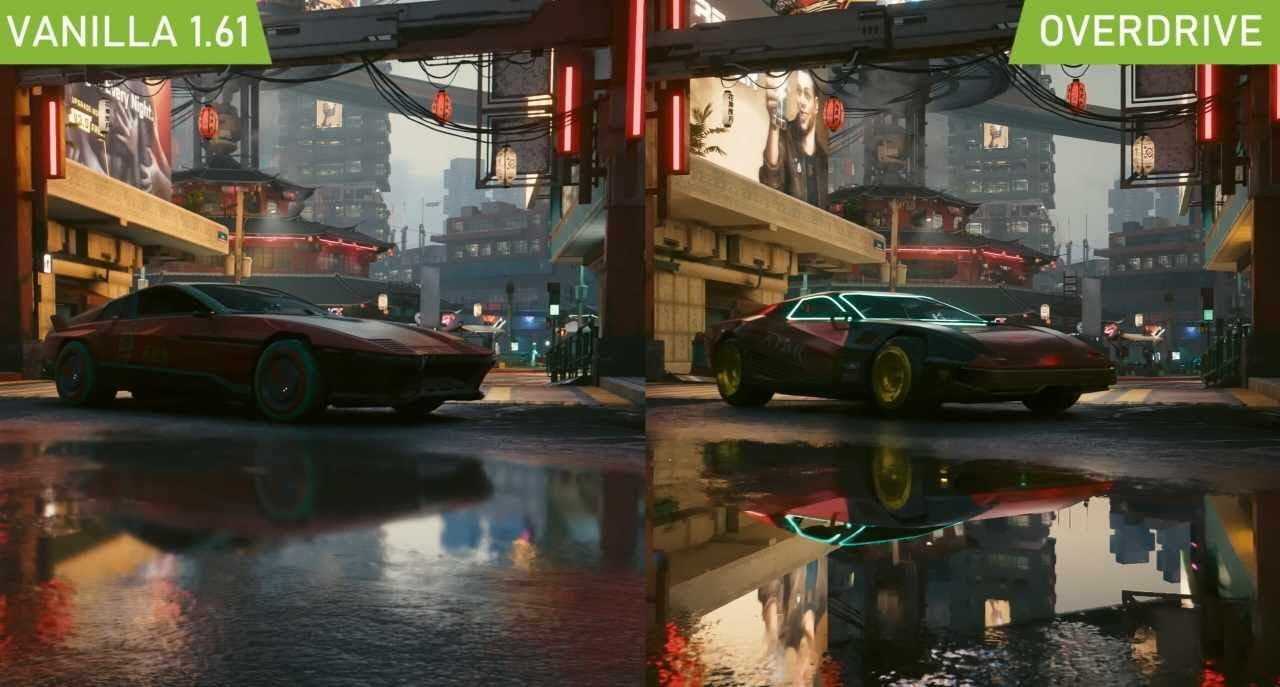
Xbox ray tracing capabilities allow for more realistic lighting, shadows, and reflections in supported games, providing a visually enhanced gaming experience.
Have you ever wondered what makes some games appear so incredibly lifelike? A big part of that is advanced graphics techniques, and the Xbox ray tracing capabilities play a major role. This technology calculates how light interacts within a virtual environment.
This process creates scenes with far more realistic lighting and shadows, improving visual fidelity. The reflections you see on surfaces also appear much more accurate and natural. It all adds up to a more immersive experience.

Xbox Ray Tracing Capabilities: A Deep Dive
Okay, gamers, let’s talk about something really cool – ray tracing on your Xbox! You might have heard the term, but what does it actually mean, and how does it make your games look even more awesome? Think of it like this: before, game developers had to fake how light bounces around. Now, with ray tracing, light behaves more like it does in real life. It’s like upgrading from drawing a picture to taking a photograph. We’re going to explore exactly how this works and what it means for your gaming experience on Xbox.
Understanding Ray Tracing: The Basics
So, what’s the big deal with ray tracing? Imagine you’re in a room with a shiny mirror. When you look at the mirror, you see a reflection of the room. Regular game graphics kind of “fake” that reflection. They guess where the reflection should be. Ray tracing is different. It actually traces the path of light rays from the light source (like a lamp or the sun), as they bounce off objects and go to your eye. It’s like simulating the way light really works.
Here’s a simpler way to think about it:
- Traditional Graphics: Imagine drawing a picture of a room with reflections. You have to guess where the reflections should be.
- Ray Tracing: Imagine shining a flashlight and seeing how the light bounces and creates shadows and reflections. Ray tracing does this in the game world.
This gives us:
- More realistic reflections on surfaces like water, glass, or shiny metal.
- More natural-looking shadows and light.
- More detailed lighting effects.
How Does Ray Tracing Work on Xbox?
Your Xbox, whether it’s the Series X or Series S, has special hardware built-in to handle the complicated math involved in ray tracing. Think of it as having super-powered calculators just for light. These calculators are part of the Xbox’s Graphics Processing Unit (GPU). The GPU is like the engine for your games. It’s the part that puts all the pretty pictures on your screen.
Here’s a breakdown:
- Dedicated Ray Tracing Cores: The Xbox uses special parts within the GPU called “ray tracing cores.” These parts do the hard calculations needed to figure out how light bounces around.
- Hardware Acceleration: Having these cores means that your Xbox doesn’t just struggle along with ray tracing, it makes it easier for the games to use this technology.
- Game Engine Support: Game developers also need to make their games in a way that can use the ray tracing capabilities. They need to make it work for the way light affects objects.
Ray Tracing on Xbox Series X
The Xbox Series X is the bigger, more powerful Xbox of the two. It packs a lot of punch, which means it can handle ray tracing with more intensity and detail. This leads to more impressive reflections, better shadows, and overall more realistic-looking games. You’ll notice this most when you’re in a game with reflective surfaces like puddles or shiny armor, and in environments with complex lighting like forest or cities.
Ray Tracing on Xbox Series S
The Xbox Series S is still a very capable console, and it can also do ray tracing. While it is not quite as powerful as the Series X, it still brings ray tracing effects to games. The ray tracing effects may not be as detailed or as complex as what you see on the Series X, but it’s still a major improvement over older consoles. It allows for ray traced shadows, reflections and lighting to be presented at a lower resolution or with fewer light sources.
What Ray Tracing Actually Looks Like In Games
Let’s get to the good stuff: what does ray tracing look like when you’re playing a game? It’s not always something that jumps out and screams “look at me!” It’s often subtle, but it makes a big difference to the overall look and feel. Here are a few examples:
- Reflections: Imagine walking through a futuristic city. The windows of the skyscrapers reflect the sky and the lights of other buildings more realistically. Instead of a blurry, fake reflection, it will be crisp and accurate.
- Shadows: Ray tracing can make shadows look more natural. Shadows will change smoothly, and you will notice that they are not hard edges of the objects, but they are soft and smooth. Imagine looking at tree shadows on the ground, those shadows will be much more realistic with ray tracing enabled.
- Global Illumination: This is a fancy way of saying that light interacts with the environment more realistically. Imagine sunlight bouncing off a wall, illuminating other parts of a room. With ray tracing, it’s possible to see the light interacting naturally with all objects around it.
Here are some real-world examples in games:
- Cyberpunk 2077: This game shows off ray tracing with shiny surfaces and neon lights all over the city. Reflections in puddles, car windows, and even character’s cybernetic parts are vastly improved by ray tracing.
- Metro Exodus: The dark and moody environments in this game benefit from ray tracing’s shadow and lighting enhancements. You’ll see the realistic look of light filtering through the woods or the flickering light sources.
- Dying Light 2: With ray tracing, reflections on wet surfaces in the city and the way light interacts with smoke and fog are brought to another level.
Ray Tracing: More Than Just Pretty Graphics
Ray tracing isn’t just about making games look more pretty. It can also make a game feel more immersive, more believable. When the lighting and reflections feel real, it’s easier for our brains to get into the game. It makes the game world feel more like a real place rather than just a bunch of pixels on a screen.
Here are some additional points:
- Increased Immersion: The more realistic visuals make you feel like you are truly in the game environment. This also leads to the game world looking more lived in and believable.
- Better Atmosphere: Enhanced shadows and lighting can change the mood of a scene, making the game world feel more suspenseful, mysterious, or atmospheric.
- Improved Visibility: Although shadows may become more dramatic, lighting in dark areas is actually improved. The details are enhanced which helps players to see better within the game itself.
The Impact of Ray Tracing on Game Performance
Ray tracing is amazing, but it’s also very demanding on your Xbox’s hardware. All that extra calculating power comes with a cost. Sometimes, using ray tracing can slightly reduce the frame rate of the game. Frame rate is how many times the image is updated on the screen every second, and when it’s high it gives a more smooth gameplay experience. Game developers have to strike a balance between how awesome the game looks with ray tracing and how smooth the game feels.
Here is how the game developers deal with these challenges:
- Optimization: Game developers are working hard to make ray tracing more efficient, so that it doesn’t affect the game performance as much as it could.
- Graphics Settings: Many games let you choose if you want to turn ray tracing on or off, or at different intensity levels. If you really want ray tracing you can have it turned on, or you can turn it off to make the game run smoother.
- Resolution and Frame Rate: Game developers sometimes use lower resolution or adjust the frame rates a bit to make sure that ray tracing can work properly, this can also mean that you can get the benefits of ray tracing on a slightly less performance hit.
The Future of Ray Tracing on Xbox
Ray tracing is still relatively new on consoles like Xbox. As time goes on, it is going to get better and better. Game developers will become more skilled at using this technology, and they will find even more creative ways to use ray tracing in their games.
Here’s what we can look forward to:
- More Efficient Ray Tracing: We’ll see more games use ray tracing and the performance hit should get smaller.
- More Advanced Effects: The use of ray tracing will improve in complexity and will allow for more intricate light interactions, and more interesting and realistic game worlds.
- Wider Adoption: Eventually, ray tracing will become the norm in gaming. It is more than likely that it will become a standard feature across games.
How to Tell if a Game Uses Ray Tracing
It’s not always obvious if a game is using ray tracing unless you’re really looking for it. Many games will show the ray tracing effects on loading screens, or in the options screen in the menu. Here is how you can try to identify ray tracing when you play games:
- Look for Options: Check the game’s graphics settings. If there is an option to turn “Ray Tracing” or “RT” on or off, the game is using it.
- Look at Reflections: Check the reflections in the game. Are they sharp and detailed, or do they look blurry or flat? If the reflections look real, there’s a high chance ray tracing is at work.
- Observe the Shadows: Check how shadows move and how they interact with the environment. With ray tracing, the shadows appear to be more natural.
- Check for Technical Buzzwords: Sometimes games will mention “ray-traced shadows”, “ray-traced reflections”, or “ray-traced lighting” in their trailers or promotional materials.
Ray Tracing: A Game Changer
Ray tracing on Xbox has the ability to change games, not just visually, but also emotionally. The way the light interacts with the game’s world and how it interacts with you, can have a huge impact on how you experience the game. Even small visual changes can make a huge difference in how you see the game world. This has the ability to add a new level of depth and richness to the game play, making the game experiences richer and more fulfilling.
Ray tracing is a super-cool technology that makes games on your Xbox look more realistic and immersive. It uses fancy math to simulate how light behaves in real life, giving us better reflections, shadows, and lighting. While it can sometimes affect game performance, game developers are constantly improving it to make it work better. As ray tracing becomes more common, our games will look and feel more realistic, making our gaming experience even more fun. The future of ray tracing on Xbox is bright, and it’s exciting to see where this technology takes us.
10 Ray Tracing Games On Xbox Series X|S
Final Thoughts
Xbox ray tracing capabilities significantly improve visual fidelity. Shadows and reflections appear more realistic, adding depth. This enhances the gaming experience, making environments feel more immersive. The current generation delivers impressive results with this rendering technology. Xbox ray tracing capabilities are a key selling point for the consoles.

