
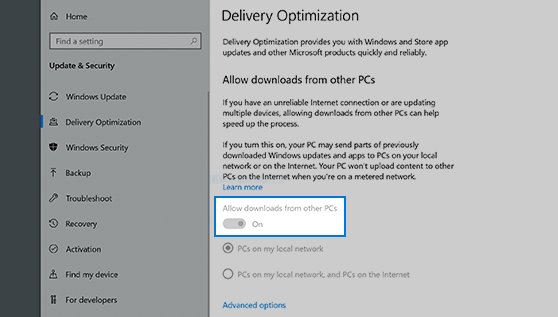
Xbox service delivery optimization improves content delivery speed, reduces latency, and enhances overall player experience by leveraging efficient network infrastructure and content distribution strategies.
Gamers crave seamless experiences; no one enjoys lag or slow downloads. We explore how the backend magic of Xbox service delivery optimization works. This process ensures you get your game updates and content quickly and efficiently.
Understanding these mechanics gives players insight to why games load smoother. Improvements in this area directly enhance the overall Xbox experience. Better delivery results in happier gamers.

Xbox Service Delivery Optimization
Let’s talk about making your Xbox experience super smooth! Imagine playing your favorite games without any annoying lags, downloads that happen in a flash, and everything just working like a charm. That’s what “Xbox service delivery optimization” is all about. It’s like giving your Xbox a super boost, making sure everything runs as quickly and efficiently as possible. We’re going to dive deep into how Microsoft does this, and what it means for you, the player.
Understanding the Basics: What is Service Delivery?
Before we get into the nitty-gritty, let’s define what “service delivery” means in the context of Xbox. Think of it like this: when you turn on your Xbox and want to play a game, or download a new one, or even chat with your friends, your Xbox needs to communicate with Microsoft’s servers. Service delivery is all about how smoothly and efficiently that communication happens. It covers a lot of things, including game downloads, software updates, online multiplayer connections, and even access to the Xbox Store.
Key Components of Service Delivery
Several key pieces work together to make service delivery successful:
- Content Delivery Networks (CDNs): These are like super-fast highways for data. Instead of getting all the information directly from one central location, CDNs store copies of games, updates, and other content in locations closer to you. This way, the information has less distance to travel, making downloads faster. Imagine having a library in your neighborhood instead of going to a far away central library.
- Data Compression: Imagine trying to fit a big bouncy ball into a small box. Data compression is like squeezing that bouncy ball, making the game files smaller, so they can be sent more quickly over the internet. When your game is downloaded, it automatically expands back to its full size.
- Network Infrastructure: This includes the physical cables, routers, and servers that carry all the data. Microsoft invests heavily in making sure this network is as fast and reliable as possible. It’s like having a super smooth highway for your data to travel on.
- Intelligent Caching: This means that the Xbox system remembers frequently used files and information. So if you play the same game over and over, the system can load parts of it faster. This is like a library keeping your favorite book easily accessible.
- Traffic Management: This helps keep internet traffic flowing smoothly, even during peak times, like when a highly anticipated game is released. It ensures that downloads and gameplay are not impacted significantly by sudden spikes in traffic. Think of traffic management as traffic lights and lanes on a real road, directing traffic so things don’t become too congested.
Why is Optimization Important?
Optimizing Xbox service delivery is crucial for a few big reasons. First and foremost, it gives you a better gaming experience. Nobody likes waiting forever for a game to download or having their online game interrupted by lag. By optimizing the way data is sent to your Xbox, Microsoft helps to reduce wait times and prevent frustrations. This translates to:
- Faster Downloads: You can start playing your new games much quicker.
- Smoother Gameplay: Less lag and fewer interruptions mean a more enjoyable gaming experience.
- Reliable Access to Services: You can count on being able to access the Xbox Store, chat with friends, and use other Xbox services without any hassle.
- Better overall experience: Improved service delivery gives you a much better feeling of the Xbox eco-system.
Beyond that, it’s also important for Microsoft. If services are not optimized, they would need far more resources to manage the enormous flow of data they have. This would be far more expensive. Optimizations allow them to be more efficient and cost effective.
How Microsoft Optimizes Service Delivery
Microsoft employs several strategies to ensure top-notch service delivery. Let’s take a closer look at how they do it:
Leveraging Content Delivery Networks (CDNs)
As mentioned earlier, CDNs are a cornerstone of service delivery optimization. Microsoft uses a global network of CDNs, meaning that when you download a game, the data often comes from a server that’s located much closer to you than the main server. This reduces the physical distance the data must travel and means faster downloads. Think about ordering something online. It’s quicker when the item comes from a nearby warehouse than from a faraway factory. CDNs are that nearby warehouse for your Xbox game data. Microsoft has thousands of servers across the globe making sure the data is very close to you.
Smart Data Compression
Game files are huge! To get these files to your console quickly, Microsoft uses advanced data compression techniques. These techniques reduce the size of game files without losing important information. The compression process is like making a small package of all the necessary data to download the game. When your Xbox receives the data, it uncompresses it back to its original format. This reduces the download time and bandwidth use, making the process much more efficient. It’s like packing your suitcase: You use compression to pack it full of clothes. Once at your destination, you unpack and have all of your clothes back to normal size.
Advanced Network Infrastructure
Microsoft invests heavily in building a strong network infrastructure. This includes high-capacity fiber optic cables, powerful servers, and specialized network equipment that can handle huge amounts of data. This is like building a wide, smooth highway with many lanes so lots of cars can travel without getting stuck in traffic. This makes it possible for people to download games and access online services quickly and consistently. They have dedicated cables around the world and dedicated servers to ensure this.
Intelligent Caching Mechanisms
Your Xbox console also has built-in caching mechanisms. This means that frequently used data, like game updates, is stored locally on your console’s hard drive. This data can be accessed much faster than having to download it every time you need it. It’s like keeping a spare key to your house, so you don’t need to wait to open the door again every time. Caching is like this spare key for parts of your games that are used regularly. It makes the Xbox quicker by reducing the need to fetch data over and over.
Adaptive Streaming for Gameplay
For cloud gaming via Xbox Game Pass, Microsoft uses adaptive streaming. This technology adjusts the video quality and game resolution based on your internet connection speed. If you have a fast connection, you get the best possible image quality and smooth gameplay. But, if your internet is slow, the system will automatically adjust the quality to make sure that the game is playable without any interruptions. Adaptive streaming is like a smart TV, it changes the quality of the picture depending on your signal.
Traffic Management Techniques
Especially during peak times, like when a very popular game is released, the internet can get really busy. Microsoft uses traffic management tools to direct data traffic efficiently. They are similar to traffic control at a big event, where they have different entry points and traffic controllers to make sure that everything flows efficiently. These tools make sure that everyone gets a fair share of the network bandwidth, preventing lag and ensuring consistent service. These techniques distribute traffic to multiple locations to make sure everyone is getting what they need, quickly and reliably.
Predictive Downloads
Microsoft uses algorithms to predict when users are likely to play a game and starts pre-downloading updates and patches automatically. This proactive approach means that updates are often installed before the user even notices, further reducing wait times. It’s like having someone fill up your car with gas when they know you are going to drive, so it is ready when you are.
Monitoring and Continuous Improvement
The team at Microsoft never stops optimizing the service delivery process. They continuously monitor the network, analyze data, and look for ways to make the system better. This process is like having a team of doctors continuously monitoring your body and finding the right things you need. Microsoft analyzes what areas can be improved and updates its systems to make everything faster and more efficient. This ensures that your Xbox experience continues to get even better over time.
What You Can Do to Improve Your Experience
While Microsoft does a lot to optimize service delivery, there are also steps you can take to ensure that you’re getting the best performance:
Optimize Your Home Network
- Use a Wired Connection: Whenever possible, connect your Xbox to your router using an Ethernet cable. Wired connections are more stable and faster than wireless connections. It’s like having a direct road instead of going through lots of backroads.
- Upgrade Your Router: If you have an older router, it might be worth upgrading to a newer model that supports the latest Wi-Fi standards. This can improve your wireless connection speed and stability. A more modern router is like a faster and smoother highway.
- Minimize Interference: Keep your router away from other electronics that could cause interference, like microwaves, cordless phones, and Bluetooth devices. Interference is like having a lot of traffic on your road, this slows you down.
Manage Downloads Efficiently
- Don’t Download Too Many Things At Once: If you’re downloading multiple games or apps at the same time, it can slow things down. Just downloading one game at a time allows it to download faster.
- Schedule Downloads: You can schedule downloads for times when you’re not using your internet connection, like overnight.
Maintain Your Xbox
- Keep Your Console Up To Date: Install system updates as soon as they become available. These updates often include performance improvements and fixes that can help improve the quality of service.
- Clear Your Cache: Occasionally clearing your Xbox’s cache can help improve performance. It gets rid of temporary data that might be slowing things down. Just like cleaning out your closet.
Monitor Your Internet Connection
- Check Your Internet Speed: Regularly check your internet speed to make sure that you’re getting the speed you’re paying for. It is possible that your internet speed can change over time.
- Contact Your ISP If Problems Persist: If you are constantly experiencing slow speeds or unreliable internet, contact your internet service provider. They might be able to identify and fix any issues on their end.
The Future of Xbox Service Delivery
Microsoft is always looking at new and innovative ways to improve service delivery. As technology evolves, we can expect to see even more advancements in this area. Here are some areas to watch out for:
More Advanced CDNs
We’ll likely see even more sophisticated CDNs that are closer to users, making downloads even faster. This could include smaller regional CDNs, that help deliver data more efficiently for a specific community. Microsoft will continue to invest heavily in making sure your data is as close to you as possible.
AI-Powered Optimization
Artificial intelligence (AI) could play a bigger role in predicting network usage patterns and proactively optimizing service delivery. AI is great at figuring out patterns, which means it could be a key to making data delivery even more efficient.
5G and Next-Gen Connectivity
As 5G and other next-generation internet technologies become more widespread, we’ll likely see another jump in data transfer speeds, further improving Xbox service delivery. This may mean the future of gaming could be more portable and easier to access on the go.
Cloud Gaming Advancements
With cloud gaming becoming more popular, Microsoft will continue to innovate to make the streaming experience as seamless and low-latency as possible. Microsoft’s investments in service delivery will allow cloud games to be played with even better quality than before.
Ultimately, optimization of Xbox service delivery is not just about technology, it is about Microsoft being dedicated to ensuring you have the best possible gaming experience. By paying attention to the technology and strategies mentioned, you can make sure that you get the most enjoyment from your Xbox. These optimizations happen on the back end so you may not even notice it. But, these optimization efforts are what makes gaming the best experience it can be.
hidden menu on the xbox series x/s
Final Thoughts
In conclusion, the focus on improved network infrastructure and content delivery networks significantly boosts speed and reliability. These enhancements result in better performance for game downloads and online play. Xbox service delivery optimization involves constantly refining these processes for smoother user experiences. Faster updates and reduced latency are key benefits for players.

