
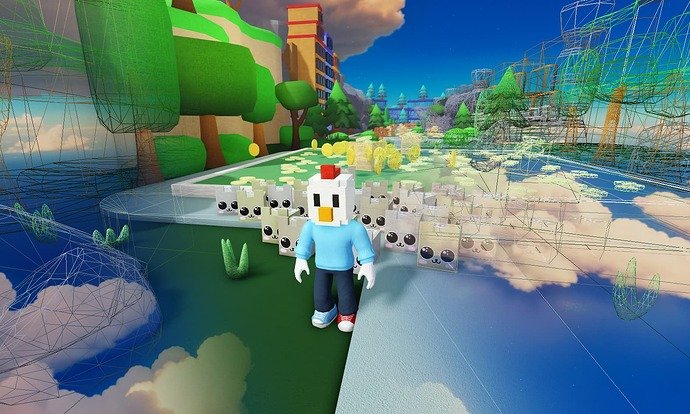
Optimizing your Roblox game requires using techniques such as efficient scripting, reducing part count, and employing level of detail.
Have you ever felt your Roblox game lagging or running slow? It’s a common issue, but understanding best practices for Roblox game optimization can significantly improve player experience. We will explore simple techniques that can make a big difference in performance.
Optimized games are not only more enjoyable for players, but they also are more likely to be successful. Let’s look at these game optimization tips.

Best Practices for Roblox Game Optimization
Making a cool Roblox game is awesome, but sometimes it can get laggy. That’s no fun! To make sure everyone has a smooth and enjoyable time, we need to optimize our games. Think of it like tuning up a race car; we need to make sure everything works perfectly.
Optimization means making your game run better. It’s about getting the most out of the game without making it slow. In this article, we’ll talk about how to do just that!
Understanding Performance Bottlenecks
Before we start fixing problems, we need to know what might be slowing our game down. These slowdowns are called “bottlenecks.” They’re like the narrowest part of a water bottle – they restrict the flow.
In Roblox, common bottlenecks include too many parts, complex scripts, and very detailed textures.
Identifying Common Culprits
Let’s dive into the most common things that cause lag in Roblox games:
- Too many parts: Imagine building a castle with thousands of tiny bricks. That’s a lot for the game to handle!
- Complex scripts: If your scripts have lots of steps or things that need to be checked often, it can slow the game down.
- High-resolution textures: Pictures that are super clear and detailed can take a lot of power to display.
- Unoptimized models: Models with too many triangles or polygons can make the game slow.
- Excessive particle effects: Lots of smoke, fire, or glitter can be pretty, but can also slow things down if there are too many at once.
Using Roblox’s Performance Tools
Roblox gives us special tools to help see where the lag is coming from. These tools are like a doctor’s scanner for our game!
The “Developer Console” is one of these tools. You can open it while you’re testing your game. It shows you how well your game is running, including scripts and rendering times.
The “MicroProfiler” is another handy tool. This helps pinpoint specific scripts or areas of the game that are taking up too much processing power.
Optimizing Geometry and Models
Our game’s world is made of shapes and models. If these are too complex, they can cause problems. We’ll learn how to simplify things without losing the cool look.
Reducing Part Count
Every part in your game is like a tiny building block. Too many blocks make the game heavy. The first step is to use fewer parts.
Instead of using lots of small parts, try using bigger parts. If you need a complex shape, think about using one big part with a texture instead of multiple small parts.
Use the “Union” tool wisely. Combining smaller parts into a single larger shape can significantly reduce the part count. This tool basically merges parts together.
Mesh Optimization
Sometimes you need very special shapes. These are often created using “meshes.” Meshes can have lots of triangles, which are like tiny pieces that make up the shape. Fewer triangles mean better performance.
Look into using “decimation” to simplify meshes. This process removes triangles without changing the look of the shape too much. There are programs available online that can do this for you.
Level of Detail (LOD)
Level of Detail, or LOD, is a technique where objects look less detailed when they are far away. You don’t need to see every tiny detail on a building across the map, right?
Implement LOD by having different versions of a model. The far away version will have less detail and therefore won’t slow down the game. When the player gets closer, the game will swap to a more detailed version of the object.
You can find various Roblox scripts and plugins online that help automate LOD. These are very useful in reducing lag.
Script Optimization
Scripts are the instructions that tell your game what to do. If the scripts are not well written, they can slow down the game.
Efficient Coding Practices
Think of your scripts like recipes. Well-written recipes are clear and easy to follow. In scripting, this is called writing efficient code.
Avoid using infinite loops and check for redundant code. An infinite loop is like a never-ending task, and that can freeze the game. Remove repeated or extra tasks to speed things up.
Using Wait and Task.Wait
Scripts run very quickly. Sometimes, you don’t need them to run every millisecond. Using “wait()” and “task.wait()” can pause scripts for a short time.
“task.wait()” is preferred over “wait()” because it handles the script’s execution better. This means it’s better at keeping everything smooth.
Debouncing
Imagine rapidly pressing a button. You only want the game to respond to the first press for a set amount of time. This is “debouncing.”
Debouncing prevents a single action from triggering multiple events within a short space of time. This can be useful to ensure that a button is only clicked once. It helps reduce extra actions or multiple triggers.
Event Connections
Event connections are like listening for when things happen in your game (e.g. clicking a button). If too many things are connected to events, it slows down the game.
Make sure you disconnect events when you no longer need them. If you don’t, they can keep running in the background and cause lag.
Caching
Caching is like saving things you use often so you don’t have to find them every time. In scripts, this means storing results in variables to be used later instead of recalculating every time.
For example, if you need to get a player’s character frequently, get the character once and save it in a variable. This variable is then used for multiple tasks instead of finding the character again each time.
Texture Optimization
Textures are like the pictures that cover your objects. Big, very detailed pictures can make the game slow. We can make textures perform better.
Image Size and Resolution
Big pictures with lots of detail are called “high-resolution.” These take up more memory. Smaller pictures load faster. You can use smaller sizes if you don’t need to see so many details. For a game, small sizes of 256×256 or 512×512 are a good starting point.
Using Texture Atlases
A texture atlas is a single big image that contains multiple smaller textures. This means that the game only needs to load one image instead of many individual images. This is more efficient!
Many free tools can help you create texture atlases from individual images. Using atlases can dramatically reduce lag.
Compression
When images are saved, they can be compressed to make them smaller. This is like putting your clothes in a vacuum bag – they take up less space.
Roblox automatically compresses textures but always make sure you are using the lowest compression that still keeps the texture looking good.
Sound and Audio Optimization
Just like pictures, sounds also need optimization. Too many or poor quality sounds can impact game performance.
Audio File Format
The format of an audio file (like .mp3, or .wav) affects its size and loading speed. OGG Vorbis is often the best choice for Roblox because it offers good sound quality while being small in size.
Choose the correct file format so you don’t slow down your game. Try to avoid WAV files, as these are generally larger files.
Reducing Sound Complexity
Avoid having too many sounds playing at the same time. If you have many explosions happening at once, they can overload your game. When a sound isn’t being used it is better not to load it.
Use sound effects sparingly. When you add a lot of sounds they take up space, leading to lagging games.
Memory Management
Think of your computer’s memory as a worktable. If the table is too crowded, it gets hard to work. We need to keep our game’s memory usage clear and not too full.
Object Pooling
Object pooling is like having a box of reusable objects. Instead of creating new objects every time, you use objects from the pool. This saves a lot of memory.
For example, instead of creating bullets every time a player shoots, you reuse bullets from a pool. The game won’t have to work hard to make new bullets.
Removing Unused Assets
Sometimes, you might have objects in your game that you no longer need. It’s very important to remove these objects from the game.
Make sure you regularly check for unused scripts, parts, models, textures, and sounds. Get rid of them to save memory.
Garbage Collection
Roblox automatically manages the memory and removes items from memory that you no longer need. This process is known as “Garbage Collection.”
Make sure you don’t have too much garbage so that this process can run smoothly. Proper coding techniques can help reduce garbage in the game.
Testing and Iterating
Optimizing a game is not just one time thing, it’s a constant process. We need to keep testing and making changes to improve performance.
Regular Performance Testing
As you build your game, regularly test its performance. Keep an eye on the developer console. Check the frame rate and see how smoothly your game is running. Look for any lags.
Test your game on different devices, as this may help reveal unexpected lagging issues.
Gathering Player Feedback
Players can help us find performance problems. Ask them for feedback. Listen to what they say. If they mention lag, you know where to focus your optimization efforts.
Make it easy for players to report lags so you can address the problems quickly.
Iterative Improvement
Optimization is an ongoing cycle. You won’t always get it perfect the first time. Keep trying new things, testing them, and improving.
Each optimization step should be small and focused. This makes it easier to fix and you will learn about where to find any lag.
Additional Tips
Here are a few more simple things you can do to help with optimization:
- Turn off shadows if they aren’t very important to the game.
- Use lighting effects sparingly.
- Avoid physics effects (like moving parts) when they are not needed.
- Hide things that are not seen, this helps reduce work needed to load the game.
Making your Roblox game run smoothly requires attention to detail and some knowledge of these practices. By addressing common bottlenecks, optimizing your scripts and models, and taking the time to test and iterate, you can create a much more enjoyable experience for all your players. Remember, optimizing isn’t a one-time job; it’s a process of continuous improvement. Keep learning, keep testing, and your game will shine!
How to OPTIMIZE Your Roblox Game… Easiest Guide!
Final Thoughts
Implementing level of detail, reducing part count, and using efficient scripts significantly improve performance. Consider utilizing culling techniques to render only visible objects.
These best practices for Roblox game optimization are crucial for smooth gameplay. Regularly test your game on different devices to identify bottlenecks.

