
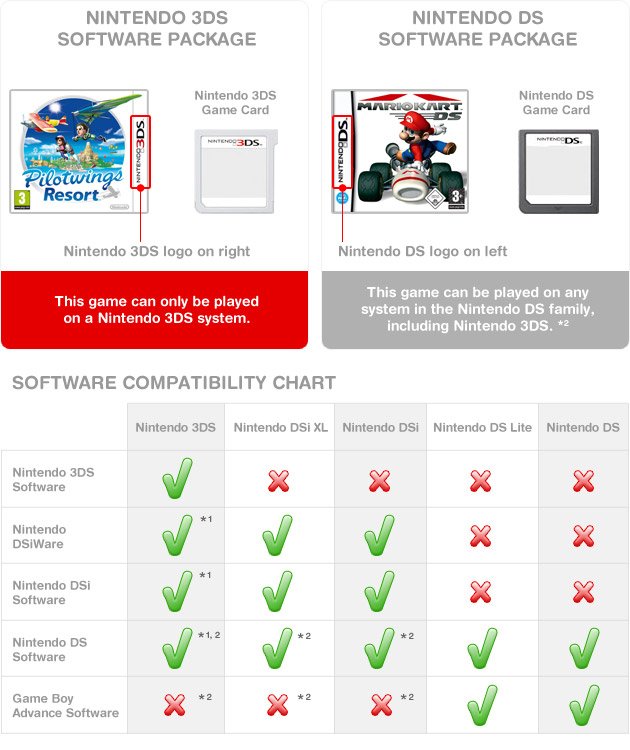
Yes, a 3DS can play DS games.
Wondering if you can revisit your old Nintendo DS titles on your 3DS? Many gamers have asked, “can a 3DS play DS games?” It’s a valid question considering the evolution of handheld consoles. The good news is the 3DS has backwards compatibility.
This means you can dust off your favorite DS cartridges and enjoy them on your 3DS system. The process is simple; insert the game and start playing. You’ll find playing older games on the 3DS brings back some great memories.

Can a 3DS Play DS Games? Exploring Compatibility and More
So, you’ve got a shiny 3DS, maybe a New 3DS or a 2DS, and you’re wondering if you can play those old Nintendo DS games that you still love. It’s a great question, and the answer is a fantastic yes! The Nintendo 3DS family is backward compatible with DS games, which is like saying it can play those older games. This means you can enjoy your library of DS games on your 3DS system, which is really convenient and awesome! Let’s take a deep dive into how this works, what you should know, and some things you can do to make your DS gaming experience on a 3DS even better.
How Does 3DS Backward Compatibility Work?
The ability of the 3DS to play DS games is all thanks to its clever design. Think of it as having two different brains inside! One brain handles the newer 3DS games, with all their fancy 3D graphics. The other brain is there specifically to run the older DS games. This is what we call “backward compatibility,” meaning it can play games from a previous system. When you put a DS game into your 3DS, the system recognizes it and automatically switches to its “DS brain”. It’s a smooth and automatic process; you don’t have to do anything special.
The Magic of the DS Cartridge Slot
The key to making this all work is the physical cartridge slot. The 3DS has a slot that’s specifically designed to accept DS game cartridges. It’s very similar to the slot on the original DS, and this is no accident. The Nintendo engineers made sure it was compatible. Simply insert your DS game cartridge into the slot, and the 3DS will detect it, and you can get started. It is a smooth and easy process without any hiccups.
Benefits of Playing DS Games on a 3DS
Now that we know it’s possible, let’s discuss the advantages of playing DS games on your 3DS system:
- One Device, Two Libraries: You can play both 3DS games and your older collection of DS games using a single handheld. This saves space and is really convenient. No need to carry around two different gaming devices.
- Larger Screen: The 3DS typically has a larger screen than the original Nintendo DS, and the 3DS XL is bigger still. This makes it easier to see the action and enjoy the game, which is great for those games that were released on the smaller DS screen. The increased size screen makes a huge difference in overall enjoyment.
- Better Resolution (Sometimes): While the DS games themselves won’t magically become higher resolution, the 3DS’s screen resolution can sometimes provide a slightly clearer image compared to the original DS screen. The difference might not be huge, but it does give the older games a nice touch.
- Built-in Controls: The 3DS has buttons and a touch screen that are compatible with all DS games, ensuring a seamless control experience. You can use the same methods you used to play games on the old DS systems.
- Portability: The 3DS is a portable system, just like the old DS. This means you can take your favorite DS games anywhere, just as before, whether you are traveling or just relaxing at home.
Are there any DS games that won’t work on a 3DS?
While the vast majority of DS games work perfectly fine on the 3DS, there are very few exceptions. There might be very rare compatibility issues with certain games but the likelihood of this is very low. In some circumstances, a very, very small number of games that use specific hardware add-ons may have some issues. However, these kinds of games are not common. For example: Games that required a specific add-on, such as the Guitar Hero grip controller, which was not originally designed to fit the 3DS. But these examples are niche cases and not the rule.
DS games that are not compatible with 3DS
The likelihood of a DS game not working on a 3DS is incredibly low, but here’s a quick summary:
- Hardware Add-ons: A very few select DS games that need unique attachments might not function properly, as they were made to connect to the original DS hardware. These are very rare, and it is likely that you would not have to encounter such a game.
- Very Obscure Titles: Some extremely rare or less common titles may have compatibility issues. These are games that are not widely known and are not part of any popular game collection.
It’s important to note that these cases are exceptions and most of the popular DS games will work without any problems on a 3DS system. If you are uncertain about a game, doing a quick online search to see if other users have had any compatibility issues would be a great plan.
How to Insert and Play DS Games on Your 3DS
Playing your favorite DS game on your 3DS is very simple. Here is the step-by-step guide on how to do this:
- Locate the Game Cartridge Slot: On your 3DS, you will see a slot on the bottom of the system. This is where the game cartridges go.
- Insert the DS Cartridge: Take your DS game and carefully insert it into the slot. Make sure that the label is facing the same way as the screen of the 3DS. You should hear or feel a little click when it’s correctly in place.
- Turn on Your 3DS: Press the power button, and the 3DS will start up.
- Select the DS Game: After the 3DS boots up, the DS game will show up as an icon on the home screen. Simply use the stylus or finger to click on it to start the game.
- Start Playing: Your game will now launch. You can now start having fun just as you did when you played it on the original DS system.
It’s really as easy as that! You don’t need any special tools or additional equipment, and you can start gaming very quickly.
Differences Between Playing DS Games on a DS and a 3DS
Even though the 3DS plays DS games seamlessly, there are a few small differences between playing DS games on the original DS system and playing them on a 3DS. These variations are mostly related to display and some user interface elements.
Screen Display Differences
- Screen Resolution: As mentioned previously, the 3DS screen might provide a slight clarity in comparison to the original DS screen. The resolution will not magically increase, it will just look slightly better on the screen of the 3DS.
- Screen Size: The 3DS and 3DS XL systems have larger screens compared to the original DS, which allows for an improved viewing experience. Playing games on a bigger screen makes a huge difference.
- Aspect Ratio: The DS screen aspect ratio and 3DS screen are different and the DS game display can sometimes be stretched to fit the bigger 3DS screen. This is not a huge difference, but something you might notice.
User Interface (UI)
- 3DS Menu System: When you launch a DS game, it launches through the 3DS menu. The 3DS menu UI surrounds the game you are playing, which is different from the experience on the original DS.
- Button Mapping: All the controls will be mapped to the 3DS buttons, just as they were in the original DS system.
Maximizing Your DS Gaming Experience on a 3DS
While playing DS games on a 3DS is straightforward, here are a few tips to make your experience even better:
- Use Headphones: Playing with headphones can help block out external sounds and make it easier to hear the game’s audio clearly. This will improve the overall immersion of playing the game.
- Adjust Screen Brightness: To save battery and make the screen easy to see, adjust the screen’s brightness using the 3DS settings. It’s a great idea to adjust the settings depending on where you are playing.
- Charge Your 3DS: As with any handheld game console, keeping your 3DS charged is very important. Make sure it’s charged before a long gaming session so you don’t lose progress because of a dead battery.
- Clean Your Cartridges: To make sure that the DS game plays smoothly, clean the game cartridge with a soft cloth to get rid of any dust or dirt. This will help with a better connection with the system.
- Update Your System: Make sure your 3DS system software is up to date. This can help with general system performance, game compatibility, and sometimes, even add some more features.
Exploring 3DS Models and DS Compatibility
It’s worth mentioning that all the various models in the Nintendo 3DS family are capable of playing DS games. Whether you have the original 3DS, the 3DS XL, a 2DS, or any model in the New 3DS line, they all have the same backward compatibility with DS games. This means you can choose any 3DS model based on its other features, like screen size or price, with the confidence that it will play your library of DS games without any problems.
3DS Models That Play DS Games
- Nintendo 3DS
- Nintendo 3DS XL
- Nintendo 2DS
- New Nintendo 3DS
- New Nintendo 3DS XL
- New Nintendo 2DS XL
Troubleshooting Common Issues
Although playing DS games on a 3DS is normally a very smooth experience, sometimes you might encounter a small issue. Here are some troubleshooting steps that you can take:
- Game Not Reading: Make sure your game cartridge is completely inserted into the slot and it’s properly seated. If the issue continues, try cleaning the cartridge carefully with a soft, dry cloth.
- Screen Issues: If you have any problems with the screen, try adjusting the brightness of your screen. You can also try restarting the system.
- Freezing or Crashing: If the game freezes or crashes, restart the 3DS. If the issue happens frequently, the game cartridge might be damaged.
- Sound Problems: Make sure your 3DS’s volume is up. If the problem persists, try using a different pair of headphones.
The Nintendo 3DS family’s capability to play DS games makes it very versatile. The ability to enjoy both 3DS and DS games on a single handheld device is a great feature that allows gamers to experience a huge library of games. Backward compatibility expands your gaming options and can be a great way to rediscover some old favorites that you might not have played in a while. Knowing all this, you are now fully equipped to enjoy your collection of classic DS games on your 3DS console. You can enjoy hours of fun and adventure with your 3DS and a wide range of great games.
Do THIS when playing DS Games on 3DS
Final Thoughts
Yes, a 3DS can play DS games. The 3DS system includes a slot specifically designed for DS game cartridges. This functionality makes it easy for you to enjoy your older titles on the newer console.
The backward compatibility is a key feature. You can still access a wide library of games. This is beneficial for anyone who owns both DS and 3DS systems.
Therefore, the answer is affirmative. A 3DS can play DS games, giving you a great gaming experience.

