
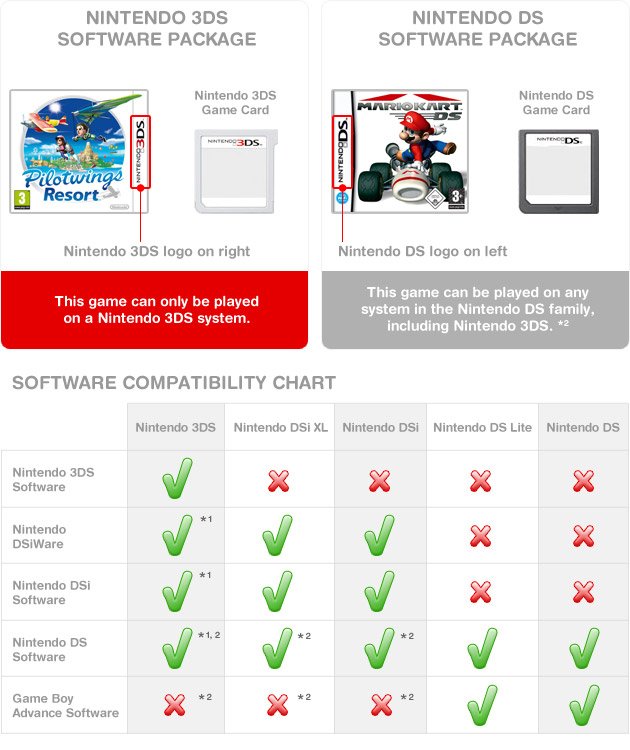
Yes, a 3DS can play DS Lite games.
So, you’ve got a shiny 3DS and a pile of your old DS Lite games gathering dust. You’re probably wondering, can a 3ds play ds lite games? It’s a common question for anyone upgrading their handheld consoles.
Good news, the Nintendo 3DS is backward compatible. This means you can enjoy your entire collection of DS Lite titles on the newer system.
Simply insert the DS game cartridge into the 3DS game slot, and you’re ready to play. It’s a great way to revisit those classic games.

Can a 3DS Play DS Lite Games? A Deep Dive
The Nintendo 3DS, with its cool 3D screen, was a big step up from the Nintendo DS Lite. But many of us still have a bunch of DS Lite games we love. So, the big question is: can you actually play those old DS Lite games on your shiny new 3DS? The short answer is a resounding yes! But, like most things, there’s a bit more to the story than just that. Let’s explore all the ins and outs of playing DS Lite games on your 3DS, so you can get back to your favorites in no time.
The Magic of Backwards Compatibility
The reason you can enjoy your DS Lite game library on a 3DS comes down to something called “backwards compatibility.” This basically means that a newer gaming system can play games made for an older system. Nintendo is actually quite good at this! They’ve designed the 3DS in such a way that it can understand and run the software that was designed for the DS and DS Lite.
How Does Backwards Compatibility Work?
Think of it like this: the 3DS has a special brain, or processor, that can understand both how 3DS games and how DS games work. When you put a DS game into the 3DS, the system knows it’s a DS game and adjusts itself to play it properly. It’s kind of like putting on different glasses; one type lets you see 3DS games, and another allows you to enjoy DS games. This is all done behind the scenes, so you don’t have to worry about any complicated settings.
Here’s a simple breakdown:
- Hardware: The 3DS has the hardware components needed to run DS game software.
- Software: The 3DS system software includes the capability to interpret DS game code.
- Cartridge Slot: The same cartridge slot is used for both DS and 3DS games, although DS games are physically smaller.
Playing DS Games on Different 3DS Models
One great thing is that backwards compatibility isn’t just for one 3DS model; it extends across the entire family. Whether you own the original 3DS, the 3DS XL, the New 3DS, or the New 3DS XL, or even the 2DS or New 2DS XL, you can play your DS games. All these versions of 3DS systems work with DS game cartridges without any issues. So, no matter which model you have, dust off those old DS games and enjoy!
Specific 3DS Models and DS Games
Here’s a quick rundown:
- Original 3DS: Can play both DS and 3DS games.
- 3DS XL: Also supports both DS and 3DS game libraries.
- New 3DS and New 3DS XL: These enhanced models retain full DS compatibility.
- 2DS and New 2DS XL: These models, designed without 3D screens, still fully support DS game cartridges.
Differences in Gameplay Experience
While playing DS games on your 3DS is easy, there are some minor differences in how these games look and feel on the larger screen.
Screen Size and Resolution
The screens on 3DS systems are generally larger than those on the DS Lite. When you play a DS game, it won’t magically stretch to fit the whole 3DS screen. Instead, the game will appear in its original resolution in the center of the 3DS screen, with black borders surrounding it. This is because DS games have a lower resolution than 3DS games. It’s similar to watching an older video on a modern TV; it’ll work fine, but it won’t fill up the whole screen.
You will not get improved visuals while playing old games, as system only does the upscaling of the resolution but it does not change the in-game graphics or textures.
How the Dual Screen Experience is Preserved
One of the defining features of the DS and DS Lite was its dual-screen setup. When you play a DS game on the 3DS, the dual screen setup is maintained. The top screen on the 3DS is used for the primary game display, and the bottom touch screen of 3DS works as the bottom screen for the DS games. You can still control the games with the touch screen just as you did on the DS Lite. This ensures that the experience is authentic and all the touch controls work as intended.
The 3DS also supports touch inputs just like the DS lite, so touch-based games can be enjoyed without any issue.
Controls and Gameplay Mechanics
The controls for DS games remain the same on the 3DS. You’ll use the same buttons and the touch screen just like on the DS Lite. There are no major changes or adjustments you need to make. This makes it simple to transition to playing your favorite DS titles on your 3DS.
Touch Screen Functionality
The touch screen works perfectly as intended, even though the screen sizes are not same. The touch functionality is mapped correctly to the area of the game screen, so you should face no problems. This seamless experience ensures that games that rely heavily on touch controls, such as puzzle games, work just as expected.
Button Layout and Controls
The button layouts are slightly different between the DS Lite and 3DS. But since most of the DS games did not utilize the extra buttons on 3DS and most of the games used only D-pad, A, B, X, and Y buttons and the shoulder buttons, you won’t have any problems with that. All the games work as intended, as Nintendo was quite thoughtful while making the 3DS, making sure there are no hiccups while playing DS games.
Advantages of Playing DS Games on a 3DS
There are some real upsides to playing your DS games on your 3DS.
Convenience
Carrying one 3DS that plays both 3DS and DS games is a lot easier than carrying two separate consoles. This makes it great for travel, and you have access to a wider variety of games in a compact setup.
Improved Hardware
The 3DS generally has better hardware than the DS Lite. This can lead to better battery life and sometimes faster loading times for DS games, although the difference is small. The 3DS consoles are more durable. So, playing your beloved games on a newer device, makes it a better and convenient option for many users.
Access to the Entire Library
The backwards compatibility gives you access to the entire library of Nintendo DS, including both DS and DSi exclusive titles without any problem. You can enjoy your games which you enjoyed in past. You have access to 100s of games. It makes 3DS console a much better value for your money.
Potential Issues and Limitations
There are a few things to consider when playing DS games on your 3DS.
Visual Differences
As mentioned earlier, the image quality of DS games on a 3DS isn’t as crisp as 3DS games. The games appear in their original resolution with black borders around the game image. This might seem less visually appealing but it doesn’t effect the gameplay.
No Upscaling
The 3DS does not upscale DS games and this can make the visuals of the games looks a bit blurry, especially on larger screens, such as 3DS XL.
No 3D Effects
DS games will not utilize the 3D feature of the 3DS. While this is obvious, some people might have the expectation that it will somehow make the 3D effects work on older games but that’s not the case.
Rare Compatibility Issues
Though uncommon, there might be a handful of DS games that could have minor compatibility problems on the 3DS. These are usually very rare and involve very specific games. If this happens, then you might have to play that game on its original console.
Tips for Playing DS Games on a 3DS
To make your gaming experience as good as possible, here are a few tips:
Clean Your Cartridges
Before playing any old game, especially if you haven’t played in a while, it’s a good idea to clean the game cartridges. Dust and dirt can sometimes make the 3DS have trouble reading the game. You can use a dry cotton swab or a soft cloth to wipe the metal connectors carefully.
Adjust Screen Brightness
You might need to adjust the screen brightness on your 3DS to get the best view of your DS games. A different brightness level might be more optimal for DS games than for 3DS games.
Consider the System’s Battery
Playing older games does not change the battery usage of your 3DS so it’s same whether you play 3DS games or DS games. Make sure that your battery is charged before beginning to enjoy your DS games on 3DS.
The Joy of Retro Gaming on 3DS
In conclusion, playing DS Lite games on a 3DS is a fantastic way to revisit your favorite games from the past. The backwards compatibility of the 3DS ensures that a huge library of games is available to you on a single handheld gaming system. The small screen adjustments and some minor differences don’t stop you from enjoying your DS games on a 3DS. It’s convenient and adds another great value to the 3DS, allowing you to enjoy a wealth of classic games in addition to all that the 3DS has to offer. So, take out those old games and start a new adventure!
Do THIS when playing DS Games on 3DS
Final Thoughts
Yes, a 3DS can play almost all DS Lite games. The 3DS has backward compatibility. This means you can insert a DS game cartridge directly into your 3DS and play.
So, to answer the question, ‘can a 3ds play ds lite games?’, the answer is a definite yes. You can enjoy your old DS titles on the 3DS device. The games work flawlessly.

