
Unfortunately, no, androids cannot directly play iMessage games.
Ever tried to join a friend’s iMessage game from your Android phone? You probably noticed you can’t seem to get in on the fun. This is because iMessage games use Apple’s proprietary technology. Therefore, they are exclusive to Apple devices.
The frustrating reality is that direct access is impossible. So, while your friends with iPhones are battling it out in mini-games, you’re left on the sidelines. The question ‘can androids play iMessage games’ is a very common one, and sadly the answer is still no.

Can Androids Play iMessage Games?
Okay, let’s get straight to it. You have an Android phone, and your friends with iPhones are always chatting about fun games they play in iMessage. You’re probably wondering, “Can I join in on the fun?” The short answer is… kind of, but not directly. Let’s dive into the details and see what’s really going on.
What Are iMessage Games?
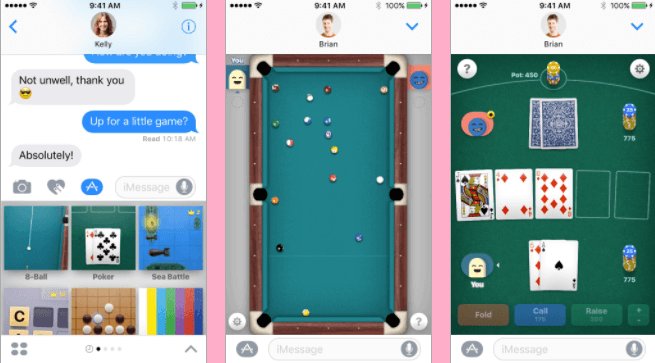
First, it’s good to understand what iMessage games actually are. They’re not like games you download from the Google Play Store or the Apple App Store. Instead, these are mini-games built right into the Messages app on iPhones, iPads, and other Apple devices. They often involve simple controls and are designed for quick, casual fun with your contacts. You’ll see things like:
- Simple word games
- 8-ball pool
- Chess
- Mini golf
- And many other casual titles
These games are part of the larger iMessage ecosystem, which includes things like stickers, GIFs, and other interactive elements. Think of it as a playground built just for Apple users.
The Problem: Apple’s Closed Garden
Here’s the main reason why it’s tricky for Android users to play iMessage games: Apple’s ecosystem is famously “closed.” This means that Apple likes to keep its software, hardware, and services working best within its own world. iMessage, the app that hosts these games, is exclusive to Apple devices. So, the technology behind iMessage and its games is designed to only work on Apple’s iPhones, iPads, and Macs. It’s not a simple app that someone could just copy over to Android. Apple doesn’t make iMessage available for Android phones. The way these games connect to other players is through Apple’s proprietary system, which Androids can’t access. They are not simple standalone app files that can be shared easily. It’s a bit like trying to play a PlayStation game on an Xbox; the systems are just not compatible.
Why Don’t Apple Make iMessage Available For Android?
Good question! There are a few reasons why Apple likely keeps iMessage within its own ecosystem. First, iMessage is a big reason why people choose iPhones. It’s a popular communication service that works really well with Apple devices. Keeping it exclusive means it’s a feature that pushes people to buy Apple products. It is a good business strategy for Apple. Secondly, iMessage’s end-to-end encryption is a big deal for user privacy. Apple built this encryption system tightly into its devices and operating system. Making it work on other systems like Android could introduce technical challenges. Third, Apple has always focused on creating a seamless experience across its products. Keeping iMessage in their own world allows them to fully control that experience. So, while it’s frustrating for Android users, it does make sense from Apple’s perspective. But this doesn’t mean all is lost for you, keep reading on!
The Workarounds: Alternatives to iMessage Games
While you can’t directly play iMessage games on your Android, don’t give up hope! There are other ways you can play games with your iPhone-using friends. These aren’t iMessage games, but they can still give you a great way to connect and have fun together.
Using Third-Party Gaming Apps
This is the most common workaround. Many apps that are available on both the Google Play Store and the Apple App Store allow you to play games with friends. You can find plenty of games that are made to work across platforms. So, whether you have an Android or an iPhone, you can enjoy the same game together. Let’s explore a few types of games.
Cross-Platform Word Games
Word games are always a hit. Apps like Words with Friends, Scrabble GO, and Boggle allow you to play with friends, no matter what type of phone they have. These apps will give you a very similar experience to the word games available on iMessage, and will allow you to have fun with your friends on iPhone.
Multiplayer Puzzle Games
Puzzle games are another great choice for cross-platform gaming. Apps like Among Us, Roblox, and many others will let you play various kinds of puzzles or problem-solving games. Many games that offer multiplayer gaming are available on the Google Play Store and Apple App Store, so you will have more choice. And the best part? These games will often offer a similar experience to iMessage games, without being restricted to Apple devices.
Strategy and Board Games
Many classic board games and strategy games are available as cross-platform apps. Think of classics like Chess, Checkers, or even online versions of Catan or Ticket to Ride. These are a nice option to play more complex games with your Apple-using friends without being restricted by the platform you are using. And the experience is very close to iMessage games.
Casual Multiplayer Games
There are many fun and simple casual games that work across Android and iOS. Games like Uno!, Draw Something, and other similar casual games offer a similar experience to what you would get playing mini-games on iMessage. They are fun, simple, and accessible to all.
Using Social Media Games
Many social media platforms have their own gaming sections. Facebook Gaming, for instance, has a large library of games you can play with friends who are on Android, iOS or even on computer. They are a good solution to having a similar experience to iMessage games. Even though they aren’t part of your messaging app, they allow you to connect and play with people no matter their device.
The Power of SMS/MMS
While you can’t play iMessage games with SMS, you can still share information and communicate on these platforms with iPhone users. While it’s not ideal, you can use SMS and MMS to chat with your friends and share your scores on the cross platform games you are playing.
Comparing iMessage Games and Cross-Platform Alternatives
Let’s look at a quick comparison to help you see the differences:
| Feature | iMessage Games | Cross-Platform Games |
|---|---|---|
| Availability on Android | No | Yes |
| Availability on iOS | Yes | Yes |
| Integration with Messaging App | Yes, Seamless | No, Separate app |
| Variety of Games | Good variety within the iMessage ecosystem | Huge variety on various platforms and app stores |
| Cost | Often free | Often free, but with in-app purchases for some titles |
| Setup | Very simple, launch games right from chat | Slightly longer, require to download or use external platforms |
| Compatibility | Only Apple Devices | Android, iOS and sometimes even desktop |
Tips for Gaming with iPhone Friends
It’s good to have a strategy when trying to play games with friends, so here are some tips:
- Agree on the app: Before you start playing, decide which app you and your friends will use. This will avoid any confusion or the need to download too many apps.
- Check for compatibility: Make sure the app you pick is truly cross-platform and will work on both Android and iOS. Some apps might look cross-platform but might have issues for some users. Read reviews and feedback for the game to make sure it works as expected.
- Communicate: Keep the communication flowing during your games. Chat with your friends, trash talk them, or celebrate your victories. Use the chat feature within the app or create a chat group.
The Future of Cross-Platform Gaming
While iMessage games may be exclusive to Apple users for now, the world of gaming is always changing. Cross-platform play is becoming more and more common, and this trend should continue. More developers are realizing that making their games available to everyone will open new opportunities. Some companies are pushing for better standards and cross-platform communication. It is possible that in the future, even messaging systems will find a way to be interoperable. For now, there are still many ways to enjoy games with your friends, no matter what type of phone they have. Keep searching, and you’ll find plenty of fantastic gaming options.
So, while you can’t directly play iMessage games on an Android, there are many excellent alternative ways to play games with your friends who use Apple devices. Cross-platform gaming is becoming more common and offers many great options. So, have fun exploring the many great options!
Can Android users play iMessage games?
Final Thoughts
Currently, Android users cannot directly join iMessage games. Apple’s ecosystem restricts these games to its own devices. This limitation stems from iMessage’s proprietary technology.
Workarounds might exist through third-party apps but lack native iMessage integration. Consequently, ‘can androids play imessage games’ is definitively answered with a no. This presents a barrier for cross-platform gaming among friends.

