
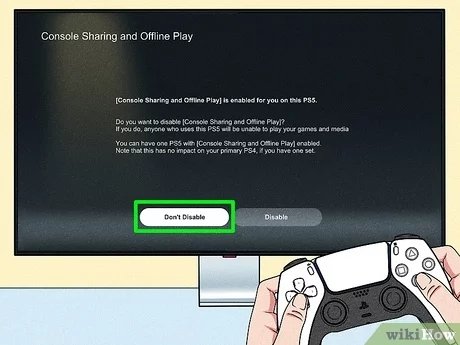
Yes, the PS5 does have game sharing capabilities through the console sharing and offline play feature.
Ever wondered if you can share your awesome PS5 game library with a friend or family member? This question often pops up as players navigate the console’s features. Many are curious to know if the PS5 provides ways to share purchased titles.
The idea of playing games on someone else’s PS5 is certainly appealing. Knowing the ins and outs of “does PS5 have game sharing” can really enhance your gaming experience. We will explore how this works and what limitations exist.

Does PS5 Have Game Sharing?
Okay, so you’ve got a shiny new PlayStation 5, and you’re wondering if you can share all those awesome games with your friends or family. It’s a great question because, let’s face it, games can be pricey! The good news is, the PS5 does have a way to share games, but it’s not quite as simple as handing over a disc. It’s called “Console Sharing and Offline Play,” and we’re going to dive deep into how it works, what you need to know, and some things to keep in mind. So, let’s explore this feature and understand the full scope of PS5 game sharing.
Understanding Console Sharing and Offline Play
Console Sharing and Offline Play is the official way Sony allows you to share your digital game library on the PS5. It’s designed for families or close friends who are within the same household but can be used in other scenarios with certain precautions. Basically, you designate one console as your “primary” PS5. Anyone who uses that primary console can play your purchased digital games, even if you’re not signed in.
How to Activate Console Sharing and Offline Play
Here’s a step-by-step guide on how to set up Console Sharing and Offline Play on your PS5:
- Sign In: First, make sure you’re logged into your PlayStation Network (PSN) account on the PS5 you want to set as your primary console. This is super important, as it’s the account that owns the games.
- Go to Settings: Head over to the settings menu on your PS5. It’s the little gear icon on the top right of the home screen.
- Users and Accounts: Scroll down and select “Users and Accounts.”
- Other: Next, go to “Other.”
- Console Sharing and Offline Play: Now you’ll see “Console Sharing and Offline Play.” Select it.
- Enable: You’ll have the option to “Enable” Console Sharing and Offline Play. Choose this.
That’s it! Your selected PS5 is now your primary console, and anyone who uses it can play your games. The process is quite straightforward, but always double check to ensure you’ve completed every step.
How Does This Work?
When you enable Console Sharing and Offline Play on a PS5, it essentially gives other accounts on that specific console the permission to use the games that are linked to your account. Think of it like having a shared library in your house; the games belong to you, but everyone in the house can read them (or in this case, play them) on that chosen console. Crucially, though, this permission is only for that specific console.
Limitations of PS5 Game Sharing
While it’s a pretty handy feature, there are certain limitations you need to know about when using Console Sharing and Offline Play.
Only One Primary PS5
You can only have one primary PS5 console associated with your account at a time. This means if you have a PS5 at your house and another at a friend’s house, you have to choose which one is your primary. You can always switch it back, but you need to do so. That primary console is where all other profiles can play the games you own.
Playing on Another PS5
If you want to play your games on a different PS5 that is not set as your primary console (like at your friend’s house), you can! Here’s how:
- Sign in: Log in to your PSN account on the other PS5.
- Access Games: Go to your game library on that console.
- Play: Download and play your games! However, there is a catch.
The catch is that you MUST be connected to the internet and signed into your PSN account. The non-primary console is always checking back with your account to ensure that you have a valid game license. If the internet goes down or you can’t log in, you will not be able to play the game on the non primary console. Remember, only the primary console allows offline access for other users.
Online Play Limitations
This is a critical point. If you’re using Console Sharing, only one person with your account can play online simultaneously. This means that if you’re playing on your account on the non-primary console and another user is using your account games on your primary, both of you can play simultaneously locally or offline. But only one person can play online with your account at any given time. If both of you try to play online at the same time, one will be kicked off.
Account Restrictions
Keep in mind that this applies to your PSN account. Other users cannot use your online storage, cloud save, or anything else tied to your account on non-primary consoles. Only you can access those features with your account. Also, game progress is tied to individual PSN accounts. So, if your friend is playing on their account on your primary console, they will not have your save files and vice versa, so they’ll have to start from the begining.
Game Sharing with Physical Discs
Console Sharing and Offline Play is only for digital games you’ve purchased from the PlayStation Store. So, what about those games on physical discs? Well, physical games work in a more traditional way. You can lend a physical game disc to a friend, and they can play it on their PS5. However, the key difference here is, only one person can play the game at a time. The game belongs to whoever has the disc and has the console which can read disc. The digital copy will have multiple users at a time but a physical copy would only have one player at a time.
Lending Physical Games
Here’s a basic rundown of how lending physical games works:
- Hand It Over: Just give the disc to your friend.
- Insert and Play: They insert the disc into their PS5 and play.
- Return the Disc: When they’re done, they give the disc back to you.
It’s the old-school way of doing things. With physical disc, there are no primary consoles. If you have the disc, you can play the game, as long as you have the right console for it.
Swapping Primary PS5s: How and When
Sometimes, you might want to change which PS5 is your primary console. Maybe you bought a new PS5, or you’re traveling. It’s important to know how to swap your primary PS5. Here’s how:
Deactivating Console Sharing
Before setting up a new PS5 as your primary, you need to deactivate the existing one:
- Sign in on the Old PS5: Make sure you are signed into your account on the PS5 you want to make the non primary console.
- Go to Settings: Head to “Settings,” then “Users and Accounts.”
- Select “Other”: Go to “Other”.
- Disable Sharing: Select “Console Sharing and Offline Play” then choose “Disable”.
Setting a New Primary PS5
Now, you can set up a new PS5 as your primary using the steps we discussed earlier. Make sure you are signed in with the account that owns the games before enabling Console Sharing and Offline Play. Make sure that any device using the other console that was previously your primary, and it is not set as primary anymore, they will lose access to your games. You can only enable Console Sharing and Offline Play one console at a time. If you try to enable on another without disabling from other it will give you an error.
When to Swap?
You might want to swap your primary PS5 when:
- Getting a New Console: If you buy a second console, you’ll likely want to set that as your primary, particularly if you plan to share games with others on that console.
- Traveling: If you take your console to a different location for an extended time, and want to give your game access to someone else at the location, you might want to swap the primary console.
- Moving: If you move your main console to a different location, you would need to swap it to make it accessible for all players playing on that specific console.
Why Use Console Sharing and Offline Play?
Console Sharing and Offline Play is an awesome feature for multiple reasons. Primarily, it provides a lot of flexibility, especially for families or friends living together. Here’s a quick summary of the benefits:
- Save Money: You don’t need to buy multiple copies of digital games for each person in your house. This can potentially cut down the cost of gaming by half or even more.
- Convenience: Once set up, other profiles on your primary console can instantly access your entire digital library, making access quick and easy.
- Offline Play for Others: This is a big one. On the primary console, other profiles can play your games even when you aren’t online. This is not possible for the non-primary console. This is a great option to continue playing your purchased games, even when internet goes down.
Tips for Game Sharing Safely and Effectively
While game sharing on PS5 is very convenient, it is essential to do it safely and effectively to get the most out of it. Here are some helpful tips:
Communication is Key
Talk to your friends or family members about how game sharing works, especially regarding the one primary console limitation. It’s helpful to discuss the one person at a time for online play rule, or the importance of not messing up saves or account details, before getting started. Ensure that everyone is aware of when and where you are changing consoles. You wouldn’t want to block someone’s game access unintentionally!
Account Security
Be careful about sharing your PSN account details. Remember that whoever has access to your account can potentially change your password or make purchases. It is essential to never share your login information, or keep a strong password. Using 2 factor authentication is advised.
Keeping Track of Primary Console Changes
It’s easy to lose track if you are frequently switching your primary consoles. So, keep a note of which console is your primary to avoid any issues down the line. If you forget which one is set, you may not be able to play your games.
Alternatives to Console Sharing
If Console Sharing doesn’t quite meet your needs, or if you prefer a different method of sharing, there are other alternatives to consider. Although these are not ‘game sharing’ per se, it’s great to have more options.
PlayStation Plus Game Catalog
PlayStation Plus subscribers at the Extra or Premium tier have access to a wide catalog of downloadable games. If you and your friends or family all have the membership, you can both play many games without having to share. However, the availability of these games vary from time to time.
Game Rentals
Although not as common as in the past, some rental services still offer physical video game rentals. If there’s a specific game that you want to try for a short period without buying it, renting is a good option. But again, keep in mind you need a disc-reader console to use the game disc.
Buying Multiple Copies
The most straightforward option is that you can purchase the games separately. This is the most expensive method, but it allows you and another person to play the same game online, at the same time, on different consoles without any additional steps and restrictions.
Game sharing on the PS5 is designed to be a family-friendly way of sharing digital titles within a household. While it comes with a few important caveats, these rules are put in place to protect publishers and the PlayStation community. By understanding the details of ‘Console Sharing and Offline Play’ you’ll be able to make an informed decision about the best approach for you.
How to Game Share on PS5! (EASY) (2024) | SCG
Final Thoughts
The PlayStation 5 allows game sharing via console sharing and primary account activation. You can share your digital games with another user on their PS5. This requires both users to set up their accounts on each other’s consoles.
However, only one person can play a shared game at a time. “does ps5 have game sharing” is a frequent question, and the answer is a conditional yes. So, you can enjoy each other’s games if you follow the account setup guidelines.

