
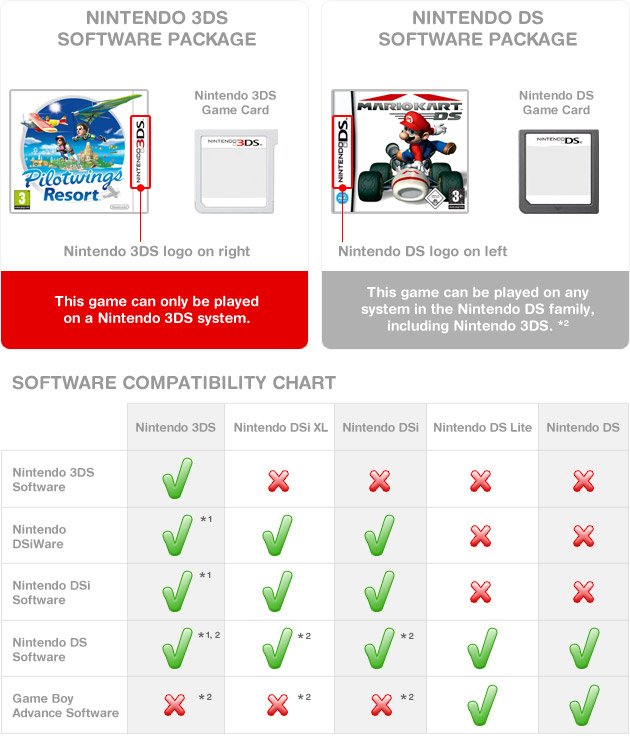
Yes, DS games can play on DSi consoles.
Thinking about dusting off your old Nintendo handhelds? It’s a common question among retro gamers: can ds games play on dsi? The good news is that the DSi is mostly backwards compatible.
You won’t have any trouble enjoying your favorite DS titles on your DSi console. The DSi was designed to play the previous generation’s cartridges. So feel free to revisit those classic adventures.

Can DS Games Play on DSi? A Deep Dive
So, you’ve got a shiny Nintendo DSi and a pile of awesome Nintendo DS games. The big question is: can you play those older games on your newer handheld? The short answer is, mostly yes! But let’s get into the details because there’s more to it than just popping in a cartridge and pressing start. We will explore compatibility, regional differences, and any limitations you might encounter. Let’s make sure you get your gaming groove on without any hiccups.
The Good News: DS Games and DSi Compatibility
The Nintendo DSi was designed to be backward compatible with Nintendo DS games. This means that almost all of your original DS game cartridges will work perfectly fine on your DSi system. Think of it like a digital time machine where you can go back and enjoy all the titles you loved. This is great news for anyone who upgraded from a DS and doesn’t want to lose their game library. It means you can continue those epic Pokémon journeys, solve mysteries with Professor Layton, and explore vast worlds in The Legend of Zelda without needing your old console. The DSi retains the two screen setup of the DS, making the game experience seamless for older DS titles. The touchscreen of the DSi is just as responsive as the one on the original DS, ensuring that touch based gameplay continues to work perfectly. Whether it’s stylus-based puzzles or menu navigations, DS games work wonderfully on the DSi.
Exploring the Exceptions and Limitations
While most DS games work on the DSi, there are a few tiny exceptions and things to consider. These are not major issues, but it’s good to know about them to ensure you have the best gaming time.
Game Cartridge Slot: The Key Connection
The DSi has a dedicated slot for game cartridges, identical to the one on the Nintendo DS. This slot accepts Nintendo DS game cartridges. This means that any physical game you purchase in cartridge form for the original DS can be played on your DSi. This slot is specifically designed for DS cartridges and doesn’t accept other types of cartridges or even DSiWare games that come preloaded on the system. This makes it very easy to tell what is compatible just by looking at the shape and size of the cartridge.
The Absence of Game Boy Advance Support
One significant change from the original DS to the DSi is the removal of the Game Boy Advance cartridge slot. The original DS could play Game Boy Advance games, but the DSi does not have this feature. So, while you can play all your DS games on your DSi, you won’t be able to enjoy your old Game Boy Advance games, which is an important distinction. If you love those classic GBA titles, you might still need to hold on to your original DS or a Game Boy Advance.
Regional Differences: A Small Hurdle
Like with most Nintendo consoles, region locking is something to keep in mind. If you have a DSi from a specific region, it will only play games from the same region. This means that if you have a DSi purchased in the US, it will only play US Nintendo DS games. The same thing goes for European and Japanese regions. The game cartridges, like the consoles, are region locked, and this prevents you from playing games purchased from another region, which is designed to protect against grey market imports. Always ensure that the game you are buying matches your DSi’s region. If you do try to play a game from a different region, it will typically not be recognized or will give an error message.
DSi Specific Games vs. DS Games
It’s essential to understand the difference between DSi games (DSiWare) and traditional DS games. DSiWare are games that are downloaded onto the console and not on a cartridge. These games can only be played on DSi consoles. They are digital only. DS games which come in a cartridge, can be played on both original DS console and the DSi console. This means the DSi is backwards compatible to original DS games, but not vice-versa. DSiWare can not be played on original DS. The main question here is focused on can DS games be played on DSi, so yes they can, with the exception of region differences and the removed Game Boy Advance support. While the DSi has many cool features, it’s still a great console for playing all the original DS games.
How To Play Nintendo DS Games on DSi
Playing Nintendo DS games on your DSi is pretty simple. Here’s a step by step guide on what to do:
- Power off your DSi: Always make sure your DSi is completely off before inserting or removing a game cartridge.
- Locate the Game Cartridge Slot: It’s the slot on the top of the DSi. It will say “GAME CARD” next to it.
- Insert the Game Cartridge: Gently push the DS game cartridge into the slot until you feel it click into place. Make sure the label of the cartridge is facing the front of the console.
- Power On your DSi: Turn on your DSi. It should automatically detect the inserted cartridge.
- Start Playing: From the DSi menu, select the game icon to start your game.
That’s all there is to it. The DSi will behave like a regular DS when playing these games. There are no special steps or considerations. The main difference you’ll notice is a slightly brighter screen on the DSi compared to the original DS, which may even enhance the visual experience of some older games.
Enhancements and Advantages of Playing DS Games on DSi
While the basic game play is the same, there are a few advantages to playing your DS games on the DSi.
- Brighter Screen: The DSi has a better screen than the original DS, which means colors are more vibrant and you’ll have a clearer picture of the game you’re playing. This means your older games can look even better than they did on their original console.
- Slightly Better Audio: DSi speakers are improved over the DS so that the sound in your games will be slightly improved.
- Smaller Size: The DSi is a little slimmer and more compact than the original DS, making it very portable and easy to carry around.
- Better Controls: Though the controls are the same as the original DS, the DSi is often cited as feeling more comfortable to hold. This is a small detail, but it may improve your overall game play experience.
Troubleshooting Common Issues
Even though the DSi is very compatible with DS games, sometimes you might face a hiccup. Here are some issues and how to fix them:
Game Not Recognized
If your DSi doesn’t recognize the game, try these steps:
- Check the Cartridge: Take out the game and examine it. Clean the contact points (the gold pins) using a soft dry cloth. Do not use liquids on the game cartridge.
- Reseat the Game Cartridge: Make sure the game cartridge is fully clicked into place. Sometimes, it needs to be taken out and reinserted.
- Try another game: If the problem persists, try another game. If another game works, there might be an issue with the original game cartridge.
- Region Lock: Ensure that the game and the DSi are from the same region, such as a US game with US DSi.
Game Freezing or Glitching
Sometimes, your game might freeze or glitch. Here’s how to deal with that:
- Restart the DSi: Turn off the console and turn it back on again. This is the classic turn it off and on again troubleshooting.
- Check Game Cartridge: Remove the cartridge and clean its contacts. Then re-insert it carefully.
- Game’s Condition: If the game is damaged, it might not work properly. If there are any visible damages, then it may be damaged beyond repair.
Preserving Your Game Collection
Here are some ways to help your original DS games last longer, so you can keep enjoying them on your DSi:
- Storage: Keep games in a dry and cool place. Direct sunlight and extreme temperatures can damage them. Original packaging such as the game case is a good way to store the games.
- Handling: Handle game cartridges carefully. Don’t force them into the console slot and avoid touching the gold pins if possible.
- Cleaning: Clean the game cartridges with a soft dry cloth, like a microfiber cloth. Always use a dry cloth, and don’t use liquid cleaners.
- Avoid bending: Game cartridges can be easily damaged if bent so keep them somewhere where they will not be bent or damaged.
Proper care can increase the lifespan of your game cartridges.
Overall, playing DS games on your DSi is a fantastic way to experience old games on a slightly improved system. The DSi works incredibly well as a backward compatible option for Nintendo DS games.
Enjoy revisiting your favorite DS games on your DSi! It’s a great way to enjoy old classics with some new benefits.
How You Should Play Nintendo DS In 2024
Final Thoughts
Yes, the DSi can absolutely play DS games. The DSi maintains full backward compatibility with the original DS cartridge format. This means you can enjoy your existing library of DS titles on the DSi system.
Therefore, if you’re wondering ‘can ds games play on dsi’, the answer is a definite yes. This backward compatibility is a great feature. You may need to update to a recent firmware version.

