
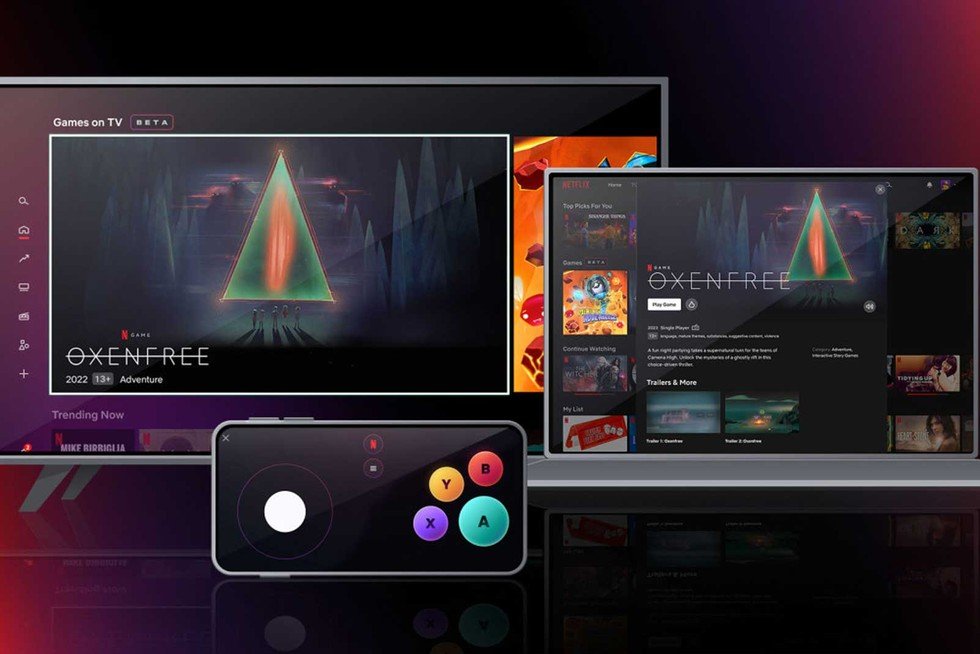
No, you cannot directly play Netflix games on a PC. They are exclusively available on mobile devices through the Netflix app.
Ever wondered, “can I play Netflix games on pc?” It’s a question many of us have asked. Currently, the platform limits game access to phones and tablets. The convenience of mobile play is great, but what about those who prefer a larger screen?
Unfortunately, Netflix hasn’t extended its gaming library to computers. This means you’ll need an Android or iOS device to enjoy the included games. Hopefully, they will eventually expand to other platforms.

Can I Play Netflix Games on PC?
Okay, so you’re a gamer and you love Netflix, right? You’ve probably seen those cool Netflix games on your phone or tablet and wondered, “Can I get in on that action on my computer?” It’s a great question! Let’s dive into everything about Netflix games and whether you can play them on your trusty PC.
The Short Answer: It’s Not Quite That Simple
The quick answer is: Not directly in the way you might think. Netflix games are primarily designed for mobile devices – that means smartphones and tablets. You can easily find and play them within the Netflix app on your phone or tablet. However, you won’t find a dedicated Netflix games app for your computer, at least not in the way you might find Steam or the Epic Games Store. This doesn’t mean all hope is lost for PC gamers though. Let’s explore why and what your options are.
Why Aren’t Netflix Games Directly on PC?
That’s a good question! The main reason comes down to how Netflix has built its gaming platform. It’s focused on mobile gaming first, probably because that’s where many people already watch Netflix. It’s convenient for people to quickly switch from binge-watching shows to playing games all within the same app on their phone. Designing for mobile also allows for a wide range of devices, from high-end smartphones to older tablets. There are technical differences between mobile devices and computers, and making games that work well on both requires extra work.
Another factor could be that Netflix may be testing the waters with mobile gaming. They might see how popular the games are on phones and tablets before trying to bring them to computers. This lets them understand what people enjoy most in mobile games before making huge changes in the way they make and share these games.
Understanding the Current Netflix Games Platform
Before we talk about alternatives, it’s important to know how Netflix games currently work. Here are the key aspects to keep in mind:
- Mobile-First Approach: Netflix games are designed and optimized for mobile touchscreen devices, meaning controls are designed for taps and swipes.
- Included with Subscription: Access to Netflix games is included in most Netflix subscriptions. You don’t pay extra to play them.
- Download Through the Mobile App: You download games directly within the Netflix app on your mobile device. You don’t need to go to a separate app store.
- Offline Play: Once downloaded, most games can be played offline, which is awesome for travel or areas with spotty internet.
- Variety of Games: Netflix has a range of games in different styles, from puzzles and strategy games to action and role-playing games, trying to cater to many different tastes.
Alternatives: How to Sort of Play Netflix Games on PC
Okay, so a direct PC app isn’t available now. However, there are a few ways you can, shall we say, indirectly play some Netflix games on your PC. These methods aren’t perfect, but they offer a workaround. Let’s check them out:
Using Android Emulators
An Android emulator is a program that makes your computer act like an Android phone or tablet. It allows you to run Android apps, including the Netflix app, on your PC. Here’s how it works:
- Download and Install an Emulator: There are several popular Android emulators, such as BlueStacks, NoxPlayer, and LDPlayer. You will need to download and install one of these emulators on your computer.
- Install the Netflix App: Once your emulator is installed, you need to sign in with your Google account. Then, you can find and install the Netflix app from the Google Play Store within the emulator.
- Log in to Netflix: Open the Netflix app in the emulator and sign in with your Netflix account.
- Find and Play Games: Just like on a phone or tablet, you can navigate to the games section within the Netflix app and select a game to download and play.
Pros of Using Emulators:
- Access to Mobile Games: It’s a method that lets you play mobile games on a PC.
- Larger Screen: Playing on your computer monitor is a bigger and, for many, more enjoyable experience than a smaller phone or tablet screen.
Cons of Using Emulators:
- Can Be Buggy: Emulators can be a little unstable, sometimes leading to glitches or crashes.
- Performance Issues: The games might not run as smoothly as they do on a dedicated mobile device. This depends on your computer’s hardware.
- Control Issues: Games are designed for touchscreens, so controlling them with a mouse and keyboard can sometimes feel awkward. You may need to customize the key binds.
- Not a True PC Experience: It’s still a mobile game running in an emulated environment.
Screen Mirroring (Less Ideal)
Another option, though not really for playing the game on your PC as much as seeing it on your PC, is screen mirroring. This involves displaying your phone or tablet screen on your computer monitor. Here’s how it works:
- Use a Mirroring App: You can use apps like AirDroid, Vysor, or even built-in features on some devices to mirror your screen to your computer.
- Launch Netflix and the Game: Start the Netflix app on your phone and launch the game you want to play.
- Play the Game on your Phone: You would still use your phone’s touch screen to play the game, and your computer’s display will mirror what’s happening on your phone screen.
Pros of Screen Mirroring:
- Larger Viewing Area: You get to see the game on a bigger monitor.
Cons of Screen Mirroring:
- Still Have to Use Mobile Controls: You’ll still need to use your phone or tablet to play the game.
- Lag Can Be an Issue: Screen mirroring can often have some lag, which might make gaming frustrating.
- Not a True PC Experience: You aren’t actually playing on your PC, you’re just seeing the game on the computer screen.
The Future of Netflix Games on PC
While there isn’t a dedicated way to play Netflix games on PC now, things could change! Netflix has shown they’re serious about gaming, so there’s always a chance they will expand their platform. Here are some possibilities:
A Dedicated PC App
The most likely option that most people would like is a standalone PC app. This would allow you to download games directly on your computer and play them without needing an emulator or using a mobile device. This would also allow for better optimization for PC and better keyboard and mouse controls for the games.
Cloud Streaming
Netflix could also explore cloud gaming. This would allow you to play games on your PC by streaming them from powerful remote servers. You would not need a high-end computer because all the game processing would be on the server. This technology allows games to run smoothly even on less powerful computers.
Cross-Platform Play
Another possibility is that Netflix might add cross-platform play. This could mean you could start a game on your phone or tablet and then continue it on your computer (if they release a PC app or cloud service) or vice versa. This would make the gaming experience more seamless.
Game Compatibility and Controls
It’s important to understand that even if you use an emulator to play Netflix games on your PC, the experience will be different from playing a game specifically designed for a computer. Mobile games use touchscreen controls, while computers usually use a keyboard and mouse.
Control Issues
When you play Netflix games using an emulator, you’ll likely have to figure out how to make the keyboard and mouse work with the touch-based controls. Most emulators have key mapping options, where you can assign specific keys to simulate screen taps and swipes. However, the controls might not always feel natural or very responsive.
Game Compatibility
Not all games might work perfectly on emulators, this is a common problem. Some games might have display issues or not run smoothly because they’re not optimized for the emulator or the PC. Therefore, keep in mind that not every game will have a smooth experience.
The Netflix Gaming Experience: What to Expect
Regardless of how you play the games, here’s a general idea of what you can expect from Netflix games:
- Simpler Gameplay: Many Netflix games are designed to be easily picked up and played. You might not see extremely complicated and deep gameplay.
- Focus on Fun: The games are made to be entertaining and engaging, even in short bursts. Many of them are time-killers.
- No Pay-to-Win: Because the games are part of your Netflix subscription, you won’t see those annoying in-app purchases that want you to spend more money to progress in the game.
- Regular Updates: Netflix is continuously adding new games to its platform, so there is something fresh to play.
Is it Worth Trying to Play on PC?
So, is it worth the effort to play Netflix games on your PC? It really depends on what you are looking for. If you’re okay with using an emulator and want to play mobile games on a bigger screen, it can be a fun and interesting experience. However, if you’re expecting a similar experience to what you get with other PC games, you might be disappointed. The experience can be clunky and not as smooth.
What You Should Remember
Here’s a quick recap of the main takeaways when it comes to playing Netflix games on a PC:
- No Direct PC App: There’s no official Netflix games app for your computer right now.
- Emulators are an Option: You can use an Android emulator to play mobile games on PC.
- Screen Mirroring is Possible: You can also screen mirror your mobile device.
- Control and Performance May Vary: Be prepared for potential control issues and performance problems.
- Future Possibilities: Netflix may explore more ways to bring games to PC in the future.
So there you have it! While you can’t play Netflix games on PC in a direct, straightforward way, there are ways around it if you are really interested. Keep an eye on Netflix news for any changes in their gaming policies and options, and who knows, maybe one day we’ll have a proper PC client for Netflix Games.
What Is Netflix Gaming and how to Access it
Final Thoughts
Currently, you cannot directly play Netflix games on a PC. The games are designed for mobile devices. Access requires the Netflix mobile app on phones and tablets.
Netflix games function separately from their video platform on PC. You need to use an Android or iOS device to play. ‘can i play netflix games on pc’ is still no.

