
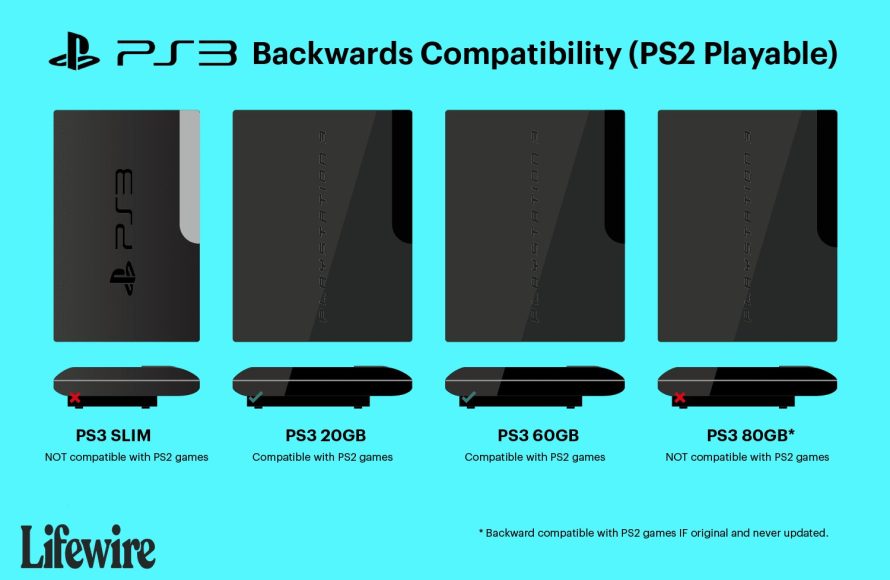
Unfortunately, the slim PS3 cannot play PS2 games natively.
Many gamers wonder if their slim PlayStation 3 can play their old PlayStation 2 games. It’s a valid question given the previous PS3 model’s ability to handle PS2 discs. The slim version of the console, however, removed that hardware compatibility to cut costs. This design change means that if you’re hoping to play your favorite PS2 titles, you’ll need to explore other options besides just popping the disc into your slim PS3.

Can Slim PS3 Play PS2 Games? Unveiling the Truth
So, you’ve got a shiny, slim PlayStation 3 (PS3), and you’re itching to play some of your old PlayStation 2 (PS2) classics. That’s totally understandable! The PS2 had some amazing games, and it’d be awesome if you could play them on your newer console. But here’s the big question: can a slim PS3 actually play PS2 games? The answer isn’t a simple yes or no, and we’re going to break down why.
The Original PS3: Backwards Compatibility Champion
Let’s rewind a bit. The very first PS3 models, often called “fat” PS3s, were special. They came with some fancy hardware inside that allowed them to play PS2 games almost perfectly. These early PS3s included actual PS2 components (the Emotion Engine and Graphics Synthesizer) on the motherboard. This meant they weren’t just mimicking the PS2; they were basically a PS2 and a PS3 all in one. Think of it like having two game consoles in a single box! These models provided a real PS2 gaming experience and this feature is known as hardware backwards compatibility. Not all original PS3 models had this, however, it was only the 20GB, 60GB, and 80GB versions that featured this full backwards compatibility, with other models later coming out with partial backwards compatibility via software emulation, however, this wasn’t nearly as smooth or reliable.
Why the Original PS3’s Backwards Compatibility Was So Good
- Dedicated PS2 Hardware: The inclusion of the PS2’s core hardware allowed for near-perfect compatibility with almost the entire PS2 game library.
- Seamless Gameplay: Games played as they did on a real PS2, without glitches or hiccups due to emulation.
- Authentic Experience: Players enjoyed the original games the way they were meant to be played, with proper resolution and performance.
The Slim PS3: A Different Story
Fast forward to the slim PS3. Sony wanted to make the console smaller, cheaper, and more energy-efficient. To achieve this, they removed some of the original PS3’s hardware. One of the main things that got cut was the PS2 hardware. The slim PS3, and all subsequent PS3 models (including the super slim), no longer had the dedicated PS2 chips inside. This was a big change, and it meant no more easy PS2 gaming.
The Impact of Removing the PS2 Hardware
- No Physical PS2 Chips: The most important thing to remember is that the slim PS3 doesn’t have any physical PS2 hardware inside. It is purely a PS3 console.
- Software Emulation Instead: To play PS2 games, the slim PS3 would need to rely on software emulation. Software emulation can be good, but it’s never as perfect as having the real hardware. It has its limitation, that we will further discuss in upcoming sections.
- Limited Compatibility: With software emulation, game compatibility is a significant hurdle. Not every game will run perfectly or even at all. Many games would experience glitches, slowdowns, and issues that make them unplayable.
What is Software Emulation?
Since the slim PS3 doesn’t have the actual PS2 chips, it relies on software to mimic a PS2. This software, called an emulator, acts like a translator. It tries to understand the instructions of a PS2 game and then tells the PS3 how to run that game. This is a tricky job. Imagine trying to teach your cat to speak human. It’s difficult and often doesn’t work perfectly.
How Software Emulation Works
- Translating Code: The emulator intercepts the game’s instructions which are meant for PS2 hardware, converts them into instructions that the PS3 processor can understand and process.
- Resource Intensive: This translation process requires a lot of processing power from the PS3 console, which can sometimes lead to slowdowns, bugs, and glitches in games.
- Inherent Limitations: Software emulation is not perfect, meaning some aspects of the original game will not be fully replicated.
Why Software Emulation Isn’t Perfect
Software emulation is a clever idea, but it has a few common problems:
- Performance Issues: Some games might run slower or might freeze up, because the PS3 is using its own power to mimic PS2 hardware. This means the PS3 does a lot of work that it wasn’t originally designed to do.
- Compatibility Problems: Not every PS2 game can be emulated perfectly. Some might simply not work, while others might have serious bugs. The emulator might not correctly understand how every game works, causing issues.
- Glitches and Bugs: Games can often have strange problems like graphical errors, missing sound, and other bugs. The emulator might miss some important details in the way the game works.
The Specific Case of Slim PS3’s and PS2 Games
Now, let’s get back to the slim PS3. Officially, the slim PS3 does not have any form of hardware or full software based backwards compatibility for PS2 games. Sony removed the hardware and also did not implement the robust emulation seen on some of the earlier, ‘fat’ models. This means you cannot simply insert a PS2 disc into a slim PS3 and expect it to work.
Official PS2 Game Compatibility on Slim PS3
- No Disc Support: The slim PS3 cannot read PS2 game discs directly.
- No Built-In Emulation: Sony did not include a native PS2 emulator in the system’s software for Slim models, unlike how they did on some ‘fat’ models, and thus the system lacks the necessary emulation layer to play PS2 games
- PS2 Classics on the PSN Store: Sony released some selected PS2 titles via the PlayStation Network (PSN) Store. These titles are usually pre-configured to run on PS3 with the emulation software, however, the games offered are limited to the selection that sony chose to release on the store.
Playing PS2 Games on Slim PS3: What Are Your Options?
So, what can you do if you want to play PS2 games on your slim PS3? The options are very limited due to the nature of the system’s design, where it’s not meant to be backwards compatible, but there are still a few options you might find.
Option 1: PlayStation Network (PSN) Store
One way to experience some PS2 games on your slim PS3 is through the PSN Store. Sony did make a selection of PS2 games available for download. These are usually called ‘PS2 Classics’.
- Digital Downloads Only: These games are only available as digital downloads, you will have to purchase them from the PSN store. You can’t use your old PS2 discs.
- Limited Selection: The number of PS2 games available on the PSN Store is quite small compared to the vast PS2 library. You may not find all of your favorite titles.
- Emulated Performance: The PS2 Classics you download from the PSN Store use software emulation on the PS3 hardware to function. This can result in the same issues discussed before, where games may experience frame drops, glitches, and audio issues.
- Compatibility: Even the games available on the PSN might have some issues. It is not a perfect emulation and thus the game might not perform as well as it did on an original PS2.
Option 2: Using a Modded PS3
This section discusses modifying the console for unofficial purposes and is meant for informational purposes only. Please note that this action goes against the terms of use set by the manufacturer and might void the warranty, while also carrying the risk of damaging your console.
Another route some people explore is to modify (or “mod”) their PS3 with custom firmware, this then allows the use of unofficial methods of playing PS2 games. This process involves making changes to your PS3’s software, which might void your warranty and potentially damage your console if not handled properly. It is generally not recommended, as it carries considerable risk, if done wrong.
- Custom Firmware: This replaces the official system software with a modified version, allowing the installation of new applications.
- Unstable Performance: This method can sometimes be unreliable, with varying results, as it relies on unofficial software and not official emulation. Games can experience glitches, bugs and crashes more often.
- Not Supported: Please note that these are not officially sanctioned by Sony, and thus, if anything happens to your console you are on your own and there will be no customer support from the manufacturer.
- Risk Involved: There is a risk of damaging or bricking your console and violating the terms of use set by the manufacturer.
PS2 Games on PS3: A Quick Table Summary
To make it easier to understand, here’s a table summarizing the PS2 compatibility across the different PS3 models:
| PS3 Model | PS2 Hardware | Software Emulation | PS2 Game Disc Playback | PS2 Classics on PSN | General PS2 compatibility |
|---|---|---|---|---|---|
| Original “Fat” PS3 (some models) | Yes | No | Yes | Yes | Good |
| Original “Fat” PS3 (some models) | No | Yes | No | Yes | Fair |
| Slim PS3 | No | No | No | Yes | Very Limited |
| Super Slim PS3 | No | No | No | Yes | Very Limited |
Why the Slim PS3 Dropped PS2 Compatibility
So why did Sony remove the PS2 hardware from the slim PS3? There were a few important reasons:
- Cost Reduction: Including PS2 hardware made the original PS3 expensive to produce. Removing it allowed Sony to lower the price of the slim PS3, making it more affordable.
- Size and Weight: The PS2 hardware took up a lot of space and contributed to the original PS3’s large size. Removing it allowed for a much smaller console design.
- Power Consumption: The PS2 components used a significant amount of power. By removing them, the slim PS3 became more energy-efficient.
- Focus on PS3 Games: Sony wanted to focus on the current generation of PS3 games instead of the older generation of PS2 games. The focus shifted to newer experiences and titles.
In conclusion, the slim PS3 does not possess the capability to play PS2 game discs. While some PS2 games can be accessed through the PSN store as digital downloads, its options are limited. The PS2 capability was dropped by Sony, in the newer models, to make the system cheaper, smaller, and more power efficient.
How to Backup & Play PS2 Games on PS3HEN! – No PKG Conversion Required
Final Thoughts
The original PlayStation 3 models could play PlayStation 2 games. Sony removed this feature from the slim PS3 and later versions. Therefore, ‘can slim ps3 play ps2 games’ is a question with a simple answer: no.
This is a hardware issue; the slim PS3 lacks the necessary components. Software emulation is also not included by Sony. You must use an older PS3 model if playing PS2 games remains a priority.

